
In an increasingly data-driven world, understanding and calculating percentages is not merely an academic exercise; it’s a fundamental skill essential for navigating everything from personal finance and retail discounts to scientific data and business analytics. Whether you’re trying to figure out a tip, calculate a sales tax, understand interest rates, or analyze survey results, percentages are ubiquitous. And while the concept itself might seem straightforward, many people find themselves momentarily stumped when it comes to translating these calculations onto a calculator. “How do I do 15% of 200?” “What if I need to add 20%?” “Does that ‘%’ button actually work the way I think it does?”

This comprehensive guide aims to demystify percentage calculations on various types of calculators, transforming a potential point of confusion into a source of confidence. We’ll explore the underlying principles of percentages, walk through step-by-step instructions for common calculations, delve into more complex scenarios, and highlight best practices to ensure accuracy, all within the practical context of using your digital tools. By the end, you’ll not only know how to do percentages on your calculator but also why each step makes sense, empowering you to tackle any percentage challenge with ease.
The Foundation: Deconstructing Percentages and Their Importance
Before we dive into the button presses, a quick refresher on what percentages truly represent is invaluable. Understanding the concept itself makes the calculator mechanics intuitive rather than rote memorization.
What Exactly is a Percentage?
The word “percent” originates from the Latin “per centum,” meaning “by the hundred.” Fundamentally, a percentage is a way of expressing a number or a ratio as a fraction of 100. It’s a standardized way to compare parts of a whole, regardless of the size of the whole itself. So, 50% means 50 out of 100, or 50/100, which simplifies to 1/2. Similarly, 25% is 25/100 or 1/4.
Every percentage can be expressed as a decimal by dividing it by 100 (e.g., 25% = 0.25) or as a fraction. This decimal conversion is key to understanding how calculators process percentages, especially those without a dedicated ‘%’ key, or when the ‘%’ key behaves unexpectedly.
Why Are Percentages Ubiquitous in Our Daily Lives?
Percentages provide a universal language for proportional relationships, making them incredibly useful across diverse fields:
- Finance: Interest rates, loan repayments, investment returns, inflation rates, and budgeting often rely on percentages.
- Retail & Commerce: Discounts, sales tax, markups, commissions, and tips are all percentage-based.
- Statistics & Data: Expressing survey results, growth rates, market share, and demographic data frequently uses percentages to provide clear, comparable insights.
- Health & Science: Concentrations in solutions, nutrient daily values, and success rates in studies are presented as percentages.
Given their widespread application, mastering their calculation on your most accessible digital tool — the calculator — is an indispensable skill for informed decision-making and daily operational efficiency.
Navigating Basic Percentage Operations on Standard Calculators
Most standard calculators, from basic models to scientific ones, follow similar logical steps for percentage calculations. The primary distinction often lies in the behavior of the ‘%’ key, which can sometimes be more confusing than helpful.
Calculating a Percentage of a Number (e.g., 15% of 200)
This is perhaps the most common percentage calculation. You want to find a specific fraction (expressed as a percentage) of a given whole number.
Method 1: Using the Decimal Equivalent (Universal & Recommended)
This method works on any calculator, regardless of whether it has a ‘%’ key or how that key functions.
- Convert the percentage to a decimal: Divide the percentage by 100. (e.g., 15 ÷ 100 = 0.15)
- Multiply by the number: Multiply this decimal by the number you’re finding the percentage of. (e.g., 0.15 × 200 = 30)
- Calculator sequence:
15÷100=×200=(Result: 30) - Simpler sequence:
0.15×200=(Result: 30)
- Calculator sequence:
Method 2: Using the ‘%’ Key (If your calculator behaves as expected)
Some calculators simplify this, but their behavior can vary.
- Enter the number:
200 - Press the multiplication symbol:
× - Enter the percentage:
15 - Press the percentage key:
%- Calculator sequence:
200×15%(Result: 30) - Caution: On some calculators,
200×15%might display200 * 0.15, and you’d need to press=to get the final answer. On others,200×15%might immediately display30. Always test your specific calculator’s ‘%’ key behavior.
- Calculator sequence:
Adding a Percentage (e.g., Adding Sales Tax, Markup)
Let’s say you have an item priced at $50 and need to add 8% sales tax.
Method 1: Calculate and Add (Universal)
- Calculate the percentage of the number: 8% of $50 = (0.08 × 50) = $4
- Add this amount to the original number: $50 + $4 = $54
- Calculator sequence:
50×0.08=(Result: 4)+50=(Result: 54) - Alternative for step 1:
8÷100×50=
- Calculator sequence:
Method 2: Direct Calculation (More Efficient)
If you’re adding a percentage, you’re essentially finding 100% of the original amount plus the additional percentage. So, 100% + 8% = 108%, or 1.08 as a decimal.
- Multiply the original number by (1 + decimal equivalent of percentage):
- Calculator sequence:
50×1.08=(Result: 54)
- Calculator sequence:
Method 3: Using the ‘%’ Key (Specific Calculators)
On some calculators, the ‘%’ key can be used directly for this.
- Enter the number:
50 - Press the addition symbol:
+ - Enter the percentage:
8 - Press the percentage key:
%- Calculator sequence:
50+8%(Result: 54) - Note: Again, test your calculator. Some might require
50+50×8%=or50+(50×8%)=
- Calculator sequence:
Subtracting a Percentage (e.g., Discounts)
Imagine an item is $80 and has a 25% discount.
Method 1: Calculate and Subtract (Universal)
- Calculate the percentage of the number: 25% of $80 = (0.25 × 80) = $20
- Subtract this amount from the original number: $80 – $20 = $60
- Calculator sequence:
80×0.25=(Result: 20)80-Ans=(Result: 60) or80-20=
- Calculator sequence:
Method 2: Direct Calculation (More Efficient)
If you’re subtracting 25%, you’re left with 100% – 25% = 75% of the original amount.
- Multiply the original number by (1 – decimal equivalent of percentage):
- Calculator sequence:
80×0.75=(Result: 60)
- Calculator sequence:
Method 3: Using the ‘%’ Key (Specific Calculators)
- Enter the number:
80 - Press the subtraction symbol:
- - Enter the percentage:
25 - Press the percentage key:
%- Calculator sequence:
80-25%(Result: 60) - As always, verify your calculator’s behavior.
- Calculator sequence:
Finding the Percentage One Number Is of Another (e.g., Test Scores)
If you scored 75 out of a possible 90 on a test, what percentage did you get?
Method 1: Divide and Convert (Universal)
- Divide the part by the whole:
75÷90=(Result: 0.8333…) - Multiply by 100 to convert to a percentage:
0.8333×100=(Result: 83.33%)- Calculator sequence:
75÷90×100=
- Calculator sequence:
Method 2: Using the ‘%’ Key (Less Common, but exists)
Some advanced calculators might allow:
- Enter the part:
75 - Press the division symbol:
÷ - Enter the whole:
90 - Press the percentage key:
%(Result: 83.333…)- This is less consistent across calculators, so the divide-and-multiply-by-100 method is generally more reliable.
Tackling Complex Scenarios with Scientific and Smartphone Calculators
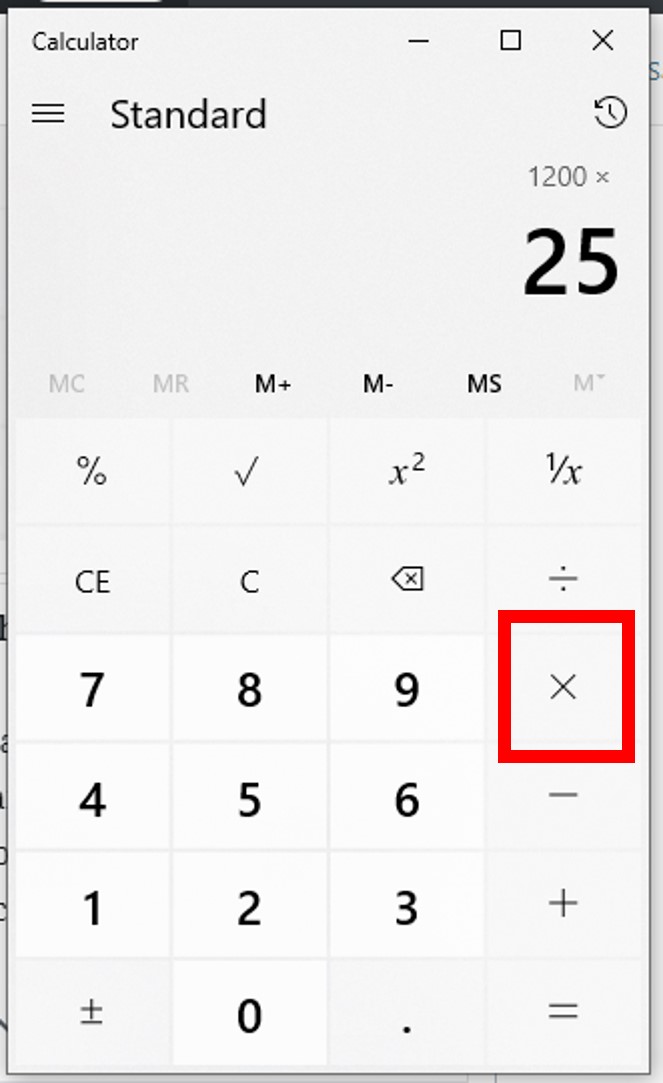
Modern calculators, especially scientific models and smartphone apps, offer greater versatility. Understanding their features can streamline more intricate percentage problems.
Percentage Change: Increase and Decrease
Calculating percentage change (e.g., growth or reduction over time) is crucial in many analyses.
Formula: ((New Value - Old Value) / Old Value) × 100
Example: Increase
A stock went from $120 to $150. What’s the percentage increase?
- Find the change:
150-120=(Result: 30) - Divide the change by the original value:
30÷120=(Result: 0.25) - Multiply by 100:
0.25×100=(Result: 25%)- Calculator sequence:
(150-120)÷120×100= - (Remember to use parentheses for order of operations on scientific calculators or perform subtraction first on basic models)
- Calculator sequence:
Example: Decrease
A population dropped from 5000 to 4500. What’s the percentage decrease?
- Find the change:
5000-4500=(Result: 500) - Divide the change by the original value:
500÷5000=(Result: 0.1) - Multiply by 100:
0.1×100=(Result: 10%)- Calculator sequence:
(5000-4500)÷5000×100=
- Calculator sequence:
Reversing Percentages: Finding the Original Number
This is often called “working backward.” If an item costs $75 after a 25% discount, what was its original price?
If there’s a 25% discount, you’re paying 75% of the original price (100% – 25% = 75%). So, $75 is 75% of the original price.
- Convert the remaining percentage to a decimal: 75% = 0.75
- Divide the final amount by this decimal:
75÷0.75=(Result: 100)- Calculator sequence:
75÷0.75=(Original price: $100)
- Calculator sequence:
Similarly, if an item costs $108 after an 8% sales tax, what was the price before tax?
With an 8% tax, the final price is 108% of the original (100% + 8% = 108%). So, $108 is 108% of the original price.
- Convert the total percentage to a decimal: 108% = 1.08
- Divide the final amount by this decimal:
108÷1.08=(Result: 100)- Calculator sequence:
108÷1.08=(Original price: $100)
- Calculator sequence:
Chained Percentage Calculations
Sometimes you encounter multiple percentages applied sequentially, like a discount on an item, followed by sales tax. It’s crucial not to simply add or subtract the percentages directly.
Example: An item is $100. There’s a 10% discount, then a 5% sales tax.
- Apply the first percentage: $100 with a 10% discount means you pay 90% of the original.
100×0.90=(Result: $90)
- Apply the second percentage to the new value: Now add 5% tax to $90. This means finding 105% of $90.
90×1.05=(Result: $94.50)- Incorrect approach: Don’t calculate 10% – 5% = 5% and then apply 5% to the original $100. That would yield $95, which is wrong. Percentages compound!
Utilizing Memory Functions for Multi-Step Problems
For calculations involving multiple steps or intermediate results you’ll need again, your calculator’s memory functions (M+, M-, MR/MC) can be invaluable.
- M+ (Memory Plus): Adds the current display value to the memory.
- M- (Memory Minus): Subtracts the current display value from the memory.
- MR (Memory Recall): Displays the value currently stored in memory.
- MC (Memory Clear): Clears the memory.
Using these functions can prevent re-typing numbers and reduce errors, particularly in complex financial or statistical percentage problems.
Common Mistakes and Best Practices for Flawless Percentage Calculations
Even with a clear understanding, certain pitfalls can trip up users. Awareness of these common errors and adopting best practices will significantly improve accuracy.
Misinterpreting the Percent Key
As noted, the ‘%’ key can behave differently across calculator models. On some, it acts as a shortcut for division by 100 (e.g., 15 % becomes 0.15). On others, it performs the entire calculation (e.g., 200 × 15 % directly yields 30). This inconsistency is why the “convert to decimal and multiply/divide” method is universally recommended for clarity and reliability.
Order of Operations Errors
In multi-step problems, remember the mathematical order of operations (PEMDAS/BODMAS). On scientific calculators, parentheses () are your best friend for ensuring calculations are performed in the correct sequence. For basic calculators, perform operations one step at a time, making sure to hit = at appropriate intermediate stages.
The Importance of Decimal Conversion
The most robust and universally applicable method for percentages is to convert them to their decimal form (e.g., 20% becomes 0.20) before multiplying or dividing. This eliminates ambiguity and works on any calculator. (Value × Percentage/100) is always reliable.
Double-Checking Your Work and Estimating
Whenever possible, do a quick mental estimate to gauge if your calculator result is in the right ballpark. If you’re calculating a 10% discount on $200, you know the answer should be around $20. If your calculator spits out $2000 or $2, something went wrong. For critical calculations, performing the operation twice or using a different method can confirm accuracy.
Beyond the Handheld: Online and Spreadsheet Percentage Tools
While physical calculators are convenient, digital tools offer even more powerful ways to handle percentages, especially for recurring or complex data sets.
Harnessing Web-Based Percentage Calculators
Numerous websites offer free, specialized percentage calculators. These often have dedicated fields for “percentage of,” “add percentage,” “percentage change,” etc., making complex calculations straightforward with minimal input. They are great for quick, specific tasks without needing to remember formulas.
The Power of Spreadsheets for Recurring Calculations
For tasks involving many percentage calculations, such as budgeting, sales tracking, or financial modeling, spreadsheet software like Microsoft Excel or Google Sheets is indispensable.
- Direct percentage formatting: You can type
0.15and then format the cell as a percentage to display15%. - Formulas: Enter formulas directly using standard mathematical operators. For example, to find 15% of a number in cell A1, you’d type
=A1*0.15or=A1*15%. - Reusability: Once you set up a formula, you can drag it down a column or across rows to apply it to hundreds of data points instantly, saving immense time and reducing manual errors.
- Conditional Formatting: Highlight cells based on percentage criteria (e.g., sales growth above 10%).

Specialized Calculator Apps for Mobile Devices
Most smartphones come with a built-in calculator that offers basic and often scientific functions. Beyond that, app stores are filled with specialized financial or percentage calculators that provide user-friendly interfaces for specific tasks like tip calculation, loan amortization, or discount calculations, often with integrated tutorials.
Mastering percentages on your calculator is a fundamental skill that underpins financial literacy, effective shopping, and informed decision-making in a multitude of contexts. By understanding the core concept, applying consistent calculation methods (especially the reliable decimal conversion), and leveraging the right tools for the job, you can confidently tackle any percentage challenge. The calculator, far from being a mysterious device, becomes a powerful ally in navigating the numerical landscape of modern life.
aViewFromTheCave is a participant in the Amazon Services LLC Associates Program, an affiliate advertising program designed to provide a means for sites to earn advertising fees by advertising and linking to Amazon.com. Amazon, the Amazon logo, AmazonSupply, and the AmazonSupply logo are trademarks of Amazon.com, Inc. or its affiliates. As an Amazon Associate we earn affiliate commissions from qualifying purchases.