
In an increasingly digital world, managing our online presence extends far beyond social media profiles. Financial technology (fintech) apps like Venmo have become integral to our daily transactions, offering unparalleled convenience for peer-to-peer payments. However, circumstances change, and users may find themselves needing to disconnect from these platforms. Whether driven by privacy concerns, a shift to alternative services, or simply a desire to declutter your digital footprint, the process of deleting a Venmo account requires a careful and informed approach. This guide delves into the technical intricacies of account deletion, ensuring a secure and complete separation from the platform, while addressing vital data management and security considerations.
Pre-Deletion Checklist: Essential Technical Steps
Before initiating the final deletion of your Venmo account, several crucial technical steps must be completed to ensure a smooth transition and prevent future complications. Neglecting these prerequisites can lead to financial limbo, data discrepancies, or difficulties in accessing past information.
Withdrawing Your Balance: Ensuring Zero Funds
The most critical step before deleting your Venmo account is to ensure that your balance is exactly $0. Venmo accounts cannot be closed with funds remaining. This isn’t just a policy; it’s a technical safeguard to prevent users from losing access to their money. You have two primary options for withdrawing funds:
- Standard Transfer: This typically takes 1-3 business days and is free of charge. Funds are moved from your Venmo balance to your linked bank account. This is the recommended method for most users.
- Instant Transfer: For a small fee (usually 1.75% of the transfer, with a minimum of $0.25 and a maximum of $25), funds can be moved almost immediately to your linked debit card. This option is useful if you need to zero out your balance quickly.
Confirming the successful transfer and a zero balance is paramount. It’s advisable to wait until the funds have settled in your bank account before proceeding with further steps.
Disconnecting Payment Methods: Securing Financial Data
While deleting your account will eventually remove associated payment methods, it’s a best practice for digital security to manually disconnect them beforehand. This includes bank accounts, debit cards, and credit cards. Removing these links ensures that no payment method remains inadvertently tied to an inactive or pending deletion account.
- Navigate to “Settings” within the Venmo app or website.
- Select “Payment Methods.”
- Tap or click on each linked bank account or card.
- Choose the option to “Remove” or “Delete” the payment method.
This proactive measure adds an extra layer of security, safeguarding your financial data even as the account transitions through the deletion process.
Downloading Transaction History: Data Archiving for Your Records
From a technical and personal finance perspective, maintaining a record of past transactions is crucial. This data can be vital for tax purposes, budgeting, or simply for personal archiving. Venmo provides a mechanism to export your transaction history:
- Access Venmo via a web browser (this feature is typically not available in the mobile app).
- Go to “Settings” and then “Statements & Taxes.”
- You can select specific date ranges to download your transaction history as a CSV (Comma Separated Values) file. This format is easily viewable in spreadsheet programs like Microsoft Excel or Google Sheets.
Downloading this data is a proactive measure in data ownership and management, ensuring you retain access to your financial records even after the platform no longer hosts them.
Updating Linked Apps and Subscriptions: Preventing Service Interruptions
Consider any third-party apps or subscription services that might be linked to your Venmo account for payments. While less common than direct bank links, some services might offer Venmo as a payment option. If you’ve used Venmo in this capacity, update your payment method for those services before deleting your account. This prevents potential service interruptions or declined payments once your Venmo account becomes inaccessible. Reviewing your transaction history (downloaded earlier) can help identify any such recurring payments.
Step-by-Step Guide to Deleting Your Venmo Account
Once you’ve completed the pre-deletion checklist, you’re ready to proceed with the technical process of account deletion. It’s important to understand that this is a permanent action, and data associated with your account will eventually be unrecoverable according to Venmo’s data retention policies.
Initiating the Deletion Process: Via App or Web
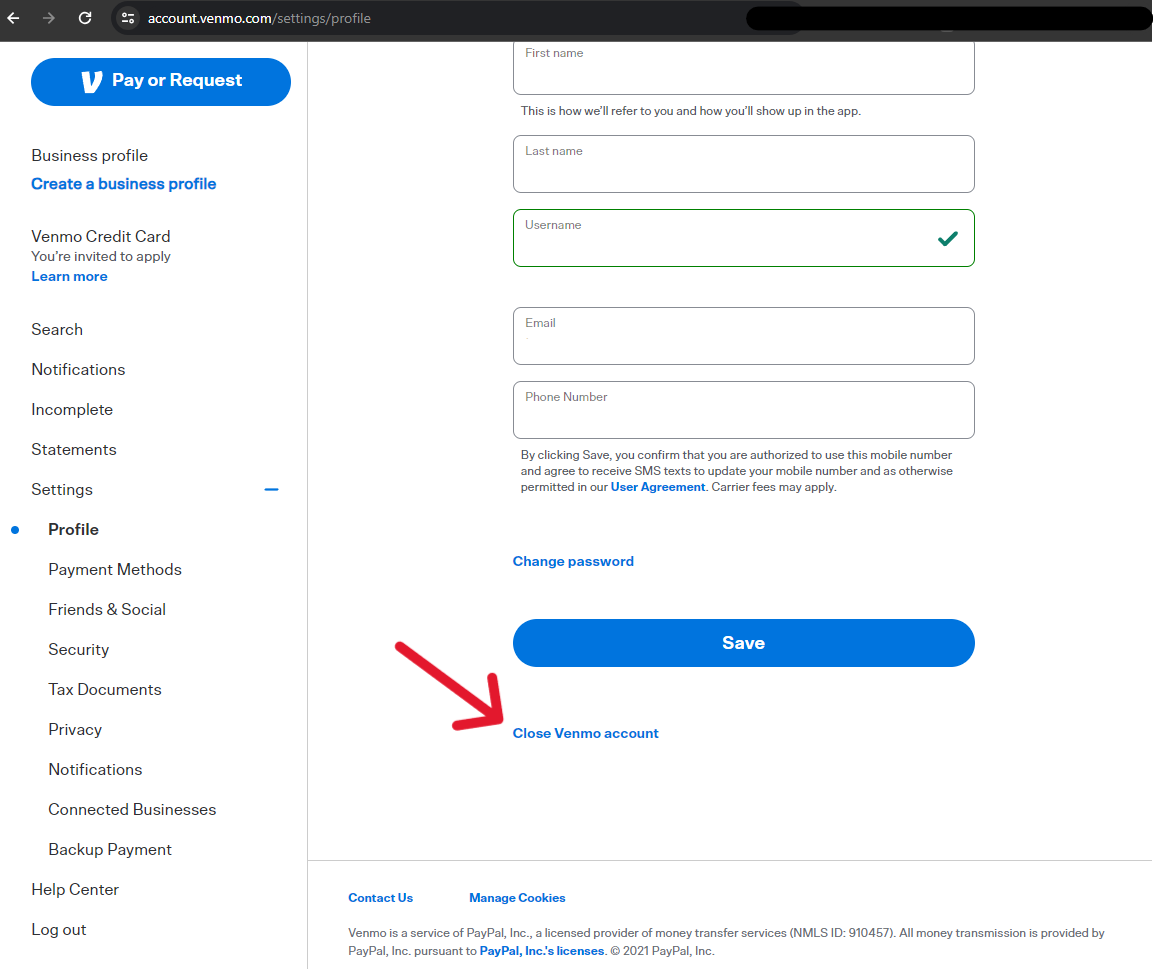
While many account management tasks can be performed in the Venmo mobile app, certain administrative functions, including account deletion, are often routed through their support channels or require a web browser interface for security and clarity.
- Through the Venmo App: Often, the app will guide you to contact support if you seek permanent deletion.
- Via the Venmo Website: This is generally the more direct route. Log in to your Venmo account through a web browser.
Navigating to Account Settings: Locating the Deletion Option
Venmo does not typically offer a prominent “Delete Account” button within the main settings, primarily due to the permanent nature of the action and the desire to guide users through the proper pre-deletion steps. The standard procedure involves contacting Venmo’s customer support.
- Contacting Support: Navigate to the “Help” or “Support” section on the Venmo website.
- Searching for Deletion: Use the search bar to look for “delete account” or “close account.”
- Initiating the Request: You will likely find an article or link that directs you to submit a support ticket or contact them via chat/phone to request account closure. Be prepared to verify your identity.
This process ensures that Venmo’s support team can confirm all necessary conditions (like a zero balance) have been met and can provide any specific instructions relevant to your account.
Confirming Deletion: Understanding the Finality
When communicating with Venmo support, they will guide you through the final confirmation steps. This usually involves:
- Verifying Identity: You will need to confirm personal details to prove you are the legitimate account holder. This is a critical security measure.
- Acknowledging Permanence: You will be prompted to confirm that you understand account deletion is irreversible. This is an important technical and legal disclaimer.
- Final Processing: Once confirmed, Venmo’s team will process the deletion request. You might receive an email confirmation once the process is complete.
It’s vital to respond promptly to any requests from Venmo support to expedite the deletion process.
What Happens After Deletion: Data Retention Policies and Repercussions

After your account is successfully deleted, several technical and practical implications come into play:
- Inaccessibility: Your account will no longer be accessible through the app or website. Your transaction history, friends list, and profile information will be removed from your active user view.
- Data Retention: While your active account is deleted, Venmo, like most financial service providers, is legally obligated to retain certain transactional data for a specific period to comply with financial regulations, anti-money laundering (AML) laws, and tax requirements. This data is no longer linked to an active user profile but is stored securely in their backend systems.
- Peer-to-Peer Visibility: Your past transactions may still appear in the feeds of friends you’ve transacted with, though your name or profile might be anonymized or show as “Venmo User.” This is a technical characteristic of peer-to-peer networks where transaction history is shared.
- Re-registration: While your old account is deleted, you typically can create a new Venmo account in the future if you wish, though you would start fresh with no previous history.
Understanding these post-deletion realities is crucial for managing expectations and maintaining awareness of your digital footprint.
Data Privacy and Security Considerations Post-Deletion
Deleting an account isn’t just about removing an app; it’s a significant step in managing your digital identity and privacy. Even after deletion, the ghost of your online activity might linger.
Venmo’s Data Retention Policies: What Stays and What Goes
As mentioned, financial institutions operate under strict regulatory frameworks. Venmo’s Privacy Policy and Terms of Service will detail their data retention practices. Typically, they will retain:
- Transaction Records: For compliance with financial regulations, anti-fraud measures, and tax reporting.
- Account Information: Basic identification data linked to past transactions.
- Communications: Records of any interactions with customer support.
What generally “goes” from your active profile includes your public feed history, friends list (as it pertains to your profile), and any personalized settings. The distinction between actively viewable user data and internally retained regulatory data is critical for understanding digital privacy in fintech.
Protecting Your Digital Footprint: Best Practices for Account Closure
Beyond Venmo, the deletion process serves as a template for sound digital hygiene:
- Regular Review: Periodically review which financial apps you use and if they are still necessary.
- Data Export: Always export critical data (like transaction history) before deletion, whenever possible.
- Secure Password Management: Ensure you use strong, unique passwords for all financial accounts, even those you plan to delete.
- Privacy Settings Review: Before deleting an account, maximize privacy settings. This limits data exposure even during the transition.
- Email Confirmation: Keep any email confirmations of account deletion as proof of closure.
These practices contribute to a robust strategy for managing your online identity and data security across all platforms.
Implications for Past Transactions: P2P Network Effects
Venmo’s core functionality as a peer-to-peer payment network means your past transactions are inherently linked to others. When you delete your account:
- Recipient Records: The recipients of your payments will still have records of those transactions from their perspective.
- Public/Friends Feed: If your transactions were public or visible to friends, they might persist in their historical feeds, albeit often anonymized if your account is fully deleted. This is a technical consequence of the distributed nature of P2P financial records within a closed network. It underscores the importance of thoughtful privacy settings while an account is active.
Alternatives to Full Account Deletion
Full account deletion is a permanent and often irreversible step. For users who might be hesitant about such finality, Venmo offers or allows for less drastic alternatives that can address many concerns without completely severing ties.
Temporarily Deactivating Your Account: A Less Permanent Option
Some platforms offer a “deactivate” option, which hides your profile and activity without permanently deleting your data. While Venmo itself doesn’t always advertise a direct “deactivation” button like some social media platforms, you can achieve a similar effect by:
- Removing Payment Methods: Unlink all bank accounts and cards.
- Zeroing Balance: Ensure no funds remain.
- Maximizing Privacy Settings: Set all past and future transactions to “Private.”
- Deleting the App: Simply uninstalling the app from your devices.
This approach effectively renders the account dormant and inaccessible for transactions, without the irreversible step of full deletion. Your data technically remains on Venmo’s servers, but your active presence is removed. If you later decide to use Venmo again, you can simply log back in and re-link your payment methods.
Adjusting Privacy Settings: Maximizing Security Without Deletion
For users whose primary concern is privacy rather than full disengagement, robust privacy settings can go a long way:
- Default Transaction Privacy: Set all future transactions to “Private.”
- Retroactive Privacy: Change the privacy settings for past transactions from “Public” or “Friends” to “Private.”
- Friends List Visibility: Control who can see your friends list.
- Public Profile: Limit the information visible on your public profile.
These technical adjustments can significantly reduce your digital footprint and exposure on the platform without the need for complete account closure. It’s a method to exercise greater control over your data within the existing framework.
Contacting Venmo Support: When Manual Intervention is Needed
Sometimes, specific or unusual circumstances might arise that prevent a straightforward account deletion or management. In such cases, direct engagement with Venmo’s customer support team becomes essential.
- Technical Issues: If you encounter errors while trying to withdraw funds or remove payment methods.
- Fraud or Compromise: If your account has been compromised and you need immediate action to secure or close it.
- Deceased Account Holder: If you are an authorized representative trying to close the account of a deceased individual.
Venmo’s support channels (in-app help, website help center, phone support) are equipped to handle these complex scenarios, offering tailored technical assistance beyond the standard self-service options.

Conclusion
Deleting your Venmo account, or any financial app, is more than just uninstalling software; it’s a considered technical process involving data management, financial security, and digital privacy. By following a methodical approach – from zeroing out your balance and archiving data to understanding Venmo’s retention policies and exploring alternatives – users can ensure a clean and secure exit from the platform. In an era where our digital identities are increasingly intertwined with our financial lives, taking control of how and when we disconnect from these services is a fundamental aspect of responsible digital citizenship and personal data governance. This comprehensive technical guide empowers you to navigate the deletion process with confidence and informed decision-making.
aViewFromTheCave is a participant in the Amazon Services LLC Associates Program, an affiliate advertising program designed to provide a means for sites to earn advertising fees by advertising and linking to Amazon.com. Amazon, the Amazon logo, AmazonSupply, and the AmazonSupply logo are trademarks of Amazon.com, Inc. or its affiliates. As an Amazon Associate we earn affiliate commissions from qualifying purchases.