
In the current era of digital expansion, maintaining a lean and secure online presence is a cornerstone of robust digital hygiene. As users transition between various financial technologies and software ecosystems, the need to decommission legacy accounts becomes a matter of technical necessity and data privacy. PayPal, a pioneer in the digital payment space, remains a dominant tool, yet many users find themselves seeking to close their accounts due to platform migration, security concerns, or a desire to consolidate their software stack.
Deleting a PayPal account is more than a simple toggle in the settings; it is a multi-stage technical process that requires careful preparation to ensure that your financial data remains secure and that you are not locked out of essential services. This guide provides a deep dive into the technical protocols for closing your account, the security implications of data retention, and the steps required to prune your digital footprint effectively.
Pre-Deletion Protocol: Securing Your Financial Data and Software Integration
Before engaging the deletion mechanism within the PayPal interface, it is critical to address the underlying software integrations and financial connections that your account maintains. Because PayPal acts as a middle-tier software layer between your bank and third-party vendors, simply deleting the account without preparation can cause “broken” payment loops in other applications.
Auditing Active Subscriptions and Automatic Payments
One of the most common technical hurdles when deleting a payment platform is the presence of active “Automatic Payments” (also known as billing agreements). These are API-driven authorizations that allow services like Netflix, Spotify, or SaaS providers to pull funds automatically.
To prevent service interruptions or failed payment notifications, you must navigate to the “Payments” tab in your settings and select “Manage Automatic Payments.” Here, you should manually cancel every active link. From a software management perspective, it is more efficient to move these subscriptions to a new payment gateway before initiating the PayPal deletion, as PayPal’s server will immediately bounce any incoming pull requests once the account status is set to “closed.”
Transferring Remaining Balances to Linked Accounts
PayPal’s internal ledger system cannot close an account that holds a non-zero balance. Whether you have a surplus of a few cents or a significant sum, the system will trigger a validation error if you attempt to close it with funds remaining.
Users should initiate a standard “Withdraw Funds” request to their linked bank account or debit card. For those utilizing PayPal’s cryptocurrency features, the technical process is slightly more complex: you must either sell your assets back into fiat currency (USD/EUR/etc.) or transfer your holdings to an external hardware or software wallet. Note that these transactions may take 1–3 business days to clear the ACH (Automated Clearing House) network. The account deletion button will remain unresponsive until the internal ledger reflects a zero balance.
Resolving Pending Transactions and Disputes
From a technical and legal standpoint, PayPal will not permit account closure if there are open “Disputes” or “Claims” in the Resolution Center. If you have an ongoing chargeback or a pending transaction that has not yet been reconciled by the banking network, the system will flag your account as “Ineligible for Closure.”
Check your “Activity” log for any transactions marked as “Pending” or “Uncleared.” In the world of digital finance, these are essentially open database entries that must be finalized before the account’s record can be purged. Ensuring all technical disputes are closed prevents the possibility of your account being reopened or flagged for debt collection after you believe it has been deleted.
Step-by-Step Technical Guide to Closing Your PayPal Account
Once the preparatory steps are complete, the actual deletion process is relatively straightforward but differs significantly depending on the platform you are using. It is important to note that deleting the PayPal app from your smartphone does not delete the account; it merely removes the mobile interface.
Navigating the Desktop Interface
The most reliable way to close an account is through a desktop web browser, as the full suite of security settings is most accessible there.
- Authentication: Log in to your account and complete any Two-Factor Authentication (2FA) prompts.
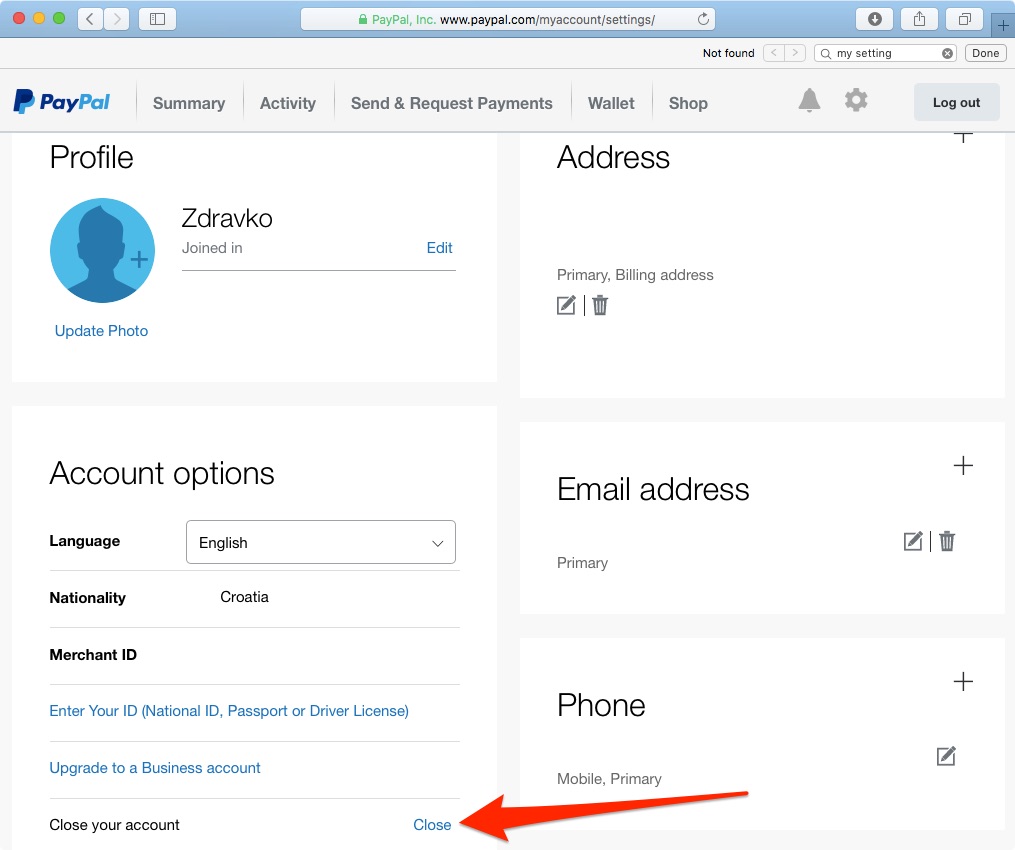
- Account Settings: Click the gear icon in the top-right corner to access the User Profile settings.
- Account Options: Under the “Account” tab, scroll to the bottom of the page. You will find a link labeled “Close your account.”
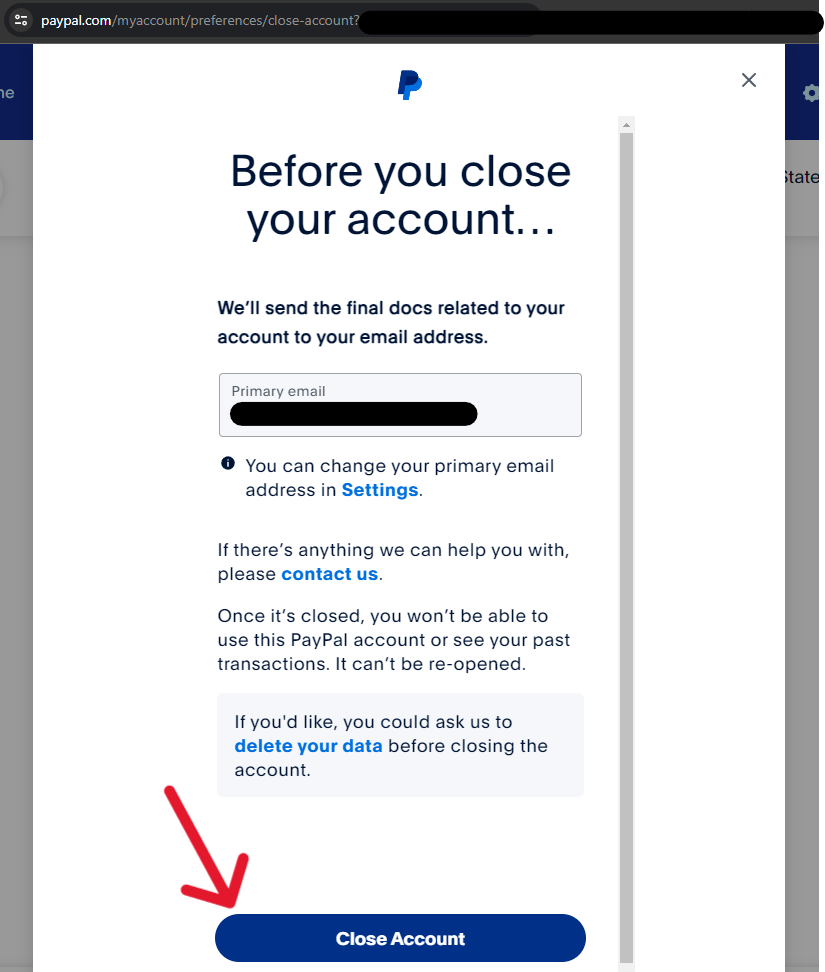
- Validation: The system will ask you to confirm your identity once more. This is a security fail-safe designed to prevent unauthorized script-based deletions.
- Finalization: Once confirmed, the account is scheduled for closure. You will receive an automated confirmation email.
Deleting Your Account via the Mobile App
While the desktop version is preferred for its stability, the mobile app (iOS and Android) does allow for account closure in recent updates.
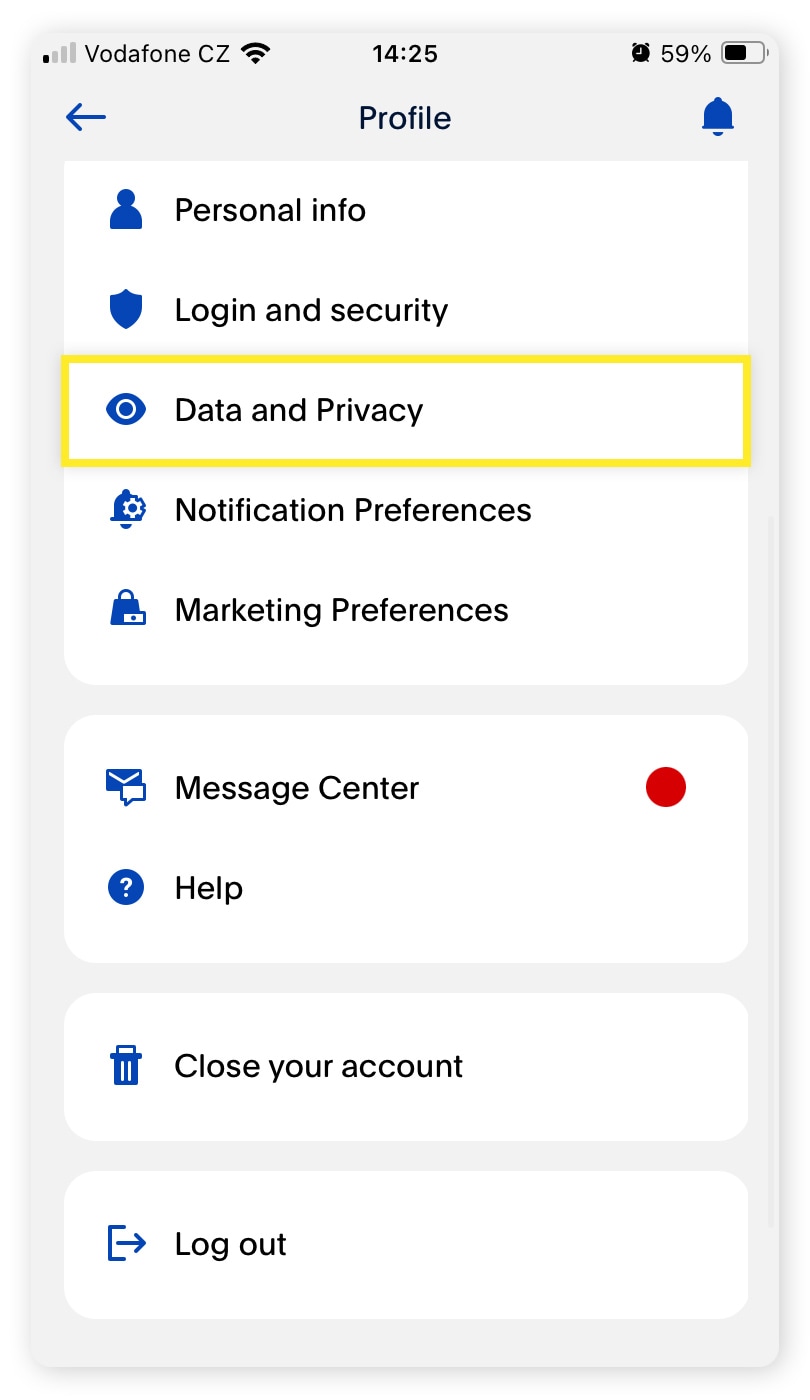
- Tap the “Profile” icon or the settings gear within the app.
- Scroll to the bottom to find the “Close Your Account” option.
- Follow the biometric or PIN verification steps.
If the option does not appear in your app version, it is likely due to regional software limitations or pending updates, in which case the desktop browser remains the fallback solution.
Troubleshooting Common Technical Hurdles
If you receive an error message such as “Your account cannot be closed at this time,” it is usually due to one of three technical triggers:
- Unresolved Limitations: If your account has a “Limitation” placed on it due to suspicious activity or a request for ID verification, the deletion API will be blocked. You must resolve the security flag with the compliance team before proceeding.
- Negative Balance: If your account balance is below zero—perhaps due to a reversed transaction—the system requires the balance to be brought to zero via a bank transfer.
- PayPal Credit: If you have an integrated PayPal Credit line (formerly Bill Me Later), this is a separate financial product. You must contact the credit provider to close the line of credit before the primary PayPal shell can be decommissioned.
The Digital Security Implications of Account Deletion
Closing a PayPal account is a strategic move for those practicing high-level digital security. In an era where data breaches are increasingly common, reducing the number of platforms that hold your sensitive financial information is a key defensive tactic.
Why “Ghost Accounts” Pose a Security Risk
A “ghost account” is an inactive account that a user has forgotten but remains live on a company’s servers. These accounts are prime targets for credential stuffing attacks. If you used an old password or do not have 2FA enabled on your dormant PayPal account, hackers could potentially gain access to your linked bank accounts or personal identity details. By deleting the account, you revoke the platform’s authorization to act as a conduit to your bank, effectively closing a potential entry point for cybercriminals.
Understanding PayPal’s Data Retention Policy
It is a common technical misconception that deleting an account results in the immediate and total erasure of all data from a company’s servers. Under various international regulations—such as the Bank Secrecy Act in the US or GDPR in Europe—financial institutions are legally required to retain transaction data for a specific period (often 5 to 10 years) for anti-money laundering (AML) and “Know Your Customer” (KYC) compliance.
While your account will no longer be “active” and cannot be logged into, the technical record of your past transactions remains in a secured, non-public database. However, deleting the account ensures that this data is no longer “hot” or accessible through the standard web interface, significantly lowering your risk profile.
Post-Deletion Cleanup: Removing Linked Cards and Bank Info
As an extra layer of security, many tech-savvy users prefer to manually remove their linked credit card numbers and bank account details before hitting the final delete button. By deleting the stored payment methods from the “Wallet” section, you ensure that even if a legacy backup of your account were compromised, the most sensitive data—your full card numbers and routing details—has already been cleared from the active user-profile database.
Modern Alternatives: Evaluating the Fintech Ecosystem
Once you have successfully decommissioned your PayPal account, you may find the need for a more modern, tech-forward payment solution. The fintech landscape has evolved significantly, offering tools with better API integrations, lower fees, and enhanced privacy features.
Moving Toward Decentralized Finance (DeFi) Solutions
For users who are deleting PayPal to distance themselves from centralized financial institutions, the world of Decentralized Finance (DeFi) offers a technical alternative. Using non-custodial wallets (like MetaMask or Ledger), users can facilitate peer-to-peer transfers without a middleman. Unlike PayPal, which can “freeze” an account based on internal algorithms, a decentralized wallet gives the user total control over their private keys and software interactions.
Privacy-Focused Payment Platforms
If you require a traditional payment gateway but want better privacy, platforms like Privacy.com or Stripe (for business users) offer more granular control. Privacy.com, for instance, allows you to create “virtual” cards that act as a buffer between the merchant and your actual bank account. This tech-first approach to spending mimics the convenience of PayPal but provides superior security by ensuring that no single merchant ever has your “real” financial data.
Furthermore, ecosystem-native tools like Apple Pay and Google Pay have become highly sophisticated. These platforms use tokenization—a process where your actual card number is replaced with a unique digital identifier—to process payments. This means that even if a merchant’s database is hacked, your technical financial details remain encrypted and useless to the attacker.
Final Summary of the Technical Lifecycle
Deleting your PayPal account is a definitive step in managing your digital identity. By following a structured protocol—auditing subscriptions, clearing the internal ledger, and resolving technical disputes—you ensure a clean exit from the platform. From a security perspective, this action minimizes your attack surface and protects you from the vulnerabilities associated with dormant accounts. As you move forward, the transition to newer payment technologies provides an opportunity to implement better security practices, such as tokenization and hardware-based authentication, ensuring your digital financial life remains both efficient and secure.
aViewFromTheCave is a participant in the Amazon Services LLC Associates Program, an affiliate advertising program designed to provide a means for sites to earn advertising fees by advertising and linking to Amazon.com. Amazon, the Amazon logo, AmazonSupply, and the AmazonSupply logo are trademarks of Amazon.com, Inc. or its affiliates. As an Amazon Associate we earn affiliate commissions from qualifying purchases.