
Navigating the labyrinthine support system of a platform that hosts over three billion active users is a task that requires patience, strategy, and a clear understanding of the digital infrastructure. For many, the search for a direct phone number or a general support email address leads to a dead end. This is because Meta, the parent company of Facebook, utilizes a decentralized, tech-driven support model that prioritizes automated tools, self-service portals, and tiered assistance based on account type.
Understanding how to effectively contact Facebook customer support involves moving beyond the traditional concept of a “customer service hotline.” In the modern tech landscape, support is integrated into the software itself. Whether you are dealing with a locked account, a technical glitch in the Meta Business Suite, or a security breach, the path to resolution is paved with specific digital forms and algorithmic workflows.

Understanding the Facebook Support Infrastructure
The primary challenge users face when seeking assistance is the sheer scale of the platform. Unlike a traditional service provider, Facebook’s support ecosystem is designed to filter billions of queries through automated systems before a human agent ever enters the loop. This is not merely an efficiency measure; it is a necessity of operating a global software network.
The Self-Service Philosophy
At the core of Facebook’s support strategy is the Help Center. This is not just a list of Frequently Asked Questions; it is a dynamic database designed to solve approximately 90% of user issues through documentation and guided workflows. When a user asks “How do I contact support?”, the platform’s primary response is to provide the tools for the user to fix the issue themselves. This includes guided walkthroughs for password resets, privacy setting adjustments, and notification management. For technical issues that do not involve account access or financial transactions, the Help Center remains the most efficient route to a solution.
Identifying Your Specific Issue Type
Before attempting to contact a representative, it is vital to categorize your issue. Facebook segments its support channels based on the nature of the problem:
-
Personal Account Issues: Forgotten passwords, hacked accounts, or community standard violations.
-
Business and Advertising Issues: Billing discrepancies, ad rejections, or Page management problems.
-
Developer and Technical Issues: API bugs, integration failures, or platform performance.
-
Security and Privacy: Data breaches, impersonation, or harassment.
Each of these categories has a dedicated pathway within the software, and attempting to use the wrong channel—such as using the Business Help Center for a personal profile issue—will often result in an automated redirection.
Direct Channels: When and How You Can Talk to a Human
While the majority of interactions are automated, there are specific scenarios where direct human intervention is possible. These channels are typically reserved for issues that involve financial transactions or verified identities.
Meta Business Suite and Ads Support
The most robust direct support channel is reserved for advertisers. If you have an active ad account or manage a business page through the Meta Business Suite, you have access to specialized support.
-
Live Chat Support: For businesses with a history of ad spend, a “Contact Support” button often appears within the Business Help Center. This opens a live chat window with a Meta Pro or a support representative. This is arguably the most effective way to speak with a human in real-time.
-
Email Support for Businesses: If live chat is unavailable due to time zones or account status, the system will allow you to open a support ticket. These tickets are tracked via a unique case ID and usually receive a response within 24 to 48 hours.
The Facebook Help Center: More Than Just FAQs
For the average user, the “Contact Us” options are hidden within specific articles in the Help Center. If a technical issue persists after following the suggested steps, certain articles will provide a “Was this helpful?” prompt. Selecting “No” and providing feedback sometimes triggers a follow-up form. Additionally, for specific issues like “Report a Problem,” users can shake their mobile device while the app is open to trigger a technical report dialog. This sends a diagnostic log to the engineering team, though it rarely initiates a two-way conversation.
Reporting Forms for Specific Technical Failures
Meta provides a variety of specialized forms for critical technical issues. These are not general contact forms but are high-priority queues for specific software failures:
-
Copyright Infringement: Dedicated forms for intellectual property theft.
-
Payment Issues: For users who have purchased items on Facebook Marketplace or via in-app games.
-
Deceased Users: Forms for memorializing or removing accounts of deceased loved ones.
Resolving Security and Access Issues
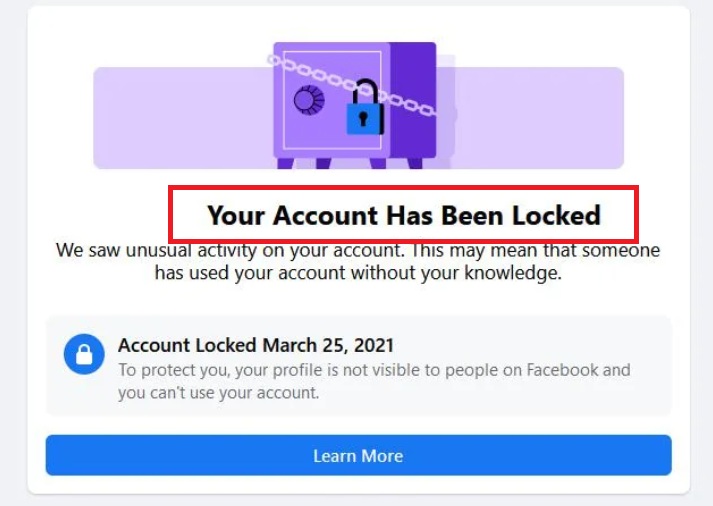
Security concerns, such as account hijacking or the loss of two-factor authentication (2FA) devices, represent the most urgent reason users seek support. Because these issues involve sensitive personal data, the contact methods are strictly controlled to prevent social engineering attacks.
Account Compromise and Hacked Profiles
If you believe your account has been compromised, the standard support channels are bypassed in favor of a specialized security portal: facebook.com/hacked. This is an interactive recovery tool that uses historical data (such as previous passwords, recognized devices, and trusted contacts) to verify your identity. This process is fully automated to ensure that even if the platform’s human staff were compromised, your account security remains tied to your verifiable digital footprint.
Two-Factor Authentication (2FA) Troubleshooting
One of the most common technical hurdles is losing access to a 2FA method (like an authenticator app or a phone number). In this instance, Facebook provides a “Manual Review” process. You may be asked to upload a photo of a government-issued ID. This is one of the few instances where a human “Reviewer” (often a third-party security contractor) will look at your documentation to grant account access. The response time for this can range from a few hours to several days depending on the volume of requests.
Identity Verification Protocols
In the modern tech era, “contacting support” often means “verifying identity.” If your account is disabled for a perceived violation of terms, the only way to contact the review team is through the “Request a Review” button on the login screen. This initiates a queue where a specialist reviews the account’s activity against the platform’s Community Standards.
Advanced Strategies for Business and Creator Accounts
As Meta moves toward a “service-based” model, new avenues for direct support have emerged, particularly for those willing to invest in the ecosystem.
Leveraging the Meta Verified Subscription
In 2023, Meta introduced “Meta Verified,” a subscription service for creators and individuals. Beyond the blue checkmark, the most significant technical benefit is Direct Account Support. Subscribers gain access to a dedicated chat support line for common issues. This represents a fundamental shift in how tech giants handle customer service, moving it from a free, automated service to a premium, human-centric feature. For users who rely on Facebook for their livelihood, this subscription is currently the fastest way to reach a human agent.
Utilizing the Commerce Manager for E-commerce Support
For those running shops on Facebook or Instagram, the Commerce Manager provides a separate support interface. Because these interactions involve sales tax, shipping logistics, and financial disputes, the level of support is significantly higher. Users can often request a “Call Me Back” option where a representative will phone them directly to resolve complex transaction errors.
Best Practices for Effective Resolution
When you finally reach a contact form or a chat window, the quality of your technical documentation will determine the speed of your resolution. Simply stating “my account doesn’t work” will result in generic advice. To get actual help, you must speak the language of tech support.
Documenting Your Technical Issue
Before reaching out, gather the following information:
-
Case Details: A clear, one-sentence summary of the problem.
-
Error Codes: If the app displays a specific alphanumeric code, write it down.
-
Device and OS Info: Are you on iOS, Android, or a desktop browser? Which version?
-
Screenshots: Visual evidence of the glitch or error message.
-
Step-by-Step Reproduction: “I clicked X, then Y happened instead of Z.”

Managing Expectations and Response Times
It is important to understand that Facebook’s internal ticketing system prioritizes issues based on “Impact and Urgency.” A bug affecting millions of users will be addressed by engineering teams immediately, whereas an individual login issue might take longer. If you have opened a support ticket, avoid opening multiple duplicate tickets for the same issue. In the world of automated CRM (Customer Relationship Management) software, duplicate tickets can often reset your place in the queue or trigger a spam filter, further delaying your resolution.
By approaching Facebook support as a technical challenge rather than a traditional customer service interaction, you can navigate the systems more effectively. Whether through the automated tools of the Help Center, the direct lines of Meta Verified, or the specialized forms for security, the key is to provide clear, documented information and to use the specific channel designed for your unique problem.
aViewFromTheCave is a participant in the Amazon Services LLC Associates Program, an affiliate advertising program designed to provide a means for sites to earn advertising fees by advertising and linking to Amazon.com. Amazon, the Amazon logo, AmazonSupply, and the AmazonSupply logo are trademarks of Amazon.com, Inc. or its affiliates. As an Amazon Associate we earn affiliate commissions from qualifying purchases.