
The transition of SiriusXM from a hardware-reliant satellite radio service to a sophisticated, multi-platform digital streaming entity has transformed how users interact with the brand. However, as with many legacy services that have pivoted to a “Software as a Service” (SaaS) model, the process of offboarding—specifically, canceling a subscription—can be a complex technical endeavor. For many subscribers, the question “how do I cancel XM radio” is not just about ending a payment, but about navigating a digital ecosystem designed with high-friction retention loops.
Understanding the technical pathways to cancellation requires an analysis of the SiriusXM Online Account Center, the integration of third-party billing APIs, and the management of hardware-specific Radio IDs. This guide provides a comprehensive technical walkthrough for users seeking to terminate their service while navigating the modern digital landscape of subscription management.
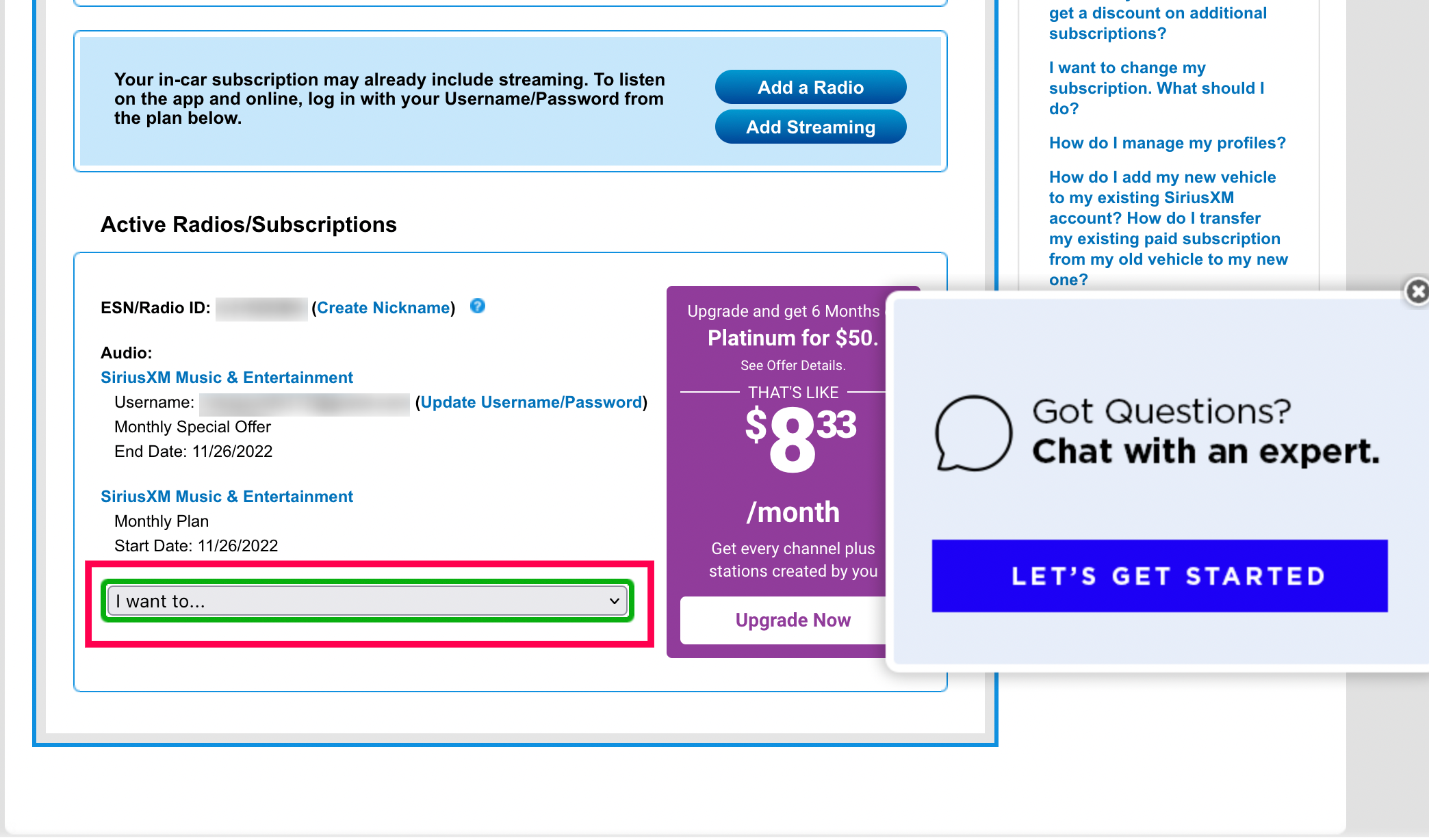
Navigating the Online Account Center: A Step-by-Step Digital Walkthrough
The primary method for managing a SiriusXM subscription is through their proprietary Online Account Center (OAC). Over the last few years, SiriusXM has updated its web interface to allow for more self-service options, though these are often buried beneath several layers of UI.
Accessing the CSS Portal
To begin the cancellation process, a user must navigate to the SiriusXM website and access the “Manage My Account” section. This portal acts as the central Customer Self-Service (CSS) hub. Logins are typically authenticated via email or a username linked to a specific Radio ID (an 8-digit alphanumeric code unique to the tuner hardware).
Once authenticated, the dashboard displays the active subscription packages. From a technical standpoint, the “Cancel” trigger is rarely a single-click operation. Instead, it is a multi-stage workflow designed to verify user intent and provide alternative “save” offers. Users should look for a “Subscriptions” or “Billing” tab, where the option to “Modify” or “Cancel” the plan is located.
Utilizing the Automated Chat Interface
In recent software updates, SiriusXM has leaned heavily into AI-driven chatbots to handle offboarding. When a user clicks “Cancel,” they are often redirected to an automated assistant. This chat interface is programmed with natural language processing (NLP) to identify the user’s reason for leaving and present counter-offers based on the account’s historical data.
To successfully navigate this, the user must interact with the chatbot using clear, declarative commands. Often, typing “Agent” or “Technical Support” can bypass the initial AI logic gates to reach a human representative, which is sometimes still a requirement for certain legacy plans that haven’t been fully migrated to the modern self-service API.
Troubleshooting Browser-Side Blocks
A common technical hurdle during the online cancellation process involves browser extensions and cookie settings. Because the cancellation flow often relies on complex JavaScript triggers and pop-up modal windows, aggressive ad-blockers or “Do Not Track” settings can inadvertently break the cancellation sequence. If the “Cancel” button appears non-responsive, users should attempt the process in an Incognito/Private window or temporarily disable script-blocking extensions to ensure the background API calls can complete successfully.
Managing Subscriptions through Mobile Ecosystems and Third-Party API Integrations
A significant portion of modern SiriusXM users does not subscribe directly through the website but rather through mobile application stores or digital aggregators. This introduces a layer of technical abstraction where the “how-to” changes based on the billing API.
The Apple App Store and Google Play Store Paradigms
If you subscribed to SiriusXM via an iPhone or Android device, your subscription is managed by Apple’s or Google’s billing systems, not SiriusXM’s internal servers. This is a crucial distinction. In this scenario, logging into the SiriusXM website will not show a “Cancel” button; instead, it will indicate that the subscription is managed by a third party.
-
iOS/iPadOS: Users must navigate to Settings > [Apple ID Name] > Subscriptions. From here, the Apple billing API allows for a one-tap cancellation that immediately notifies SiriusXM’s servers to terminate access at the end of the current billing cycle.
-
Android: Users open the Google Play Store app, tap the profile icon, and select “Payments & Subscriptions.” This centralized management ensures that the user maintains control over the recurring token without needing to interact with the service provider’s retention department.
Third-Party Bundles and Automotive Integration
Many users receive SiriusXM as part of a “connected car” suite or a broader digital bundle (such as those offered by mobile carriers or internet service providers). In these cases, the cancellation must be initiated through the primary service provider’s portal. This is because the SiriusXM account is essentially a sub-account authenticated via an OAuth or similar token-sharing protocol. Revoking access at the source (e.g., the car manufacturer’s telematics portal) is the most efficient way to ensure billing stops across the integrated stack.

Overcoming Technical Barriers: Chatbots, Retention Scripts, and UX Dark Patterns
The difficulty many experience when trying to cancel XM radio is often attributed to “dark patterns” in user experience design. Dark patterns are UI/UX choices made to intentionally make a specific action—like canceling a service—more difficult than the sign-up process.
Identifying “Roach Motel” Design
In software design, the “Roach Motel” pattern describes a system that is very easy to get into but very difficult to get out of. For years, SiriusXM required a phone call to a physical call center to cancel, despite allowing one-click digital sign-ups. While they have moved toward digital cancellation, the logic remains “high friction.”
The technical manifestation of this includes hidden links, multi-page surveys that must be completed before the final “Submit” button becomes active, and the use of “confirmative” language that can be confusing (e.g., asking if you want to “Keep your service for a lower price” instead of “Confirm Cancellation”). Recognizing these as deliberate technical hurdles allows a user to navigate the flow with more focus and less frustration.
The Role of Scripted Retention Logic
During the cancellation flow, the system’s backend logic often checks the user’s “Lifetime Value” (LTV) score. If the score is high, the system may trigger a specific “Retention API” that presents deeply discounted offers. Technically, these offers are stored as “win-back” SKUs in the product catalog. While these are designed to prevent churn, they can be an obstacle for a user who simply wants to terminate the service. The most direct path is to reject all “if-then” logic prompts until the final confirmation receipt is generated.
Data Sovereignty and Hardware Management Post-Cancellation
Canceling a subscription is not just about the billing cycle; it also involves the management of digital assets and hardware identifiers. Once a subscription is terminated, several technical changes occur within the user’s ecosystem.
Handling the Radio ID and ESN
Every satellite-capable radio has an Electronic Serial Number (ESN) or Radio ID. When you cancel, the SiriusXM satellite network sends a “kill signal” or de-authorization command to that specific ID. For this to work, the radio must be powered on and have a clear line of sight to the sky to receive the de-activation packet. If the radio is in a garage or underground, it may stay active for a short period until it eventually connects and receives the signal.
From a data perspective, the Radio ID remains associated with your account profile in the SiriusXM database. For users concerned with data privacy, simply canceling the subscription does not delete the account. A separate request for data deletion under CCPA or GDPR (depending on jurisdiction) may be necessary to fully purge the hardware identifier and personal information from their marketing databases.
Exporting User Data: Favorites and History
Before executing the final cancellation, users should consider the data they have generated within the app. SiriusXM does not currently offer a robust “Data Portability” feature that allows users to export their favorite channels, custom stations, or listening history to a different platform like Spotify or Apple Music. Users who have spent years curating their “Personalized Stations” will find that this data is proprietary and locked within the SiriusXM ecosystem. Manually documenting these preferences is the only current workaround before the account access is revoked.
Transitioning to Modern Digital Audio Architectures
Once the technical process of canceling XM radio is complete, the user is often left with integrated hardware in their vehicle that is no longer functional. This provides an opportunity to transition to more open-source or flexible digital audio architectures.
Smartphone Integration: CarPlay and Android Auto
Most modern vehicles that come equipped with SiriusXM also support Apple CarPlay and Android Auto. These technologies act as a “projection” of the smartphone’s OS onto the car’s head unit. By canceling a satellite-based subscription, users can shift their technical focus to data-driven streaming apps. This shift replaces the satellite receiver (subject to signal loss in tunnels or urban canyons) with a 5G-driven data stream that offers higher fidelity and more granular control over content.
The Future of Satellite vs. IP-Based Streaming
The move away from satellite radio reflects a broader tech trend: the convergence of all media into IP-based (Internet Protocol) delivery. As 5G infrastructure becomes ubiquitous, the technical necessity of satellite-based hardware diminishes. Canceling a legacy satellite service is often the first step in streamlining one’s digital life, reducing the number of proprietary hardware dependencies, and moving toward a unified, app-based audio environment.
By understanding the technical nuances of the SiriusXM offboarding process—from navigating CSS portals and chatbot logic to managing third-party billing APIs—subscribers can effectively take control of their digital footprint and transition to platforms that better suit their technological needs.
aViewFromTheCave is a participant in the Amazon Services LLC Associates Program, an affiliate advertising program designed to provide a means for sites to earn advertising fees by advertising and linking to Amazon.com. Amazon, the Amazon logo, AmazonSupply, and the AmazonSupply logo are trademarks of Amazon.com, Inc. or its affiliates. As an Amazon Associate we earn affiliate commissions from qualifying purchases.