
In the modern digital landscape, managing one’s “digital footprint” has become as essential as managing a physical workspace. As fintech ecosystems evolve, many users find themselves consolidating their digital tools or migrating to more specialized platforms. PayPal, one of the oldest and most ubiquitous payment processors in existence, often sits at the center of a user’s financial web. However, whether you are seeking to minimize your data exposure, switching to decentralized finance (DeFi) alternatives, or simply streamlining your software stack, knowing how to properly decommission a PayPal account is a critical technical skill.
Closing a PayPal account is more than just clicking a “delete” button; it is a technical process that involves settling ledger balances, revoking API permissions, and understanding the long-term data retention policies of the platform. This guide provides a deep dive into the technicalities of account closure, ensuring that your transition is seamless and your data remains secure.
1. The Preparatory Phase: Securing Your Financial Data and History
Before initiating the deletion sequence, a user must perform several technical “housekeeping” tasks. Unlike simple social media accounts, a financial platform like PayPal is integrated with your bank accounts, credit cards, and numerous third-party merchants. Failing to prepare can lead to orphaned subscriptions or lost financial records.
Settling Outstanding Balances and Resolving Disputes
The PayPal interface will programmatically block any closure attempt if there is a non-zero balance. This includes both positive balances and negative arrears. If you have funds remaining, you must initiate a transfer to a linked bank account—a process that typically takes 1–3 business days via ACH transfer. Conversely, if your account is in the negative, the system requires a deposit to reach a neutral state before the “Close Account” option becomes active in the settings menu. Furthermore, any open disputes or “limitations” on the account must be resolved through the Resolution Center, as the backend database will not allow the deletion of an account tied to an active legal or financial investigation.
Exporting Transaction History for Record-Keeping
Once an account is deleted, access to historical data is permanently revoked. From a digital security and auditing perspective, it is vital to download your transaction history. To do this, navigate to the “Activity” tab and utilize the “Download” tool. You should export this data in a machine-readable format such as a CSV or an Excel file. This ensures that you have a local backup of all P2P transfers, merchant payments, and tax-relevant data. This step is particularly important for users who have utilized PayPal for business purposes or freelance income, as the IRS and other regulatory bodies require records to be kept for several years.
Revoking Third-Party API Access and Recurring Subscriptions
One of PayPal’s most powerful features is its ability to act as a gateway for recurring payments (e.g., Netflix, Spotify, or SaaS tools). Before closing the account, you must manually audit your “Automatic Payments” list within the website’s “Payments” settings. If you delete your account without updating the payment method on these third-party platforms, you risk service interruptions or “failed payment” flags on your credit report. Technically, you are revoking the “billing agreement” token that allows the merchant to pull funds from your PayPal vault.
2. Executing the Deletion: A Technical Step-by-Step
While many modern apps attempt to keep users within their mobile ecosystem, PayPal’s account closure process is most reliably handled through a desktop web browser. This is due to the complex security protocols and the need for a full view of the account’s settings interface.
Navigating the Desktop Interface
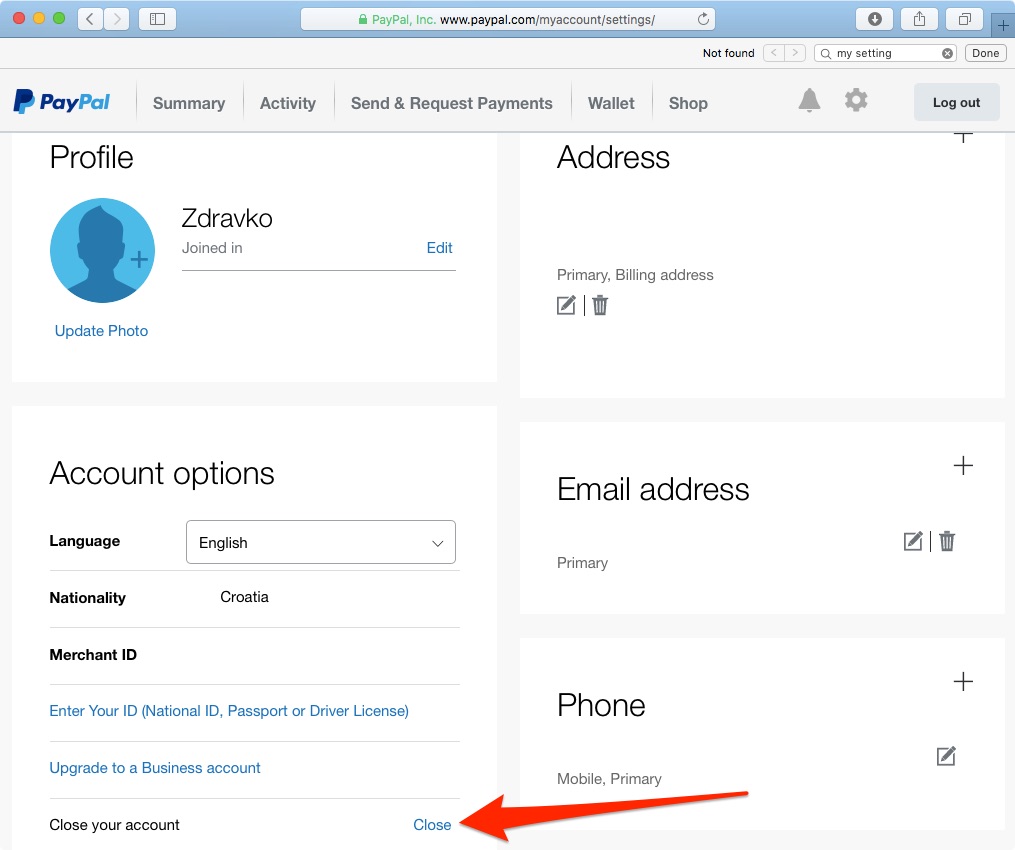
To begin the process, log in to the PayPal web portal. Once authenticated—likely requiring a Two-Factor Authentication (2FA) token—click on the gear icon representing “Settings.” On the “Account” tab, you will find the “Close your account” link located at the bottom of the page. This link triggers a script that checks for the prerequisites mentioned in the previous section (balance, disputes, and pending transactions). If any of these checks fail, the system will provide an error code or a specific instruction on what needs to be cleared before proceeding.
Why the Mobile App Isn’t Enough
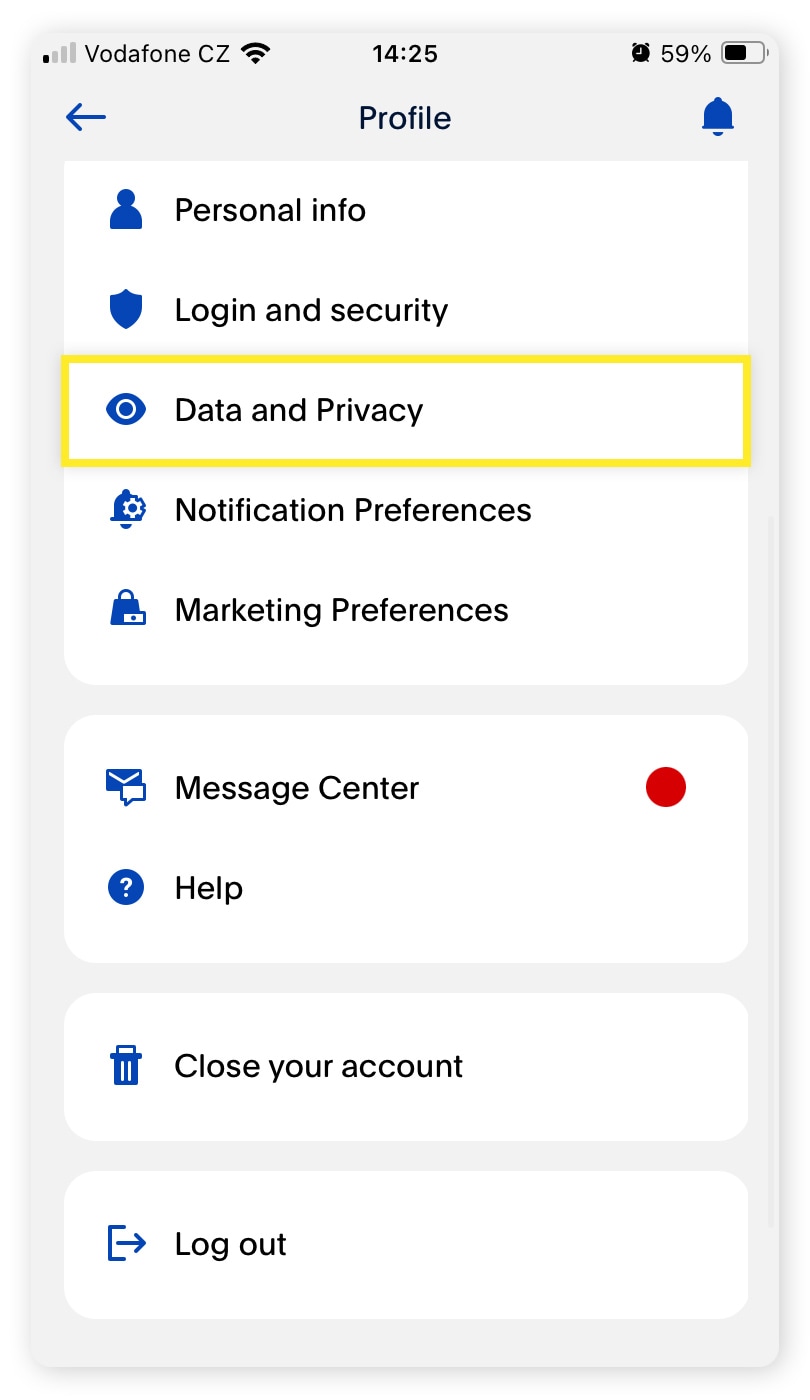
Users often find that the “Close Account” option is missing or buried deep within the mobile application. From a UI/UX design perspective, financial institutions often restrict high-level administrative changes to desktop environments to prevent accidental deletion and to ensure the user is operating in a secure, stable browser environment. If you are attempting to delete your account via a smartphone, it is highly recommended to switch to a desktop or use the “Request Desktop Site” feature in your mobile browser to access the full suite of administrative tools.
The Permanent Nature of the “Close Account” Command
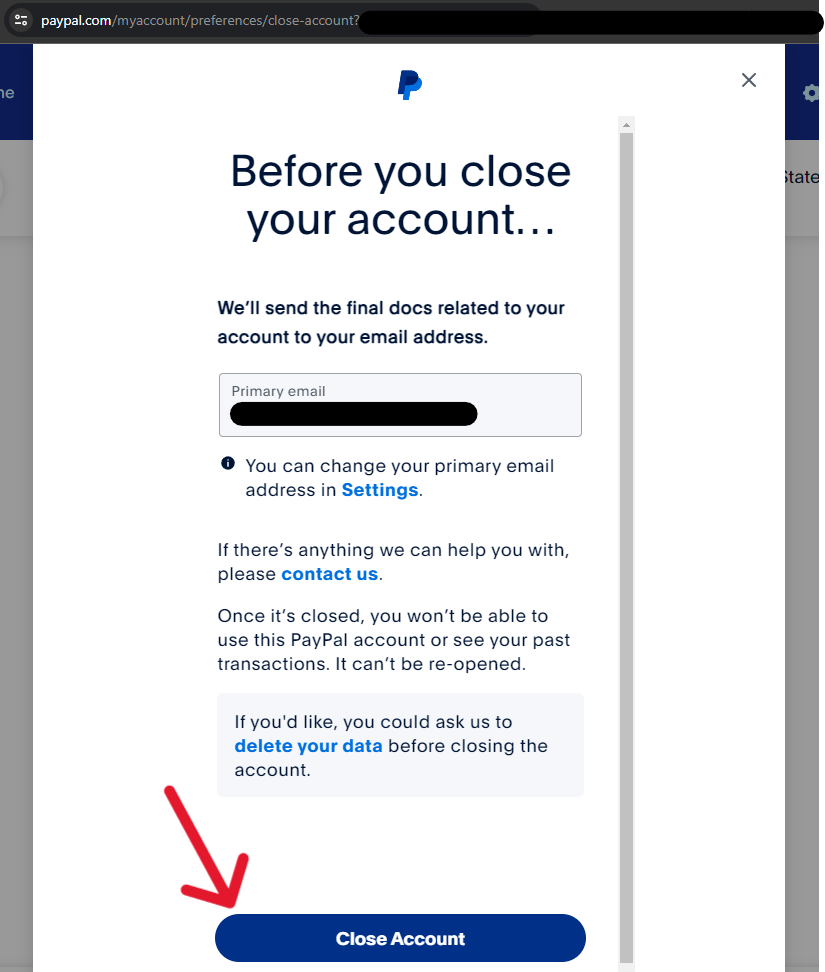
It is important to understand the technical finality of this action. When you click “Close Account,” the system doesn’t just “hide” your profile; it marks your unique User ID (UID) as “closed” in the master database. This action is irreversible. Unlike some social platforms that offer a 30-day “cooldown” period where you can reactivate by logging in, PayPal’s closure is immediate. Any loyalty points, unredeemed vouchers, or “PayPal Credit” lines associated with the account will be terminated.
3. Security Considerations and the “Digital Shadow”
In the realm of digital security, “deletion” does not always mean “erasure.” Understanding how PayPal handles your data post-closure is essential for anyone concerned with long-term privacy and the General Data Protection Regulation (GDPR) or similar frameworks.
Data Retention Policies and Regulatory Compliance
Even after you close your account, PayPal is legally obligated by various international “Know Your Customer” (KYC) and Anti-Money Laundering (AML) laws to retain certain data points. This includes your name, transaction history, and verified identity documents. Usually, this data is moved from an “active” database to a “cold storage” or “archive” database, where it is kept for a period ranging from 5 to 10 years, depending on the jurisdiction. While you can no longer access this data, it remains on PayPal’s servers for regulatory audits.
Protecting Your Linked Identity After Closure
After the account is closed, the email address and phone number previously associated with it are released. However, if you ever decide to return to the platform, you may encounter technical friction if you try to use the same credentials. Systemic “flagging” often occurs if a new account is opened with the same details too quickly after a closure. From a security standpoint, it is also wise to remove your bank account and credit card details from the PayPal “Wallet” before clicking the final close button, adding an extra layer of decoupling between your financial hardware and the defunct account.
4. Overcoming Technical Barriers to Closure
Occasionally, a user may encounter a “System Error” or a message stating that the account cannot be closed at this time. These hurdles are usually built-in safeguards designed to protect both the user and the platform.
Addressing Frozen Accounts and Security Holds
If your account has been “limited” or “frozen” due to suspicious activity or a security breach, the “Close Account” function will be programmatically disabled. In this scenario, you must go through the identity verification process. This might involve uploading a government-issued ID or a utility bill to prove residency. Only after the “Security Operations Center” (SOC) at PayPal clears the flag will the administrative functions of the account be restored, allowing for deletion.
The Role of Two-Factor Authentication (2FA) in Account Access
If you have lost access to your 2FA device (such as an old phone number or a lost authenticator app), you will find it impossible to reach the settings menu required for deletion. In this case, the technical resolution involves contacting PayPal’s automated recovery system. This often involves a “knowledge-based authentication” (KBA) process where you verify past transactions or linked card numbers. Ensuring your 2FA is up-to-date before attempting a closure is the most efficient way to avoid these technical roadblocks.
5. Strategic Alternatives and Digital Security Hygiene
Closing a PayPal account is often the first step in a broader strategy of digital hygiene. As we move toward a world of encrypted communications and decentralized finance, the way we interact with payment software is shifting.
Evaluating Encrypted and Privacy-Focused Alternatives
For those who are deleting PayPal due to privacy concerns, the next technical step is evaluating alternatives that offer end-to-end encryption or minimize data collection. Platforms like Signal (for small P2P payments in some regions) or hardware-wallet-based crypto-transactions offer a different security profile. If you require a traditional fintech tool, look for those that offer “virtual card numbers,” which allow you to mask your true banking details from merchants, providing a layer of technical abstraction that PayPal’s standard interface lacks.
Best Practices for Long-Term Digital Security
The act of deleting an account should be part of a semi-annual “Security Audit.” This involves:
- Checking your password manager for old, unused credentials.
- Scanning your email for “confirmation of closure” receipts to ensure the process was completed.
- Clearing your browser cache and cookies after the deletion to remove any residual session tokens or tracking pixels associated with the platform.
By following this technical roadmap, you ensure that your exit from the PayPal ecosystem is not only clean but also serves to strengthen your overall digital security posture. Managing an account closure with this level of technical rigor prevents future headaches, protects your financial history, and ensures that your digital identity remains under your direct control.
aViewFromTheCave is a participant in the Amazon Services LLC Associates Program, an affiliate advertising program designed to provide a means for sites to earn advertising fees by advertising and linking to Amazon.com. Amazon, the Amazon logo, AmazonSupply, and the AmazonSupply logo are trademarks of Amazon.com, Inc. or its affiliates. As an Amazon Associate we earn affiliate commissions from qualifying purchases.