
In today’s interconnected world, the ability to move money swiftly and securely is paramount for personal finance and business operations alike. PayPal stands as a cornerstone in this digital financial landscape, offering a versatile platform for sending and receiving funds globally. Whether you’re paying a friend, settling a bill, or sending money for goods and services, understanding the intricacies of sending money to PayPal, or via PayPal, is a fundamental skill for effective financial management. This guide delves into the various methods, financial implications, and best practices involved, ensuring your transactions are always smooth, cost-effective, and secure.
Understanding PayPal’s Role in Modern Money Transfers
PayPal has evolved far beyond a simple online payment processor; it’s a comprehensive financial tool that integrates seamlessly into countless aspects of our economic lives. Its widespread adoption stems from its convenience, robust security features, and accessibility, making it an indispensable part of digital financial strategies for individuals and businesses alike.
The Ecosystem of Digital Payments
The digital payment ecosystem is a complex web of technologies, regulations, and user behaviors. At its core, it aims to replace traditional cash and paper checks with electronic transactions, offering greater speed, traceability, and often, lower costs. PayPal operates within this ecosystem as a bridge between bank accounts, credit cards, and online merchants or individuals. It facilitates peer-to-peer (P2P) transfers, online shopping, and international remittances, significantly streamlining the flow of capital across borders and digital interfaces. Understanding where PayPal fits allows users to leverage its capabilities more effectively, optimizing their financial workflows and ensuring their money moves precisely where and when it needs to.
Why Choose PayPal for Your Transactions?
The choice of a payment platform often comes down to a balance of trust, convenience, and cost. PayPal excels in several key areas, making it a preferred option for millions. First, its ubiquity means that a vast number of individuals and businesses already have a PayPal account, simplifying the process of sending and receiving money without needing to exchange sensitive bank details. Second, PayPal’s security protocols are among the industry’s strongest, employing advanced encryption and fraud detection systems to protect user financial information. Third, its buyer and seller protection programs offer a layer of financial security, mitigating risks associated with online transactions. Finally, the ease of use, particularly through its intuitive website and mobile app, makes managing funds and initiating transfers straightforward, even for those new to digital finance. These combined factors solidify PayPal’s position as a reliable and efficient financial tool.
Direct Methods for Sending Money to Another PayPal User
The most common way to “send money to PayPal” is to send funds directly from your PayPal account to another person’s PayPal account. This is a core functionality that underpins much of PayPal’s utility, enabling instant or near-instant transfers across various contexts.
Initiating a Payment via Email or Phone Number
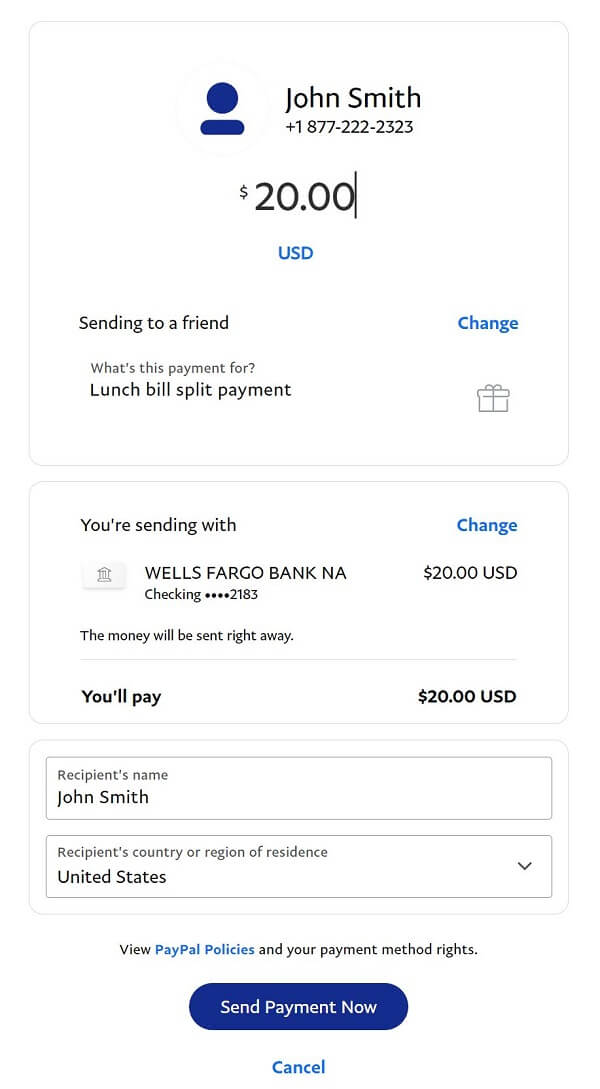
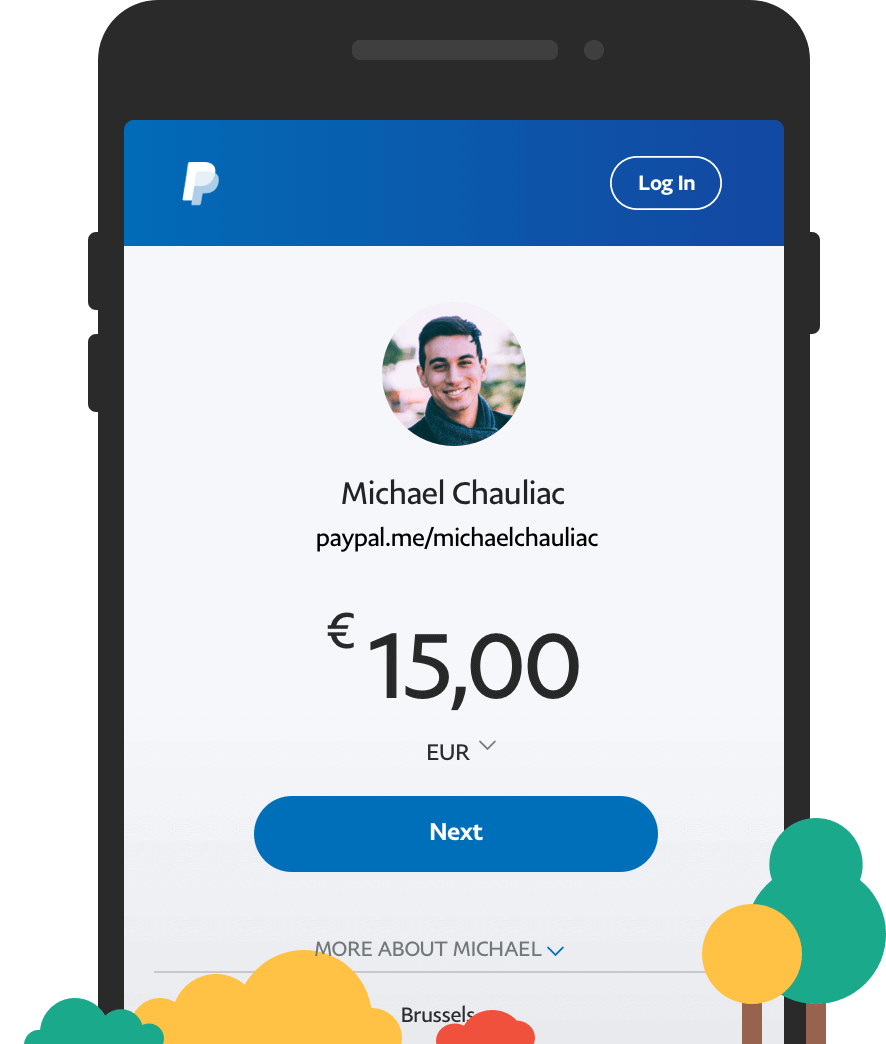
Sending money to another PayPal user is remarkably straightforward. The primary requirement is the recipient’s email address or mobile phone number, which must be linked to their PayPal account. From your PayPal dashboard, you typically select the “Send” or “Send & Request” option. You’ll then input the recipient’s identifier, the amount you wish to send, and select the currency. PayPal will present you with the total amount, including any applicable fees, before you confirm the transaction. This method is incredibly efficient for personal transfers, gift-giving, or paying for services where both parties agree to use PayPal. The system is designed to be intuitive, minimizing potential errors and ensuring funds reach their intended destination quickly.
Navigating Personal vs. Goods & Services Payments
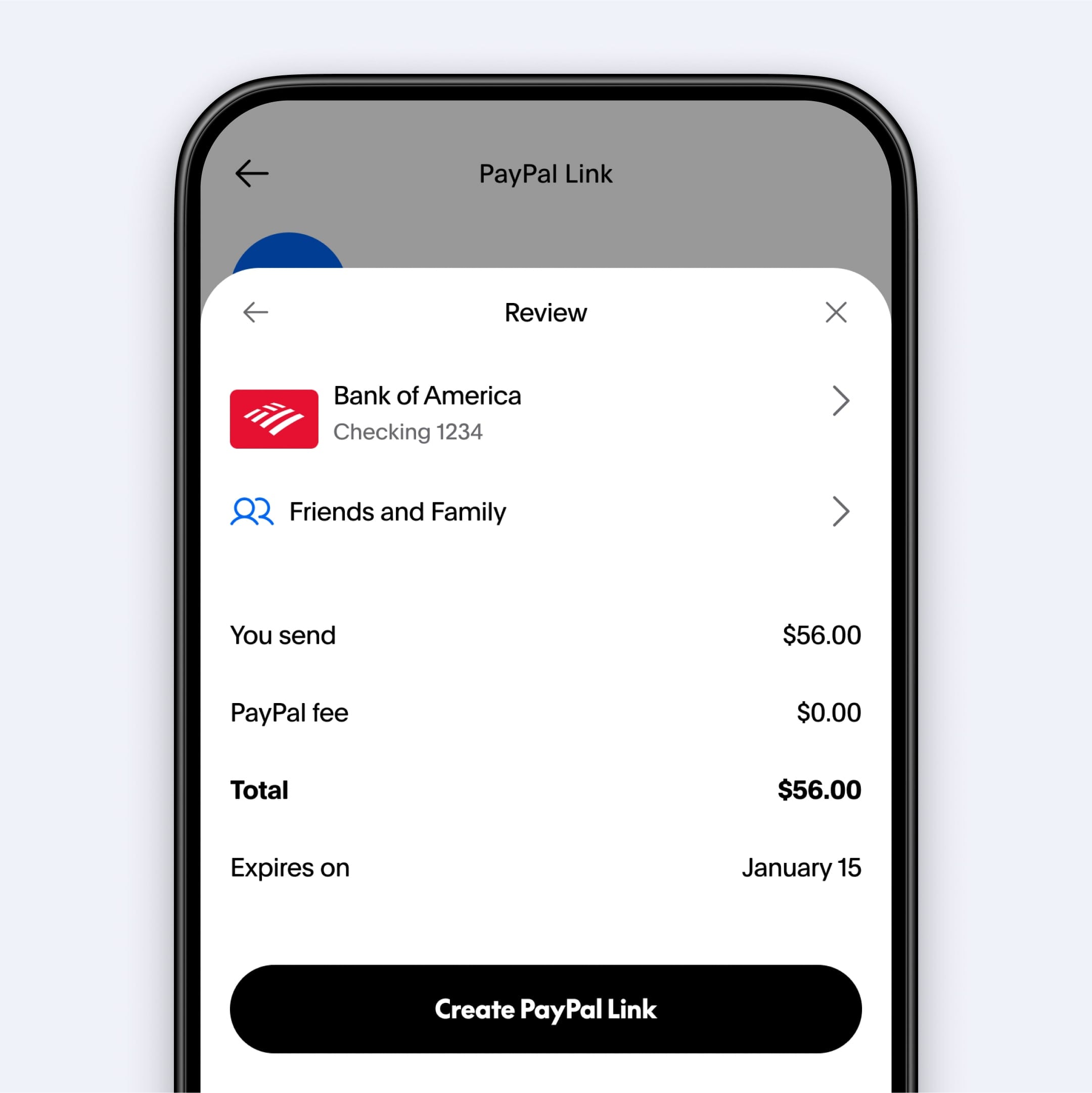
A critical financial distinction when sending money via PayPal is choosing between a “Personal” payment (often labeled “Friends and Family”) and a “Goods & Services” payment. This choice significantly impacts fees, buyer/seller protection, and tax implications.
- Personal Payments (Friends and Family): These are intended for sending money to people you know, such as family members or friends, without any commercial intent. When funded by your PayPal balance or a linked bank account, these transactions often incur no fees for the sender in many regions (though currency conversion fees may apply for international transfers). However, these payments typically do not come with PayPal’s Purchase Protection.
- Goods & Services Payments: These are for commercial transactions, such as buying an item from an online seller or paying for a freelance service. PayPal charges a fee to the recipient for these transactions, but in return, both the buyer and seller are usually covered by PayPal’s Purchase Protection and Seller Protection policies. This offers a crucial layer of financial security, protecting buyers against non-delivery or items not matching descriptions, and sellers against fraudulent claims.
Understanding this distinction is vital for managing your financial exposure and ensuring you have the appropriate protections for your transactions.
Leveraging the PayPal Mobile App for On-the-Go Transfers
The PayPal mobile app has revolutionized how individuals manage their finances and execute transactions. Available for both iOS and Android devices, the app offers the full functionality of the web platform in a more convenient, mobile-first interface. Sending money to another PayPal user via the app is incredibly efficient:
- Log In: Access your account quickly with biometrics (fingerprint or face ID) for enhanced security.
- Tap “Send”: Usually a prominent button on the main screen.
- Enter Details: Input the recipient’s email or phone number and the amount.
- Select Payment Type: Choose “Friends and Family” or “Goods & Services.”
- Confirm: Review the details and tap “Send Now.”
The app also provides instant notifications for incoming and outgoing payments, allows for easy management of linked payment methods, and provides a clear transaction history. This makes it an indispensable tool for anyone who needs to manage their finances and make payments while away from a computer, offering flexibility and control over your financial movements.
Funding Your Own PayPal Account: A Key Financial Management Strategy
While the question “how can I send money to PayPal” often refers to sending it to another person, it can also imply adding funds to your own PayPal balance. Maintaining a balance can be a strategic financial move, especially for frequent online shoppers, international transactions, or for those who prefer to keep a dedicated pool of funds separate from their primary bank account for specific purposes.
Linking Bank Accounts and Debit/Credit Cards
Before you can add funds or send money from your PayPal account, you first need to link a funding source. PayPal supports linking:
- Bank Accounts: This is generally the most common and cost-effective method for adding funds. Linking requires verifying your bank account, usually through small deposits or your online banking credentials. Once linked, you can initiate transfers directly from your bank.
- Debit Cards: Debit cards linked to your bank account can also be used to fund payments or add money. These often offer faster processing times for certain transactions compared to bank transfers but may incur fees for instant transfers.
- Credit Cards: While credit cards can be linked and used to send money, PayPal typically charges a fee for these transactions, as they treat it as a cash advance. It’s generally not recommended for adding funds to your own balance due to these fees but serves as a useful backup payment method for purchases.
Linking these accounts provides flexibility and ensures you always have a way to fund your PayPal transactions or top up your balance when needed.
Adding Funds from Your Bank Account to PayPal Balance
The most direct way to “send money to PayPal” for your own use is to transfer funds from a linked bank account to your PayPal balance.
- Log In: Access your PayPal account.
- Navigate to “Wallet” or “Money”: This section manages your linked accounts and balance.
- Select “Transfer Money” or “Add Money to Your Balance”: Look for an option that allows you to top up your PayPal balance.
- Choose Bank Account: Select the linked bank account from which you wish to draw funds.
- Enter Amount: Specify how much money you want to add.
- Confirm: Review the details and initiate the transfer.
This process typically takes 1-3 business days to complete, as it’s an ACH transfer between your bank and PayPal. There are usually no fees for standard transfers from your bank account to your PayPal balance, making it a cost-effective way to manage your digital funds.
Understanding Instant vs. Standard Transfers
When adding funds to your PayPal balance or withdrawing money from it, you’ll encounter two primary speed options:
- Standard Transfers: As mentioned, these typically take 1-3 business days. They are free for transfers from a linked bank account to your PayPal balance and usually free for withdrawals from PayPal to your bank account. This is the default and most cost-effective option for non-urgent financial movements.
- Instant Transfers: PayPal offers the option for instant transfers, which move funds to your linked debit card or bank account (if eligible) within minutes. While incredibly convenient for urgent financial needs, PayPal typically charges a fee for these services (a percentage of the transfer amount). This fee compensates for the immediate availability of funds and the associated processing costs.
Choosing between instant and standard transfers depends on your immediate financial requirements and your willingness to pay for speed. For strategic financial planning, standard transfers are often preferred due to their cost-free nature.
Costs, Currencies, and Security: Financial Considerations for PayPal Transfers
Beyond simply knowing how to send money, a financially savvy user understands the associated costs, currency implications, and critical security measures. These elements are crucial for optimizing your financial health and protecting your assets.
Demystifying PayPal Transaction Fees
PayPal’s fee structure can seem complex, but understanding the common scenarios can save you money:
- Sending Personal Payments (Friends and Family): Free within your own country when funded by PayPal balance or linked bank account. If funded by a credit card or debit card, a fee (typically around 2.9% + a fixed fee) is charged to the sender.
- Receiving Personal Payments: Free for the recipient if funded by PayPal balance or bank account. If funded by a credit/debit card, the recipient pays a fee.
- Sending/Receiving Goods & Services Payments: A fee (typically 2.9% + a fixed fee) is usually charged to the recipient in the buyer’s currency. The buyer generally pays no fees.
- International Transfers: Fees apply for international personal payments, often a percentage of the amount sent, plus a currency conversion spread if different currencies are involved.
- Currency Conversion: PayPal applies its own exchange rate, which includes a spread above the wholesale rate. This spread acts as a fee for converting currencies.
It is imperative to always review the “Total amount to pay” and “Fees” breakdown before confirming any transaction. Being aware of these fees allows you to choose the most cost-effective method for your financial transactions.
Managing International Payments and Exchange Rates
Sending money internationally via PayPal introduces additional financial layers. When you send money in a different currency or to a recipient in another country, PayPal will perform a currency conversion. This conversion is done at PayPal’s exchange rate, which includes a markup. While convenient, this rate might not always be the most competitive compared to specialized currency exchange services. For frequent international transfers or large sums, comparing PayPal’s exchange rate with other platforms (e.g., Wise, Remitly) can lead to significant savings. It’s also crucial to understand the recipient’s currency to avoid unnecessary double conversions. Planning international transfers carefully, considering timing and alternative services, is a key component of prudent financial management.
Implementing Best Practices for Financial Security on PayPal
Protecting your financial information and funds on PayPal is paramount. Adopting robust security practices is not optional; it’s essential:
- Strong, Unique Passwords: Use a complex password unique to your PayPal account.
- Two-Factor Authentication (2FA): Enable 2FA immediately. This adds an extra layer of security, requiring a code from your phone in addition to your password to log in.
- Beware of Phishing Scams: PayPal will never ask for your password, bank details, or credit card numbers in an email. Always verify the sender’s email address and look for suspicious links. If in doubt, go directly to the PayPal website by typing the URL yourself.
- Monitor Activity: Regularly check your transaction history for any unauthorized activity. Set up email or text alerts for every transaction.
- Secure Devices: Ensure your devices are protected with antivirus software and kept up-to-date with the latest security patches. Avoid using public Wi-Fi for sensitive financial transactions.
- Use Purchase Protection Wisely: Understand and utilize PayPal’s Purchase Protection for goods and services, but be aware of its limitations and specific requirements for disputes.
By adhering to these best practices, you significantly reduce the risk of financial fraud and unauthorized access to your PayPal account, safeguarding your assets.
Common Challenges and Troubleshooting for PayPal Transactions
Even with careful planning, issues can arise during financial transactions. Knowing how to address common PayPal challenges effectively is part of being a financially literate user, minimizing stress and potential financial losses.
Addressing Payment Holds and Delays
PayPal sometimes places holds on payments, especially for new sellers, high-value transactions, or payments for certain goods and services. This is primarily a security measure to protect buyers and ensure funds are available if a dispute arises.
- Why holds occur: Common reasons include new accounts, unusual transaction patterns, high-risk items, or cross-border payments.
- How to expedite: Providing tracking information for shipped items, marking services as complete, and demonstrating a positive transaction history can help release funds faster.
- Communication: Maintain open communication with the buyer/seller and respond promptly to any PayPal requests for information.
Understanding that holds are often standard procedure for risk management can help users navigate these delays without undue panic.
Resolving Incorrect Recipient Issues
Sending money to the wrong person is a distressing financial error. The ability to reverse or retrieve funds depends heavily on the payment status:
- Unclaimed Payments: If the recipient has not yet claimed the payment (e.g., if sent to an unverified email address), you can usually cancel it from your activity history. The funds will be returned to your account.
- Claimed Payments: If the recipient has already claimed the funds, reversing the payment is more difficult. You must contact the recipient directly and politely request they send the money back. If they refuse, and it was a Goods & Services payment, you might have recourse through a dispute, but for Friends and Family payments, your options are severely limited. This highlights the importance of double-checking recipient details before confirming any financial transaction.
Contacting PayPal Support for Financial Assistance
When you encounter issues that you cannot resolve yourself, or if you suspect fraudulent activity, contacting PayPal’s customer support is essential.
- Accessing Support: PayPal offers various support channels, including a comprehensive help center with FAQs, a community forum, phone support, and message center within your account.
- Be Prepared: Before contacting support, have all relevant transaction details ready, including transaction IDs, dates, amounts, and any communication with the other party.
- Patience and Persistence: While PayPal aims to resolve issues efficiently, complex financial disputes can take time. Follow up on your case and keep detailed records of all interactions with support.
Leveraging PayPal’s support system effectively can be crucial for resolving financial discrepancies, disputes, and security concerns, ensuring your financial interests are protected.
In conclusion, knowing how to send money to and through PayPal is more than just clicking buttons; it’s about making informed financial decisions. By understanding the platform’s mechanisms, fees, security measures, and troubleshooting steps, you empower yourself to manage your digital finances with confidence and efficiency. PayPal remains a powerful tool in your financial arsenal, and mastering its use is a valuable asset in the modern economy.
aViewFromTheCave is a participant in the Amazon Services LLC Associates Program, an affiliate advertising program designed to provide a means for sites to earn advertising fees by advertising and linking to Amazon.com. Amazon, the Amazon logo, AmazonSupply, and the AmazonSupply logo are trademarks of Amazon.com, Inc. or its affiliates. As an Amazon Associate we earn affiliate commissions from qualifying purchases.