
The Convenience and Benefits of Online Banking with Chase
Opening a bank account online has transformed personal finance, offering unparalleled convenience and efficiency. For those considering Chase, one of the largest and most reputable financial institutions in the United States, the online application process streamlines access to a broad suite of financial products. Understanding the advantages can help you decide if an online Chase account is the right fit for your financial journey.
Why Choose Chase for Online Account Opening?
Chase, as part of JPMorgan Chase & Co., offers a compelling combination of digital innovation and traditional banking strength. Its extensive network of ATMs and physical branches provides a safety net for those times when in-person assistance is required, while its robust online and mobile platforms cater to the needs of the modern, digitally-savvy consumer. This hybrid model means you get the best of both worlds. From basic checking and savings accounts to more complex credit cards, mortgages, and investment services, Chase provides a comprehensive financial ecosystem. Their established reputation for security and customer service further enhances the appeal, ensuring peace of mind as you manage your money.

Advantages of Applying Online
The primary draw of applying for a Chase account online is the sheer convenience. You can initiate and complete most of the application process from the comfort of your home, at any time of day, without needing to adhere to branch hours or navigate traffic. This accessibility is particularly beneficial for individuals with busy schedules or those who prefer managing their finances digitally. The online process is often faster than traditional in-branch applications, with digital forms and streamlined document submission. It’s also a more environmentally friendly option, reducing paper usage. Furthermore, the intuitive design of Chase’s online application portal aims to guide users seamlessly through each step, minimizing confusion and potential errors.
Essential Prerequisites for Your Online Application
Before you begin the online application for a Chase bank account, it’s crucial to understand the eligibility criteria and gather all necessary information and documents. Being prepared will ensure a smooth and quick process, preventing delays or rejection.
Eligibility Criteria
To open a bank account with Chase, whether online or in person, you typically need to meet certain fundamental requirements. Most importantly, you must be at least 18 years old. Applicants generally need to be U.S. citizens or permanent residents with a valid Social Security Number (SSN) or Individual Taxpayer Identification Number (ITIN). These numbers are essential for identity verification and tax reporting purposes. While not always strictly an eligibility criterion, having a good banking history, without a record of unpaid fees or fraudulent activities with other institutions, can contribute to a smoother approval process.
Information and Documents You’ll Need
Gathering the following information and documents beforehand will make the online application much more efficient:
-
Personal Details: Your full legal name, current residential address, phone number, and email address. Ensure these details are accurate and current, as they will be used for communication and verification.
-
Date of Birth: To confirm you meet the age requirement.
-
Identification: A valid, government-issued photo ID. This could be a U.S. state driver’s license, a state identification card, or a U.S. passport. You might be asked to upload images of your ID or use a webcam for real-time verification.
-
Social Security Number (SSN) or Individual Taxpayer Identification Number (ITIN): This is mandatory for all U.S. bank accounts.
-
Mother’s Maiden Name: Often used as an additional security verification question.
-
Existing Bank Account Information (for initial funding): If you plan to fund your new Chase account electronically from another bank, you’ll need that account’s routing and account numbers.
-
A Device with Internet Access: A computer, tablet, or smartphone with a stable internet connection. Some identity verification methods might require a camera on your device.
Having these items readily available before starting the application will help you complete it in one sitting, avoiding timeouts or the need to save and return later.
A Step-by-Step Guide to Opening Your Chase Account Online
The online application process for a Chase bank account is designed to be straightforward. By following these steps, you can efficiently open your new account and begin managing your finances.
Navigating to the Chase Website

Your journey begins at the official Chase website, www.chase.com. Once on the homepage, look for clear navigation options related to “Accounts,” “Banking,” or “Open an Account.” These links are typically prominently displayed in the main navigation menu or on the homepage banner. Clicking on these will lead you to a page where you can explore the various account types Chase offers, such as checking, savings, and credit cards.
Selecting Your Account Type
Chase offers a diverse portfolio of accounts tailored to different financial needs. It’s essential to select the account that best aligns with your goals.
-
Checking Accounts: Popular options include Chase Total Checking, often chosen for its widespread accessibility and fee waiver possibilities through direct deposit. Other options might include Chase Sapphire Checking (for those with higher balances seeking premium benefits) or Chase College Checking (for students). Each checking account comes with specific features, minimum balance requirements, and potential monthly service fees, which can often be waived by meeting certain criteria.
-
Savings Accounts: The primary savings option is typically Chase Savings, which can be linked to a checking account for convenience. For those with larger balances, Chase Premier Savings might offer tiered interest rates.
Before proceeding, carefully review the terms, conditions, and fee structures of each account type. Consider your expected transaction volume, direct deposit amounts, and how much you plan to maintain in the account to ensure you choose the most cost-effective and beneficial option.
The Application Form: Inputting Your Details
Once you’ve selected your desired account, you’ll be directed to the online application form. This form will systematically request all the personal and identification information you gathered in the prerequisite stage. Take your time to accurately input:
-
Your full name, exactly as it appears on your government ID.
-
Your current address, phone number, and email address.
-
Your date of birth, SSN/ITIN.
-
Employment status (sometimes optional, but can aid in verification).
-
Your mother’s maiden name for security purposes.
Before submitting, meticulously review all entries for typos or inaccuracies. Minor errors can lead to delays or require you to restart the process. You will also be presented with disclosures, terms and conditions, and a privacy policy. It’s imperative to read and understand these documents, then provide your electronic signature consent to proceed.
Identity Verification and Initial Funding
Chase employs various methods to verify your identity online, ensuring security and compliance. This might involve:
-
Knowledge-Based Authentication (KBA): Answering a series of personal questions based on your credit history or public records.
-
Document Upload: Uploading scanned copies or clear photos of your government-issued ID (driver’s license, passport).
-
Real-time Photo Verification: Using your device’s camera to take a selfie and a picture of your ID.
Once your identity is verified, you’ll be prompted to make an initial deposit to fund your new account. Common options include:
-
Electronic Transfer (ACH): Linking an existing bank account and transferring funds. You’ll need the routing and account number of the external bank.
-
Debit Card: Using a debit card from another bank to fund the account immediately.
-
Mailing a Check: While less common for online applications, this might be an option if others aren’t suitable.
Be aware of the minimum opening deposit required for your chosen account type, as this can vary.
Confirmation and Next Steps
After successfully submitting your application and initial funding, you should receive an immediate confirmation that your application is under review. Chase will typically send an email confirmation within a few minutes or hours. The approval process can be instant in many cases, especially if all information is accurate and verification is seamless. If additional information is needed, Chase will contact you via email or phone.
Once approved, you will receive information regarding:
-
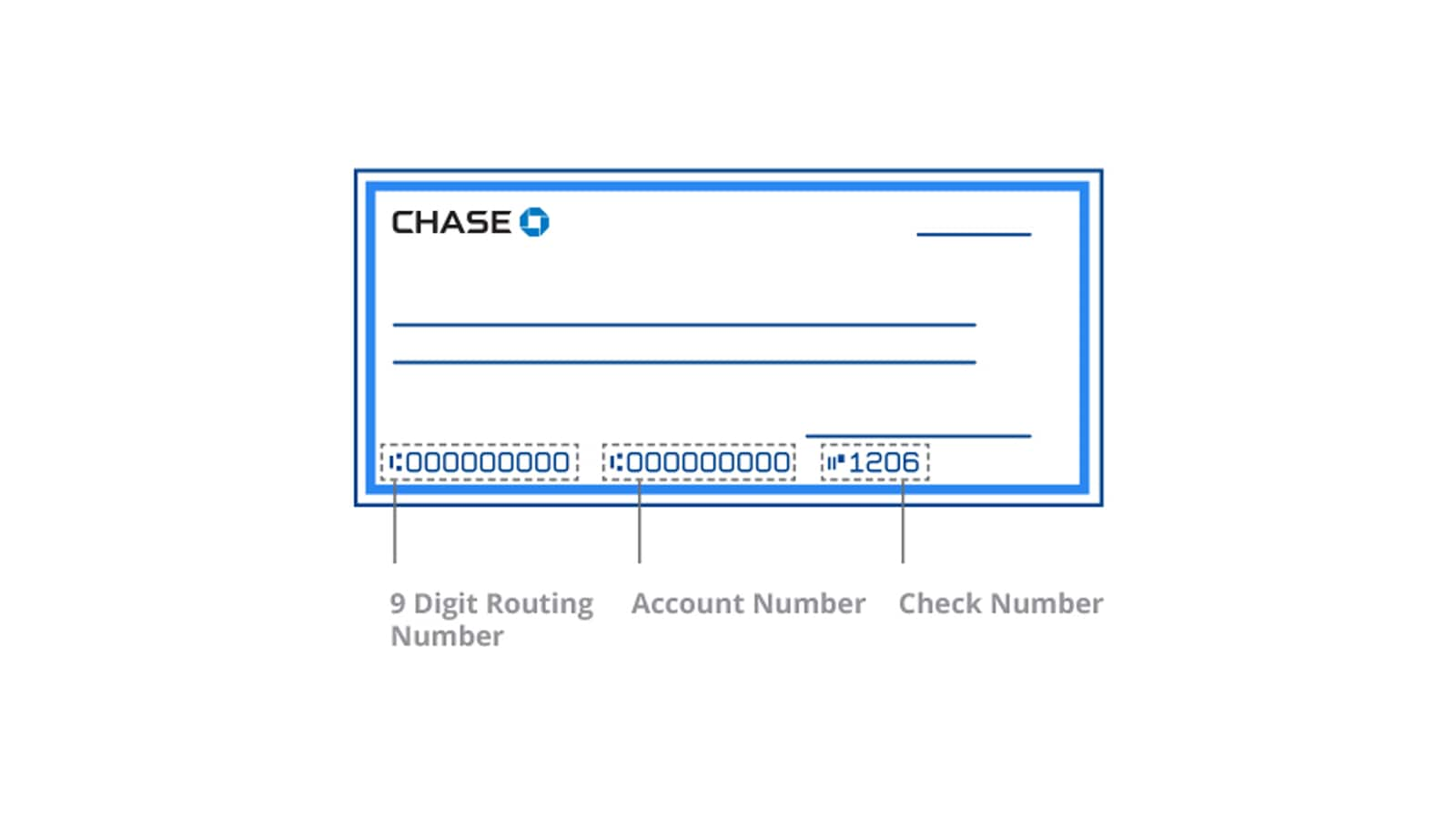
Account Number and Routing Number: Essential for setting up direct deposits or bill payments.
-
Debit Card: Your new debit card will typically arrive via mail within 7-10 business days.
-
Checks: If ordered, checks will also be mailed separately.
-
Online Banking Setup: Instructions on how to register for Chase Online and download the Chase Mobile App to start managing your account digitally.
Maximizing Your New Chase Account and Online Banking Experience
Opening your Chase account online is just the first step. To truly benefit from your new financial tool, it’s crucial to set up your digital access, understand account mechanics, and prioritize security.
Setting Up Online Banking and Mobile Access
Immediately after account approval, register for Chase Online. This involves creating a unique User ID and password. Once registered, download the Chase Mobile App on your smartphone or tablet. The app offers a comprehensive suite of features that transform how you interact with your money:
-
Account Monitoring: View balances, transaction history, and statements.
-
Transfers: Easily move money between your Chase accounts or to external banks.
-
Zelle: Send and receive money quickly with friends and family.
-
Bill Pay: Schedule one-time or recurring payments for utilities, loans, and other bills.
-
Mobile Deposit: Deposit checks using your phone’s camera.
-
Alerts: Set up customized alerts for low balances, large transactions, or direct deposits, helping you stay on top of your finances.
Understanding Account Fees and Waivers
While the convenience of online banking is significant, it’s vital to be aware of any potential fees associated with your Chase account. Most Chase checking and some savings accounts have monthly service fees. However, Chase often provides clear criteria for waiving these fees. Common waiver methods include:
-
Direct Deposit: Having a certain amount directly deposited into your account each month.
-
Minimum Daily Balance: Maintaining a specified average daily balance.
-
Linked Accounts: Having other eligible Chase accounts (e.g., a Chase credit card or investment account).
-
Age-Specific Waivers: Some student or senior accounts might have waived fees.
Beyond monthly service fees, familiarize yourself with other potential charges like ATM fees (for out-of-network ATMs), overdraft fees, and foreign transaction fees if you plan to travel internationally. Understanding these can help you avoid unnecessary costs.
Protecting Your Account and Digital Security
Digital security is paramount when banking online. Chase employs robust security measures, but personal vigilance is equally important.
-
Strong Passwords: Create complex, unique passwords for your Chase Online account and update them regularly. Avoid using easily guessable information.
-
Two-Factor Authentication (2FA): Always enable 2FA if available. This adds an extra layer of security, typically requiring a code sent to your phone in addition to your password.
-
Recognize Phishing: Be suspicious of unsolicited emails or messages asking for personal information or directing you to log in through unverified links. Always navigate directly to chase.com for login.
-
Monitor Transactions: Regularly review your account activity for any suspicious or unauthorized transactions.
-
Public Wi-Fi: Avoid conducting banking transactions on unsecured public Wi-Fi networks.
Chase also offers fraud protection services, but being proactive about your digital habits significantly reduces risk.
Linking Other Financial Tools and Services
Your new Chase account can be the hub of your personal financial ecosystem. Many popular budgeting apps (like Mint, YNAB, or Personal Capital) can link directly to your Chase account, providing a consolidated view of your spending and savings across different institutions. You can also easily set up recurring transfers to investment accounts, savings goals, or charitable donations. Explore Chase’s own offerings for investment or credit products, which can often be managed seamlessly within your existing online banking portal, potentially leading to integrated benefits and simplifying your financial management strategy. By leveraging these integrations, your online Chase account becomes a powerful tool for achieving your financial aspirations.
aViewFromTheCave is a participant in the Amazon Services LLC Associates Program, an affiliate advertising program designed to provide a means for sites to earn advertising fees by advertising and linking to Amazon.com. Amazon, the Amazon logo, AmazonSupply, and the AmazonSupply logo are trademarks of Amazon.com, Inc. or its affiliates. As an Amazon Associate we earn affiliate commissions from qualifying purchases.