
In the increasingly digital landscape of personal finance, managing your bank accounts effectively hinges on knowing critical details, chief among them being your bank account number. Whether you’re setting up direct deposit, initiating a wire transfer, or linking external financial tools, your Chase account number is an indispensable identifier. For many, this seemingly simple piece of information can be surprisingly elusive, often tucked away in various documents or requiring specific navigation within digital platforms.
This comprehensive guide aims to demystify the process of locating your Chase account number, offering a range of reliable methods suitable for different preferences and circumstances. We will explore both digital and traditional avenues, providing step-by-step instructions and crucial security advice to ensure you access your information safely and efficiently. Understanding where to find this number empowers you to handle your financial transactions with confidence and precision.
The Importance and Uses of Your Chase Account Number
Your Chase account number is more than just a string of digits; it’s a unique identifier that links directly to your specific checking or savings account. Unlike your debit card number or credit card number, which are primarily for payment processing, your account number is fundamental to the core operations of your bank account. Knowing where and how to find it is essential for a multitude of financial activities.
Setting Up and Managing Direct Deposits
One of the most common reasons individuals need their account number is to set up direct deposit for paychecks, government benefits, or other regular income. Employers and benefit providers require both your bank’s routing number (which identifies Chase as an institution) and your specific account number to ensure funds are deposited correctly into your account. Without it, you might be stuck waiting for physical checks, delaying access to your money. This also applies when updating existing direct deposit information.
Automating Bill Payments and Transfers
Many people opt to automate bill payments directly from their bank accounts, especially for recurring expenses like mortgages, rent, utilities, or loan repayments. While some services only require your debit card, others, particularly those involving larger sums or direct bank-to-bank transfers, will ask for your account number. Similarly, linking your Chase account to other financial apps or services, such as budgeting tools or investment platforms, often necessitates providing this number to facilitate transfers.
Initiating Wire Transfers
For significant funds transfers, especially internationally, wire transfers are a common mechanism. These secure transactions invariably require both the sending and receiving bank account numbers, along with their respective routing or SWIFT codes. Accuracy is paramount in these situations, as an incorrect digit could lead to significant delays or even misdirected funds. Having your Chase account number readily available simplifies this often time-sensitive process.
Verifying Account Ownership and Identity
In certain situations, Chase or other financial institutions might request your account number to verify your identity or confirm account ownership, particularly during fraud investigations, account inquiries, or when disputing transactions. While not a primary form of identification, it serves as a critical piece of information that helps customer service representatives locate your specific account quickly and securely.
Digital Pathways: Finding Your Account Number Online
In the age of digital banking, accessing your financial information has never been easier, provided you know where to look. Chase offers robust online banking and mobile app platforms designed to give you instant access to your account details, including your account number. These methods are generally the quickest and most convenient for most users.
Through Chase Online Banking
Chase’s online banking portal is a comprehensive hub for managing all aspects of your accounts. If you’ve registered for online access, finding your account number is typically straightforward.
- Log In Securely: Visit the official Chase website (chase.com) and log in to your account using your username and password. Always ensure you are on the legitimate Chase website to avoid phishing scams.
- Navigate to Your Account: Once logged in, you’ll usually see a summary of all your accounts. Click on the specific checking or savings account for which you need the account number.
- Locate Account Details: On the individual account page, look for a section labeled “Account details,” “Account services,” or something similar. Chase often places sensitive information behind an additional click or requires you to explicitly “show” the full number for security reasons. You might need to click on a link like “Show details” or “View account information.”
- Identify Your Account Number: Within this section, you should find your full account number listed alongside other details like your routing number and current balance.
Using the Chase Mobile App
The Chase Mobile App offers a streamlined experience for managing your finances on the go. Its interface is designed for quick access, making it a popular choice for retrieving account information.
- Open and Log In: Launch the Chase Mobile App on your smartphone or tablet and log in using your credentials. If you have biometric login (fingerprint or face ID) enabled, this can be even faster.
- Select the Desired Account: From the main dashboard, tap on the checking or savings account whose number you need.
- Access Account Details: Similar to online banking, look for an option like “Show details,” “Account information,” or an icon that signifies more details (often a small ‘i’ in a circle or three dots). You may need to scroll down slightly.
- Reveal Account Number: Tap on the relevant option, and your full account number should be displayed. For security, the app might only show the last few digits initially and require an additional tap or verification to reveal the complete number.
Viewing Your Online Statements
Even if you primarily receive paper statements, Chase usually makes digital copies available through your online banking portal or mobile app. Your account number is prominently featured on these statements.
- Access Statements: Log in to Chase Online Banking or the mobile app.
- Navigate to Statements: Look for a “Statements” or “Documents” section.
- Select a Recent Statement: Choose any recent checking or savings account statement.
- Find Account Number: Once the PDF statement loads, your full account number will typically be located at the top of the statement, usually near your name and address, along with the routing number.
Traditional Methods: Beyond Digital Access
While digital methods offer unparalleled convenience, there are several reliable traditional avenues for finding your Chase account number, particularly useful if you prefer physical documents or don’t have immediate access to your online accounts.
Checking Your Bank Statement (Paper Copies)
If you still receive paper statements from Chase, this is one of the most straightforward methods. Your account number is always printed on your bank statement.
- Locate a Recent Statement: Find a physical paper statement for the specific checking or savings account.
- Examine the Top Section: Your full account number, along with your name and address, will be clearly visible in the header or top section of the statement. The routing number will also be present.
- Keep it Secure: After finding the number, remember that these statements contain sensitive information, so store them securely or shred them when no longer needed.
Looking at Your Checkbook
For checking accounts, your personal checks are a readily available source for your account number. This method is quick and requires no internet access.
- Open Your Checkbook: Take out one of your personal checks.
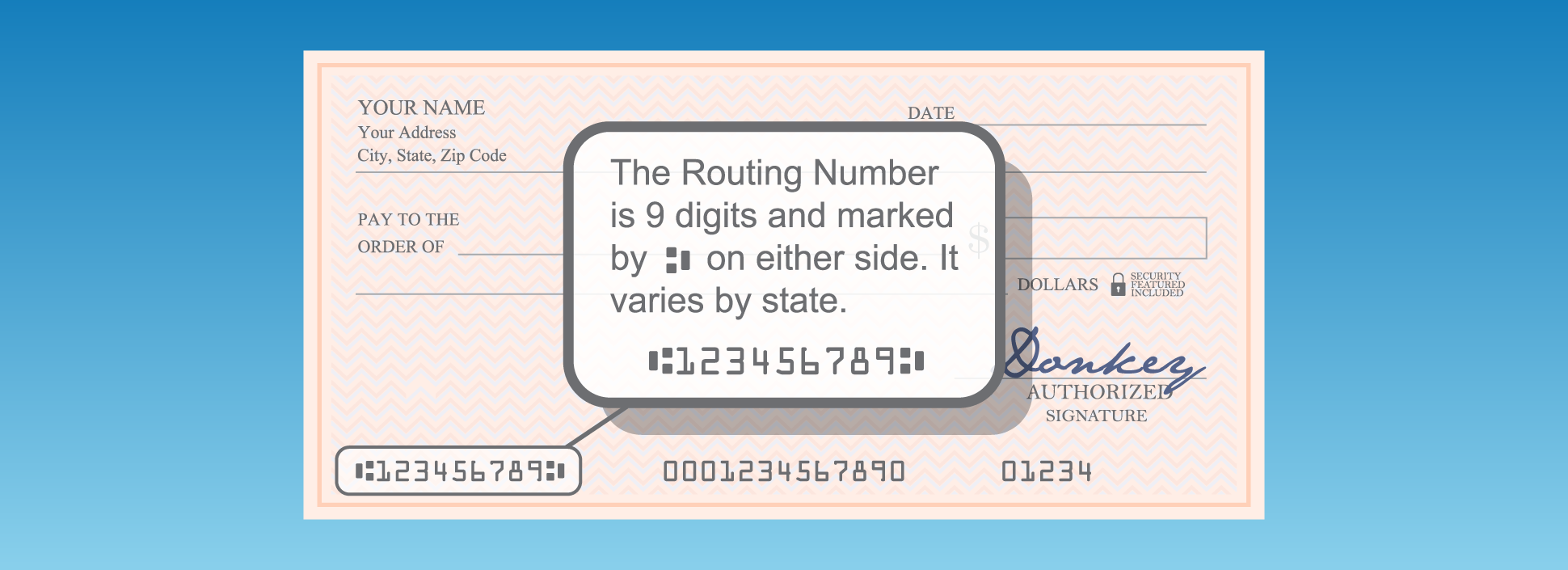
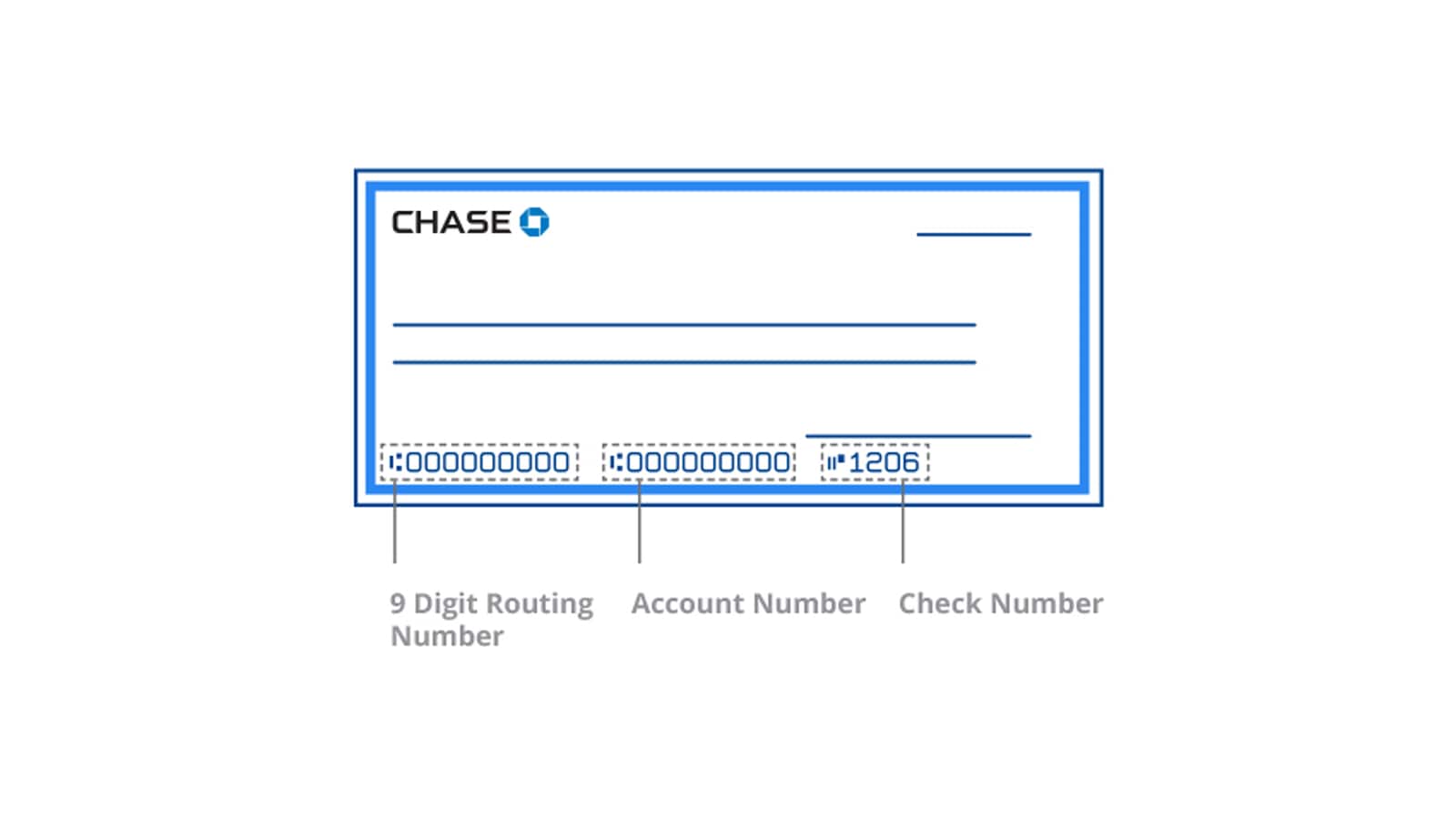
- Identify the Numbers: At the bottom of each check, you’ll find three sets of numbers. From left to right, these are:
- Routing Number (9 digits): This identifies Chase Bank.
- Account Number (variable length, typically 10-12 digits): This is your specific account number.
- Check Number: This identifies the specific check.
- Verify: Make sure you’re taking the middle set of numbers. It’s a common mistake to confuse the routing number or check number with the account number.
Contacting Chase Customer Service
If all other methods fail, or if you prefer speaking to a representative, Chase customer service is always an option. They can securely provide your account number after verifying your identity.
- Gather Information: Before calling, have some personal information ready to verify your identity. This might include your full name, address, date of birth, Social Security Number (or last four digits), and possibly answers to security questions you’ve set up.
- Call Chase: Dial the customer service number listed on the back of your debit card, on a bank statement, or on the official Chase website. For general inquiries, the main number is typically 1-800-935-9935.
- Explain Your Need: Clearly state that you need your checking or savings account number.
- Undergo Verification: The representative will guide you through a series of security questions to confirm your identity. Be prepared to answer accurately.
- Receive Your Number: Once your identity is verified, the representative will provide you with your account number. Do not share your password or full SSN over the phone unless you initiated the call to a verified number and are absolutely certain of the legitimacy of the contact.
Visiting a Chase Branch
For those who prefer face-to-face interaction or require additional assistance, visiting a local Chase branch is a secure and reliable way to obtain your account number.
- Locate a Branch: Use the Chase website or app to find the nearest branch location.
- Bring ID: Bring a valid form of government-issued identification (e.g., driver’s license, passport) to the branch. This is crucial for identity verification.
- Speak with a Teller or Representative: Explain to the staff that you need your account number.
- Identity Verification: The bank staff will verify your identity using your ID and possibly by asking security questions related to your account.
- Obtain Your Number: Once verified, they can provide you with your account number, often printed on a secure slip or provided verbally.
Security Considerations and Best Practices
While finding your account number is crucial, it’s equally important to do so securely and to protect this sensitive information once you have it. Your account number, especially when combined with your routing number, can be used for unauthorized transactions.
Protecting Your Financial Information
- Be Wary of Phishing: Never click on suspicious links in emails or text messages that claim to be from Chase and ask for your account details or login credentials. Always go directly to the Chase website or app.
- Secure Your Devices: Ensure your computer and mobile devices are protected with strong passwords, up-to-date antivirus software, and firewalls.
- Use Strong, Unique Passwords: Create complex passwords for your online banking and change them regularly. Consider using a password manager.
- Avoid Public Wi-Fi for Banking: Public Wi-Fi networks can be unsecure. If you must access your banking online, use a Virtual Private Network (VPN) for added protection.
- Shred Old Documents: Once you no longer need physical statements or other documents containing your account number, shred them thoroughly before discarding.
Recognizing and Reporting Suspicious Activity
- Monitor Your Accounts Regularly: Frequently review your bank statements and transaction history through online banking or the mobile app. Report any unauthorized transactions immediately.
- Set Up Alerts: Enable account alerts from Chase to be notified of significant transactions, low balances, or suspicious login attempts.
- Report Scams: If you suspect you’ve fallen victim to a scam or have provided your information to an unauthorized party, contact Chase immediately to report the incident and take steps to secure your account.

What If You Still Can’t Find It?
In rare circumstances, despite trying all the above methods, you might still struggle to locate your Chase account number. This could be due to various reasons, such as recently opening the account, account dormancy, or specific security concerns.
If you’ve exhausted all options, your best course of action is to directly contact Chase Customer Service. They have access to comprehensive tools and can provide personalized assistance. Be prepared for a thorough identity verification process to ensure your account security. Additionally, if you are experiencing difficulty due to identity theft or unusual account activity, it is imperative to communicate this clearly to Chase representatives, as they can guide you through specific procedures for compromised accounts.
Ultimately, knowing how to efficiently and securely find your Chase account number is a fundamental aspect of responsible personal finance management. By utilizing the digital and traditional methods outlined above, you can confidently access this crucial information whenever you need it, ensuring smooth and secure financial transactions.
aViewFromTheCave is a participant in the Amazon Services LLC Associates Program, an affiliate advertising program designed to provide a means for sites to earn advertising fees by advertising and linking to Amazon.com. Amazon, the Amazon logo, AmazonSupply, and the AmazonSupply logo are trademarks of Amazon.com, Inc. or its affiliates. As an Amazon Associate we earn affiliate commissions from qualifying purchases.