
Calculators, those ubiquitous handheld devices and software applications we often take for granted, are marvels of condensed engineering and logical design. From the simplest four-function model to sophisticated scientific and graphing calculators, they all share a common purpose: to perform mathematical computations rapidly and accurately. Yet, beneath their seemingly straightforward interface lies a complex interplay of hardware, software, and fundamental mathematical principles. Understanding “how a calculator works” delves deep into the foundational aspects of digital electronics, showcasing how a series of binary operations translates human input into precise numerical output. This exploration isn’t just about appreciating a gadget; it’s a journey into the very essence of digital computation and the ingenious methods developed to automate complex tasks.
The Fundamental Architecture of Digital Calculation
At its core, every digital calculator, regardless of its complexity, operates on a principle of translating human-readable numbers and operations into electrical signals, processing them, and then translating the results back into a comprehensible format. This process relies on a few key architectural components that work in harmony.
Input Mechanisms: Bridging Human and Machine
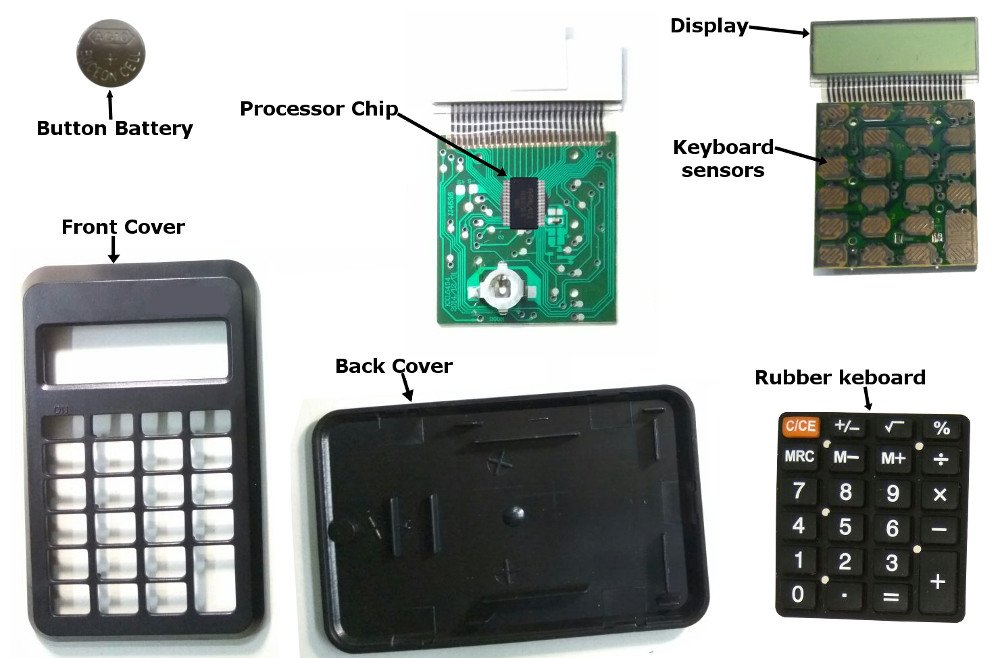
The first point of interaction is the input mechanism, typically a keypad. When you press a button, you are initiating an electrical signal. Each key corresponds to a unique digital code. Simple calculators use a matrix scanning system where rows and columns of wires are periodically checked. When a key is pressed, it completes a circuit at a specific intersection, signaling its unique identity to the calculator’s processing unit. More advanced calculators might incorporate touchscreens or styluses, but the underlying principle remains the same: convert a physical action into a machine-readable electrical impulse. This input is then momentarily held, preparing for the next stage of computation.
The Processor’s Core: From Logic Gates to ALU
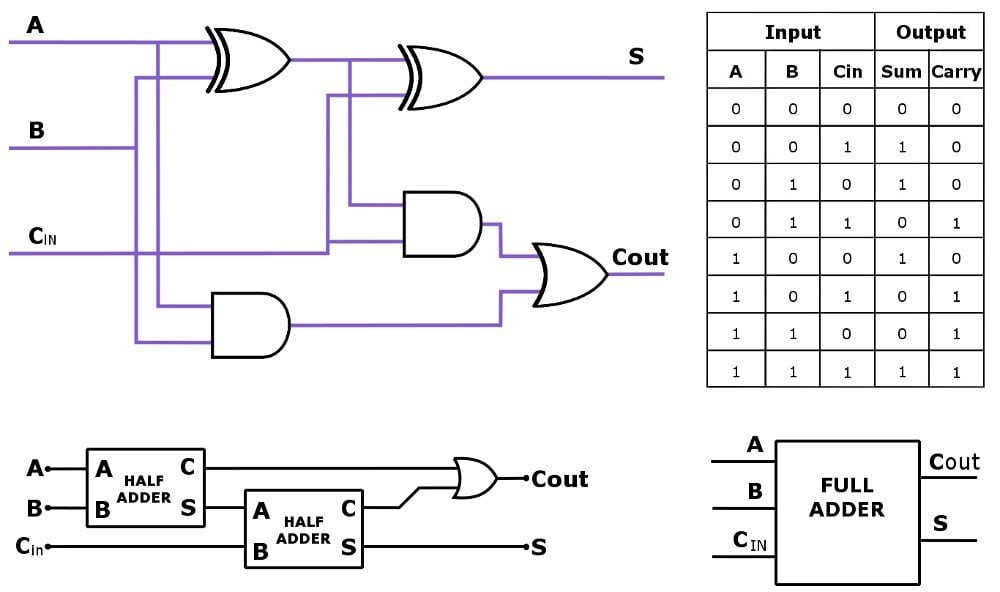
The brain of the calculator is its microprocessor or microcontroller, which houses the Arithmetic Logic Unit (ALU). The ALU is a digital circuit within the CPU that performs arithmetic and bitwise logic operations. It’s built from countless tiny transistors arranged into fundamental digital logic gates (AND, OR, NOT, XOR, etc.). These gates operate on binary input (0s and 1s, representing voltage states) to produce binary output. When you input “2 + 2”, the numbers ‘2’ are converted into their binary representations, and the ‘+’ operation is an instruction for the ALU. The ALU then executes the addition by manipulating these binary values according to predefined logic circuits. For instance, addition is performed using a series of half-adders and full-adders. The efficiency and speed of these operations are paramount, allowing calculations to be performed almost instantaneously.
Memory: Storing Numbers and Instructions
A calculator requires memory for several crucial functions. First, it needs to temporarily store the numbers you input and the operations you select. This is typically handled by volatile RAM (Random Access Memory), which holds data only while the calculator is powered on. Second, it needs to store intermediate results during multi-step calculations. For example, in a complex equation, the result of a sub-expression might need to be held while other parts of the equation are computed. Third, and perhaps most importantly, the calculator needs to store its operating instructions – the firmware. This non-volatile memory (ROM – Read-Only Memory) contains the programmed logic that defines how the calculator responds to key presses, how it performs arithmetic, how it displays results, and all its other functionalities. Without this embedded software, the hardware would be inert.
From Buttons to Bits: The Data Flow
The journey of a numerical input from a physical button press to a displayed result is a fascinating example of digital data processing. It’s a precisely orchestrated sequence of conversions and manipulations, transforming analog actions into digital logic and back again.
Keypad Matrix and Scanning
As touched upon, the keypad is not simply a collection of switches. Instead, it’s often designed as a matrix, with rows and columns of conductive paths. A microcontroller continuously “scans” this matrix by sending a signal down each row and checking which column line, if any, receives a return signal. When a key is pressed, it creates a connection between a specific row and column. The unique intersection point identifies which key was pressed. This scanning process happens so quickly that it appears instantaneous to the user. Once a key press is detected, its unique identifier (a scan code) is sent to the central processing unit. This method efficiently reduces the number of wires required compared to having a separate wire for each key.
Encoding and Decoding Operations
Upon receiving a scan code, the calculator’s firmware decodes it. If it’s a number key (0-9), the corresponding digit is converted into its binary representation. For example, pressing ‘1’ might trigger a sequence of bits like ‘0001’, ‘2’ as ‘0010’, and so on. If it’s an operation key (+, -, x, /, etc.), a specific instruction code is generated for the ALU. This encoding is crucial because the processor only understands binary. Conversely, after the ALU completes its calculation, the binary result needs to be decoded back into a human-readable decimal format. This decoding process involves converting binary numbers back into decimal digits that can be represented on a display. This usually involves algorithms that convert positional binary values into their decimal equivalents, often optimized for display segments.
Display Technology: Presenting the Results
The final stage of the calculation process is presenting the result. Most calculators utilize Liquid Crystal Displays (LCDs) due to their low power consumption and clarity. An LCD screen is composed of individual segments or pixels that can be turned on or off. Each segment is controlled by an electrical signal. For numeric displays, a common type is the seven-segment display, where each digit is formed by illuminating a specific combination of seven bar-shaped segments. When the microcontroller has the decoded decimal result, it sends signals to the LCD driver, which then activates the appropriate segments to form the numbers and symbols on the screen. More advanced graphing calculators use pixel-based LCDs, similar to miniature computer screens, allowing for the display of complex graphs, multiple lines of text, and more detailed interfaces, each pixel individually controlled by the display driver.
Unpacking the Algorithms: How Math Happens
The apparent simplicity of pressing “2 + 2 =” belies a sophisticated suite of algorithms that allow the calculator to perform not just basic arithmetic but also complex functions with remarkable precision.
Basic Arithmetic Operations (Addition, Subtraction, Multiplication, Division)
For basic operations, calculators use established digital logic. Addition is performed using binary adders, which sum bits and carry over to the next position, much like manual decimal addition but in binary. Subtraction is often handled by a method called two’s complement, where subtracting a number is equivalent to adding its negative two’s complement. This allows the same adder circuits to perform both addition and subtraction. Multiplication can be achieved through repeated addition or more complex algorithms like Booth’s algorithm, which are optimized for speed. Division is typically implemented through repeated subtraction or non-restoring/restoring division algorithms, which are essentially binary long division. The efficiency of these algorithms is a key differentiator between older, slower calculators and modern, high-speed devices.
Advanced Functions: Exponents, Roots, and Trigonometry
Scientific and graphing calculators go far beyond basic arithmetic, employing more intricate numerical methods for advanced functions.
-
Exponents and Logarithms: These are often computed using algorithms based on Taylor series expansions, CORDIC (Co-ordinate Rotation Digital Computer) algorithm, or by leveraging properties of logarithms and exponentials (e.g.,
x^y = e^(y * ln(x))). -
Square Roots: The square root can be found using iterative methods like the Babylonian method or Newton’s method, which progressively refine an estimate until it reaches the desired precision.
-
Trigonometric Functions (sin, cos, tan): Similar to exponents, these are frequently calculated using Taylor series expansions, where the function is approximated by a polynomial. The CORDIC algorithm is also particularly efficient for these types of rotations and is widely used in hardware for trigonometric and hyperbolic functions.
These algorithms require careful implementation to ensure both speed and accuracy, particularly when dealing with small angles or very large numbers.
Floating-Point Arithmetic: Handling Precision
One of the greatest challenges in digital computation is accurately representing and manipulating numbers that are not integers (i.e., numbers with decimal points). This is where floating-point arithmetic comes in. Most calculators use a variation of the IEEE 754 standard for floating-point numbers. A floating-point number is stored in a way similar to scientific notation: a significand (mantissa) and an exponent. For example, 123.45 could be represented as 1.2345 x 10^2. In binary, this involves storing the sign, the significant digits (mantissa), and the exponent that dictates the position of the binary point. Operations on these numbers involve aligning the exponents, performing the arithmetic on the mantissas, and then normalizing the result. Floating-point arithmetic is inherently prone to tiny rounding errors due to the finite number of bits used to represent numbers, which is why extremely precise calculations can sometimes show minute discrepancies. Engineers designing calculator algorithms must balance the need for speed with the imperative of minimizing these accumulated errors.
Powering the Computation: Energy and Efficiency
The ability of calculators to perform complex operations for extended periods on minimal power is a testament to significant advancements in low-power electronics and efficient design.
Battery Technologies and Power Management
Early calculators consumed considerable power, often requiring large batteries or AC adapters. Modern calculators primarily use small, long-lasting batteries, often coin cells (like CR2032) for basic models or AA/AAA batteries for scientific and graphing calculators. Rechargeable lithium-ion batteries are common in more advanced devices. The longevity of these batteries is largely due to power management techniques. Calculators employ very low-power microcontrollers and LCDs, which consume minimal current. They often feature automatic shut-off functions after a period of inactivity and dynamic voltage and frequency scaling, where the processor runs at lower speeds and voltages when not performing intensive calculations, thus conserving energy. Solar cells integrated into some models supplement battery power, further extending operational life, especially in well-lit environments.
Microcontroller Optimization for Low Power
The microcontrollers used in calculators are specifically designed for low power consumption. They typically feature highly optimized instruction sets and architectures that prioritize efficiency over raw speed. Techniques like clock gating (turning off the clock signal to parts of the chip that are not currently in use) and power gating (completely cutting off power to inactive sections) are common. The choice of manufacturing process for these chips also plays a role, with processes optimized for low leakage current. Furthermore, the firmware itself is often written with power efficiency in mind, minimizing unnecessary operations and ensuring the device spends as much time as possible in a low-power “sleep” mode, only waking up when a key is pressed or a calculation needs to be performed.
Evolution of Calculator Power Consumption
The history of calculators is also a story of shrinking power footprints. From the desktop-sized machines of the 1960s with vacuum tubes or early transistors consuming tens of watts, to handheld devices using integrated circuits in the 1970s drawing a few watts, to today’s micro-power wonders consuming only microwatts or even nanowatts in standby, the trend has been relentless. This evolution has been driven by improvements in semiconductor technology (smaller transistors, lower operating voltages), more efficient display technologies (LED to LCD), and sophisticated power management ICs. This ongoing quest for efficiency not only makes calculators more convenient but also contributes to their environmental sustainability by reducing battery waste and energy consumption.
The Enduring Legacy and Future of Calculators
From their mechanical origins to their digital dominance, calculators have played a pivotal role in human progress, evolving continuously to meet growing computational demands and integrating seamlessly into our digital lives.
From Mechanical Wonders to Scientific Powerhouses
The lineage of the calculator stretches back centuries, from the abacus and Napier’s bones to Pascal’s and Leibniz’s mechanical adding machines. The 20th century saw the advent of electro-mechanical calculators, then purely electronic ones with vacuum tubes, transistors, and finally, integrated circuits. The first electronic handheld calculator, the Busicom LE-120A “Handy-LE” in 1971, marked a true revolution. Subsequent decades saw the proliferation of basic four-function models, followed by scientific calculators capable of logarithms, trigonometry, and statistics, and eventually graphing calculators that transformed how students learned mathematics by visualizing functions. This progression illustrates a relentless drive for miniaturization, increased capability, and affordability, making complex computation accessible to the masses.
Software Calculators and Integration with Modern Devices
While dedicated hardware calculators still thrive, especially in educational settings where distractions need to be minimized, the concept of a calculator has expanded significantly into the software domain. Every smartphone, tablet, and computer comes equipped with a built-in calculator application, often with multiple modes (basic, scientific, programmer). These software calculators leverage the powerful processors and extensive memory of their host devices, offering an unprecedented level of functionality, often including unit conversions, currency exchange, and even symbolic math capabilities. The integration means that computational tools are always at our fingertips, deeply embedded into the very fabric of our digital existence, rather than being standalone gadgets.

The Role of Calculators in STEM Education and Beyond
Calculators are indispensable tools in science, technology, engineering, and mathematics (STEM) education. They allow students to focus on understanding concepts and problem-solving strategies rather than getting bogged down in tedious arithmetic. Graphing calculators, in particular, enable visual exploration of functions and data, fostering deeper comprehension. Beyond education, calculators remain vital in various professional fields, from engineering and finance to research and everyday life. While advanced computing tasks are handled by specialized software and powerful computers, the humble calculator, in its many forms, continues to be the go-to device for quick, reliable numerical operations. Its evolution reflects humanity’s persistent quest to master numbers and automate intelligence, solidifying its place as a cornerstone of technological advancement.
aViewFromTheCave is a participant in the Amazon Services LLC Associates Program, an affiliate advertising program designed to provide a means for sites to earn advertising fees by advertising and linking to Amazon.com. Amazon, the Amazon logo, AmazonSupply, and the AmazonSupply logo are trademarks of Amazon.com, Inc. or its affiliates. As an Amazon Associate we earn affiliate commissions from qualifying purchases.