
For the modern PC gamer, time is a precious commodity. Between work, social commitments, and the sheer volume of incredible games released each year, every minute counts. This often leads to a common, yet complex, question: Can you install new games on Steam while actively playing another? The allure of multitasking is strong – why wait for a massive download and installation to complete when you could be diving into another virtual world? While Steam, Valve’s ubiquitous digital distribution platform, does allow for concurrent operations, the seamlessness of this experience is far from guaranteed and depends heavily on a multitude of technical factors. This article delves into the intricacies of Steam’s background processes, the potential performance impacts, and practical strategies to optimize your gaming and installation workflow, ensuring you make the most of your valuable gaming time without sacrificing performance.

Understanding Steam’s Concurrent Operations
At its core, Steam is more than just a storefront; it’s a sophisticated client managing game purchases, libraries, social features, and, critically, game downloads and installations. The ambition to multitask within this ecosystem is understandable, but grasping how Steam handles these operations concurrently is the first step to understanding the feasibility and potential pitfalls.
How Steam Manages Downloads and Installations
When you initiate a game download on Steam, the process isn’t merely a direct transfer of files to your hard drive. Steam employs a more nuanced approach to ensure efficiency and data integrity. First, games are typically downloaded in a compressed format, often utilizing proprietary compression algorithms. This minimizes the bandwidth required and speeds up the initial download phase. Once the compressed data is on your system, Steam then begins the installation process, which involves several resource-intensive steps:
- Decompression: The downloaded files must be decompressed to their original size and format. This is a CPU-intensive operation, requiring significant processing power, especially for large, modern game assets.
- File Placement and Verification: The decompressed files are then written to their designated directories on your storage device. During this phase, Steam also performs checks to ensure file integrity, comparing local files against manifest data to detect any corruption or missing components. This involves heavy disk I/O (Input/Output).
- Patching/Updating: For games that are being updated rather than installed fresh, Steam often uses a differential patching system. This means it only downloads and applies the specific changes between versions, rather than re-downloading the entire game. However, applying these patches still requires disk I/O and CPU resources to integrate the new data with existing files.
While these processes occur, Steam is designed to run in the background, allowing you to interact with other parts of the client or launch games. The challenge arises when these background operations start competing directly with a foreground game for essential system resources.
The Resource Demands of Concurrent Operations
Every action your computer performs requires system resources. When you’re playing a game, particularly a graphically demanding one, your system is already under significant strain. Introducing a game download and installation into this scenario adds another layer of demand across multiple hardware components:
- Central Processing Unit (CPU): Gaming requires the CPU for game logic, AI, physics, and rendering instructions. Simultaneously, game installation demands CPU cycles for decompression, file verification, and managing the overall process. A less powerful CPU can quickly become a bottleneck, struggling to keep up with both tasks, leading to noticeable slowdowns.
- Disk Input/Output (I/O): This is arguably the most critical resource when discussing simultaneous gaming and installation. Playing a game involves constant reading of game assets (textures, models, audio) from your storage device. Installing a game involves continuous writing of new files and potentially reading existing ones for verification. When these two processes try to access the same storage device concurrently, they can create a “disk thrashing” scenario, where the drive head (on HDDs) or controller (on SSDs) constantly switches between tasks, drastically reducing overall read/write speeds and causing severe stuttering or freezes in the game.
- Network Bandwidth: Online multiplayer games require a stable, low-latency internet connection. A large game download, especially without bandwidth throttling, can saturate your internet connection, leading to high ping, packet loss, and disconnections in your active game. Even single-player games might require occasional network access for DRM checks, cloud saves, or background updates, which can be impacted.
- Random Access Memory (RAM): Both the active game and the Steam client (along with its background processes) consume RAM. While modern systems often boast ample RAM, particularly demanding games combined with large installations can push a system close to its limits, potentially forcing the system to rely on slower virtual memory (page file) on the storage device, further exacerbating disk I/O issues.
Understanding these intertwined resource demands is crucial for predicting how well your system will handle the simultaneous download dilemma. It highlights that while technically possible, the practical experience can range from mildly inconvenient to utterly frustrating, depending on your hardware configuration and the demands of the games involved.
Performance Impact: When Multitasking Goes Wrong (or Right)
The theoretical understanding of resource demands translates directly into tangible performance impacts for the user. While some systems might handle the strain gracefully, many will exhibit clear signs of struggle.
Bandwidth Bottlenecks and Network Latency
The internet connection is often the first bottleneck encountered when attempting to download a game while playing an online title. Modern broadband speeds are impressive, but even a gigabit connection can be strained by a large game download (e.g., 80GB at peak speed) competing with the real-time data requirements of an online multiplayer game.
- Lag and Disconnections: When the download saturates your available bandwidth, the active game struggles to send and receive data packets efficiently. This results in high ping (latency), visible lag spikes, rubber-banding, and in severe cases, complete disconnections from multiplayer servers. For competitive gamers, this can be game-ending.
- Slower Download Speeds: Paradoxically, playing a game can also slow down your download. If the game itself requires significant network resources (e.g., constant asset streaming in an open-world MMO or battle royale), Steam’s download prioritization might be affected, or the overall network congestion on your local network might reduce the bandwidth available for the download.
- Impact on Other Network Devices: Don’t forget other devices on your home network. If your PC is hogging all the bandwidth for both gaming and downloading, streaming services on a smart TV, video calls on a laptop, or general web browsing on other devices will also suffer, leading to a diminished experience for everyone.
Disk I/O and CPU Strain
As highlighted earlier, the simultaneous demand on your storage device and CPU is perhaps the most significant hurdle. The specific type of storage device plays a monumental role here.
- Traditional Hard Disk Drives (HDDs): If your active game or the installation target (or both) reside on an HDD, the experience will almost certainly be poor. HDDs are mechanical devices with moving read/write heads. Asking these heads to constantly jump between reading game assets and writing new installation files creates extreme seek times and dramatically reduces effective data transfer rates. This manifests as:
- Severe Stuttering and Freezes: The game will frequently pause, stutter, or outright freeze for several seconds as the HDD struggles to respond to simultaneous requests.
- Extended Loading Times: Both the game’s loading screens and the installation process itself will take significantly longer.
- Game Crashes: In extreme cases, the inability of the disk to keep up can lead to game errors or crashes.
- Solid State Drives (SSDs): SSDs (SATA and NVMe) are a game-changer for this scenario. Lacking moving parts, they can handle multiple read/write operations concurrently with far greater efficiency.
- SATA SSDs: While much faster than HDDs, SATA SSDs still have limitations, particularly with intense, sustained mixed read/write operations. You might still experience minor hitches, especially with very demanding games and large installations, but it will be vastly superior to an HDD experience.
- NVMe SSDs: These are the pinnacle of consumer storage performance, offering PCIe-based interfaces that provide orders of magnitude faster speeds and vastly superior IOPS (Input/Output Operations Per Second). Systems equipped with NVMe SSDs for both the OS/Steam client and game installations will handle concurrent operations with the least noticeable impact. Stuttering might still occur in very specific, high-stress scenarios, but for most users, the experience will be remarkably smooth.
Beyond disk I/O, the CPU’s ability to juggle both tasks is critical. Decompression is a CPU-bound task. If your CPU has fewer cores or threads, or if it’s an older generation, it will struggle more. You might notice overall system sluggishness, slower frame rates in your game, and a longer overall installation time as the CPU tries to allocate resources between the game’s calculations and Steam’s background processing.
RAM and GPU Considerations
While less often the primary bottleneck compared to disk I/O or network, RAM and GPU can also contribute to performance degradation.
- RAM: If your system has just enough RAM for the active game, adding the memory footprint of Steam’s download/installation processes might push it over the edge, forcing the system to swap data to the page file on your slower storage drive. This can exacerbate disk I/O issues, particularly on HDDs, creating a vicious cycle of slowdowns. Adequate RAM (16GB or more for modern gaming) mitigates this risk.
- GPU: The Graphics Processing Unit is primarily responsible for rendering your game’s visuals. While direct competition for GPU resources between a game and a background installation is rare, indirect effects can occur. If the CPU or RAM is severely bottlenecked, it can’t feed data to the GPU fast enough, leading to “GPU starvation” and lower frame rates, even if the GPU itself isn’t fully utilized.
In essence, the success or failure of simultaneous gaming and installation hinges on the weakest link in your system’s hardware chain. A well-balanced, modern PC with fast storage and a capable CPU/ample RAM will fare much better than an older or budget-constrained setup.
Optimizing Your Steam Experience
Given the potential for performance degradation, the key is to proactively manage your system resources and leverage Steam’s built-in features to mitigate the impact. Optimization is about making conscious choices to ensure a smoother, more enjoyable experience.
Prioritizing Downloads and Gameplay
One of the simplest yet most effective strategies is manual prioritization. Steam does offer some automatic management, but user intervention can fine-tune the experience.
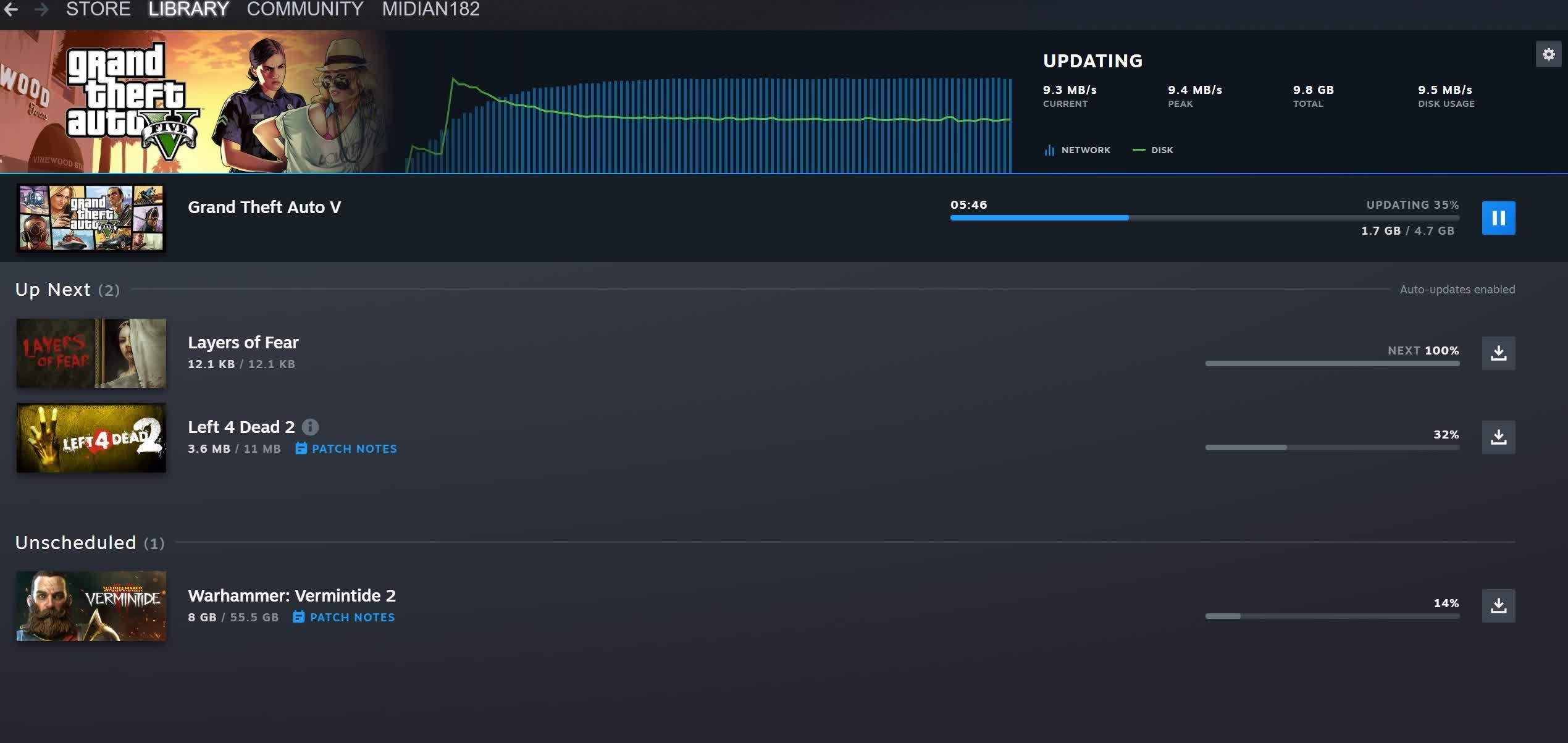
- Pause and Resume Strategically: If you’re about to engage in a critical online multiplayer match, it’s often best to pause any ongoing downloads. You can easily do this from the “Downloads” section in your Steam client. Resume them after your gaming session is complete. This ensures your network bandwidth and disk I/O are fully dedicated to your game during crucial moments.
- Schedule Downloads: Steam allows you to schedule download windows. You can configure Steam to only download games during off-peak hours (e.g., overnight) when you’re not using your PC, or when you’re playing less demanding single-player titles where minor interruptions are tolerable. This is an excellent way to keep your internet free during active gaming hours.
- Prioritize Specific Downloads: If you have multiple games downloading, you can manually set a higher priority for the one you want to play next, or pause others that aren’t as urgent.
Strategic System Upgrades for Multitasking
For those frequently encountering performance issues with concurrent operations, hardware upgrades can offer the most significant improvements. This aligns perfectly with a “Tech” focused approach to optimizing your digital life.
- Invest in SSDs (Especially NVMe): If you’re still running games off an HDD, upgrading to an SSD is perhaps the single most impactful upgrade for general system responsiveness, game loading times, and the ability to multitask. An NVMe SSD provides superior performance for both reading game assets and writing installation data, dramatically reducing bottlenecks. Ideally, have your operating system, Steam client, and active games on an SSD.
- Increase RAM: Aim for at least 16GB of RAM for modern gaming. If you frequently run background applications, stream, or keep many browser tabs open while gaming, 32GB can provide even more headroom, preventing reliance on slower virtual memory and ensuring both your game and Steam’s processes have ample memory.
- Upgrade Your CPU: A CPU with more cores and higher clock speeds will be better equipped to handle the simultaneous demands of a game’s logic, AI, and Steam’s decompression tasks. Modern CPUs with efficient multi-threading capabilities are particularly adept at juggling multiple demanding processes.
- Improve Your Network: If your internet connection itself is the bottleneck, consider upgrading your internet plan. Furthermore, always prioritize a wired (Ethernet) connection over Wi-Fi for your gaming PC. Ethernet offers lower latency, greater stability, and generally faster speeds, minimizing network-related interruptions during downloads and online play.
Leveraging Steam’s Built-in Features
Steam provides several configuration options designed to help users manage their download experience.
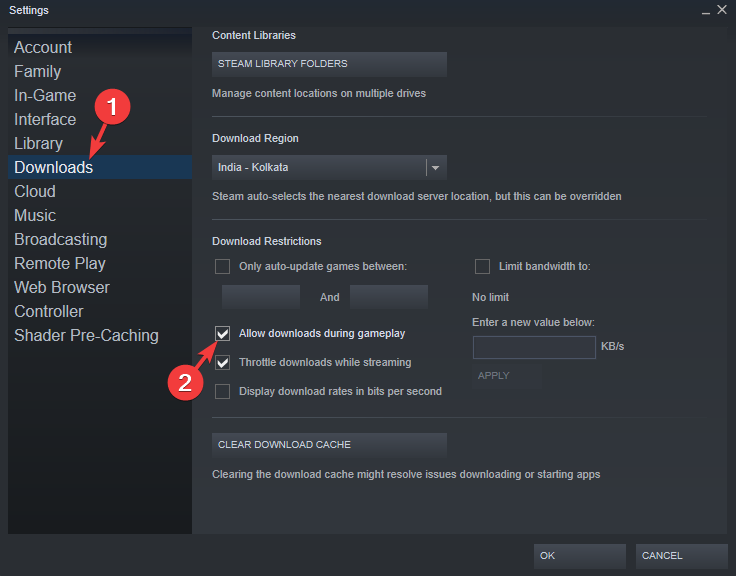
- Download Throttling: Within Steam’s “Downloads” settings, you can set a maximum download speed. If you have a fast internet connection but want to ensure some bandwidth is always reserved for your active game, you can set a limit (e.g., 50% of your maximum speed). This prevents downloads from completely saturating your connection.
- Download Region Selection: Sometimes, choosing a different download region can improve download speeds if your default server is congested. While this doesn’t directly impact concurrent gaming, faster downloads mean less time spent downloading, reducing the overall window for potential conflicts.
- Disk Write Caching (Caution Advised): While not a Steam-specific feature, enabling disk write caching in Windows can theoretically improve disk I/O performance. However, this comes with a risk of data loss if your system experiences a sudden power outage. For most users, relying on a fast SSD is a safer and more effective solution.
By combining strategic pausing, hardware investments, and smart utilization of Steam’s settings, you can significantly enhance your ability to multitask without severely compromising your gaming experience.
The Verdict: Best Practices for Gamers
So, does Steam install while you play games? The definitive answer is: yes, it can, but whether you should depends on your system’s capabilities and your tolerance for potential performance hiccups. The reality is a nuanced landscape where hardware specifications, game demands, and network conditions all play critical roles.
When to Multitask and When to Wait
- Multitask When:
- You have a powerful gaming PC with a fast multi-core CPU, 16GB+ RAM, and crucially, NVMe SSDs for both your active game and the installation drive.
- The game you are playing is not demanding (e.g., an older indie title, a card game, or a turn-based strategy game).
- The game you are playing is entirely single-player and doesn’t rely heavily on continuous internet connectivity.
- You are willing to accept minor, occasional stutters or increased loading times.
- The download itself is small and will complete quickly.
- Wait When:
- You have an older PC, a budget system, or a system relying on HDDs for gaming/installation.
- You are playing a highly demanding, graphically intensive game that pushes your hardware to its limits.
- You are playing a competitive online multiplayer game where even momentary lag can impact your performance and enjoyment.
- Your internet connection is limited, or you rely solely on Wi-Fi for gaming.
- The game being installed is very large, suggesting a prolonged period of resource contention.
A Balanced Approach to Gaming and Installation
Ultimately, the best approach is one of balance and awareness. Acknowledge that while the technology allows for concurrent processes, optimal performance usually requires dedicated resources.
- Prioritize Your Experience: Decide which is more important at that moment: uninterrupted gaming or faster installation. Most often, the enjoyment of your current game should take precedence.
- Monitor Your System: Utilize tools like Task Manager (Windows) or Activity Monitor (macOS) to keep an eye on CPU, disk, and network usage. This can help you identify bottlenecks when multitasking.
- Proactive Management: Don’t just set and forget. Be prepared to pause downloads if your game starts struggling. Schedule large downloads for times you’re not gaming or using your internet heavily.
- Hardware Matters: If multitasking seamlessly is a high priority for you, consider investing in modern hardware, particularly fast SSDs and ample RAM, as these upgrades will yield the most significant improvements.
In conclusion, the question of installing games while playing others on Steam is a classic example of technical possibility meeting practical limitations. While Steam’s robust client is capable of managing these parallel tasks, the user experience is directly proportional to the strength and optimization of their underlying hardware and network. By understanding the demands placed on your system and employing smart management strategies, you can navigate the simultaneous download dilemma effectively, ensuring your journey through the vast landscape of PC gaming remains as smooth and enjoyable as possible.
aViewFromTheCave is a participant in the Amazon Services LLC Associates Program, an affiliate advertising program designed to provide a means for sites to earn advertising fees by advertising and linking to Amazon.com. Amazon, the Amazon logo, AmazonSupply, and the AmazonSupply logo are trademarks of Amazon.com, Inc. or its affiliates. As an Amazon Associate we earn affiliate commissions from qualifying purchases.