
In the vast and intricate world of Linux, where every command and configuration plays a crucial role in system performance, understanding the fundamental building blocks is paramount. While we often interact with files and directories by name, there’s a powerful, unseen system at play that orchestrates their existence and accessibility. This unseen system revolves around inodes. If you’ve ever delved into disk usage, file system troubleshooting, or simply sought a deeper comprehension of how your Linux operating system manages data, you’ve likely encountered the term “inode.” But what exactly are these elusive entities, and why are they so vital to the functioning of Linux?
This article, drawing from the core tenets of technology and the importance of efficient digital systems, will demystify inodes. We’ll explore their purpose, structure, and impact on your Linux experience, offering insights relevant to anyone from a budding system administrator to a seasoned developer.
The Foundation: Why Files Need More Than Just Names
Imagine a library. You might find a book by its title, author, or genre. However, the library doesn’t just store book titles; it also keeps track of where each book is physically located on a shelf, its ISBN, publication date, number of pages, and other crucial metadata. Without this detailed information, simply knowing a book’s title wouldn’t be enough to retrieve it from the shelves.
In Linux, files and directories are the “books” of your digital library. Their names are how we humans identify and interact with them. However, the operating system needs a more robust system to manage them efficiently. This is where inodes come in.
An inode, short for “index node,” is a data structure on a Linux file system that stores crucial information about a file or directory, excluding its name and the actual data content. Think of it as a unique fingerprint for every file and directory on your system. Each inode is assigned a unique number, known as the inode number, which the file system uses internally to reference and manage that specific file or directory.
The Inode Table: A Master Index for Your Files
Every file system on a Linux system has an inode table. This table is essentially a large array of inodes, with each entry corresponding to a specific inode number. When you access a file (e.g., by opening it, deleting it, or listing its contents), the Linux kernel first consults the inode table to locate the relevant inode. Once the inode is found, the kernel can then access all the necessary information about the file to perform the requested operation.
The inode table is one of the most critical components of a file system. It’s like the central index of a massive database, ensuring that every piece of data can be located and managed effectively. The size of the inode table is determined when the file system is created, and it’s crucial to allocate enough inodes to accommodate the expected number of files. Running out of inodes is a common cause of “disk full” errors, even if there’s still free space on the disk – a phenomenon we’ll explore further.
What Information Does an Inode Hold?
While an inode doesn’t store the file’s name or its data, it contains a wealth of essential metadata that the operating system needs to function:
- File Type: This specifies whether the entry is a regular file, a directory, a symbolic link, a hard link, a character device, a block device, or a named pipe (FIFO).
- Permissions: This defines who can read, write, and execute the file (owner, group, and others).
- Owner and Group IDs: These numerical identifiers specify the user and group that own the file.
- File Size: The exact size of the file in bytes.
- Timestamps:
- Access Time (atime): The last time the file was accessed (read).
- Modification Time (mtime): The last time the file’s content was modified.
- Change Time (ctime): The last time the file’s metadata (inode information) was changed, such as permissions or ownership.
- Link Count: The number of hard links pointing to this inode. This is crucial for understanding how many names refer to the same underlying file data.
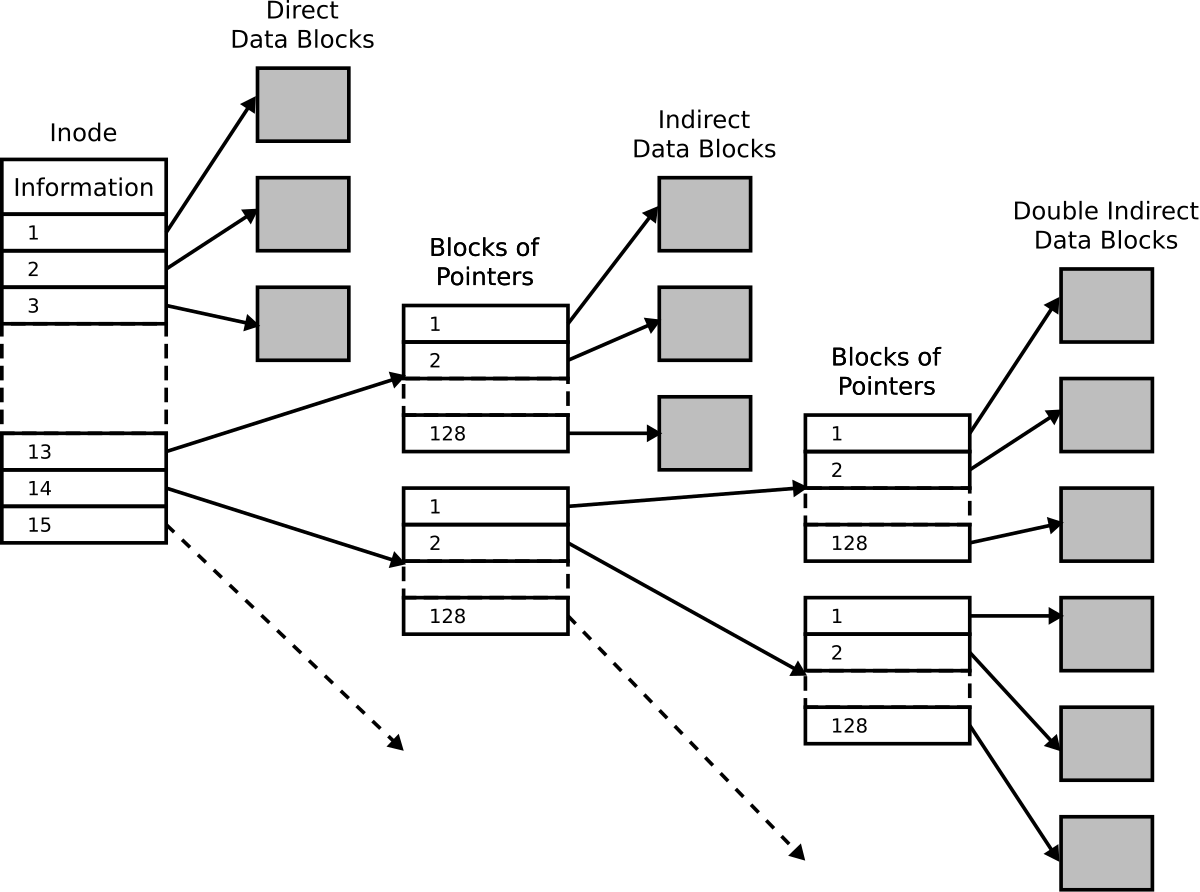
- Pointers to Data Blocks: This is perhaps the most critical piece of information. The inode contains pointers that indicate the physical location of the actual file data blocks on the disk. These pointers can be direct, indirect, or doubly indirect, allowing for efficient management of files of varying sizes.
- Extended Attributes (xattrs): These are optional metadata that can be associated with a file, providing more detailed information or capabilities.
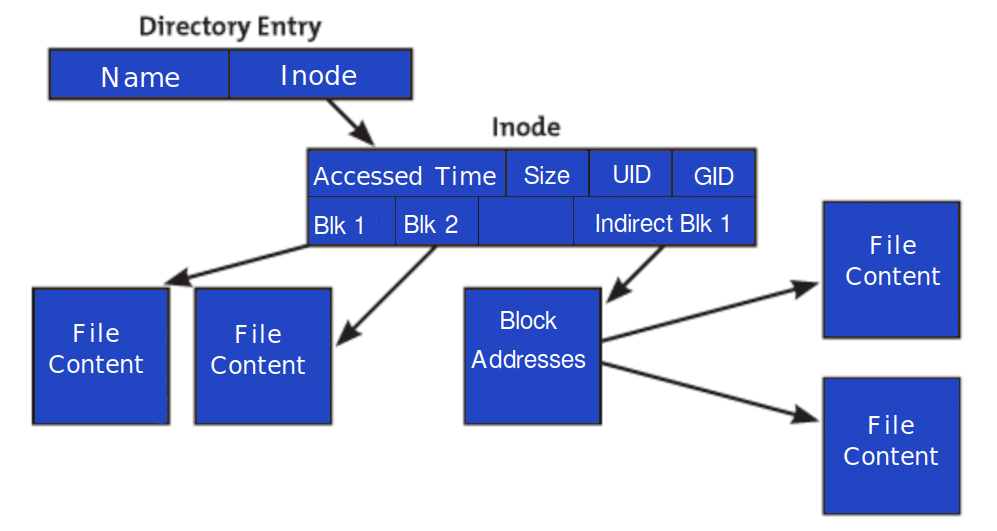
This comprehensive set of information allows the Linux kernel to manage files and directories without needing to constantly refer back to the directory entries, which only store filenames and their corresponding inode numbers.
Inodes in Action: How They Govern File Management
Understanding what inodes are is one thing; seeing them in action reveals their true significance. They are not just passive data structures; they actively govern how your Linux system interacts with your files.
The Relationship Between Directories and Inodes
While inodes store information about files, directories are essentially special types of files that contain lists of other files and their inode numbers. When you create a directory, an inode is created for it. This directory inode contains pointers to data blocks that hold entries for each file or subdirectory within it. Each entry in a directory typically consists of a filename and the corresponding inode number.
For example, when you create a file named my_document.txt inside a directory called documents, the documents directory’s data blocks will contain an entry like:
my_document.txt -> [inode_number_for_my_document.txt]
When you want to access my_document.txt, the system first looks up the documents directory’s inode. It then scans the data blocks associated with the documents inode to find the entry for my_document.txt. Once found, it retrieves the inode number associated with my_document.txt and uses that to access the file’s actual inode and its data.
Hard Links vs. Symbolic Links: An Inode Perspective
The concept of inodes is fundamental to understanding the difference between hard links and symbolic links:
- Hard Links: A hard link is essentially another name for an existing file. When you create a hard link to a file, you are creating a new directory entry that points to the same inode as the original file. The
link countwithin the inode is incremented. This means that deleting a hard link doesn’t delete the file itself; the file’s data is only removed when the last hard link to its inode is deleted. Hard links cannot span across different file systems.
- Symbolic Links (Symlinks): A symbolic link, on the other hand, is a special type of file that contains the path to another file or directory. When you create a symbolic link, a new inode is created for the symlink itself, and its data content is the path to the target file. The inode of the symlink does not share the same inode number as the target. If the target file is moved or deleted, the symbolic link will become broken. Symbolic links can span across different file systems.
This distinction highlights how inodes serve as the central reference point for files, and how different linking mechanisms leverage this central reference in distinct ways.
The “Inodes Exhausted” Error: A Common Conundrum
One of the most perplexing issues users encounter is the “disk full” error, even when df -h (which reports human-readable disk space) shows plenty of free space. This often occurs when the inode table is full.
As mentioned earlier, the inode table is pre-allocated when a file system is created. Each file and directory on that file system requires an inode. If you have an extremely large number of very small files (e.g., cache files, temporary session files), you can consume all available inodes even if the total data size is relatively small.
When the inode table is full, the file system cannot create new files or directories, leading to the “disk full” error. This is because creating a new file involves allocating a new inode from the table.
Troubleshooting this often involves:
- Identifying directories with a high number of files: Tools like
findcan be used to count files within directories. - Deleting unnecessary small files: Carefully cleaning out temporary directories or application caches can free up inodes.
- Increasing inode allocation: This is a more advanced solution that typically involves reformatting the file system with a larger inode allocation, which is not a trivial undertaking.
Understanding inodes provides the crucial context to diagnose and resolve such issues, moving beyond the superficial “disk full” message to the underlying resource limitation.
Beyond the Basics: Advanced Concepts and Performance Implications
While the foundational understanding of inodes is essential, a deeper dive reveals their impact on system performance and advanced file system concepts.
File System Choice and Inode Density
Different Linux file systems (e.g., ext4, XFS, Btrfs) have varying approaches to inode allocation and management. Some file systems allow for more dynamic inode allocation, while others pre-allocate a fixed number. The choice of file system and its configuration can significantly influence the number of inodes available and how efficiently they are utilized.
For instance, file systems designed for servers that handle a massive number of small files often have mechanisms to manage inodes more efficiently or offer larger default inode allocations. Conversely, file systems optimized for large files might have a different inode density.
The Role of Inodes in File System Performance
The inode table is constantly accessed by the kernel for almost every file operation. Therefore, the speed at which the kernel can access and process inodes directly impacts file system performance.
- Inode Cache: The Linux kernel employs an inode cache to keep frequently accessed inodes in memory. This significantly speeds up file access because the kernel doesn’t need to constantly read inode information from the disk.
- Disk Fragmentation: While not directly an inode issue, heavy disk fragmentation can indirectly affect inode performance. If the data blocks pointed to by an inode are scattered across the disk, it takes longer for the system to read the file’s content, even if the inode itself is quickly retrieved.
Monitoring and Managing Inodes
For system administrators and power users, monitoring inode usage is a crucial part of system maintenance. Tools like:
df -i: This command displays inode usage statistics for mounted file systems, showing the total number of inodes, used inodes, free inodes, and their usage percentage.find /path/to/directory -type f | wc -l: This command can be used to count the number of regular files within a specific directory.
Regularly monitoring inode usage helps prevent the dreaded “inodes exhausted” error and ensures the smooth operation of your Linux system.

Conclusion: The Unsung Heroes of Linux File Management
Inodes are the silent architects of your Linux file system, the invisible backbone that holds your digital world together. They are the indispensable metadata structures that enable the kernel to locate, manage, and access every file and directory. From the simplest file creation to complex linking mechanisms, inodes are at the heart of it all.
While you might not interact with them directly on a day-to-day basis, understanding what inodes are provides a profound insight into the inner workings of Linux. It empowers you to troubleshoot effectively, optimize your system, and appreciate the elegant efficiency of the operating system. So, the next time you save a document, download a file, or navigate your file system, take a moment to acknowledge the vital, unseen role of the inode – the true fingerprint of every entity in your Linux domain.
aViewFromTheCave is a participant in the Amazon Services LLC Associates Program, an affiliate advertising program designed to provide a means for sites to earn advertising fees by advertising and linking to Amazon.com. Amazon, the Amazon logo, AmazonSupply, and the AmazonSupply logo are trademarks of Amazon.com, Inc. or its affiliates. As an Amazon Associate we earn affiliate commissions from qualifying purchases.