
The annual ritual of tax filing often comes with an exasperated sigh, not just at the complexity of the forms, but also at the unexpected cost of the software designed to simplify it. Many individuals approach tax season hoping to leverage “free” solutions, only to find themselves prompted for payment by TurboTax or similar platforms. This common experience begs a fundamental question: why, despite the promise of streamlined digital filing, do so many taxpayers end up paying for TurboTax? The answer lies in a sophisticated interplay of financial value, tiered services, and the often-underestimated complexities of personal finance.

The Financial Value Proposition of Paid Tax Software
At its core, paying for tax software like TurboTax is a financial decision, trading direct monetary cost for perceived value in time savings, accuracy, and peace of mind. For many, the expense is justified by the tangible and intangible benefits that directly impact their personal finances.
Convenience and Time Savings
One of the most immediate financial benefits of paid tax software is the sheer convenience it offers. Time is a valuable commodity, and for individuals balancing work, family, and other commitments, dedicating hours to manually deciphering IRS instructions and completing forms can be a significant opportunity cost. Paid software automates calculations, imports data from various financial institutions, and guides users through the process step-by-step. This efficiency translates into saved hours that can be spent earning income, pursuing leisure, or simply avoiding the stress of a tedious task. While “free” options exist, they often come with limitations that can increase manual effort for those with even slightly more complex tax situations, ultimately eroding the time-saving benefit.
Accuracy and Error Reduction
Tax laws are notoriously intricate, and mistakes can be costly. Errors on a tax return can lead to delays in receiving refunds, unwanted audits, or even penalties and interest charges from the IRS. Paid tax software employs sophisticated algorithms designed to catch common errors, cross-reference data, and ensure compliance with the latest tax codes. It prompts users for necessary information, identifies potential deductions they might have missed, and helps prevent mathematical errors. For individuals with investments, self-employment income, or multiple deduction categories, the assurance of accuracy provided by a robust software package can significantly outweigh its cost by preventing future financial liabilities and ensuring they claim every eligible credit.
Expert Assistance and Audit Support
Beyond automation, premium versions of tax software often include access to tax professionals for personalized advice or a final review. This feature provides a crucial safety net, especially for taxpayers facing unusual circumstances or significant life changes like marriage, divorce, or purchasing a home. The ability to consult with a certified public accountant (CPA) or enrolled agent (EA) through the software can be invaluable for optimizing a tax return and ensuring compliance. Furthermore, many paid versions offer audit support, which can include guidance, representation, or even financial assistance in the event of an IRS audit. Given the potential financial and emotional toll of an audit, this level of support represents a significant value proposition for many taxpayers, essentially acting as an insurance policy.
Decoding TurboTax’s Tiered Pricing Structure
A major reason users find themselves paying for TurboTax stems from its well-defined, yet often misunderstood, tiered pricing model. What starts as a seemingly “free” option quickly escalates in cost as a user’s tax situation moves beyond the simplest scenarios. Understanding these tiers is key to anticipating your financial outlay.
The “Free” Baseline and Its Limitations
TurboTax’s “Free Edition” is genuinely free for a specific subset of taxpayers: those filing a simple 1040 form with W-2 income, claiming the standard deduction, and potentially a few common credits like the Earned Income Tax Credit or Child Tax Credit. This covers a significant portion of the population, particularly younger taxpayers or those with very straightforward financial lives. However, the moment a taxpayer’s situation becomes even slightly more complex, the “free” option often becomes insufficient. This can include having income from investments (stock sales, dividends), self-employment income (Form 1099-NEC or K-1), itemizing deductions, or needing to file specific schedules (like Schedule A for itemized deductions, Schedule C for self-employment, Schedule D for capital gains/losses, or Schedule E for rental income).
Triggers for Upgrades and Increased Costs
The core of TurboTax’s revenue model lies in these upgrade triggers. As users input their financial data, the software intelligently identifies the need for forms or schedules not supported by the Free Edition. This automatically prompts an upgrade to a paid version, such as Deluxe, Premier, or Self-Employed.
- Deluxe: Typically required for itemizing deductions (e.g., mortgage interest, state and local taxes, charitable contributions), which many homeowners or individuals with significant medical expenses opt for.
- Premier: Geared towards investors and rental property owners, supporting complex investment income (stocks, bonds, mutual funds, cryptocurrency) and rental property income/expenses.
- Self-Employed: Designed for freelancers, contractors, small business owners, and gig economy workers, supporting Schedule C filings, business expenses, and depreciation.
Each upgrade tier unlocks additional forms, features, and guidance tailored to those specific financial situations, justifying the increased cost from TurboTax’s perspective. From a personal finance standpoint, taxpayers must weigh the cost of these upgrades against the benefits of accurate filing and potential tax savings or deductions that might only be accessible through these specialized tools.
The State Filing Surcharge
Another significant contributor to the final bill is state tax filing. While many federal returns might qualify for the free edition, state tax filing is almost universally an additional charge across all TurboTax tiers (and many other tax software platforms). This is because each state has its own unique set of tax laws, forms, and filing requirements, necessitating separate development and maintenance efforts for the software. For taxpayers living in states with income tax, this represents a non-negotiable additional cost that can quickly turn a “free” federal filing into a paid one. This cost is a crucial consideration in personal finance planning for tax season.
Exploring Alternatives: From Free to Full Service
Understanding TurboTax’s pricing helps clarify why you pay, but it also prompts the question of whether there are viable, more cost-effective alternatives. Taxpayers have a spectrum of options, each with its own financial implications, risks, and benefits.

The True Cost of “Free” Tax Filing
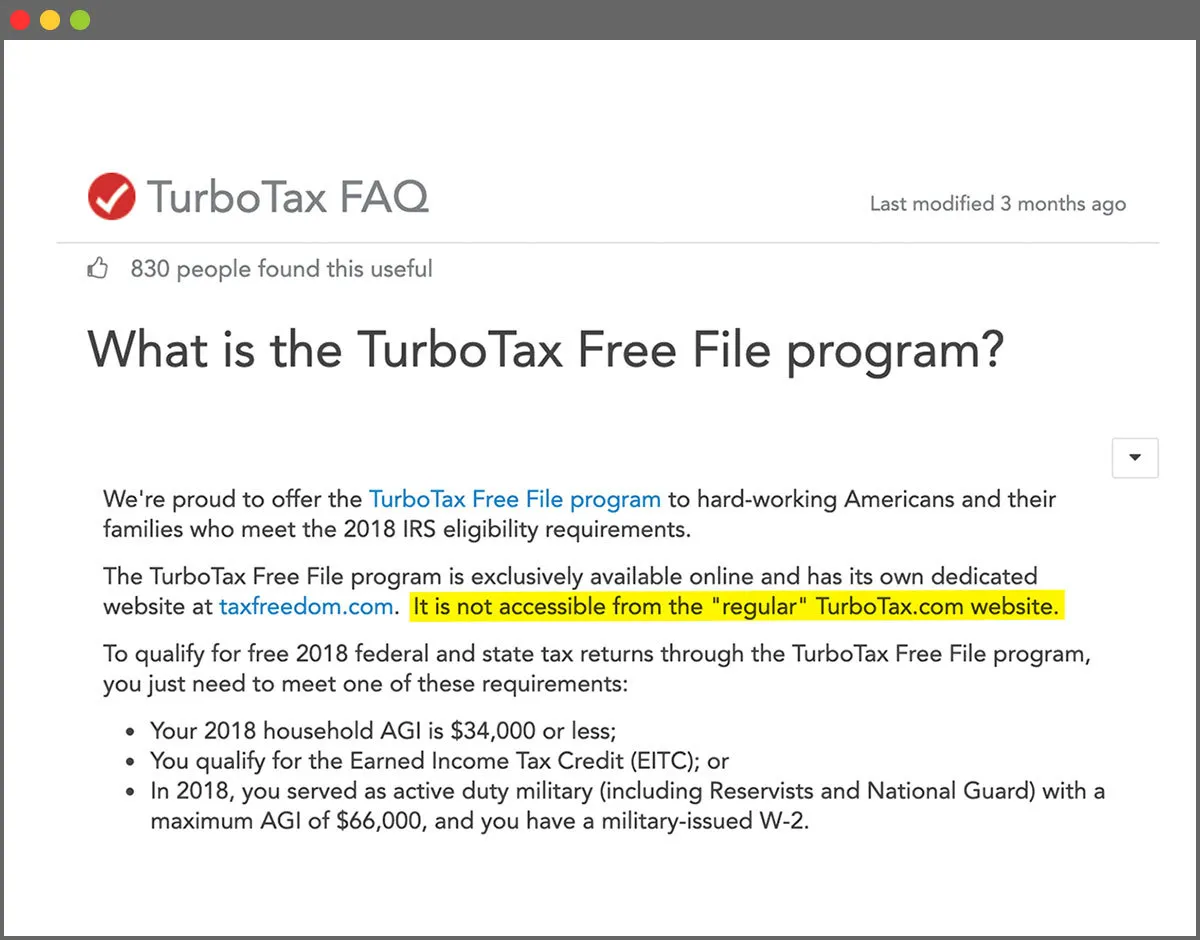
Beyond TurboTax’s Free Edition, genuinely free tax filing options exist, primarily through the IRS Free File program. This program is a partnership between the IRS and various tax software companies (including some that also offer paid versions). It allows taxpayers whose Adjusted Gross Income (AGI) falls below a certain threshold (which changes annually) to file both federal and often state taxes for free using guided tax software. For those who qualify, this is arguably the most financially prudent choice, offering similar ease of use to paid software without the cost.
However, “free” often comes with caveats. Eligibility for IRS Free File is income-dependent, meaning many taxpayers will not qualify. Additionally, the specific software providers participating in the Free File Alliance may have their own internal limitations, only supporting certain forms even for eligible users. For those who don’t qualify for IRS Free File, or whose needs exceed the free software’s capabilities, the “true cost” of attempting to use an unsuitable free option can be high – wasted time, potential errors, or ultimately needing to purchase software anyway.
Comparing with Competitors: Feature vs. Price
The market for tax preparation software is competitive, with players like H&R Block Tax Software, TaxAct, and FreeTaxUSA offering alternatives to TurboTax. From a financial perspective, these competitors often present lower price points, especially for returns requiring more complex forms.
- H&R Block Tax Software: Often directly comparable to TurboTax in features and user experience, but sometimes with slightly lower price points, particularly for Deluxe and Premier equivalents.
- TaxAct: Generally known for being more budget-friendly, especially for those with moderately complex returns, though some users report its interface isn’t as intuitive as TurboTax’s.
- FreeTaxUSA: A popular choice for its exceptionally low cost. Federal filing is always free, and state filing is a nominal fee. It supports a wide array of forms, making it a strong contender for those seeking maximum savings, provided they are comfortable with a less polished interface and potentially less hand-holding.
When choosing a competitor, taxpayers should carefully compare not just the advertised price, but also the specific forms supported at each tier, the cost of state filing, and any included features like audit support or expert help. The goal is to find the software that offers the best financial value for your specific tax situation.
Professional Tax Preparers: When to Invest in Expertise
For individuals with highly complex financial situations – such as multiple businesses, intricate investments, significant international income, or specific high-net-worth tax planning needs – the cost of a professional tax preparer (CPA, EA, or tax attorney) may be a worthwhile investment. While significantly more expensive than software (often hundreds or thousands of dollars), a professional offers personalized advice, strategic tax planning, and the highest level of assurance against errors. They can identify complex deductions and credits that software might miss, provide year-round tax advice, and represent you directly before the IRS.
The decision to use a professional is a personal financial calculation. For some, the peace of mind, the potential for greater tax savings, and the expert guidance justify the higher fee. For others, the cost outweighs the benefits, and robust software remains the better financial choice.
Maximizing Value and Minimizing Your Tax Preparation Costs
Navigating the complexities of tax season while keeping an eye on your budget requires a proactive financial strategy. There are several steps you can take to ensure you’re getting the most value for your money, whether you choose TurboTax or an alternative.
Know Your Tax Situation Before You Start
The most effective way to avoid unexpected charges is to understand your tax situation before you even open a tax preparation software. Take stock of your income sources (W-2s, 1099s, investment statements), major financial transactions (home sale, large deductions, business expenses), and any life changes (marriage, new child) that occurred during the tax year. Knowing whether you need to itemize, have self-employment income, or deal with complex investments will immediately inform which tier of software you’ll likely need, or if a free option is truly viable. This preliminary financial assessment empowers you to choose the right tool from the outset, rather than being forced into an upgrade mid-process.
Leverage Free Resources and Planning
The IRS website is an invaluable, free resource that provides detailed information on tax laws, forms, and publications. Understanding basic tax principles and being aware of common deductions and credits applicable to your situation can help you make informed decisions about software features. Additionally, strategic financial planning throughout the year can impact your tax bill. Keeping meticulous records of income and expenses, especially for self-employment or itemized deductions, streamlines the filing process and ensures you don’t miss any legitimate write-offs. Proactive financial management can often reduce your taxable income or increase your refund, making any software cost feel more justified.
Consider Less Expensive Alternatives for Simpler Returns
If your tax situation is relatively straightforward, even if it requires a paid tier of software, explore alternatives to TurboTax that might offer similar functionality at a lower price point. As discussed, FreeTaxUSA, TaxAct, and sometimes H&R Block can provide comparable services for less money. For instance, if you only need to file Schedule A for itemized deductions, a lower-cost competitor might offer this without forcing an expensive upgrade. Do a quick comparison of features and pricing across several platforms before committing. Remember, the cheapest option isn’t always the best, but the most expensive isn’t always necessary either. The goal is optimal financial efficiency.
Understand State Filing Costs
Always factor in the cost of state tax filing when budgeting for tax preparation. Many free federal filing options still charge for state returns. Some software providers offer free state filing with certain paid federal tiers, or for specific low-income situations. If you live in a state with income tax, research whether your chosen federal software integrates state filing seamlessly and what the associated fee will be. In some cases, it might even be cheaper to file your state taxes directly through your state’s tax website, which often provides free e-filing services, even if you use software for your federal return.
Ultimately, paying for TurboTax or similar software is an investment in accuracy, convenience, and peace of mind. While the “why” can be frustrating, a clear understanding of your financial situation, the software’s offerings, and the available alternatives empowers you to make a financially sound decision that optimizes your tax preparation process.
aViewFromTheCave is a participant in the Amazon Services LLC Associates Program, an affiliate advertising program designed to provide a means for sites to earn advertising fees by advertising and linking to Amazon.com. Amazon, the Amazon logo, AmazonSupply, and the AmazonSupply logo are trademarks of Amazon.com, Inc. or its affiliates. As an Amazon Associate we earn affiliate commissions from qualifying purchases.