
In the rapidly evolving landscape of digital finance, tools like Cash App have become indispensable for millions, offering seamless peer-to-peer payments, investing capabilities, and an integrated debit card for everyday transactions. However, like any sophisticated digital service, users occasionally encounter situations where their Cash App Card becomes “locked,” rendering it temporarily unusable. This can be a source of frustration, especially when immediate access to funds is required. This guide delves into the technical intricacies of why your Cash App Card might be locked and provides a meticulous, step-by-step tutorial on how to navigate the application to unlock it, ensuring you regain full control over your digital finances with minimal hassle.
Understanding the “Locked” Status: Why Your Card Might Be Inaccessible
The “locked” status on your Cash App Card is a crucial security and management feature designed to protect your funds and give you granular control. It’s not always a malfunction; often, it’s a deliberate safeguard or a temporary measure you initiated yourself. Understanding the different reasons behind a locked card is the first step toward effective resolution.
Intentional User Action: Manually Locking for Security
One of the most common reasons a Cash App Card is locked is because the user initiated it. Cash App provides a convenient in-app toggle that allows you to instantly lock your card. This feature is a powerful deterrent against unauthorized use if your card is misplaced, lost, or stolen. For example, if you realize you left your wallet at a restaurant, you can immediately lock your card from the app to prevent any fraudulent activity. Once you retrieve your card, or if it was simply a temporary misplacement, unlocking it is just as straightforward. This manual lock acts as a digital circuit breaker, severing the card’s connection to your funds until you explicitly re-enable it. From a cybersecurity perspective, this user-controlled “kill switch” is a fundamental component of empowering users to protect their assets.
Automated Security Measures: Why Cash App Locks Your Card
Beyond manual intervention, Cash App’s robust security protocols might automatically lock your card. These automated systems are designed to detect and prevent suspicious or potentially fraudulent activity, safeguarding your account against sophisticated cyber threats. For instance, if the system detects unusual spending patterns – such as large transactions in unfamiliar locations, multiple rapid transactions, or activity inconsistent with your typical usage – it might automatically lock the card as a precautionary measure. This proactive approach minimizes risk, even if it occasionally causes inconvenience. Other triggers for an automated lock could include multiple incorrect PIN attempts, suspected data breaches involving your credentials elsewhere (which might prompt Cash App to secure your account proactively), or system-wide security updates that temporarily restrict card access for certain users. These algorithmic decisions are based on complex risk assessment models, continuously learning and adapting to new threat vectors.
Distinguishing Between Locked, Disabled, and Deactivated
It’s vital to differentiate between a “locked” card, a “disabled” card, and a “deactivated” card within the Cash App ecosystem, as the resolution steps vary significantly.
- Locked: As discussed, this is a temporary state, usually user-initiated or an automated security measure, and can be reversed directly within the app. The card and account are otherwise active.
- Disabled: A card might be disabled if it’s expired, damaged, or if Cash App’s internal systems have flagged a more severe issue with the account or cardholder identity that requires more than a simple toggle switch to resolve. This often necessitates contacting Cash App support.
- Deactivated/Canceled: This is a permanent action, usually taken when a card is reported stolen, and a replacement is issued, or if a user explicitly cancels their card. A deactivated card cannot be unlocked; a new card must be ordered.
Understanding these distinctions helps users identify the appropriate course of action, preventing unnecessary troubleshooting or contacting support for issues solvable directly through the app’s interface.
Step-by-Step Guide to Unlocking Your Card via the Cash App
Unlocking your Cash App Card is a simple process that can be completed within the application itself in just a few taps. This section provides a detailed walkthrough, assuming your card is in a “locked” state and eligible for immediate unlocking.
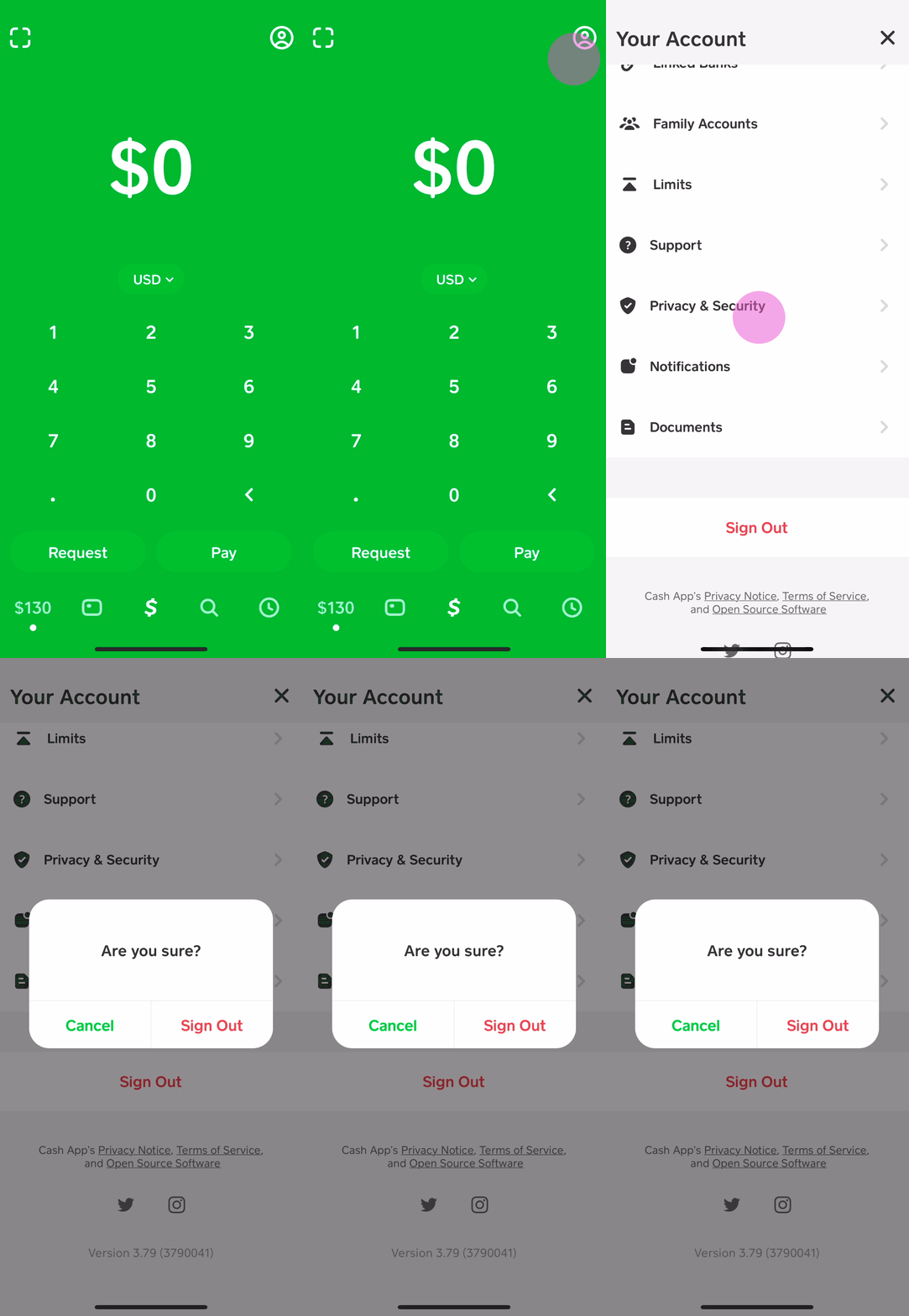
Accessing the Cash App Interface
The first step is to launch the Cash App on your mobile device. Ensure you are using the latest version of the application to benefit from the most current features, security updates, and a streamlined user experience. Outdated app versions can sometimes lead to interface glitches or prevent access to certain functionalities.
- Launch the App: Tap the green Cash App icon on your smartphone’s home screen or app drawer.
- Log In Securely: If prompted, enter your PIN, use Touch ID, or Face ID to log into your account. Always ensure you are on a trusted network and your device’s security features are enabled to protect your login credentials.
Navigating to the Card Section
Once logged in, the Cash App’s intuitive interface makes it easy to locate the specific section dedicated to your Cash App Card management.
- Locate the Card Icon: On the main Cash App screen (typically displaying your balance), look for the card icon. This icon usually resembles a debit card and is often found in the bottom navigation bar or near your balance display. Tap on this icon.
- Access Card Management: Tapping the card icon will take you to a dedicated screen where you can view your card details, recent transactions, and various card management options.
Executing the Unlock Command
This is the core action required to restore functionality to your card.
- Identify the Card Status: On the card management screen, you should clearly see the status of your Cash App Card. If it’s locked, there will be a prominent indicator, often a toggle switch or a button labeled “Unlock Card” or “Enable Card.”
- Toggle the Switch: Locate the toggle switch or button that controls the card’s locked/unlocked status. This is typically labeled “Enable Card,” “Lock Card,” or directly states “Cash App Card Locked.” Tap or slide this toggle to the “unlocked” or “enabled” position. The color or text on the toggle will usually change to indicate its new status (e.g., from red/grey to green).
- Wait for Confirmation: The app will process your request. This usually takes only a few seconds.
Confirmation and Verification
After executing the unlock command, it’s crucial to confirm that the action was successful.
- On-Screen Confirmation: The app will typically display a confirmation message, such as “Your Cash App Card is now enabled” or “Card Unlocked.” The card’s status indicator on the management screen should also reflect its active state.
- Test a Transaction (Optional but Recommended): To fully verify that your card is functional, consider making a small, non-critical test transaction. This could be checking your balance at an ATM (if supported without a fee) or making a small online purchase. This step ensures that the card’s digital infrastructure is fully operational.
- Check Notifications: Cash App may also send a push notification or an in-app message confirming the card status change.
By following these precise steps, you can quickly and efficiently unlock your Cash App Card, restoring your access to funds and ensuring continuity in your digital transactions.
Troubleshooting Common Issues During the Unlocking Process
While unlocking your Cash App Card is generally straightforward, users might occasionally encounter technical glitches or errors. Identifying and resolving these common issues is crucial for a smooth user experience.
App Freezes and Crashes
An unresponsive app can halt any process, including unlocking your card.
- Force Close and Restart: The simplest fix is to force close the Cash App completely (swipe it away from your recent apps list) and then reopen it. This clears temporary memory and reinitializes the application.
- Restart Device: If a force close doesn’t work, restarting your smartphone can often resolve deeper system-level conflicts that might be affecting app performance.
Network Connectivity Problems
Cash App, like any online service, requires a stable internet connection to function correctly.
- Check Wi-Fi/Mobile Data: Ensure your device is connected to a reliable Wi-Fi network or has strong mobile data signal.
- Toggle Airplane Mode: Turning airplane mode on and off can often reset your device’s network connections, resolving minor glitches.
- Test Other Apps: Try accessing another internet-dependent app to confirm if the issue is specific to Cash App or a broader network problem.
Outdated App Versions
Running an old version of Cash App can lead to compatibility issues, bugs, and missing features.
- Check for Updates: Visit your device’s app store (Google Play Store for Android, Apple App Store for iOS) and search for “Cash App.” If an update is available, download and install it. Developers frequently release updates to fix bugs, improve security, and enhance functionality.
Device-Specific Glitches
Sometimes, the issue might stem from your device itself rather than the app or network.
- Clear App Cache (Android): On Android devices, you can go to your phone’s Settings > Apps > Cash App > Storage, and then tap “Clear Cache.” This removes temporary files that might be corrupted without deleting your login data.
- Reinstall App (Last Resort): If all else fails, consider uninstalling and then reinstalling the Cash App. Be absolutely sure you remember your login credentials before doing this, as it will require you to log back in from scratch. This ensures you have a fresh, uncorrupted installation of the app.
By systematically addressing these technical troubleshooting steps, most common issues preventing the successful unlocking of your Cash App Card can be resolved, allowing you to quickly restore card functionality.
Enhancing Your Cash App Card’s Digital Security
While unlocking your card is about regaining access, maintaining robust digital security practices is about preventing the need to lock it in the first place, or mitigating risks should it become compromised. A strong security posture is paramount for any digital financial tool.
Leveraging Two-Factor Authentication (2FA)
Two-factor authentication adds an essential layer of security beyond just a password or PIN. Even if someone obtains your primary login credentials, they would still need access to a second verification method to access your account or conduct sensitive transactions.
- How it Works: Cash App typically offers 2FA via SMS codes sent to your registered phone number or through an authenticator app (like Google Authenticator or Authy). When you log in or perform certain actions, a unique code is sent to your second device, which you must enter to proceed.
- Implementation: Ensure 2FA is enabled within your Cash App security settings. This critical feature significantly reduces the risk of unauthorized access due to compromised passwords.
Crafting Strong, Unique Passwords
Your Cash App password is the primary gatekeeper to your funds. A weak or reused password is an open invitation for cybercriminals.
- Complexity: Create passwords that are long (at least 12-16 characters), complex, and include a mix of uppercase and lowercase letters, numbers, and special characters.
- Uniqueness: Never reuse passwords across different online services. If one service is breached, all accounts using that same password become vulnerable.
- Password Managers: Consider using a reputable password manager (e.g., LastPass, 1Password) to generate, store, and auto-fill strong, unique passwords securely. This eliminates the need to remember complex strings and significantly enhances your overall digital hygiene.
Regularly Reviewing Transaction History
Vigilant monitoring of your account activity is an early warning system for potential fraud.
- Frequent Checks: Make it a habit to regularly review your Cash App transaction history, ideally daily or every few days.
- Identify Discrepancies: Look for any unfamiliar transactions, no matter how small. Even minor unauthorized charges can indicate a compromised account.
- Immediate Action: If you spot suspicious activity, immediately lock your card via the app and contact Cash App support to report the potential fraud. Prompt action can limit your liability and prevent further losses.
Enabling Instant Notifications
Real-time alerts about your account activity provide immediate feedback and empower you to react swiftly to any unauthorized use.
- Push Notifications: Enable push notifications for all Cash App activity, especially for transactions, transfers, and login attempts.
- Email/SMS Alerts: Configure email or SMS alerts for account changes or transactions if available.
- Benefit: These instant alerts mean you’ll know almost immediately if your card is used, even if you don’t have the app open. This allows you to lock your card or report fraud within moments, potentially stopping illicit activity before it escalates.
By integrating these advanced digital security practices into your routine, you can significantly fortify your Cash App Card against a myriad of online threats, making your digital financial experience safer and more reliable.
Beyond Unlocking: Advanced Card Management Features
While unlocking your Cash App Card is a basic yet crucial function, the app offers an array of advanced features designed to give users comprehensive control over their card’s security and functionality. These features, often overlooked, are powerful tools for proactive digital security management.
Temporary Freezing vs. Permanent Locking
Many users use “locking” and “freezing” interchangeably, but there can be subtle differences in how financial apps implement them. In Cash App’s context, the “lock card” feature often serves as the “freeze” functionality.
- Temporary Nature: The ability to “lock” or “freeze” your card temporarily is its defining characteristic. It’s designed for situations like misplacing your wallet, traveling, or when you simply want to prevent any usage for a short period. Funds remain safe within your Cash App balance, but the card cannot be used for purchases or ATM withdrawals.
- Full Control: This temporary status ensures you retain full control to unlock the card at your convenience without requiring a new card or contacting support. This technical flexibility is a significant advantage over methods that require permanent cancellation.
Reporting Lost or Stolen Cards Electronically
In the unfortunate event that your Cash App Card is permanently lost or stolen, the app provides a streamlined process to report it and protect your funds.
- In-App Reporting: Within the card management section, you’ll typically find an option to “Report Lost/Stolen Card.” This isn’t just a “lock” button; it initiates a more severe action.
- Immediate Deactivation: Reporting a card as lost or stolen usually results in its immediate and permanent deactivation. This renders the physical card useless to anyone who might find it.
- Ordering a Replacement: The app will then guide you through the process of ordering a new replacement card, which will be linked to your existing Cash App balance. This digital replacement process is much faster and more secure than traditional banking methods, minimizing the downtime of card access.
Managing Card Notifications and Alerts
Beyond enabling basic transaction alerts, Cash App often allows for granular control over various types of notifications, optimizing your security posture and user experience.
- Customizable Alerts: Explore the notification settings within Cash App to customize what alerts you receive. This could include notifications for every purchase, large transactions, declined transactions, or even changes to your card details.
- Targeted Information: By tailoring your alerts, you can ensure you only receive information that is critical to your security and financial awareness, avoiding notification fatigue while staying informed about key activities.
- Proactive Security: Customized alerts are a powerful proactive security measure, giving you real-time insights into your card’s usage and enabling immediate action against any suspicious activity.
By mastering these advanced card management features, Cash App users can move beyond simply unlocking their cards to implementing a comprehensive, self-managed security strategy for their digital debit card, ensuring peace of mind and full control over their financial technology.
aViewFromTheCave is a participant in the Amazon Services LLC Associates Program, an affiliate advertising program designed to provide a means for sites to earn advertising fees by advertising and linking to Amazon.com. Amazon, the Amazon logo, AmazonSupply, and the AmazonSupply logo are trademarks of Amazon.com, Inc. or its affiliates. As an Amazon Associate we earn affiliate commissions from qualifying purchases.