
In today’s digital age, managing your financial affairs online has become not just a convenience, but often a necessity. For taxpayers in the United States, establishing an online account with the Internal Revenue Service (IRS) is a pivotal step towards streamlining tax compliance, accessing crucial financial information, and maintaining proactive oversight of your federal tax obligations. Far more than just a portal for filing, an IRS online account serves as a robust financial tool, empowering individuals and businesses to navigate the complexities of the tax system with greater ease and transparency. This comprehensive guide will walk you through the process of creating your IRS account, outlining its myriad benefits, detailing the necessary steps, and providing insights into maximizing its utility for sound financial management.
Understanding the Importance of an IRS Online Account
Before diving into the mechanics of account creation, it’s essential to grasp why an IRS online account is an invaluable asset in your personal finance toolkit. In an era where information is power, direct access to your tax records and real-time updates from the nation’s primary tax collection agency can prevent costly errors, missed deadlines, and unnecessary stress.
Benefits for Personal Finance Management
An IRS online account significantly enhances your personal finance management capabilities. It centralizes your tax information, making it easier to track your tax history, understand your liabilities, and plan for future tax years. For instance, being able to quickly retrieve past tax transcripts can be critical when applying for loans, mortgages, or financial aid. It provides a clear snapshot of your income, payments, and any outstanding balances, allowing for more informed budgeting and financial decision-making. Moreover, understanding your current tax status can help you identify potential tax credits or deductions you might be eligible for, leading to significant savings.
Streamlining Tax Compliance
The primary function of an IRS account is to simplify tax compliance. Gone are the days of solely relying on snail mail for official communications or having to wait weeks for paper records. With an online account, you can quickly verify if you owe taxes, review the status of your refund, or check if an Economic Impact Payment (stimulus check) was issued to you. This instant access reduces the administrative burden of tax season and helps ensure you meet your obligations accurately and on time, thereby avoiding penalties and interest charges that can erode your financial stability.
Accessing Crucial Financial Information
One of the most powerful features of an IRS online account is its ability to provide immediate access to a wealth of financial data that is otherwise difficult to obtain. This includes:
- Tax Transcripts: View and print tax return transcripts, tax account transcripts, wage and income transcripts, and verification of non-filing letters. These are often required for loan applications, student financial aid, and other financial processes.
- Payment History: See your payment history, scheduled payments, and any balance due.
- Notices and Letters: Access certain notices and letters digitally, allowing for quicker responses and better record-keeping.
- Identity Protection PIN (IP PIN): Retrieve your current IP PIN if you’ve been issued one, a crucial layer of defense against tax-related identity theft.
This level of insight empowers you to reconcile your own records, detect discrepancies, and respond proactively to any issues that may arise with your tax filings.
Enhanced Security and Communication
The IRS has continuously invested in robust security measures for its online services, making your digital account a secure channel for communication. Multi-factor authentication, encrypted connections, and advanced identity verification processes are standard, protecting your sensitive financial information. Furthermore, having a direct, secure line to the IRS reduces reliance on less secure communication methods and ensures you’re interacting with official IRS channels, minimizing the risk of falling victim to phishing scams or fraudulent activities.
Eligibility and What You’ll Need to Get Started
Creating an IRS online account requires careful preparation, primarily focused on verifying your identity to protect your sensitive tax information. The process is designed to be rigorous to ensure only you can access your data.
Basic Eligibility Requirements
Generally, any individual who has a Social Security number (SSN) or an Individual Taxpayer Identification Number (ITIN) and has filed a federal tax return can create an online account. You must be at least 18 years old. The system is designed for individual taxpayers, not for third-party tax preparers or businesses to create accounts on behalf of their clients.
Gathering Essential Personal Information
Before you begin, gather the following personal details:
- Full Legal Name: As it appears on your tax returns.
- Social Security Number (SSN) or Individual Taxpayer Identification Number (ITIN): This is your primary identifier.
- Date of Birth: To further confirm your identity.
- Current Mailing Address: As it appears on your most recently filed tax return.
- Email Address: A unique email address that you actively use and can access to receive verification codes and communications.
- Mobile Phone Number: A U.S.-based mobile phone number is required for multi-factor authentication and receiving verification codes during the setup process.
Verifying Your Identity: Financial Information Requirements
The IRS uses a third-party identity verification service, ID.me, to establish your identity. This is a critical step to ensure that only legitimate taxpayers can access their sensitive information. To successfully complete the identity verification process, you will likely need specific financial information from your past tax filings or financial accounts. Be prepared to provide:
- Information from a most recently filed tax return: This could include your filing status, specific line items, or the Adjusted Gross Income (AGI) from a previous year’s tax return (e.g., Form 1040).
- Account number from a credit card: A major credit card (Visa, MasterCard, Discover, American Express) in your name.
- Student loan account number: If you have one.
- Mortgage account number: If you have a mortgage.
- Auto loan account number: If you have one.
- Home equity loan account number: If you have one.
- Other specific financial details: The system may ask for various pieces of information to cross-reference with public and private databases.
It’s crucial to have this information readily available and accurate. Any discrepancies can lead to failed verification attempts, potentially locking you out of the process temporarily.
Technical Requirements
You’ll need a device with internet access (computer, tablet, or smartphone) and a reliable internet connection. For the ID.me verification process, a device with a camera (like a smartphone or webcam) might be necessary for identity verification steps that involve taking a selfie or scanning documents.
Step-by-Step Guide to Creating Your IRS Account
The process of creating an IRS account, while thorough, is designed to be user-friendly with clear instructions at each stage. It primarily involves navigating the IRS website and going through the ID.me verification.
Navigating to the Official IRS Website
Start by opening your web browser and going to the official IRS website: www.irs.gov. Be wary of phishing scams and fake websites; always double-check the URL to ensure you are on the legitimate government site. On the homepage, look for a section related to “Your Account” or “Get Your Tax Record,” which will lead you to the sign-in/registration page.
Initiating the Account Creation Process
Once on the sign-in page, you’ll typically find an option to “Create Your Account” or “Sign Up.” Click this link to begin. The IRS utilizes ID.me, a trusted technology provider, to handle the identity verification for its online accounts. This means you will be redirected to the ID.me website to complete the initial setup.
The Identity Verification Gauntlet (ID.me Integration)
This is the most critical and often the most time-consuming part of the process. ID.me employs multiple layers of verification to confirm your identity.
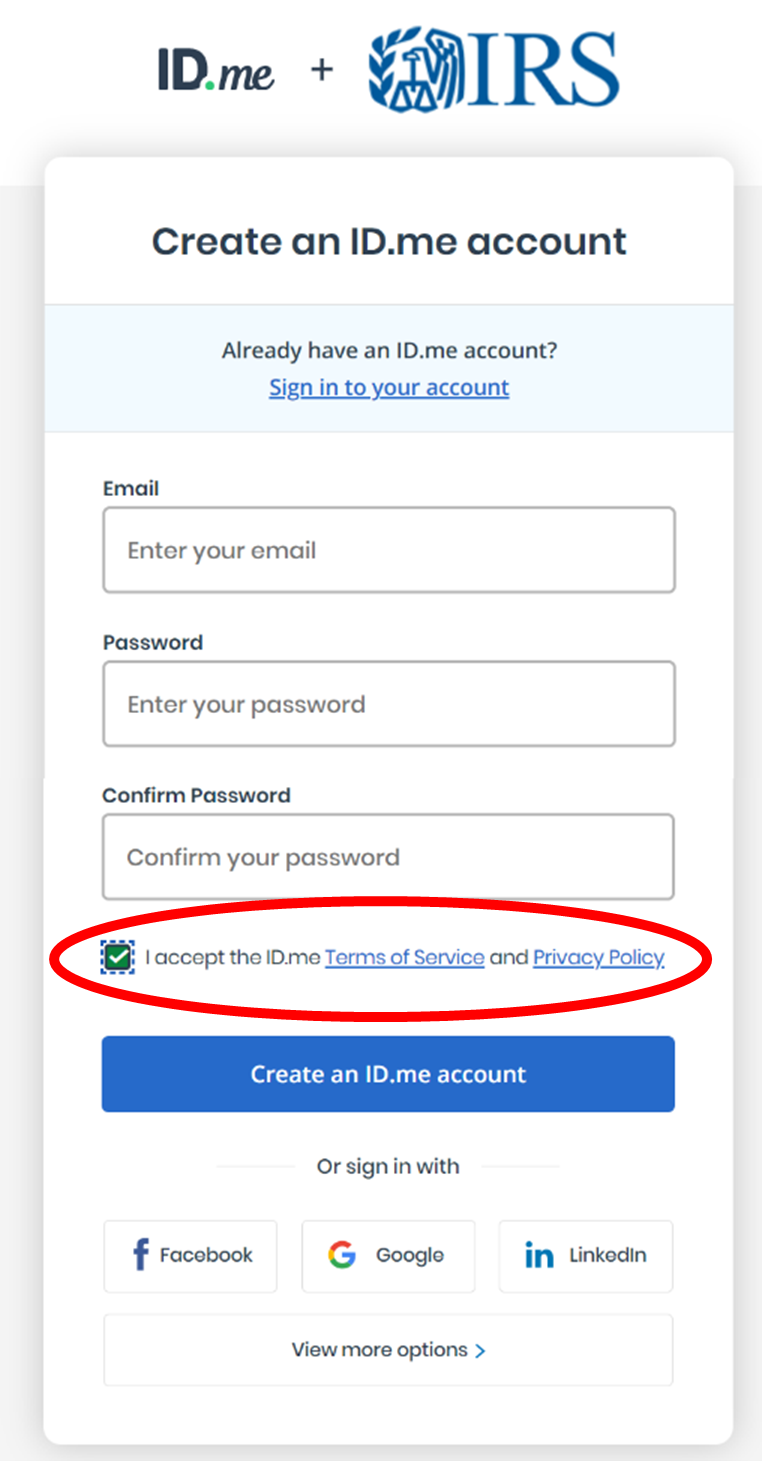
- Create an ID.me Account: If you don’t already have one, you’ll first create an ID.me account using your email address and a strong password.
- Verify Your Email and Phone: You’ll receive a verification email and potentially a text message to confirm your contact details.
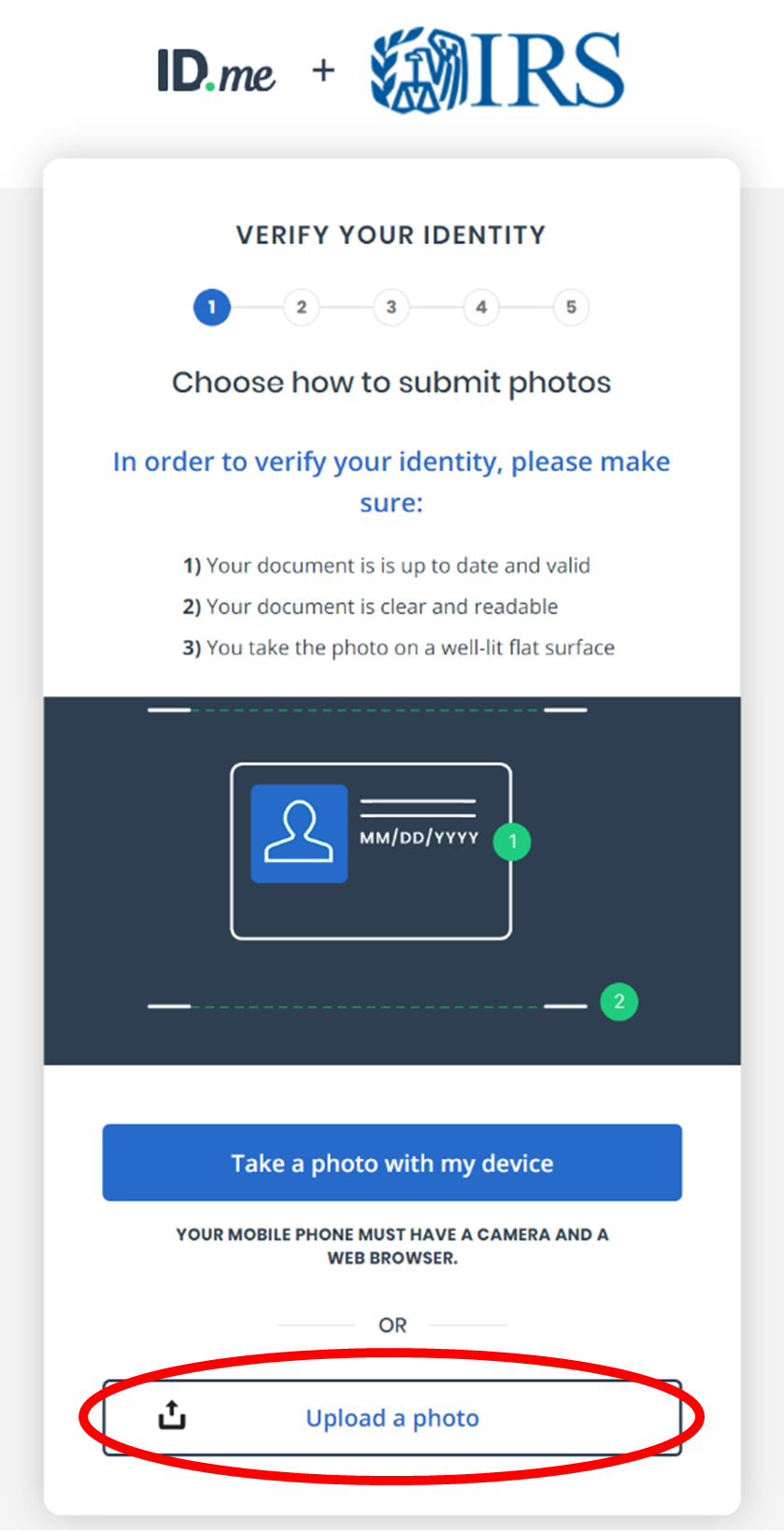
- Choose Verification Method: ID.me offers several methods for identity verification, ranging from a “selfie” with your government-issued ID to a video call with a live agent.
- Self-Service (Recommended): This typically involves uploading images of your driver’s license or state ID, providing your SSN, and often taking a live video selfie with your device’s camera. The system uses facial recognition to match your live image to the ID.
- Video Chat: If the self-service option fails or you prefer, you can opt for a video call with an ID.me agent who will visually verify your identity and documents.
- Provide Financial Information: As mentioned earlier, ID.me will then ask a series of knowledge-based authentication questions based on your credit history and tax records (e.g., previous addresses, loan amounts, specific details from past tax returns). Accuracy is paramount here.
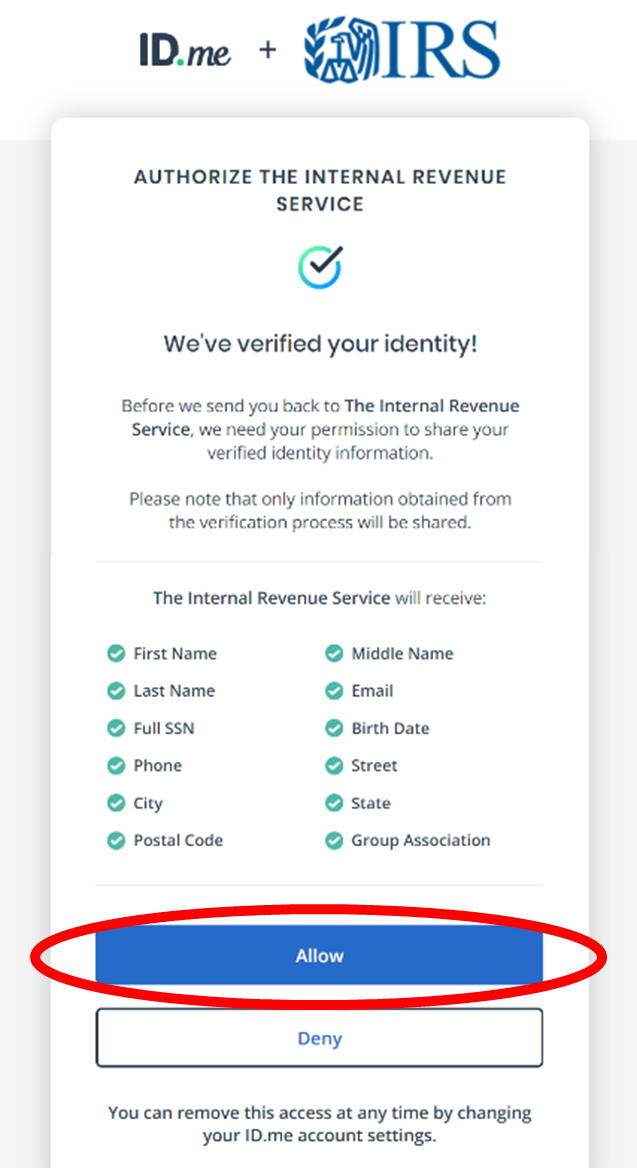
- Consent to Share: Once your identity is verified by ID.me, you will be asked to consent to share your identity information with the IRS. This step is necessary to link your verified ID.me account to your IRS online account.
Setting Up Security Features
Upon successful verification through ID.me, you’ll return to the IRS portal, where your account is now linked. You may be prompted to set up additional security features specific to the IRS platform, such as multi-factor authentication preferences (e.g., receiving a code via text message or using an authenticator app each time you log in). Always enable the strongest security options available to protect your financial data.
Confirmation and First Login
After all steps are completed, you’ll receive a confirmation, and your IRS online account will be active. You can then log in using your ID.me credentials. Take a moment to familiarize yourself with the dashboard and the various tools available.
Key Features and How to Utilize Your IRS Online Account
Once your IRS account is established, it becomes a powerful resource for proactive financial management and tax compliance. Understanding its core features will help you maximize its utility.
Viewing Your Tax Account Information
The most immediate benefit is the ability to see a comprehensive overview of your federal tax account. This includes:
- Balance Due: Current outstanding balances for all tax years.
- Payment History: A detailed record of all payments made to the IRS.
- Payment Plans: If you have an existing payment agreement (e.g., an Offer in Compromise or Installment Agreement), you can view its status and terms.
- Refund Status: Track the status of your current year’s tax refund.
This centralized view allows for quick reconciliation with your own records and immediate awareness of any financial obligations to the IRS.
Accessing Transcripts and Tax Records
The ability to instantly retrieve various tax transcripts is invaluable. You can download and print:
- Tax Return Transcripts: Shows most line items from your original tax return (Form 1040, 1040A, or 1040EZ) as it was filed, including any accompanying forms and schedules.
- Tax Account Transcripts: Shows basic data like marital status, type of return filed, adjusted gross income (AGI), and information about payments, penalties, and adjustments.
- Wage and Income Transcripts: Shows data from information returns, such as Forms W-2, 1099, 1098, and Form 5498, IRA Contribution Information.
- Verification of Non-filing Letters: Confirms that the IRS has no record of a filed Form 1040, 1040-SR, 1040-NR, or 1040-PR/SS for the requested tax period.
These documents are frequently required for loan applications (mortgage, student, business), FAFSA applications, and various other financial verifications.
Making Payments and Setting Up Payment Plans
Your online account provides a secure and convenient way to manage your tax payments:
- Make a Payment: Directly pay your taxes for current or past years, estimated taxes, or other tax liabilities.
- View Payment History: Keep track of all payments made, ensuring accurate record-keeping.
- Set Up a Payment Plan: If you can’t pay your taxes in full, you may be able to set up a short-term payment plan or an installment agreement directly through your account, providing a structured approach to managing your debt.
Responding to IRS Notices Digitally
While not all notices are available digitally yet, the IRS is expanding its online capabilities. For certain notices, you might be able to view them and respond through your account, saving time and ensuring your response is documented. This feature is particularly useful for promptly addressing inquiries and avoiding further complications.
Managing Communication Preferences
Your account may allow you to update your contact information, review communication preferences, and potentially opt for digital delivery of certain notices as the IRS expands its digital offerings. This helps ensure you receive important information in a timely and secure manner.
Troubleshooting Common Issues and Ensuring Account Security
While the IRS account creation process is streamlined, you might encounter issues. Knowing how to troubleshoot and secure your account is crucial for uninterrupted access and protection of your financial data.
What to Do if You Can’t Verify Your Identity
Identity verification is the most common hurdle. If you fail verification through ID.me:
- Review Your Inputs: Double-check all entered information for accuracy, especially SSN, date of birth, and financial details from past tax returns.
- Try Again: Sometimes, a simple reattempt resolves minor issues.
- Use a Different Verification Method: If the self-service option fails repeatedly, try the video chat option with an ID.me agent.
- Contact ID.me Support: If persistent issues arise, contact ID.me’s customer support directly, as they handle the verification process.
- Alternative Access: If online verification proves impossible, you may still be able to access certain services by mail or phone, though these methods are generally slower.
Password Recovery and Account Lockouts
For security reasons, repeated incorrect login attempts can lock your account.
- Follow Prompts: Use the “Forgot Password” or “Account Recovery” options provided by ID.me to regain access. You’ll typically need to verify your identity again via email, phone, or security questions.
- Wait It Out: If locked out, you may need to wait for a specified period (e.g., 24 hours) before attempting to log in again.
Protecting Your Account from Cyber Threats
Your IRS online account contains highly sensitive financial information, making it a prime target for cybercriminals.
- Strong, Unique Passwords: Always use a complex password that is unique to your IRS/ID.me account.
- Multi-Factor Authentication (MFA): Always enable MFA. This adds an extra layer of security, requiring a code from your phone or an authenticator app in addition to your password.
- Beware of Phishing: The IRS will never initiate contact with you via email, text message, or social media to request personal or financial information. Any such communication is a scam. Always go directly to irs.gov for information.
- Secure Internet Connection: Avoid accessing your account on public Wi-Fi networks. Use a secure, private network.
- Regular Monitoring: Periodically log in to review your account activity for any suspicious transactions or unauthorized changes.
When to Contact IRS Support
While your online account provides many self-service options, there are times when direct IRS support is necessary:
- Complex Tax Issues: For specific questions about tax law, deductions, or credits that are not addressed by the online tools.
- Errors in Transcripts: If you identify discrepancies in your tax transcripts or account information that you cannot resolve online.
- Identity Theft Concerns: If you suspect tax-related identity theft or unauthorized access to your account.
- Technical Issues Beyond ID.me: If you’re experiencing problems with the IRS portal itself after successfully verifying with ID.me.
Conclusion
Creating an IRS online account is a fundamental step for modern financial literacy and responsible tax management. It transforms what was once a cumbersome, paper-heavy process into an accessible, transparent, and secure digital experience. By leveraging the tools and information available through your account, you gain unparalleled insight into your tax obligations, empower yourself to make informed financial decisions, and contribute to a more streamlined and efficient interaction with the federal tax system. Take the time to set up your account, explore its features, and integrate it as a vital component of your overall personal finance strategy. In doing so, you’re not just creating an account; you’re building a more secure and informed financial future.
aViewFromTheCave is a participant in the Amazon Services LLC Associates Program, an affiliate advertising program designed to provide a means for sites to earn advertising fees by advertising and linking to Amazon.com. Amazon, the Amazon logo, AmazonSupply, and the AmazonSupply logo are trademarks of Amazon.com, Inc. or its affiliates. As an Amazon Associate we earn affiliate commissions from qualifying purchases.