
Effectively managing your digital finances hinges on understanding the various avenues available for funding your accounts. For users of Cash App, a popular mobile payment service, knowing precisely where and how to add money to your Cash App balance – which subsequently fuels your Cash App Card for spending – is fundamental. This comprehensive guide delves into the primary methods for depositing funds, offering insights into each process, associated considerations, and strategic tips to optimize your financial management within the Cash App ecosystem.
Understanding Your Cash App Balance and Card
At its core, the Cash App Card functions as a direct conduit to your Cash App balance. Unlike traditional debit cards linked directly to a bank account, the Cash App Card draws funds exclusively from the money you’ve loaded into your Cash App account. Therefore, any discussion about “where to add money to your Cash App Card” is intrinsically about funding your Cash App balance.
The Interplay of Balance and Card
Your Cash App balance represents the total funds available within your Cash App account. This balance is what empowers your Cash App Card, allowing you to make purchases online, in stores, and withdraw cash from ATMs wherever Visa debit cards are accepted. The convenience stems from this seamless integration: fund your balance through various means, and those funds become instantly available via your physical or virtual Cash App Card. Understanding this direct relationship is crucial for effective money management, ensuring you always have sufficient funds for your spending needs.
Benefits of a Funded Cash App Card
A well-funded Cash App Card offers significant advantages for personal finance. It provides a distinct digital wallet that can be used for budgeting, separating discretionary spending from primary bank accounts, or managing online income. The card offers a layer of security by not directly exposing your main bank account details during transactions. Furthermore, Cash App’s unique “Boosts” feature, which offers instant discounts at various merchants, becomes accessible only when using a funded Cash App Card, adding another layer of financial benefit for frequent users.
Electronic Transfer Methods: Speed and Convenience
The digital nature of Cash App makes electronic transfers the most common and often the most convenient ways to add money. These methods leverage existing bank accounts or debit cards to seamlessly move funds into your Cash App balance.
Linking a Bank Account
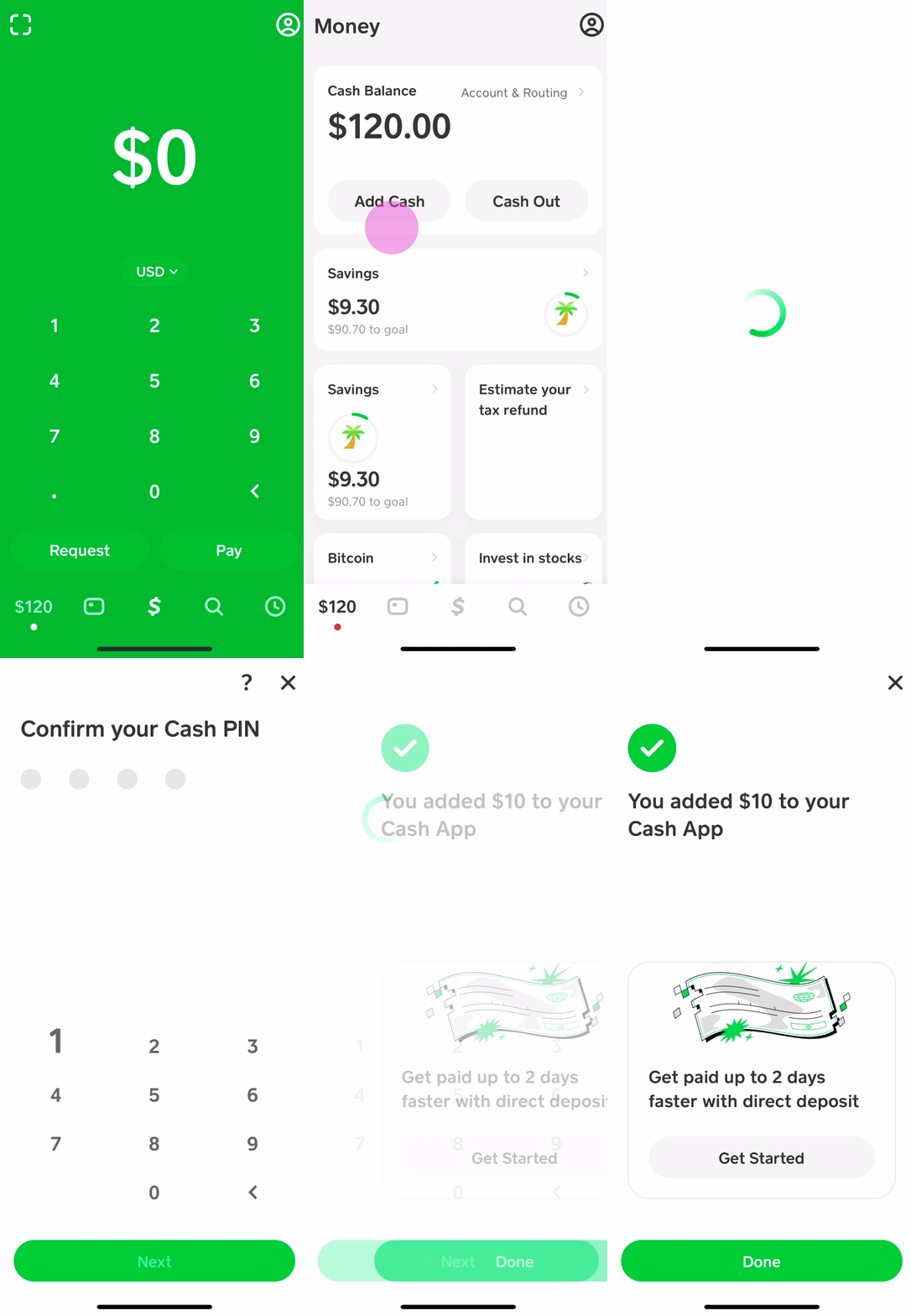
One of the most secure and straightforward methods to add money to your Cash App is by linking your traditional bank account. This allows for direct transfers, effectively pulling funds from your checking or savings account into your Cash App balance.
To initiate this process:
- Open Cash App and navigate to the “Banking” tab (represented by a house icon on the bottom navigation bar).
- Tap on “Linked Banks” or “Link Bank” if you haven’t already.
- Follow the prompts to connect your bank account. This typically involves using your bank’s online login credentials, which Cash App uses through a secure third-party service like Plaid to verify your account details.
- Once linked, return to the “Banking” tab and tap “Add Cash.”
- Enter the desired amount you wish to add and confirm the transfer.
Standard transfers from a linked bank account typically do not incur fees and usually take 1-3 business days to fully process and appear in your Cash App balance. For users prioritizing cost-efficiency over immediate availability, this is an excellent option.
Using a Debit Card
For those requiring quicker access to funds, linking and using a debit card is an expedited method. While linking a bank account is suitable for larger, less urgent transfers, a debit card allows for instant deposits.
Here’s how to add money using a debit card:
- From the “Banking” tab in Cash App, ensure your debit card is linked. If not, tap “Link Bank” and follow instructions to add your debit card information (card number, expiration date, CVV, and zip code). Note that credit cards generally cannot be used to add money to your Cash App balance, only for sending money or making purchases directly.
- Once your debit card is securely linked, tap the “Add Cash” button on the “Banking” tab.
- Enter the specific amount you wish to add.
- Confirm the transaction.
Transfers made using a debit card are often instant, meaning the funds are available in your Cash App balance immediately. However, Cash App may charge a small fee (typically 0.5% to 1.75%) for these instant deposits, which is clearly displayed before you confirm the transaction. This fee covers the cost of processing expedited transfers and is a common practice across many digital payment platforms.
Setting Up Direct Deposit
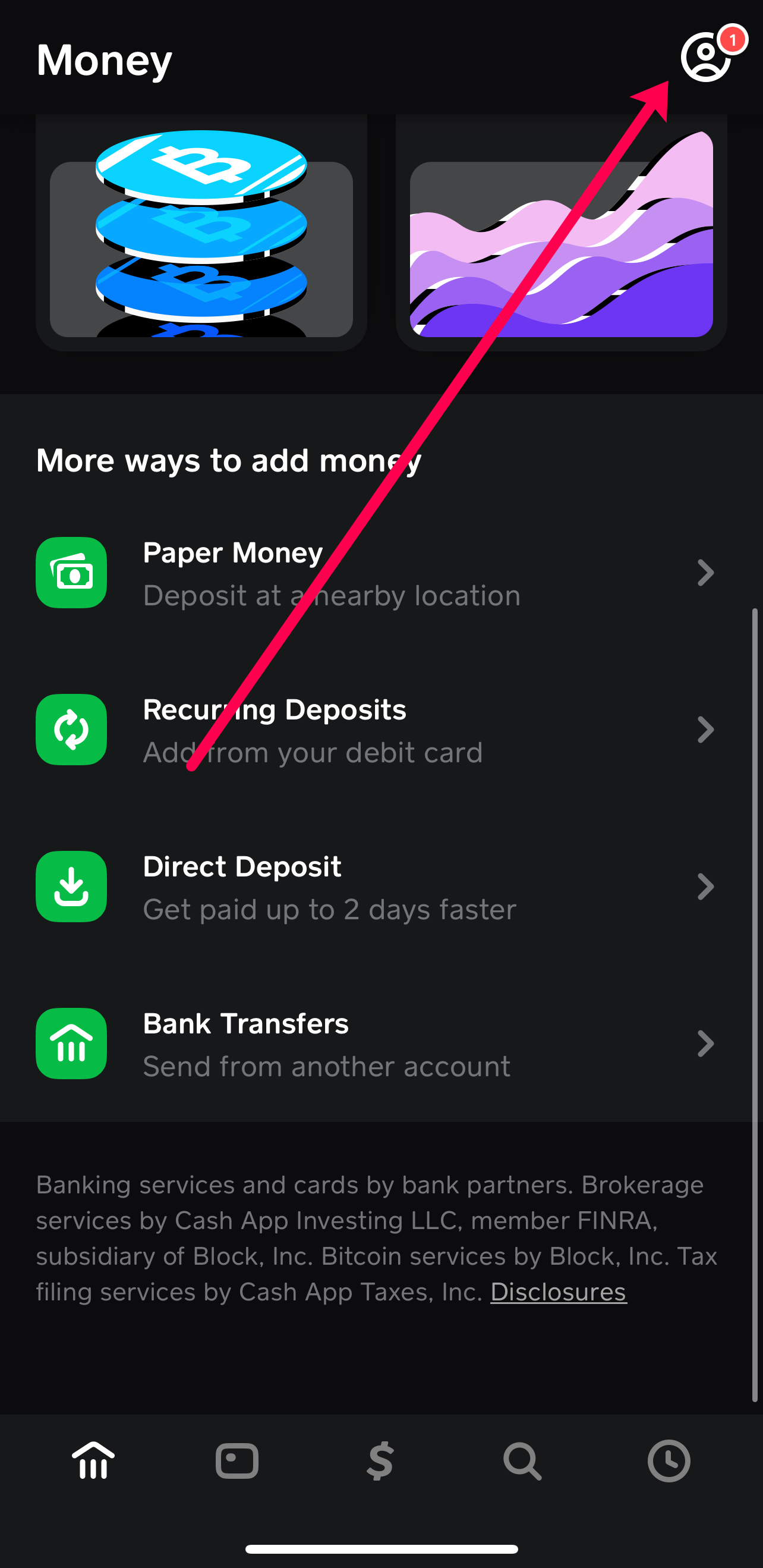
For recurring income, setting up direct deposit into your Cash App account offers unparalleled convenience. This method allows your paychecks, government benefits, or other regular payments to be automatically deposited directly into your Cash App balance, often making funds available up to two days earlier than traditional banks.
To enable direct deposit:
- Navigate to the “Banking” tab in your Cash App.
- Locate “Direct Deposit” and tap on it.
- Here, you will find your unique Cash App routing number and account number. These are the details you provide to your employer’s payroll department, government agency, or any other entity for direct deposits.
- Provide these numbers to your employer or benefits provider, usually by filling out a direct deposit form.

Once set up, your regular payments will automatically flow into your Cash App balance. This streamlines your financial flow, making Cash App a viable option for primary banking needs, especially for those who appreciate early access to their funds and the digital management capabilities of the platform. There are no fees associated with receiving funds via direct deposit.
Physical Cash Deposits & Peer-to-Peer Transfers
Beyond electronic transfers, Cash App also accommodates traditional cash and facilitates seamless peer-to-peer exchanges, providing flexibility for various financial scenarios.
Cash Deposits at Retail Locations
For individuals who primarily deal in physical cash, Cash App provides a robust solution through its partnership with numerous retail stores. This method allows you to convert physical currency into digital funds directly into your Cash App balance.
To deposit cash at a retail location:
- Open your Cash App and tap the “Banking” tab.
- Tap on “Paper Money” or “Deposit Paper Money.”
- Cash App will then display a map or list of nearby participating retail locations, which typically include stores like Walmart, Walgreens, CVS, 7-Eleven, Dollar General, and Family Dollar.
- Select a convenient location and follow the in-app instructions to generate a unique barcode.
- Proceed to the chosen retailer’s cashier and present the barcode along with the cash you wish to deposit. The cashier will scan the barcode, accept your cash, and the funds will typically be added to your Cash App balance almost instantly.
It’s important to be aware of certain parameters for cash deposits. Retailers may charge a small service fee for processing the transaction, usually around $1-$5, and there are often daily and weekly limits on how much cash you can deposit (e.g., $500 per deposit, $1,000 per week). Always confirm these details within the app or with the retailer before making a trip. This method is incredibly valuable for the unbanked or those who receive income in cash and wish to digitize it for use with their Cash App Card.
Receiving Money from Other Cash App Users
One of Cash App’s core functionalities is its peer-to-peer payment system, which allows users to send and receive money from friends, family, or even customers almost instantly. When someone sends you money via Cash App, those funds automatically appear in your Cash App balance.
To receive money:
- Ensure your sender has your $Cashtag (your unique Cash App username), phone number, or email associated with your Cash App account.
- The sender initiates a payment to you through their app.
- Once the payment is sent, you will receive a notification, and the funds will immediately be reflected in your Cash App balance.
This method is free, instantaneous, and a cornerstone of Cash App’s appeal. It eliminates the need for physical cash exchanges or complicated bank transfers between individuals, making it an extremely efficient way to get money onto your Cash App Card.
Optimizing Your Cash App Funding Strategy
Successfully integrating Cash App into your personal finance strategy involves more than just knowing how to add money; it requires understanding the nuances of fees, limits, and security to maximize its benefits.
Understanding Limits and Fees
Every financial tool comes with its own set of rules, and Cash App is no exception. Be mindful of the following:
- Deposit Limits: Cash App imposes limits on how much money you can add to your balance over certain periods. For instance, there might be a limit on how much cash you can deposit at a retail store daily or weekly, or a maximum amount you can add from a linked bank account within a specific timeframe. These limits are subject to verification status, with verified accounts typically having higher limits.
- Fees: While receiving money and standard bank transfers are typically free, instant deposits from a debit card and cash deposits at retail locations often incur small fees. Always review the transaction details before confirming any deposit to understand the total cost.
Regularly checking your account’s specific limits and understanding the fee structure can prevent unexpected hurdles and help you choose the most cost-effective method for your funding needs.
Enhancing Security and Financial Habits
Maintaining the security of your Cash App account and adopting sound financial habits are paramount.
- Security Features: Always enable robust security features within Cash App, such as a PIN lock, Touch ID, or Face ID. Be cautious of phishing scams or fraudulent requests for money. Only link bank accounts and debit cards you trust and monitor your transaction history regularly for any suspicious activity.
- Budgeting and Management: Use Cash App as a tool for intentional financial management. For example, you might designate your Cash App balance for specific spending categories or use it to manage a portion of your freelance income. This can help you track spending more effectively and stick to a budget.
- Diversification: While Cash App is a powerful tool, it’s wise not to put all your financial eggs in one basket. Maintain a primary bank account for larger savings and critical financial operations, using Cash App for its specific benefits like quick transfers, peer-to-peer payments, and easy access to spending funds via the Cash App Card.
By strategically utilizing these funding methods and adhering to best practices, you can effectively manage your money within the Cash App ecosystem, ensuring your Cash App Card is always ready for your financial needs.
aViewFromTheCave is a participant in the Amazon Services LLC Associates Program, an affiliate advertising program designed to provide a means for sites to earn advertising fees by advertising and linking to Amazon.com. Amazon, the Amazon logo, AmazonSupply, and the AmazonSupply logo are trademarks of Amazon.com, Inc. or its affiliates. As an Amazon Associate we earn affiliate commissions from qualifying purchases.