
In an increasingly digitized world, managing personal finances effectively requires leveraging tools that offer convenience, control, and security. The Cash App Card, a free, customizable debit card linked directly to your Cash App balance, stands out as a powerful financial instrument. It bridges the gap between your digital funds and everyday expenditures, enabling seamless transactions both online and in brick-and-mortar stores. This guide delves into the specifics of ordering your Cash App Card, exploring its benefits, outlining the step-by-step process, and providing insights into its optimal use for enhanced personal finance management. For anyone looking to streamline their spending, gain greater access to their digital funds, and embrace a more flexible approach to banking, understanding how to acquire and utilize this card is an essential step.

Understanding the Cash App Card: Your Gateway to Seamless Financial Transactions
The Cash App Card is more than just a piece of plastic; it’s a financial utility designed to integrate seamlessly with your personal financial ecosystem. Issued by Sutton Bank and powered by Visa, it offers the universal acceptance of a traditional debit card, but with the unique advantages of being tied to the innovative Cash App platform. For individuals focused on modernizing their personal finance strategies, this card offers a blend of accessibility, control, and smart spending features.
What is the Cash App Card?
At its core, the Cash App Card functions as a traditional Visa debit card. It allows you to spend the money held in your Cash App balance wherever Visa is accepted—online, in stores, and at ATMs. Unlike a credit card, it prevents you from spending more than you have, making it an excellent tool for budgeting and avoiding debt. It’s a direct extension of your Cash App account, meaning your digital funds are readily accessible for physical transactions, eliminating the need to transfer money to an external bank account before making purchases. This direct link makes it an invaluable asset for those who primarily manage their finances through the Cash App platform, offering an immediate and practical application of their digital balance.
Key Benefits for Personal Finance Management
The integration of the Cash App Card into your financial routine brings several compelling advantages, particularly for those prioritizing convenience and control in their personal finance strategy:
- Instant Access to Funds: Any money received in your Cash App account—whether from direct deposits, peer-to-peer payments, or investments—is immediately available on your Cash App Card. This eliminates waiting times associated with traditional bank transfers, providing unparalleled liquidity.
- Budgeting and Spending Control: As a debit card, you can only spend what’s in your Cash App balance. This inherent limitation is a powerful budgeting tool, preventing overspending and helping you stick to your financial goals. The app also provides real-time transaction tracking, allowing you to monitor your expenditures with ease.
- Direct Deposit Capability: You can set up direct deposit for your paycheck, government benefits, or tax refunds directly into your Cash App account. This means your funds are available sooner, often up to two days earlier than traditional banks, which can be a significant advantage for cash flow management.
- ATM Withdrawals: The Cash App Card allows you to withdraw cash from ATMs, offering flexibility for situations where physical cash is required. While some fees may apply for out-of-network ATMs, Cash App often reimburses ATM fees for users who receive at least $300 in direct deposits per month.
- Customization and Personalization: One of the unique, albeit aesthetic, benefits is the ability to customize your card with colors and even a unique drawing or signature. While not directly a financial benefit, it adds a personal touch to a financial tool and can subtly enhance engagement with your money management.
- No Monthly Fees: Unlike many traditional bank accounts that impose monthly maintenance fees, the Cash App Card comes without such charges, making it a cost-effective option for managing your everyday spending. This absence of hidden fees directly contributes to more efficient personal finance.
Eligibility and Requirements
Ordering a Cash App Card is a straightforward process, but it does come with a few fundamental requirements to ensure compliance and security:
- Age Requirement: You must be at least 13 years old to order a Cash App Card. For users aged 13-17, a parent or guardian must authorize the card and act as a co-owner, retaining control over spending limits and account oversight.
- Verified Cash App Account: To order a card and access all of Cash App’s features, your account generally needs to be verified. This involves providing your full name, date of birth, and the last four digits of your Social Security Number (SSN). This verification process is a standard requirement for financial services to comply with federal regulations and prevent fraud, ultimately safeguarding your financial interests.
- U.S. Residency: The Cash App Card is currently available only to residents of the United States.
Meeting these basic requirements ensures a smooth ordering process and full access to the card’s functionalities, solidifying its role as a robust tool within your personal finance arsenal.
The Step-by-Step Process of Ordering Your Card
Ordering your Cash App Card is designed to be intuitive and quick, reflecting Cash App’s commitment to user-friendly financial services. The entire process takes just a few minutes within the app, allowing you to move swiftly from decision to delivery.
Navigating the Cash App Interface
The journey begins within the Cash App itself. Open the application on your smartphone and look for the “Card” icon. This icon typically resembles a small debit card and is usually located on the bottom navigation bar. Tapping this icon will take you to the dedicated Cash Card section, which is the hub for managing all aspects of your card, from ordering to tracking its delivery.
Customizing Your Card
One of the distinctive features of the Cash App Card is the ability to personalize its appearance. This step allows you to make your financial tool uniquely yours.
- Design Selection: Upon entering the Card section for the first time or if you haven’t ordered a card yet, you’ll likely see an option to “Get Free Cash Card” or “Order Card.” Tap this.
- Choose Your Style: Cash App offers various design options, including different colors and sometimes special editions. Select the design that appeals most to you.
- Personalize with a Signature/Drawing: A fun and unique feature is the option to add a custom drawing or signature directly onto the card. You can use your finger to draw on your screen. While this step is optional, it’s a popular choice for many users, adding a touch of personality to their financial instrument. Ensure your drawing is appropriate and clearly visible.
Confirming Your Shipping Information
Accuracy in this step is paramount to ensure your card reaches you without delay.
- Enter Your Shipping Address: Cash App will prompt you to enter the address where you wish the card to be delivered. This should be your current residential address. Double-check for any typos or errors in the street number, name, city, state, and zip code.
- Review and Confirm: Before proceeding, meticulously review all the entered details. An incorrect address will result in your card being misdelivered, causing significant inconvenience and delaying your access to this financial tool.
- Agree to Terms and Conditions: You will be asked to review and agree to the Cash Card terms and conditions. It’s always advisable to read these to understand the specifics of using your card, including any potential fees or limitations.
Finalizing Your Order
Once your design is chosen and your address confirmed, the final step is to place the order.
- Confirm Order: Tap the “Order Card” or “Done” button to finalize your request.
- Confirmation Message: You’ll receive an in-app confirmation that your Cash App Card has been ordered. Cash App will typically provide an estimated delivery window, which is usually between 5-10 business days.
- Tracking Your Card: While waiting, you might be able to track the shipping status of your card directly within the app, offering transparency and peace of mind.
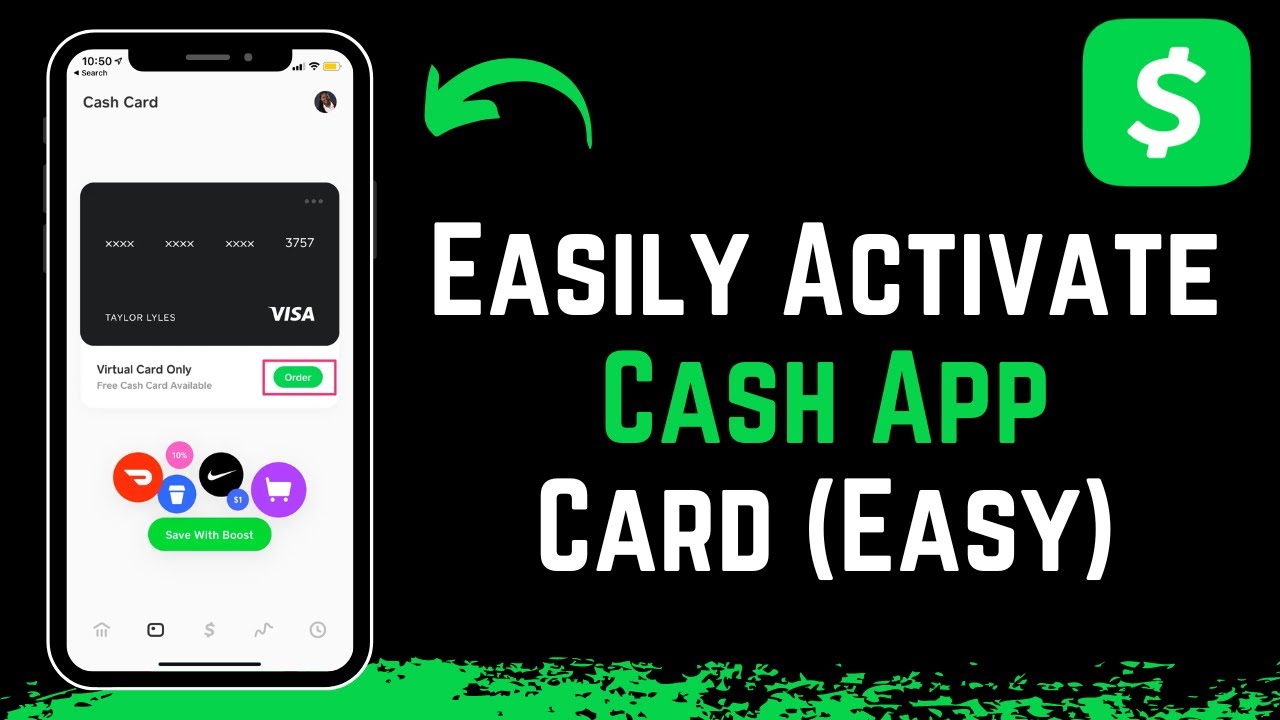
By following these simple steps, you’ll have successfully initiated the process of acquiring a valuable financial tool that will enhance your digital spending capabilities and control over your personal finances.
Activating and Maximizing Your Cash App Card
Receiving your Cash App Card is just the beginning. To harness its full potential as a financial management tool, proper activation and strategic integration into your spending habits are key. This section guides you through bringing your card to life and using it to its utmost advantage.
Simple Activation Steps
Once your physical Cash App Card arrives in the mail, activating it is a quick and essential step before you can begin using it for transactions.
- Locate the QR Code: The card typically comes attached to a paper sleeve that contains a QR code. Open your Cash App.
- Navigate to the Card Tab: Tap the “Card” icon on the bottom navigation bar in the Cash App.
- Activate Cash Card: Look for an option like “Activate Cash Card” or “Activate Card.” Tapping this will usually prompt you to use your phone’s camera.
- Scan the QR Code: Position your phone’s camera over the QR code on the card’s packaging. The app will automatically scan it.
- Enter CVV and Expiration Date (if prompted): In some cases, or if scanning fails, Cash App might ask you to manually enter the CVV (Card Verification Value) and the expiration date found on the back of your card.
- Set a PIN: You will then be prompted to set a Personal Identification Number (PIN). Choose a secure PIN that you can easily remember but is difficult for others to guess. This PIN will be required for ATM withdrawals and certain in-store purchases.
Once these steps are completed, your Cash App Card is officially activated and ready for use. You’ll receive an in-app confirmation message.
Funding Your Card and Daily Use
With your card activated, the next step is to ensure it’s funded and to understand how to use it effectively in your daily financial life.
- Funding Your Card: Your Cash App Card draws directly from your Cash App balance. To add money to your balance, you can:
- Link a Bank Account: Transfer funds from a linked bank account directly to your Cash App.
- Direct Deposit: Set up your employer to direct deposit your paycheck directly into your Cash App account using your unique routing and account numbers.
- Receive Payments: Accept peer-to-peer payments from other Cash App users.
- Deposit Cash: Use a participating retailer to deposit physical cash into your Cash App balance.
- Making Purchases: Use your Cash App Card like any other Visa debit card. Swipe, insert, or tap for in-store purchases, or enter your card details for online shopping. When prompted, enter your PIN for debit transactions.
- ATM Withdrawals: Find an ATM that accepts Visa cards. Insert your card, enter your PIN, and select “Withdrawal” from your “Checking” account. Remember that while Cash App offers fee reimbursements for certain users, out-of-network ATM fees may still apply initially.
Integrating with Your Personal Finance Strategy
The Cash App Card isn’t just for spending; it can be a strategic component of your overall personal finance plan.
- Budgeting Tool: By having a separate balance for your Cash App Card, you can allocate specific funds for discretionary spending, groceries, or entertainment. This helps prevent dipping into other savings or investment accounts, enforcing stricter budgeting. The real-time transaction history in the app provides an excellent overview of your spending patterns.
- Emergency Fund Access: While not ideal for long-term savings, having a portion of an emergency fund accessible via your Cash App Card can provide quick liquidity for unexpected, smaller expenses without having to go through traditional bank transfers.
- Subscription Management: Use your Cash App Card for specific subscriptions. If you need to cut back, pausing or managing the card in the app can prevent unauthorized charges more easily than updating multiple billing details.
- Savings Goals Integration: Some users might transfer specific amounts to their Cash App purely for a particular savings goal (e.g., a vacation fund) and then use the card to spend from that allocated budget.
- Direct Deposit Benefits: Leveraging the early direct deposit feature can provide a buffer, allowing you to pay bills earlier or manage your cash flow more proactively, potentially avoiding late fees and improving your financial well-being.
By thoughtfully integrating the Cash App Card into these aspects of your financial life, you transform it from a simple payment method into a dynamic tool that supports your personal finance goals.
Security, Support, and Responsible Card Use
While the Cash App Card offers immense convenience and flexibility for managing personal finances, responsible use and awareness of security features are paramount. Understanding how to protect your card and what to do if issues arise ensures a seamless and secure experience.
Safeguarding Your Funds
Cash App employs various security measures to protect your account and funds, but user vigilance is equally crucial.
- PIN Protection: Your Personal Identification Number (PIN) is your primary defense against unauthorized use of your physical card. Never share your PIN with anyone, and avoid writing it down in an easily accessible place. When entering your PIN at an ATM or point-of-sale terminal, shield the keypad to prevent “shoulder surfing.”
- In-App Card Lock: One of the most powerful security features of the Cash App Card is the ability to instantly lock it directly from the app. If you misplace your card, suspect unauthorized activity, or simply want to prevent spending, you can tap the “Card” tab in the app and toggle the “Enable Cash Card” off. This immediately disables the card, preventing any transactions until you enable it again. This feature offers peace of mind and immediate control over your funds.
- Instant Notifications: Enable push notifications for all transactions. This allows you to monitor your spending in real-time and quickly identify any suspicious activity, enabling you to take immediate action.
- Fraud Prevention: Cash App has sophisticated fraud detection systems in place. However, be wary of phishing scams, suspicious emails, or messages asking for your account details or PIN. Cash App will never ask for your PIN via email or phone. If you suspect fraud, report it immediately through the app.
- Secure Online Shopping: When using your Cash App Card for online purchases, ensure you are buying from reputable websites that use secure encryption (look for “https://” in the URL and a padlock icon).
- Reporting Lost or Stolen Cards: If your Cash App Card is lost or stolen, immediately lock it via the app. Then, report it lost or stolen within the app to order a replacement. This ensures your funds are protected and a new card is on its way.
Troubleshooting Common Issues
Even with careful use, you might encounter issues. Knowing how to address them can save time and frustration.
- Declined Transactions: If your card is declined, check your Cash App balance first to ensure you have sufficient funds. Also, verify that the card is not locked in the app. Sometimes, a temporary merchant issue or an incorrect PIN entry can also cause declines. Ensure you’re using the correct PIN.
- Delivery Delays: If your card hasn’t arrived within the estimated 10 business days, first verify your shipping address in the app. If the address is correct and the delay is significant, contact Cash App Support for assistance in tracking or reordering your card.
- Unrecognized Transactions: If you see a charge on your Cash App Card statement that you don’t recognize, immediately lock your card in the app and contact Cash App Support to report the fraudulent activity. Provide as much detail as possible to help them investigate.
- ATM Issues: If an ATM doesn’t dispense cash or has an error, first check your Cash App balance to see if the withdrawal was processed. If funds were debited but no cash was received, gather any transaction receipts and contact both the ATM operator and Cash App Support.
Contacting Cash App Support
For any issues that you cannot resolve independently through the app’s FAQ or self-help sections, Cash App’s customer support is available.
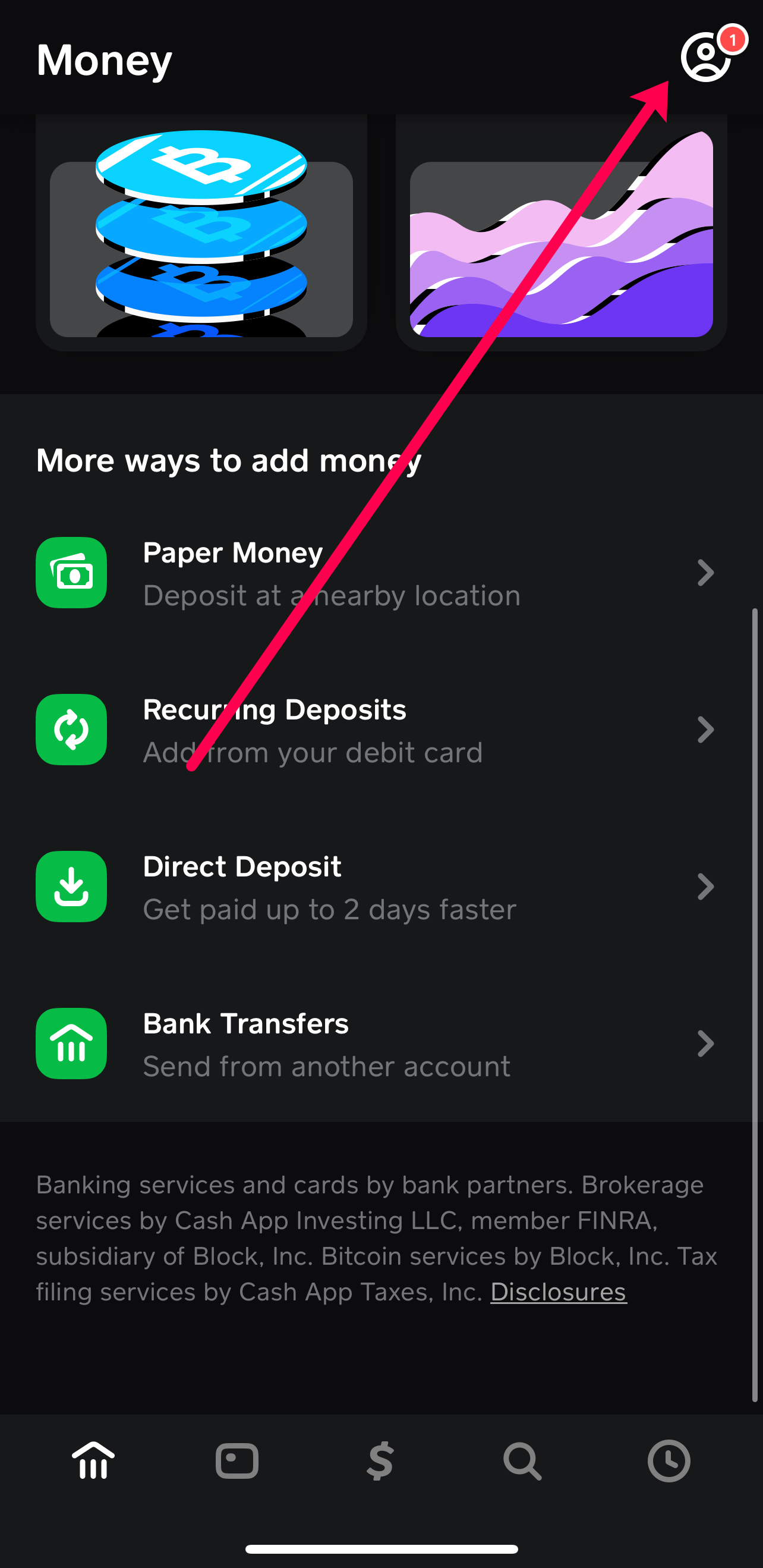
- In-App Support: This is the most recommended and secure way to contact support. From the main Cash App screen, tap the profile icon (top right corner), scroll down, and tap “Support.” Follow the prompts to describe your issue and initiate a chat or email request.
- Website Support: You can also visit Cash App’s official support website for comprehensive FAQs and options to submit a support request.
- Phone Support (Limited): While Cash App primarily relies on in-app and email support, they may offer limited phone support for specific, critical issues. Be extremely cautious of unofficial phone numbers online, as scams are prevalent. Always verify the number through the official Cash App website or app.
By being proactive about security, understanding common troubleshooting steps, and knowing how to access support, you can ensure a smooth, secure, and highly effective experience with your Cash App Card as a vital component of your personal financial management.
The Cash App Card offers a tangible link between your digital funds and the tangible world of commerce, empowering you with greater control over your spending and real-time access to your money. By following the straightforward ordering process, understanding its activation, and utilizing its features responsibly, you can transform it into an indispensable tool for managing your personal finances. From budgeting and direct deposits to secure transactions and immediate fund access, the Cash App Card is designed to meet the demands of modern digital spending, making it a compelling choice for anyone seeking efficiency and insight in their financial journey.
aViewFromTheCave is a participant in the Amazon Services LLC Associates Program, an affiliate advertising program designed to provide a means for sites to earn advertising fees by advertising and linking to Amazon.com. Amazon, the Amazon logo, AmazonSupply, and the AmazonSupply logo are trademarks of Amazon.com, Inc. or its affiliates. As an Amazon Associate we earn affiliate commissions from qualifying purchases.