
In the evolving landscape of digital finance, mobile payment applications like Cash App have become indispensable tools for managing funds. Far more than just platforms for sending and receiving money, these apps integrate a suite of functionalities designed to provide users with unprecedented control over their finances. For many, the ability to effortlessly move digital funds into tangible cash remains a critical feature. This guide delves into the technical intricacies and user-friendly processes of withdrawing cash from your Cash App account, ensuring you can access your money whenever and wherever you need it, all while adhering to best practices in digital security and app functionality.

The Digital Wallet Revolution: Understanding Cash App’s Core Functionality
The rise of mobile payment platforms has fundamentally reshaped how individuals interact with their money. Cash App, developed by Block, Inc., stands at the forefront of this revolution, offering a streamlined, intuitive interface that simplifies transactions. Understanding its foundational technology is key to leveraging its full potential, especially when it comes to accessing your funds outside the digital realm.
The Role of Mobile Payment Platforms
Mobile payment platforms serve as digital wallets, linking directly to users’ bank accounts, debit cards, or even holding funds independently within the app ecosystem. They facilitate a range of financial activities, from peer-to-peer transfers and bill payments to investing in stocks and Bitcoin. The underlying technology typically involves robust encryption protocols, secure server architecture, and user authentication layers to protect sensitive financial information. These platforms leverage the ubiquity of smartphones to provide instant access to financial services, bypassing traditional banking hours and sometimes even certain fees. Their design prioritizes user experience, aiming for seamless navigation and swift transaction processing, powered by complex backend systems and APIs that integrate with financial institutions.
Why Cash App Stands Out
Cash App distinguishes itself through its simplicity, speed, and integrated features. Its minimalistic user interface makes it accessible even for tech novices, while its ‘Cashtag’ system (a unique identifier for receiving payments) enhances its social peer-to-peer functionality. From a technological standpoint, Cash App’s infrastructure is built for rapid processing, allowing transfers to complete in moments, a stark contrast to the longer clearing times often associated with traditional bank transfers. Beyond basic transfers, the app offers a custom debit card (the Cash Card), direct deposit capabilities, and options for investing, all managed within a single, cohesive application environment. This comprehensive approach, combined with a strong emphasis on user-friendly design and robust security features, positions Cash App as a pivotal tool in personal digital finance management. Understanding these core technological tenets is crucial for anyone looking to efficiently withdraw cash from their balance.
Navigating Your Funds: Primary Withdrawal Methods
Cash App offers two primary, technically distinct methods for withdrawing your funds: direct transfer to a linked bank account and ATM withdrawals using the Cash Card. Each method leverages different technological pathways and offers varying degrees of speed and convenience, tailored to different user needs and circumstances.
Direct Transfer to a Linked Bank Account
The most common and often preferred method for withdrawing funds from Cash App is by transferring them directly to a linked bank account. This process effectively moves your digital balance within the Cash App ecosystem back into your traditional banking infrastructure.
Step-by-Step Guide for Bank Transfers
The process for initiating a bank transfer is designed to be straightforward, reflecting Cash App’s commitment to user-centric design:
- Open the Cash App: Launch the application on your mobile device. Ensure you are logged in to your account.
- Navigate to the Banking Tab: Tap the “Banking” tab, often represented by a house icon or dollar sign, on the bottom left of your screen. This section displays your current Cash App balance.
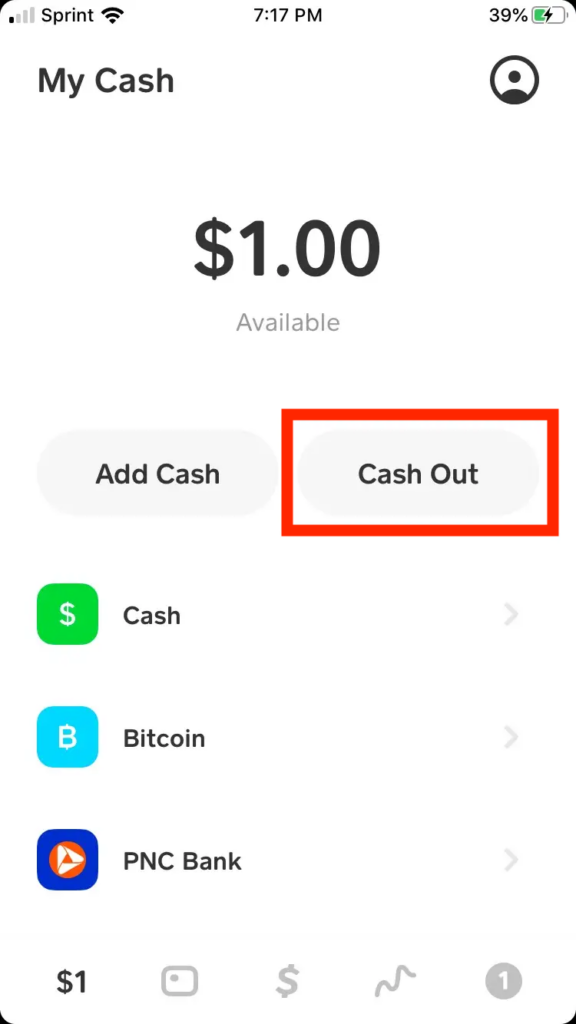
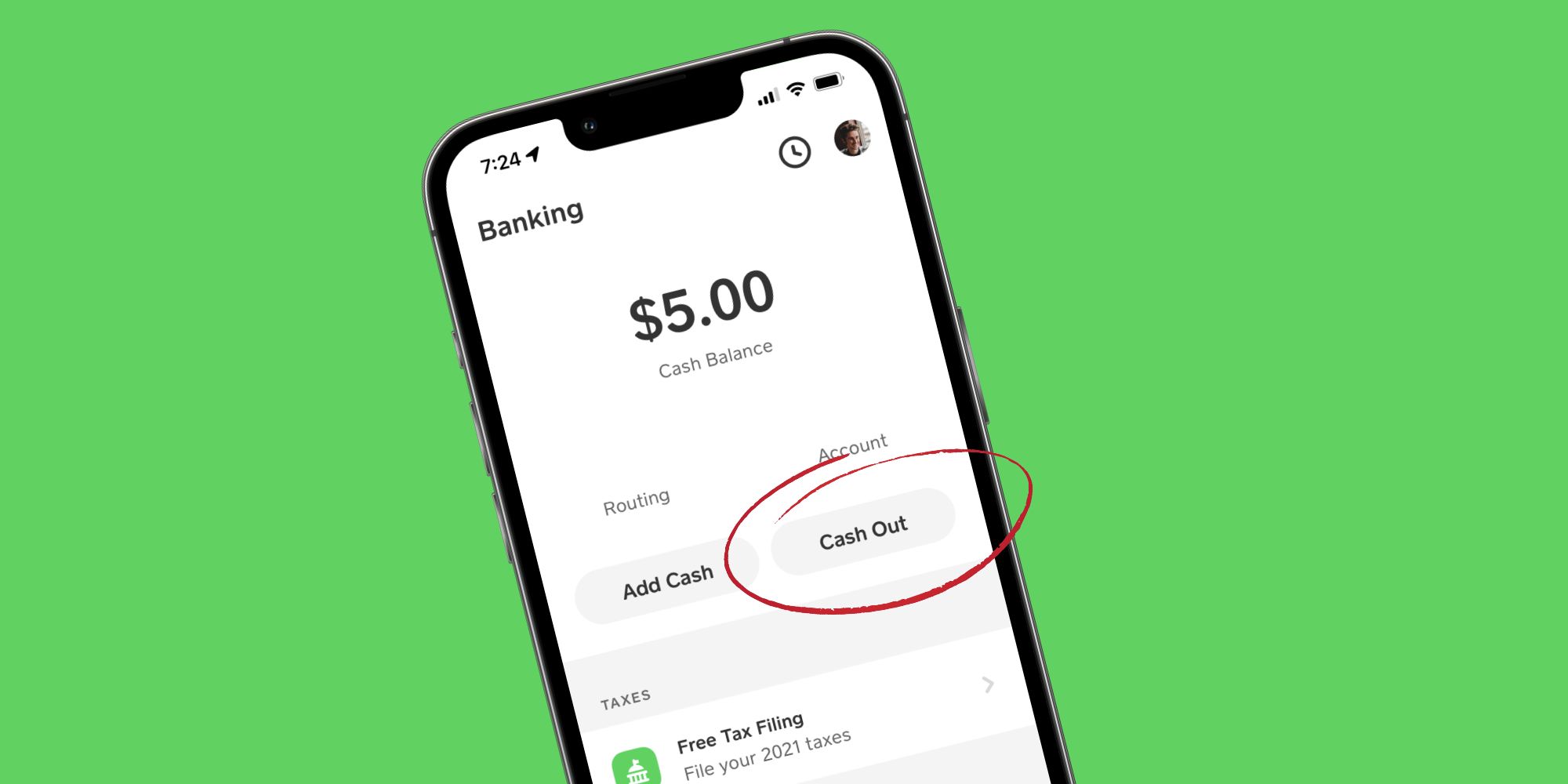
- Select “Cash Out”: Within the Banking tab, you will see your balance and an option labeled “Cash Out.” Tap this to begin the withdrawal process.
- Enter the Amount: Input the specific amount you wish to transfer from your Cash App balance to your linked bank account. You can choose to “Cash Out” your entire balance or a partial amount.
- Choose Transfer Speed: Cash App typically offers two options for transfers:
- Standard Deposit: This is usually a free service, but funds may take 1-3 business days to appear in your bank account. This option utilizes standard ACH transfer protocols.
- Instant Deposit: For immediate access to your funds, you can select the Instant Deposit option. Be aware that Cash App charges a small fee (typically 0.5% to 1.75% of the transaction) for this expedited service. This rapid transfer leverages faster payment network technologies, often bypassing the standard ACH clearing house wait times.
- Confirm the Transfer: Review the details of your transfer, including the amount and the selected transfer speed. Once confirmed, tap the “Confirm” button. The funds will then be processed according to your chosen speed.
Understanding Transfer Speeds and Options
The choice between Standard and Instant Deposit is a critical technical and financial decision. Standard deposits rely on the Automated Clearing House (ACH) network, a batch-processing system that clears transactions over a few business days. This method is cost-effective but not time-sensitive. Instant deposits, on the other hand, often leverage real-time payment networks or direct card processing technologies, allowing funds to be available within minutes. The fee associated with Instant Deposits covers the cost of using these faster, more resource-intensive payment rails. Users should consider their urgency and the associated cost when making this selection.
Utilizing the Cash Card for ATM Withdrawals
For those who prefer physical cash or need immediate access without bank transfer delays, the Cash Card offers a direct route to ATM withdrawals. The Cash Card functions as a traditional debit card, but it is directly linked to your Cash App balance.
Activating and Managing Your Cash Card
Before you can use your Cash Card at an ATM, it must be activated and managed within the Cash App itself:
- Order the Card: If you don’t already have one, you can order a physical Cash Card directly from the Cash App’s “Cash Card” tab. The customization options for the card are a unique technological feature, allowing users to personalize their card design.
- Activate the Card: Once received, the card must be activated within the app. This involves scanning the QR code on the card packaging or manually entering the CVV and expiration date. This digital activation process securely links the physical card to your Cash App account.
- PIN Management: You will also set a unique PIN for your Cash Card within the app. This PIN is crucial for ATM transactions and point-of-sale purchases, providing an essential layer of security. The app encrypts and securely stores this PIN information.
ATM Access: Locating Compatible Machines
The Cash Card is a Visa debit card, meaning it is accepted at most ATMs that display the Visa or Plus network logo.
- ATM Networks: This broad compatibility is a significant advantage, as Visa is one of the largest payment networks globally.
- Fee-Free ATMs: While Cash App does not charge a fee for ATM withdrawals if you have direct deposit enabled (and meet certain criteria, such as receiving at least $300 in direct deposits monthly), the ATM operator itself might impose a surcharge. Cash App provides a feature within the app to help users locate nearby fee-free ATMs, leveraging location services and a database of compatible ATM machines. This geo-location functionality is a core technological benefit, guiding users to cost-effective withdrawal points.
Optimizing Your Withdrawals: Fees, Limits, and Best Practices
Understanding the technical parameters, such as fees and limits, and adhering to best practices for security are crucial for an efficient and secure cash withdrawal experience from Cash App. These elements are designed to manage the flow of funds and protect users within the digital finance ecosystem.
Decoding Withdrawal Fees and How to Minimize Them
Fees are an integral part of most financial transactions, and Cash App withdrawals are no exception. From a technological perspective, these fees often cover the operational costs of faster payment networks, infrastructure maintenance, and fraud prevention measures.
- Instant Deposit Fee: As mentioned, Instant Deposits to a linked bank account typically incur a fee of 0.5% to 1.75% of the transaction amount. This fee pays for the instant processing through accelerated payment rails.
- ATM Withdrawal Fees: If you use your Cash Card at an ATM, Cash App itself does not charge a fee for the withdrawal if you have qualified for fee-free ATM withdrawals (e.g., by receiving at least $300 in direct deposits per month). However, the ATM operator may charge their own surcharge.
- Minimizing Fees: To avoid Instant Deposit fees, plan your withdrawals in advance and opt for the Standard Deposit option. To minimize ATM fees, utilize Cash App’s in-app ATM locator feature to find participating fee-free ATMs. This functionality taps into a dynamic database to provide real-time information on ATM availability and associated charges, enabling users to make informed, cost-effective decisions.
Navigating Daily and Weekly Withdrawal Limits
Cash App implements specific withdrawal limits for both security and regulatory compliance purposes. These limits are a technological control mechanism designed to mitigate fraud and adhere to anti-money laundering (AML) regulations.
- Bank Transfer Limits: While Cash App’s typical cash out limit to a bank account can be quite high (e.g., up to $25,000 per week for verified accounts), these limits can vary based on account verification status and usage history. Unverified accounts typically have much lower limits.
- ATM Withdrawal Limits: Cash Card ATM withdrawals usually have a daily limit (e.g., $310) and a weekly limit (e.g., $1,000) and sometimes even a per-transaction limit. These limits are generally lower than bank transfer limits due to the higher risk associated with physical cash transactions.
- Verification and Limits: To increase your withdrawal limits, Cash App requires account verification, which typically involves providing your full legal name, date of birth, and the last four digits of your Social Security Number. This verification process enhances the digital identity of the user, allowing Cash App to comply with “Know Your Customer” (KYC) regulations and thereby increase transaction thresholds based on a verified risk profile. Users should check the most current limits directly within the app’s support section, as these figures can be subject to change based on evolving security protocols and regulatory mandates.
Enhancing Digital Security During Transactions
Security is paramount in digital finance. Cash App employs multiple layers of technological security, but user vigilance is equally important, especially when withdrawing funds.
- Strong Passwords/PINs: Always use a unique, strong PIN for your Cash Card and enable a robust passcode, Face ID, or Touch ID for accessing the Cash App itself. These are your primary digital defenses against unauthorized access.
- Two-Factor Authentication (2FA): Enable 2FA for your Cash App account. This adds an extra layer of security by requiring a code from a second device (like your phone) in addition to your password, significantly reducing the risk of unauthorized account access even if your password is compromised.
- Be Wary of Phishing: Cash App will never ask for your sign-in code, PIN, or other sensitive information outside the app. Be skeptical of unsolicited emails or messages, as phishing attempts are a common form of digital attack.
- Secure Wi-Fi: When performing transactions, especially withdrawals, always use a secure, private Wi-Fi network or your mobile data. Avoid public Wi-Fi networks, which can be vulnerable to interception.
- Monitor Activity: Regularly review your Cash App activity and bank statements for any suspicious transactions. Cash App provides detailed transaction histories within the app, allowing for quick identification of unauthorized activity.
These measures, combined with Cash App’s internal fraud detection algorithms and encryption technologies, create a robust security posture for managing and withdrawing your funds.
Troubleshooting and Advanced Tips for Seamless Access
Even with sophisticated technology, issues can arise. Understanding common troubleshooting steps and adopting advanced usage tips can significantly enhance your experience when withdrawing cash from Cash App.
Common Withdrawal Issues and Their Solutions
Encountering a snag during a withdrawal is frustrating, but many common problems have straightforward technical solutions.
- Transfer Delay or Failure: If a standard bank transfer is taking longer than expected or fails, first check your linked bank account details within Cash App to ensure they are correct. Sometimes, a bank’s internal processing delays can also be a factor. For instant transfers, a failed transaction might be due to insufficient funds or a temporary network glitch. In such cases, re-attempting the transfer or contacting Cash App support with the transaction ID (a unique digital identifier for each transaction) is advisable.
- ATM Card Not Working: If your Cash Card is rejected at an ATM, ensure it is activated and you have sufficient funds in your Cash App balance. Verify your PIN is correct. Sometimes, a specific ATM may be out of service or have temporary issues. Try a different ATM, especially one from a different banking network. If the problem persists, the physical card might be damaged, or there could be a block on your account, necessitating contact with Cash App support.
- Exceeding Limits: If a withdrawal fails due to exceeding limits, remember your daily/weekly ceilings for both bank transfers and ATM withdrawals. Reduce the withdrawal amount or wait until the next withdrawal period. For higher limits, ensure your account is fully verified.
- Security Holds: Occasionally, Cash App’s automated fraud detection systems may place a temporary hold on a transaction if it seems unusual or high-risk. This is a security protocol to protect your funds. If this occurs, you will typically receive an in-app notification or email from Cash App explaining the hold and providing steps for verification, which often involves confirming recent activity.
Pro Tips for Efficient Cash App Usage
Maximizing your Cash App experience, particularly for withdrawals, involves a few strategic approaches.
- Link Multiple Bank Accounts: For greater flexibility and to bypass single-bank issues, consider linking more than one bank account to your Cash App. This provides alternative routes for cashing out.
- Utilize Direct Deposit for Perks: Enabling direct deposit to your Cash App account not only offers faster access to your paycheck but can also unlock benefits like fee-free ATM withdrawals, enhancing the overall utility and cost-effectiveness of the app.
- Automate Savings: While not directly withdrawal-related, Cash App allows you to set up automatic savings. By regularly moving small amounts into savings, you can build a buffer, reducing the urgency for immediate withdrawals and potentially avoiding instant transfer fees.
- Stay Updated: Regularly update your Cash App to the latest version. Updates often include performance enhancements, new features, and critical security patches that improve functionality and protect your account. The development team continuously refines the app’s algorithms and interface based on user feedback and emerging security threats.
- Leverage In-App Support: Cash App’s in-app support is a robust resource for troubleshooting. It features extensive FAQs, guides, and direct contact options, including chat and email support. Using these resources effectively can often resolve issues without lengthy waits.
The Future of Digital Cash Access and Cash App’s Evolution
The landscape of digital finance is constantly evolving, driven by technological advancements and changing consumer demands. Cash App, like other leading platforms, is not static; it continuously adapts, integrating new features and refining existing ones to meet the needs of its user base.
Integrating New Technologies for Financial Freedom
The future of withdrawing cash from platforms like Cash App will likely see deeper integration of emerging technologies. Expect to see continued advancements in real-time payment systems, potentially leading to even faster and more cost-effective instant transfers that become the norm rather than a premium service. Blockchain technology, while already incorporated for Bitcoin transactions within Cash App, could see broader application in reducing transaction costs and increasing transparency for other types of transfers. Furthermore, enhanced AI and machine learning algorithms will play an even greater role in fraud detection, making transactions safer and more seamless while reducing the need for manual security checks. Innovations in biometric security, such as advanced facial recognition and fingerprint scanning, will likely become more prevalent, offering even more secure and convenient ways to authorize withdrawals.
The Ongoing Importance of User Experience and Security
Despite technological advancements, the core principles of user experience (UX) and security will remain paramount. Cash App’s continued success hinges on its ability to maintain an intuitive interface that simplifies complex financial operations, ensuring that accessing funds remains straightforward for all users, regardless of their tech proficiency. Simultaneously, as cyber threats become more sophisticated, Cash App and similar platforms will need to continually invest in state-of-the-art encryption, robust authentication protocols, and proactive threat detection systems. The balance between ease of use and uncompromised security will be a constant challenge and a key differentiator in the competitive digital finance market. As Cash App evolves, it will undoubtedly introduce new features and methods for cash access, further empowering users with greater financial control and flexibility within a secure and technologically advanced ecosystem.
aViewFromTheCave is a participant in the Amazon Services LLC Associates Program, an affiliate advertising program designed to provide a means for sites to earn advertising fees by advertising and linking to Amazon.com. Amazon, the Amazon logo, AmazonSupply, and the AmazonSupply logo are trademarks of Amazon.com, Inc. or its affiliates. As an Amazon Associate we earn affiliate commissions from qualifying purchases.