
In the era of 4K OLED displays and high-refresh-rate gaming monitors, we often take the seamless clarity of digital video for granted. However, beneath the surface of modern media lies a complex history of broadcast engineering and signal processing. One of the most critical, yet frequently misunderstood, processes in this domain is “deinterlacing.” Whether you are a video editor, a home cinema enthusiast, or someone digitizing old family tapes, understanding deinterlacing is essential for ensuring visual fidelity and eliminating distracting artifacts.
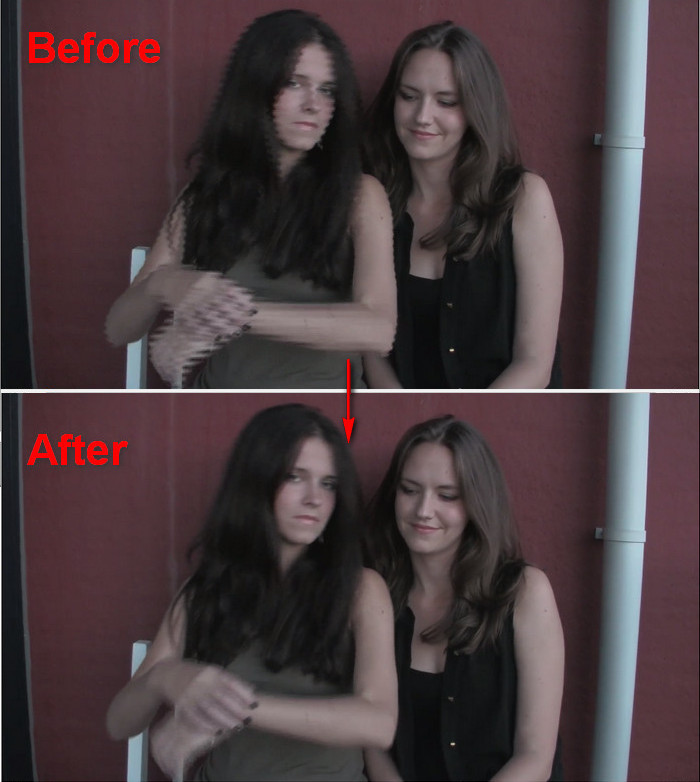
Deinterlacing is the technical process of converting interlaced video—a format where each frame is split into alternating sets of lines—into a progressive scan format, where every frame is a complete image. To understand why this is necessary, we must first look at how video technology evolved and why the “interlaced” format was created in the first place.
The Fundamentals of Interlaced vs. Progressive Video
To grasp the concept of deinterlacing, one must understand the two primary ways video frames are displayed: interlaced scan and progressive scan. These methods represent the evolution of how moving images are transmitted and rendered on a screen.
The Legacy of Interlaced Video
Interlacing was a clever engineering workaround born in the early days of analog television. In the mid-20th century, broadcast bandwidth was extremely limited. Engineers wanted to provide a smooth perception of motion (high frame rate) without exceeding the narrow frequency ranges available for television signals.
Their solution was interlacing. Instead of sending 30 full frames per second, they sent 60 “fields” per second. Each field contained only half the lines of a full frame—one field containing the odd-numbered lines and the next containing the even-numbered lines. Because the phosphors on old Cathode Ray Tube (CRT) televisions stayed lit for a short duration and the human eye possesses “persistence of vision,” the two fields would blur together to create the illusion of a single, fluid image.
How Interlacing Works: Even and Odd Fields
In an interlaced signal (often denoted with an “i,” such as 1080i), a single frame is divided into two fields. Field A consists of lines 1, 3, 5, 7, and so on, while Field B consists of lines 2, 4, 6, 8, and so forth. These fields are captured at slightly different points in time. For example, in a 60i signal, Field B is captured 1/60th of a second after Field A.
On a CRT monitor, this works perfectly because the electron gun draws these lines sequentially in real-time. However, when these two distinct points in time are combined into a single static frame on a digital display, the temporal difference between the odd and even lines becomes visible, leading to visual errors.
The Transition to Progressive Scanning
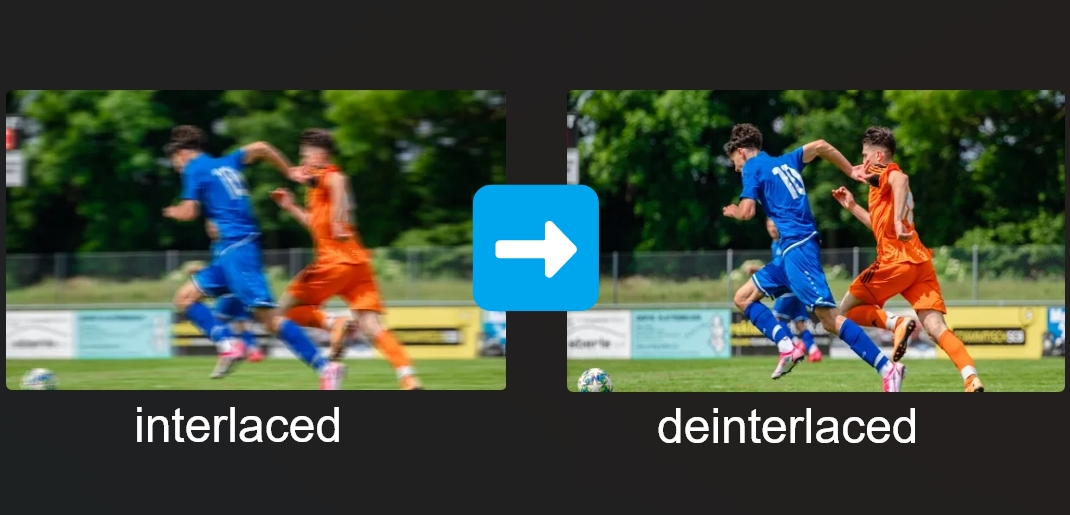
Modern displays—including LCDs, LEDs, and OLEDs—operate on progressive scanning (denoted with a “p,” such as 1080p). Unlike CRTs, these screens refresh the entire image across the whole screen simultaneously for every frame. When an interlaced signal is fed into a progressive display without processing, the screen attempts to show both Field A and Field B at the same time. Because the objects in the video may have moved during the 1/60th of a second between the fields, the resulting image appears “torn” or “jagged.” This is why deinterlacing is mandatory for modern tech environments.
Why Deinterlacing Matters in the Modern Tech Landscape
While interlaced broadcasting is becoming a relic of the past, we still interact with interlaced content daily. Cable television, legacy DVDs, and older camcorder footage often utilize interlaced formats. Without effective deinterlacing, the viewing experience is significantly degraded.
Identifying “Combing” and Ghosting Artifacts
The most prominent visual issue caused by failed or absent deinterlacing is known as “combing” or “feathering.” When an object moves quickly across the screen in an interlaced video, its position in the “odd” field is different from its position in the “even” field. On a progressive monitor, this results in horizontal serrated edges that look like the teeth of a comb.
Beyond combing, poor deinterlacing can result in “ghosting” or “motion blur,” where the software struggles to reconcile the two fields, creating a hazy or double-image effect. For professional video editors and archivists, these artifacts are unacceptable, as they obscure detail and cause eye strain for the viewer.
The Compatibility Challenge: CRTs vs. Modern Displays
The fundamental problem is hardware incompatibility. A CRT monitor is inherently an interlaced device; it doesn’t need to deinterlace because it draws the fields exactly as they were captured. Modern digital displays, however, are discrete pixel-based systems. They require a full map of pixels for every refresh cycle.
As we move toward higher resolutions like 4K and 8K, the imperfections of interlaced content become even more apparent. Upscaling an interlaced 480i or 1080i signal to a 4K panel magnifies every combing artifact, making a high-quality deinterlacing algorithm a vital component of the “scaling” pipeline in smart TVs and media players.
Technical Methods of Deinterlacing
Deinterlacing is not a single process but a variety of algorithmic approaches, ranging from simple mathematical averages to complex spatial analysis. Each method offers a different balance between processing power and visual quality.
Spatial Deinterlacing (Intra-field)
Spatial deinterlacing, often referred to as “line doubling” or “bobbing,” looks at a single field in isolation. To create a full frame, the algorithm takes the existing lines and interpolates the missing data. For example, it might look at line 1 and line 3 to guess what line 2 should look like.
The advantage of this method is that it eliminates combing entirely because it never tries to combine two different points in time. However, the disadvantage is a significant loss in vertical resolution. The image can appear “shaky” or “soft” because half of the original vertical detail is missing, and the edges of objects may appear to “bob” up and down.
Temporal Deinterlacing (Inter-field)
Temporal deinterlacing, or “weaving,” takes the opposite approach. It takes Field A and Field B and simply “weaves” them together to create a full frame. If the scene is completely static—such as a photograph or a slow-moving landscape—weaving produces a perfect, full-resolution image.
However, the moment there is motion, weaving produces the dreaded combing artifacts. Therefore, simple weaving is rarely used alone in modern software; it is typically reserved for scenes with zero movement.
Motion-Adaptive and Motion-Compensated Deinterlacing
The most sophisticated traditional methods are motion-adaptive and motion-compensated deinterlacing.
- Motion-Adaptive Deinterlacing: The processor analyzes the video on a pixel-by-pixel basis. If it detects motion in a specific area, it applies a “bob” (spatial) filter to that area to prevent combing. If the area is still, it applies a “weave” (temporal) filter to preserve maximum resolution.
- Motion-Compensated Deinterlacing: This is the “holy grail” of traditional processing. It uses advanced mathematics to predict where a group of pixels has moved between Field A and Field B. It then shifts the pixels to align them before merging the fields. While this produces the best results, it requires immense computational power and is prone to “hallucinating” strange artifacts if the motion prediction fails.
The Role of AI and Machine Learning in Video Restoration
As we enter the age of Artificial Intelligence, the limitations of traditional deinterlacing are being surpassed. AI-driven tools are revolutionizing how we handle legacy media, turning jagged, low-quality interlaced footage into crisp, progressive masterpieces.
AI Upscaling and Neural Deinterlacing
Traditional deinterlacing algorithms follow fixed mathematical rules. Neural networks, however, are trained on millions of frames of high-quality video. When an AI model encounters an interlaced frame, it doesn’t just “guess” the missing lines; it “reconstructs” them based on its learned understanding of textures, edges, and human faces.
AI deinterlacers, such as those found in specialized video enhancement software, can effectively distinguish between noise and actual detail. They can fill in the gaps of an interlaced signal while simultaneously upscaling the resolution and reducing compression artifacts. This “intelligent” approach results in video that often looks better than the original broadcast intended.
Real-World Applications in Archival and Streaming
The tech industry is heavily investing in these AI tools for archival purposes. News organizations and film studios are sitting on decades of interlaced tape (BetaSP, Digital Betacam, DVCAM). By applying AI deinterlacing, they can breathe new life into historical footage, making it suitable for modern documentaries and streaming platforms like Netflix or YouTube, which strictly require progressive content.
Furthermore, streaming services use real-time deinterlacing on the server side to ensure that when a user watches a live sports broadcast (often still captured in 1080i), the video delivered to their smartphone or smart TV is a clean 1080p or 4K signal.
Best Practices for Software and Hardware Deinterlacing
Whether you are watching video or producing it, knowing which tools to use can make a significant difference in the final result.
Choosing the Right Software Tools
For consumers, media players like VLC Media Player offer several deinterlacing options. Users can choose between “YADIF” (Yet Another Deinterlacing Filter), which is an excellent motion-adaptive filter, or “Discard,” which is a simple bob. For those digitizing media, tools like Handbrake provide robust deinterlacing and “de-comb” filters that only activate when interlacing is detected, preserving the quality of progressive sections.
In the professional world, Adobe Premiere Pro and DaVinci Resolve handle deinterlacing during the export phase. High-end editors often use third-party plugins that utilize optical flow technology to ensure that the transition from interlaced fields to progressive frames is imperceptible to the audience.

Hardware Deinterlacing in GPUs and Smart TVs
Most of the deinterlacing we experience happens automatically in our hardware. Modern NVIDIA and AMD Graphics Processing Units (GPUs) have dedicated hardware blocks for video decoding and post-processing, which include high-quality deinterlacers.
Similarly, the “Image Processor” inside a high-end Smart TV (like Sony’s XR Processor or LG’s Alpha series) is designed specifically to handle interlaced cable signals. These processors perform real-time analysis to remove combing and noise before the image ever reaches the panel. When shopping for a display, the quality of its internal processing engine is just as important as the panel type, as it determines how well the TV handles “messy” legacy signals.
In conclusion, while the world has largely moved to progressive scanning, deinterlacing remains a vital bridge between the analog past and the digital future. By understanding the mechanics of fields, the pitfalls of combing, and the power of AI reconstruction, we can ensure that our visual media remains sharp, fluid, and immersive, regardless of the technology used to capture it.
aViewFromTheCave is a participant in the Amazon Services LLC Associates Program, an affiliate advertising program designed to provide a means for sites to earn advertising fees by advertising and linking to Amazon.com. Amazon, the Amazon logo, AmazonSupply, and the AmazonSupply logo are trademarks of Amazon.com, Inc. or its affiliates. As an Amazon Associate we earn affiliate commissions from qualifying purchases.