
The seemingly simple question, “What finger is supposed to type ‘c’?” belies a deeper exploration into the foundational skill of touch typing, a cornerstone of our digital existence. While the immediate answer for a standard QWERTY keyboard user is the left middle finger, this specific keystroke is merely an entry point into a vast landscape of productivity, professional branding, and financial potential. In an era dominated by screens and keyboards, mastering efficient typing transcends mere speed; it’s about optimizing workflow, enhancing communication, safeguarding digital security, and ultimately, building a more effective personal and professional life. This article will delve into the mechanics of touch typing, demonstrating how this seemingly basic skill intertwines with technology, personal branding, and even our financial well-being, reflecting the core tenets of modern digital living.
The Foundation of Digital Dexterity: Mastering the QWERTY Layout
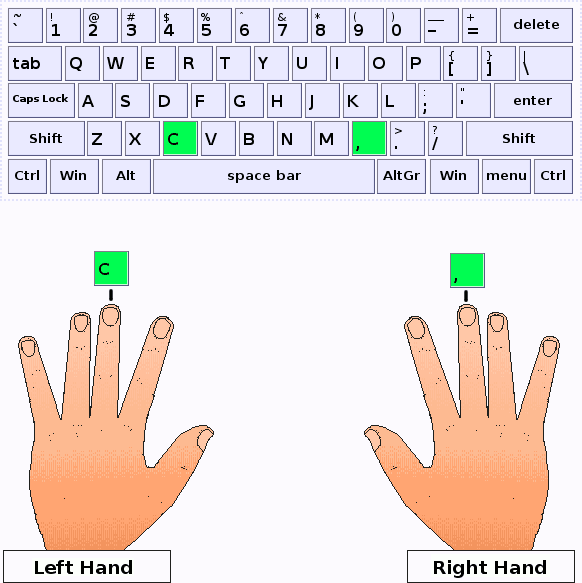
At its core, touch typing is about muscle memory, not sight. It’s the ability to type without looking at the keyboard, relying on the tactile sensation of key placement and the consistent assignment of fingers to specific zones. The ‘C’ key, positioned centrally in the lower row, falls naturally within the domain of the left middle finger for most standard QWERTY layouts, part of a meticulously designed system intended to maximize efficiency and minimize strain.
Understanding the Home Row and Finger Placement
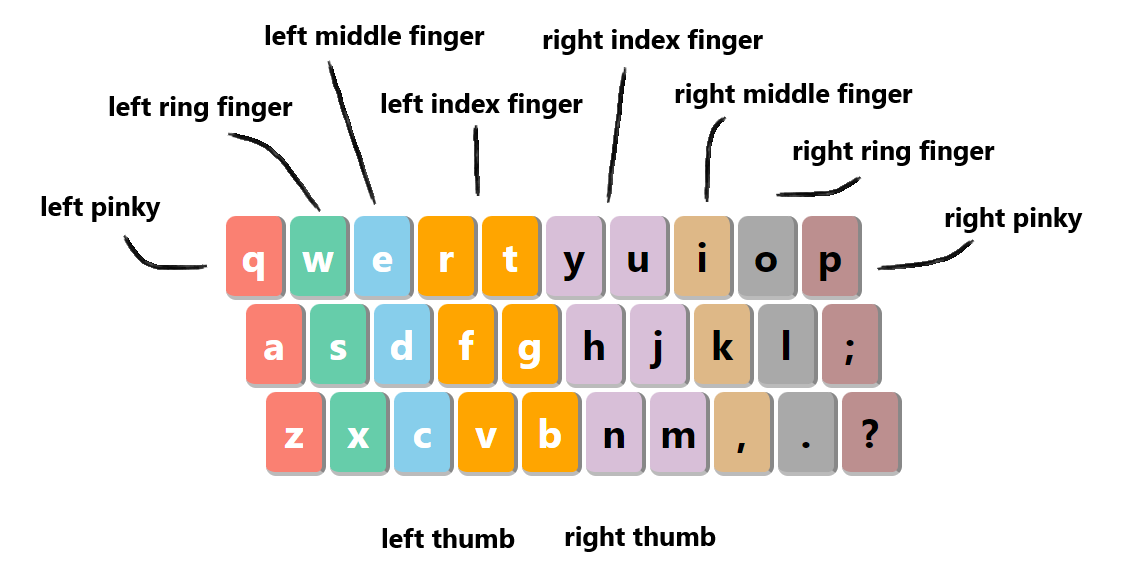
The secret to touch typing lies in the home row: ASDF for the left hand and JKL; for the right. These keys often have small raised bumps (on the F and J keys) that allow typists to orient their fingers without looking. From these anchor points, each finger is responsible for a specific set of keys.
- Left Hand:
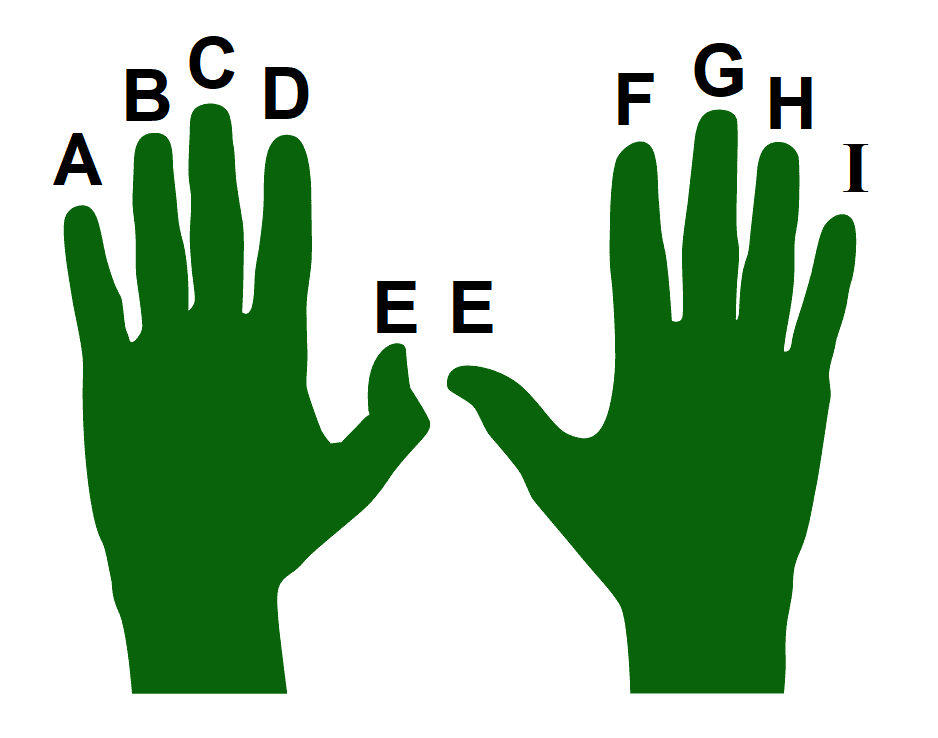
- Pinky (A finger): Q, A, Z, 1, !, Tab, Shift, Ctrl, Caps Lock.
- Ring (S finger): W, S, X, 2, @.
- Middle (D finger): E, D, C, 3, #. (This is where our ‘C’ lives!)
- Index (F finger): R, T, F, G, V, B, 4, 5, $, %.
- Thumb: Spacebar.
- Right Hand:
- Index (J finger): Y, U, H, J, N, M, 6, 7, ^, &.
- Middle (K finger): I, K, <, 8, *.
- Ring (L finger): O, L, >, 9, (.
- Pinky (; finger): P, :, ?, “, [, ], {, }, |, , Enter, Backspace, Shift, Ctrl.
- Thumb: Spacebar.
This systematic assignment ensures that each finger travels the shortest possible distance to reach its designated keys, reducing hand movement and improving speed and accuracy. The ‘C’ key’s placement under the left middle finger is not arbitrary; it’s part of an integrated system designed for fluidity and rhythm. By consistently returning to the home row after each keystroke, typists build the muscle memory necessary for rapid, error-free input.
The Ergonomics of Typing: Comfort and Efficiency
Beyond just finger placement, the physical act of typing significantly impacts comfort, health, and sustained productivity. Ergonomics, the science of designing the workplace to fit the user, plays a critical role in preventing repetitive strain injuries (RSIs) and maximizing output.
- Posture: Sitting upright with back supported, feet flat on the floor, and arms relaxed at the sides. Shoulders should be relaxed, not hunched.
- Wrist Position: Wrists should be straight, not bent up or down, and ideally, not resting on the desk or a wrist rest while typing (only during breaks). A good wrist rest can be beneficial for resting, but not for active typing.
- Keyboard and Mouse Placement: Keyboard should be directly in front of you, at a comfortable height that allows your elbows to be at a 90-degree angle. The mouse should be close to the keyboard to minimize reaching.
- Monitor Height: The top of your screen should be at or slightly below eye level, about an arm’s length away, to prevent neck strain.
Investing in an ergonomic setup, from adjustable chairs to ergonomic keyboards (split, tented, or mechanical with specific switch types), can significantly enhance typing comfort and longevity. This attention to detail isn’t just about avoiding pain; it’s about enabling sustained focus and productivity, directly impacting how effectively one can engage with various tech tools and tasks throughout the day. Neglecting ergonomics can lead to discomfort, decreased efficiency, and potential health issues, underscoring the importance of a holistic approach to digital work.
Beyond the “C” Key: Typing Speed as a Productivity Powerhouse
In today’s fast-paced digital landscape, typing is more than just data entry; it’s the primary interface with technology. From composing emails to coding software, generating reports to engaging with AI tools, the speed and accuracy of your typing directly correlate with your overall productivity and efficiency. Mastering touch typing transforms the keyboard from a barrier into a direct extension of your thoughts, a powerful tool for accelerating digital workflows.
Software and Tools for Typing Mastery
The journey to typing mastery is often supported by a plethora of digital tools, ranging from simple tutorials to sophisticated AI-powered feedback systems. These resources make learning engaging and effective:
- Typing Tutors: Websites and desktop applications like Keybr.com, TypingClub, Ratatype, or Mavis Beacon Teaches Typing provide structured lessons, drills, and progress tracking. They guide users from basic home row practice to complex word and sentence exercises, gradually increasing speed and accuracy. Many offer gamified experiences, turning practice into an enjoyable challenge.
- Online Typing Tests: Regular testing on platforms like 10FastFingers or TypingTest.com helps benchmark progress, identify weaknesses, and motivate continuous improvement.
- Specialized Keyboards and Gadgets: For those serious about optimizing their typing experience, the market offers a wide array of specialized keyboards. Mechanical keyboards, with their distinct tactile feedback and actuation points, can improve typing feel and potentially speed. Ergonomic keyboards, split designs, or even ortholinear layouts aim to reduce strain and customize the typing experience further. Reviews of these gadgets often highlight how the right hardware can complement software training to achieve peak performance.
- AI-Enhanced Tools: While AI can transcribe speech to text, proficient typing remains crucial for editing, coding, and interacting with AI models (e.g., prompt engineering). AI-powered typing analysis tools are emerging, offering personalized feedback on finger usage, common errors, and areas for improvement, taking typing instruction to a new level.
These tools, combined with consistent practice, can dramatically improve a typist’s words per minute (WPM) and reduce error rates, turning a chore into a seamless interaction with technology.
The Link Between Typing Fluency and Digital Workflow
A high WPM rate isn’t just a bragging right; it’s a tangible asset that streamlines nearly every digital task.
- Faster Document Creation: Whether writing reports, crafting articles, or drafting presentations, fluent typing minimizes the time spent on transcription, allowing more focus on content generation and critical thinking.
- Efficient Communication: Responding to emails, participating in chat groups, or engaging on social media becomes quicker and more fluid. This reduces communication lag, which is vital in fast-paced work environments.
- Coding and Development: Programmers often cite typing speed as a significant factor in their productivity. Less time spent hunting for keys means more time dedicated to problem-solving and writing clean code.
- Data Entry and Analysis: In roles requiring significant data input, fast and accurate typing is directly tied to efficiency and error reduction, saving time and preventing costly mistakes.
- Seamless Multitasking: The ability to quickly type notes during a virtual meeting while simultaneously listening and processing information allows for more comprehensive record-keeping and better retention.
By minimizing the cognitive load associated with the physical act of typing, fluency frees up mental resources for higher-level tasks, directly boosting individual and team productivity across various technological platforms and applications.
Typing as a Pillar of Professionalism and Personal Brand
In an increasingly digital-first world, how you communicate online significantly shapes your professional image and personal brand. Typing proficiency isn’t just a technical skill; it’s a foundational element of effective digital communication, reflecting attention to detail, efficiency, and professionalism. From flawless emails to agile participation in online discussions, your typing ability subtly yet powerfully conveys your competence and reliability.
First Impressions in the Digital Age
Just as a firm handshake once defined professionalism, crisp, error-free digital communication now sets the standard. Your typing skills directly contribute to this crucial first impression:
- Error-Free Communication: Typos and grammatical errors, often a byproduct of slow or inaccurate typing, can detract from the credibility of your message, making you appear careless or unprofessional. Fluent typists can proofread more effectively, catching mistakes before they reach the recipient. This is critical for everything from client proposals to internal memos.
- Speed and Responsiveness: In a world that values instant gratification, quick and articulate responses are highly valued. Whether it’s an email, a chat message, or a comment on a collaborative document, the ability to rapidly compose a thoughtful reply demonstrates attentiveness and efficiency. This responsiveness can enhance your reputation as a reliable and proactive professional.
- Professionalism in Online Meetings: During virtual conferences or webinars, the ability to type notes quickly and unobtrusively can demonstrate engagement and organization. If you’re contributing to a live chat or Q&A, your swift and accurate input reinforces your professionalism.
- Personal Branding through Content Creation: For anyone engaging in content creation—blogging, social media management, or digital marketing—fluent typing is indispensable. It allows for the rapid articulation of ideas, translating thoughts into compelling digital content without the friction of a slow keyboard. A personal brand built on insightful, well-articulated content relies heavily on the efficiency of its creation.
Ultimately, strong typing skills contribute to a polished digital presence, positioning you as a meticulous, efficient, and capable professional in any online interaction.
Corporate Identity and Operational Efficiency
Beyond individual branding, collective typing proficiency within an organization contributes significantly to its overall corporate identity and operational efficiency.
- Streamlined Internal Communications: When employees can communicate quickly and accurately, internal workflows accelerate. Projects move faster, decisions are made more promptly, and misunderstandings due to unclear messages are reduced. This creates a more dynamic and responsive organizational culture.
- Faster Report Generation and Proposal Writing: Companies rely on timely reports and compelling proposals. Teams with proficient typing skills can generate these critical documents more quickly, freeing up valuable time for strategic thinking, research, and revision, rather than basic data input.
- Enhanced Customer Service: Customer support roles, whether through chat, email, or ticketing systems, demand rapid and accurate responses. Typing fluency enables customer service representatives to address inquiries efficiently, leading to higher customer satisfaction and a stronger brand reputation.
- Agile Digital Presence: From managing social media campaigns to updating website content, a company’s digital presence is constantly evolving. Teams capable of swift and accurate typing can maintain a more dynamic and responsive online identity, keeping pace with market demands and audience engagement.
- Reduced Administrative Overheads: Administrative tasks, such as data entry, scheduling, and document management, become less time-consuming when performed by proficient typists. This reduction in overhead allows employees to focus on higher-value activities that directly contribute to the company’s bottom line.
By investing in and encouraging strong typing skills across its workforce, an organization cultivates an image of efficiency, professionalism, and forward-thinking, enhancing its corporate identity in a competitive marketplace.
Unleashing Earning Potential: Typing Skills in the Modern Economy
In an economy increasingly driven by information and digital interaction, typing skills are no longer just an administrative asset; they are a direct pathway to earning potential. From remote work opportunities and side hustles to career advancement and increased hourly productivity, the ability to type quickly and accurately can significantly impact one’s financial standing. It’s an investment in a fundamental skill that pays dividends across a multitude of industries and roles.
Online Income and Side Hustles Powered by Typing
The gig economy and the rise of remote work have amplified the value of strong typing skills, making them a cornerstone for various online income streams and side hustles:
- Content Writing and Blogging: Freelance writers, bloggers, and copywriters rely heavily on efficient typing to produce high-volume, high-quality content. Faster typing means more articles, more clients, and ultimately, more income. The friction of slow typing can hinder the flow of ideas and reduce output.
- Transcription Services: Transcribing audio or video content into text is a popular side hustle. Platforms like Rev or GoTranscript pay per audio minute, making speed and accuracy paramount for maximizing earnings. Fast typists can complete more projects in less time, directly boosting their income.
- Virtual Assistant Roles: Virtual assistants (VAs) handle a wide range of administrative, technical, or creative tasks for clients remotely. Many of these tasks—scheduling, email management, data entry, document preparation—require excellent typing skills for efficiency and professionalism.
- Data Entry and Annotation: Companies frequently need data input or annotation services for various projects, including training AI models. These tasks often require high volumes of accurate typing, and individuals with superior WPM rates are more competitive and productive.
- Coding and Web Development: While problem-solving is central to coding, the actual act of writing code involves a significant amount of typing. Faster coders can translate their logical solutions into functional code more quickly, enhancing their value to employers or clients.
- Customer Service and Chat Support: Many modern customer service roles are chat-based. The ability to type quick, clear, and empathetic responses directly impacts customer satisfaction and the agent’s efficiency, often a key performance indicator.
For those looking to generate online income or explore side hustles, honing typing skills is a practical, accessible investment that directly translates into more opportunities and higher earning capacity.
Financial Returns on Keyboard Proficiency
Beyond specific online jobs, general typing proficiency offers broad financial benefits across almost any career path:
- Increased Hourly Productivity: In salaried positions, a more efficient typist can accomplish more tasks in less time. This increased productivity makes an individual more valuable to their employer, potentially leading to better performance reviews, promotions, and higher salaries. If paid hourly, faster work directly increases earnings.
- Reduced Errors in Financial Data Input: For roles involving financial tools, accounting software, or data analysis, accurate typing is crucial. Mistakes can lead to significant financial discrepancies, costing companies time and money. Proficient typists minimize these risks, safeguarding financial integrity and demonstrating reliability.
- Faster Market Research and Financial Analysis: Professionals in finance, marketing, or research frequently input queries, analyze data, and compile reports. The ability to quickly navigate databases, enter search terms, and document findings accelerates the entire research process, leading to more timely insights and strategic decisions.
- Investment in Yourself as a Valuable Asset: Viewing typing skills as a personal investment parallels investing in financial tools or education. It’s a fundamental skill that underpins almost all digital work, making you a more versatile and capable employee or entrepreneur. This continuous self-improvement can open doors to higher-paying roles that demand efficiency and digital fluency.
- Access to Remote Work and Global Opportunities: Many high-paying remote positions prioritize candidates who can work independently and efficiently. Strong typing skills are a prerequisite for many such roles, expanding job market access beyond local geographical constraints.
In essence, the small effort invested in mastering the ‘C’ key and its brethren on the keyboard culminates in a significant advantage in the competitive job market and a tangible boost to one’s financial well-being. It transforms a basic computer interaction into a powerful economic lever.
Conclusion
From the seemingly mundane question of which finger types ‘C’ to the profound impact of digital dexterity, the journey through touch typing reveals a skill far more critical than often perceived. We’ve explored how the systematic assignment of the left middle finger for ‘C’ is part of an ergonomic design that underpins efficient interaction with technology. This foundational skill, when honed, becomes a powerful productivity tool, streamlining workflows and enhancing engagement with modern software, gadgets, and AI.
Beyond mere efficiency, superior typing skills are a cornerstone of professional and personal branding, enabling clear, concise, and timely communication that leaves a lasting positive impression. In a world where digital presence is paramount, the ability to articulate thoughts rapidly and accurately reinforces one’s competence and reliability.
Finally, in an economy increasingly reliant on digital output, typing proficiency is a direct catalyst for earning potential. It unlocks opportunities in online income, side hustles, and career advancement, translating directly into financial returns. Investing time in typing mastery is not just about moving fingers across a keyboard; it’s about investing in a skill that empowers digital mastery, fosters professional excellence, and paves the way for greater financial opportunity in our interconnected world. The humble ‘C’ key, therefore, represents much more than a letter; it symbolizes a gateway to unlocking our full potential in the digital age.
aViewFromTheCave is a participant in the Amazon Services LLC Associates Program, an affiliate advertising program designed to provide a means for sites to earn advertising fees by advertising and linking to Amazon.com. Amazon, the Amazon logo, AmazonSupply, and the AmazonSupply logo are trademarks of Amazon.com, Inc. or its affiliates. As an Amazon Associate we earn affiliate commissions from qualifying purchases.