
Navigating the digital landscape of peer-to-peer payment apps can be incredibly convenient, but it also introduces unique challenges. One such common predicament is needing to cancel a payment that has already been sent through Cash App. While the immediacy of these transactions is a major selling point, it can also create a sense of urgency and mild panic when a mistake is made or circumstances change. This guide aims to demystify the process of canceling a Cash App payment, providing you with clear, actionable steps and an understanding of the factors that influence your ability to retrieve funds. We will delve into the nuances of pending versus completed transactions, the role of recipient cooperation, and the official avenues available through Cash App support.
Understanding Cash App Payment Status: The Key to Cancellation
The ability to cancel a Cash App payment hinges almost entirely on its current status within the app’s system. Cash App, like many financial platforms, operates with different processing stages for transactions, and understanding these stages is paramount to determining your options.
Pending Payments: Your Best Chance for a Swift Resolution
When you send a payment on Cash App, it doesn’t always become instantly irreversible. For a short period, or in specific circumstances, a payment might be held in a “pending” state. This is your prime opportunity to intervene and cancel the transaction.
Identifying a Pending Payment
A payment is typically considered pending if:
- The recipient has not yet accepted it: If the person you sent money to doesn’t have a Cash App account, or if they haven’t logged in and accepted the payment within a certain timeframe (usually a few days), the funds will eventually be returned to you.
- Cash App is reviewing the transaction: In cases of unusual activity, high-value transactions, or potential fraud detection, Cash App may place a payment under review. During this period, it’s considered pending.
- You are sending to an external bank account: If you’ve linked your Cash App to a bank account and are sending funds in a way that requires external processing, there might be a brief pending period before it’s finalized.
The Simple Steps to Cancel a Pending Payment
If you identify a payment as pending, the cancellation process is usually straightforward:
- Open the Cash App: Launch the application on your mobile device.
- Navigate to your Activity Tab: Tap on the clock icon, typically located in the bottom right corner of the screen. This will display your transaction history.
- Locate the Pending Payment: Scroll through your activity feed to find the specific payment you wish to cancel.
- Tap on the Transaction: Select the pending payment to view its details.
- Look for the “Cancel” or “Delete” Option: If the payment is still in a cancellable state, you should see an option prominently displayed to cancel or delete the transaction.
- Confirm Your Action: Cash App will likely ask you to confirm your decision. Tap to confirm, and the payment should be canceled. The funds will then be returned to your Cash App balance or your linked bank account, depending on how you funded the original payment.
Important Note: The “Cancel” button will only appear if the payment is truly pending and eligible for cancellation directly through the app. If you don’t see this option, it’s a strong indicator that the payment has already been processed.
Completed Payments: A More Complex Scenario
Once a payment has been successfully processed and delivered to the recipient’s Cash App account, it becomes significantly more challenging, and often impossible, to cancel directly through the app. This is because the money has effectively left your control and entered the recipient’s account.
Why Completed Payments Are Difficult to Reverse
The core principle here is finality. When a payment is marked as “completed” in Cash App, it means the funds have been transferred and are available to the recipient. Attempting to unilaterally reverse a completed transaction would undermine the reliability and security of the platform for all users. Imagine the chaos if any sender could simply recall funds at will!
The Role of Recipient Cooperation
For completed payments, the only reliable way to get your money back is through direct communication and cooperation with the recipient.
-
Contact the Recipient Directly: The first and most crucial step is to reach out to the person or business you sent the money to. Explain your situation clearly and politely.
- Mistake in Amount: You sent the wrong amount (e.g., $50 instead of $5).
- Sent to the Wrong Person: You accidentally sent the payment to the incorrect Cash App username or phone number.
- Duplicate Payment: You accidentally sent the same payment twice.
- Service Not Rendered/Product Not Received: If the payment was for a good or service that you ultimately did not receive.
-
Request a Refund: Ask the recipient if they would be willing to send the money back to you. Most legitimate users will understand and comply, especially if it was a genuine mistake.
- Sending a Refund via Cash App: The recipient can simply send a new payment to your Cash App username for the correct amount, or for the full amount if they are refunding a mistaken payment.
- Partial Refunds: If the issue was with an incorrect amount, they can send you a partial refund.
-
Be Patient and Polite: Remember that the recipient is not obligated to refund you. Approaching them with respect and understanding will significantly increase your chances of a positive outcome.
Pro-Tip: If you’re sending money to someone you don’t know well, consider asking them to send you a small “test” payment first, or confirm their Cashtag multiple times before sending a larger sum.
When Direct Cancellation Isn’t Possible: Engaging Cash App Support

If you’ve exhausted efforts to contact the recipient, or if the recipient is unresponsive or unwilling to cooperate, you may need to escalate the issue to Cash App support. This is typically reserved for situations where you believe fraud or a significant error has occurred.
Situations Warranting Cash App Support Involvement
Cash App support can be a valuable resource, but it’s important to understand when they can and cannot intervene. Their primary role is to protect users from fraud and ensure the integrity of the platform.
- Unrecognized Transactions: If you find a payment that you did not authorize or make, this is a clear indication of potential unauthorized access or fraud.
- Payments Sent to a Scammer: If you’ve been the victim of a scam where you sent money to someone who promised something they didn’t deliver, and they are now unreachable or refusing to refund you.
- Duplicate Charges from Cash App: In rare cases, you might experience a technical glitch resulting in duplicate charges from Cash App itself.
- Recipient Account Issues: If the recipient’s account has been disabled or compromised, making it impossible for them to receive or return funds.
How to Contact Cash App Support for Payment Issues
Cash App primarily offers in-app support to manage these types of inquiries.
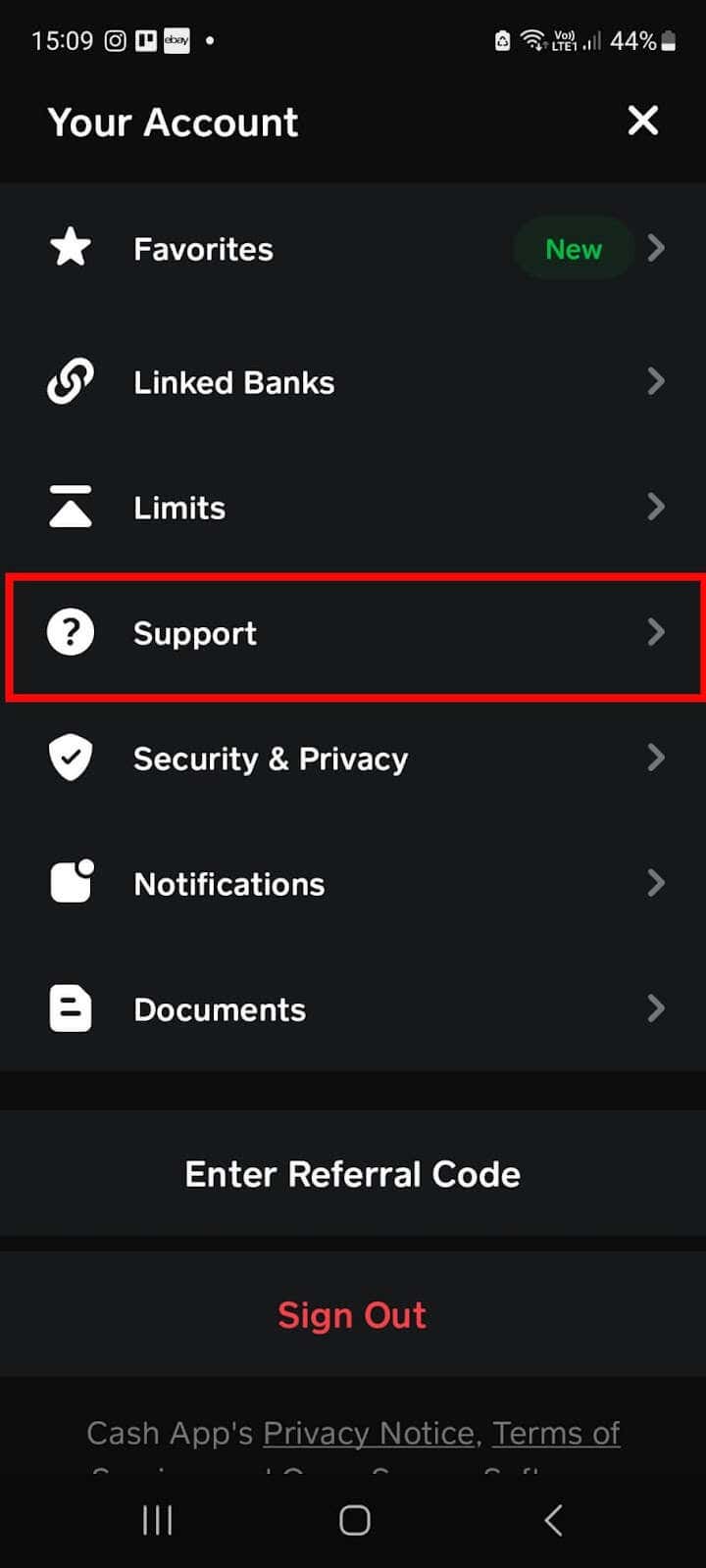
- Access the Cash App Menu: From the main Cash App screen, tap on your profile icon (usually in the top right corner).
- Select “Support”: Scroll down and tap on the “Support” option.
- Choose “Cash Support”: This will open a direct chat interface with a Cash App support representative.
- Describe Your Issue Clearly: Be as detailed as possible when explaining your situation. Include:
- The amount of the payment.
- The date and time of the transaction.
- The recipient’s Cashtag (if known).
- Any communication you’ve had with the recipient.
- Why you believe the payment should be canceled or refunded.
- Provide Necessary Documentation: Cash App may ask for screenshots of your transaction history, communication with the recipient, or other relevant evidence.
- Follow Their Instructions: The support team will guide you through their dispute resolution process. This may involve an investigation into the transaction.
Important Considerations for Support Cases:
- Investigation Time: Cash App investigations can take time. Be patient as they gather information.
- Outcome is Not Guaranteed: While Cash App aims to resolve issues fairly, they may not always be able to reverse a completed transaction, especially if it cannot be definitively proven as fraudulent or an error on their part. Their decision will be based on their terms of service and investigation findings.
- Focus on Fraudulent Activity: Cash App support is most effective in cases of outright fraud or unauthorized use of your account. For simple buyer’s remorse or minor errors where the recipient is willing to cooperate, direct communication is usually faster and more efficient.
Preventing Future Payment Mishaps: Best Practices for Cash App Users
The best way to deal with canceling a Cash App payment is to avoid the situation altogether. Implementing a few preventative measures can save you a significant amount of time, stress, and potential financial loss.
Verifying Recipient Information Thoroughly
The vast majority of payment errors stem from simple mistakes in identifying the correct recipient.
- Double-Check Cashtags: Always, always double-check the Cashtag (username), phone number, or email address you are sending money to. A single misplaced letter or number can send your funds to the wrong person.
- Confirm with the Recipient: If you are sending money to someone new or for a significant amount, it’s good practice to confirm their Cashtag with them directly before sending. You can even ask them to verify their Cashtag by showing it to you on their app.
- Utilize the “Scan QR Code” Feature: For in-person transactions, using the QR code feature in Cash App is a highly accurate way to ensure you’re sending money to the right person or business.
Understanding Transaction Limits and Fees
While Cash App is generally free for most standard transactions, understanding its limits and potential fees can prevent unexpected issues.
- Weekly and Monthly Limits: Be aware of Cash App’s transaction limits. Exceeding these limits might trigger additional verification steps or prevent transactions, leading to confusion.
- Instant Deposit Fees: If you opt for instant deposits of funds into your bank account from Cash App, there’s usually a small fee. Make sure you are aware of this if you are managing your money closely.
- Business Accounts: If you are using Cash App for business purposes, be mindful of any specific fees or terms associated with business accounts.
Utilizing the “Request” Feature for Clarity
Instead of initiating a payment directly, consider using the “Request” feature when appropriate.
- Confirming the Amount: If you’re unsure of the exact amount owed, you can request the precise sum from the recipient. This ensures you’re both on the same page before any funds are transferred.
- Reducing Accidental Overpayments: By requesting, you’re prompted to enter the amount, reducing the chance of typing in an incorrect figure.

Educating Yourself on Scams
The digital payment landscape, unfortunately, attracts scammers. Being informed is your best defense.
- Be Wary of Unsolicited Offers: If an offer seems too good to be true, it probably is. Avoid sending money to unknown individuals who promise improbable returns or services.
- Never Share Your PIN or Password: Cash App will never ask for your PIN or password via email or text.
- Report Suspicious Activity: If you encounter a suspicious user or a potential scam, report it to Cash App support immediately.
By adopting these preventative measures, you can significantly minimize the risk of needing to cancel a Cash App payment and ensure a smoother, more secure experience with your digital transactions. Remember that while the app offers convenience, user vigilance remains the most critical component of financial safety.
aViewFromTheCave is a participant in the Amazon Services LLC Associates Program, an affiliate advertising program designed to provide a means for sites to earn advertising fees by advertising and linking to Amazon.com. Amazon, the Amazon logo, AmazonSupply, and the AmazonSupply logo are trademarks of Amazon.com, Inc. or its affiliates. As an Amazon Associate we earn affiliate commissions from qualifying purchases.