
The ACT Math section can be a formidable challenge, requiring not only a solid grasp of mathematical concepts but also strategic test-taking skills. Central to this strategy is the intelligent use of a calculator. Far from being a mere number-crunching device, the right calculator, properly utilized, can be a powerful technological ally, streamlining calculations, visualizing complex functions, and saving precious time. However, the ACT, like most standardized tests, imposes strict regulations on the types of calculators permitted, designed to ensure fairness and prevent any unfair advantage. For any aspiring college student, understanding these rules is not just about compliance; it’s a critical component of their overall test preparation strategy, ensuring that their chosen piece of tech is an asset, not a liability.
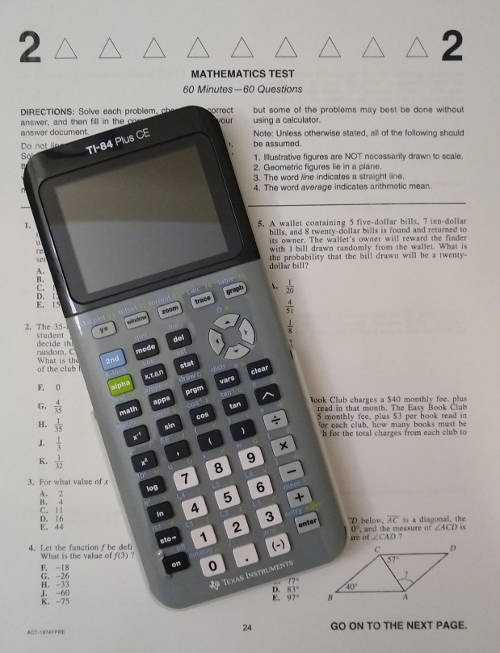
This comprehensive guide delves into the technological specifics of ACT calculator policies, offering insights into what’s allowed, what’s strictly prohibited, and how to best leverage your approved device. We’ll explore not just the “what” but also the “how” and “why” behind these regulations, empowering test-takers to make informed decisions about their tech tools and integrate them seamlessly into their path to success.
Navigating the ACT Calculator Policy: Essential Tech Compliance
The ACT’s calculator policy is designed to create a level playing field, ensuring that every student has access to similar technological assistance without undermining the integrity of the test. Disregarding these rules, even inadvertently, can lead to the confiscation of your calculator or, worse, dismissal from the test center. Therefore, meticulous adherence to the guidelines is non-negotiable.
The Core Rule: What’s Generally Permitted
The vast majority of calculators, including standard four-function, scientific, and most graphing calculators, are typically allowed. The underlying principle is to permit devices that perform standard mathematical operations and graphing capabilities without offering unfair computational or information storage advantages.
- Four-function calculators: These are the simplest, performing addition, subtraction, multiplication, and division. While allowed, their limited functionality often makes them less practical for the diverse range of problems found on the ACT Math section.
- Scientific calculators: These advanced devices build upon four-function capabilities by adding trigonometric functions (sine, cosine, tangent), logarithms, exponents, roots, and sometimes basic statistical functions. They are a significant step up in utility for the ACT and are widely permitted.
- Graphing calculators: These are the most powerful and popular choice among ACT test-takers. They include all scientific calculator functions plus the ability to plot graphs of equations, solve systems of equations graphically, perform matrix operations, and handle more complex statistical analyses. Common examples that are almost always allowed include:
- Texas Instruments (TI) Series: TI-83, TI-83 Plus, TI-84 Plus, TI-84 Plus CE, TI-86, TI-Nspire (non-CAS version).
- Casio Series: Casio FX-9750GII, Casio FX-CG50.
- Hewlett-Packard (HP) Series: HP 48GII, HP Prime.
- Sharp Series: Sharp EL-9600.
The key takeaway is that if your calculator performs standard mathematical and graphing functions and doesn’t possess capabilities that could store or transmit information in an unfair manner, it’s likely approved.
Absolute Prohibitions: Devices to Avoid
While the list of allowed calculators is extensive, the list of prohibited devices is equally critical. These are pieces of technology that the ACT has explicitly banned due to their potential to offer an unfair advantage or disrupt the testing environment.
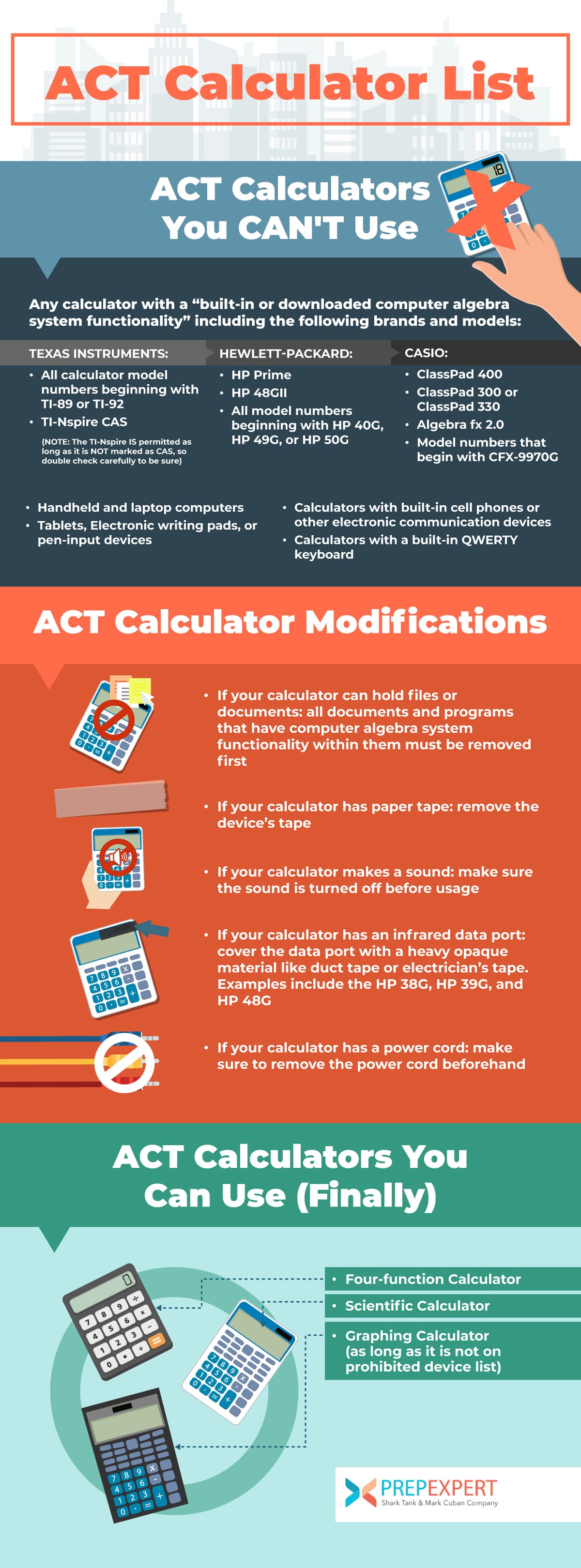
- Calculators with computer-algebra system (CAS) functionality: These calculators can perform symbolic algebra, differentiating and integrating expressions, simplifying complex algebraic equations, and even solving equations with variables. Examples include the TI-89, TI-92, TI-Nspire CAS, HP 48GII (older versions, newer ones are fine), and HP Prime (CAS-enabled mode). The ACT views CAS as providing too much computational power, potentially allowing students to bypass the need for conceptual understanding.
- Calculators with QWERTY keypads: Any calculator resembling a computer keyboard is prohibited. This includes devices like the TI-92 Plus and the Voyage 200. The rationale is to prevent devices that could potentially be used for word processing or external communication, which are not relevant to the math test.
- Electronic communication devices: This is a broad category that explicitly bans cell phones, smartphones, smartwatches (e.g., Apple Watch, Fitbit, Garmin), tablets, laptops, portable media players (iPods), cameras, and any other device with internet access, recording, or communication capabilities. These are seen as potential tools for cheating, information storage, or distraction.
- Calculators with paperless message displays (e.g., stylus/pen input): Devices that allow for electronic jotting or messaging are disallowed to prevent unauthorized communication or information retrieval.
- Calculators that make noise, have external power, or require an outlet: The testing environment demands silence and self-sufficiency. Calculators that beep, require an AC adapter, or connect to a wall outlet are therefore prohibited.
- Calculators with pre-stored test information or camera functions: Any device that could potentially store or transmit exam content, or take photos of it, is strictly forbidden. This also includes any programs pre-loaded onto a calculator that contain specific test questions or solutions.
Gray Areas and Discretion: When in Doubt
Even with clear guidelines, some devices might fall into a “gray area,” or an individual test administrator might interpret the rules strictly. In such cases, the test administrator’s decision is final. To avoid any last-minute stress or complications:
- Always check the official ACT website: Policies can occasionally be updated. The most current and authoritative source is the ACT’s own website.
- Have a backup plan: If you have an advanced calculator that might be questioned, consider bringing a simpler, undeniably allowed scientific calculator as a backup.
- If you’re unsure about a specific model, contact ACT: Before test day, reach out to ACT customer service for clarification.
Leveraging Technology: Optimizing Your Allowed Calculator
Once you’ve confirmed your calculator is allowed, the next step is to master its capabilities. An approved calculator is only a true advantage if you know how to wield it effectively. This goes beyond basic arithmetic and delves into the strategic use of its advanced features.
Beyond Basic Arithmetic: Advanced Functions for the ACT
Modern scientific and graphing calculators are packed with powerful functions that can significantly aid in solving ACT Math problems. Familiarity with these features is a crucial aspect of tech readiness.
- Graphing Capabilities: For problems involving functions, inequalities, or systems of equations, the ability to quickly graph an expression can provide immediate visual insight into the solution set, intersections, or behavior of the function. This visual confirmation can be a major time-saver and error-reducer.
- Matrix Operations: Some ACT problems involve matrices. Graphing calculators can perform matrix addition, subtraction, multiplication, and even find determinants or inverses, which can be invaluable for solving systems of linear equations.
- Statistical Functions: The ACT includes questions on statistics (mean, median, mode, standard deviation, scatterplots, linear regression). Calculators with statistical modes can quickly compute these values from a dataset, perform regressions, and even display statistical plots.
- Trigonometric Functions: Sine, cosine, tangent, and their inverses (arcsin, arccos, arctan) are essential for geometry and trigonometry problems. Ensure you know how to switch between degree and radian modes, as problems may require either.
- Program Storage: Most allowed graphing calculators can store user-created programs. While storing actual ACT test questions or solutions is prohibited, you can program useful formulas (e.g., quadratic formula, distance formula, area formulas) or common conversions (e.g., feet to inches). This can speed up recall and reduce errors, provided the programs are purely functional and not test-specific content.
Pre-Test Setup: Tech Checklist for Success
Just as an athlete checks their equipment before a game, you should prepare your calculator before the ACT. This “tech checklist” ensures your device is primed for optimal performance.
- Battery Check/Replacement: This is paramount. A dead battery on test day can be catastrophic. Install fresh batteries a few days before the test and keep an extra set handy, even if rules might restrict mid-test changes.
- Clearing Memory: Before entering the test center, you might be asked to clear your calculator’s memory. Know how to do this quickly. This ensures no unauthorized programs or data are present.
- Familiarity with Functions: The ACT is not the time to learn new calculator functions. Practice with your chosen device extensively during your preparation. Know where every key is, how to access secondary functions, and how to navigate menus efficiently.
- Mode Settings: Ensure your calculator is in the correct mode (e.g., degree mode for most geometry/trigonometry problems, but be aware if a problem specifically asks for radians).
- Contrast Adjustment: If using a graphing calculator, ensure the screen contrast is set appropriately for readability.
The Strategic Advantage: Integrating Your Calculator into Test Prep
A calculator is a tool, and like any tool, its effectiveness depends on the skill of the user. Integrating your calculator strategically into your ACT preparation means understanding not just how to use it, but when and when not to use it.
Calculator-Dependent vs. Calculator-Neutral Problems
Not every math problem on the ACT benefits from a calculator. Some questions are designed to test conceptual understanding or mental math, where using a calculator might actually slow you down.
- Calculator-Dependent Problems: These typically involve complex calculations, graphing functions, statistical analysis, or large numbers that would be tedious or error-prone to do by hand. Identifying these problems quickly allows you to deploy your tech tool efficiently.
- Calculator-Neutral Problems: Many algebra, geometry, and number theory problems can often be solved faster with mental math, algebraic manipulation, or by drawing diagrams. Attempting to force a calculator into every problem can waste time, especially if you’re navigating menus for simple operations. Develop the discernment to know when a calculator is a benefit and when it’s a hindrance.
Effective Practice with Your Chosen Device
Simply owning an approved calculator isn’t enough; you must practice with it under test-like conditions.
- Simulating Test Conditions: When taking practice tests, use your exact ACT-approved calculator. Time yourself and replicate the pressure of the actual exam. This helps you become accustomed to using the calculator quickly and accurately under duress.
- Learning Shortcuts and Efficiency Tricks: Many graphing calculators have shortcuts or features that can save time (e.g., storing values in memory, using “ANS” for the previous answer, quick access to common functions). Explore your calculator’s manual or online tutorials to discover these efficiencies.
- Understanding Error Messages and Troubleshooting: Knowing what “ERR: DOMAIN” or “SYNTAX ERROR” means and how to quickly resolve it can save valuable time and prevent panic during the test.
Avoiding Over-Reliance: The Human Element of Tech Use
While technology is an aid, it’s not a substitute for fundamental mathematical understanding. Over-reliance on a calculator can be detrimental.
- Still Need to Understand the Underlying Math Concepts: The ACT tests your mathematical knowledge, not just your ability to punch numbers into a machine. Ensure you understand why you’re performing certain operations, not just how to input them.
- Calculators Are Tools, Not Substitutes for Knowledge: A calculator won’t tell you which formula to use or how to set up an equation. It only executes the instructions you give it. Your brain remains the primary problem-solver; the calculator is its assistant.
Future-Proofing Your Calculator Choice: Trends in Test Technology
The landscape of educational technology is constantly evolving, and standardized tests often adapt to these changes. Staying informed about potential future shifts is part of being a prepared test-taker.
Evolving Policies: Staying Updated in a Digital Age
The ACT’s calculator policy has seen revisions over the years, particularly in response to the proliferation of new digital devices and advanced calculator functionalities.
- The ACT’s Response to New Tech: As smartwatches, advanced graphing calculators with enhanced processing power, and other connected devices become commonplace, the ACT regularly reviews and updates its policies. This ensures that new technologies do not inadvertently create loopholes for unfair advantage.
- Importance of Checking Policies Annually: Even if you used a particular calculator for a previous test or a friend did, it’s crucial to verify the current year’s policy. A calculator that was allowed last year might be prohibited this year if the technology has evolved or the policy has been refined.

The Digital Test Environment: Potential Shifts
While the paper-and-pencil ACT remains the standard, there’s a growing trend towards digital testing formats, as seen with some international ACT administrations and the SAT’s move to a fully digital test.
- Transition to Digital Tests and Integrated Calculator Tools: Should the ACT widely adopt a digital format in the future, it’s plausible that an on-screen, integrated calculator might become standard. This could potentially reduce or eliminate the need for physical calculators altogether, as the digital platform would control the available functionalities.
- How This Might Change Physical Calculator Requirements: In a fully digital scenario, the specific model of physical calculator you bring might become irrelevant, as the test platform would provide its own approved digital tool. However, until such a transition is fully implemented for all test-takers, bringing your own approved physical calculator remains essential. Even then, familiarity with digital calculator interfaces would become a new tech skill to master.
In conclusion, the decision of “what calculators are allowed on the ACT” transcends mere rule-following; it’s a strategic technological choice that can profoundly impact your performance. By understanding the policies, mastering your device, and integrating its use intelligently into your preparation, you transform your calculator from a simple gadget into a sophisticated tool, paving the way for a more confident and successful ACT experience. Always verify the latest guidelines, practice diligently, and remember that the most powerful tool in the exam room will always be your prepared mind, augmented by the right technology.
aViewFromTheCave is a participant in the Amazon Services LLC Associates Program, an affiliate advertising program designed to provide a means for sites to earn advertising fees by advertising and linking to Amazon.com. Amazon, the Amazon logo, AmazonSupply, and the AmazonSupply logo are trademarks of Amazon.com, Inc. or its affiliates. As an Amazon Associate we earn affiliate commissions from qualifying purchases.