
In the modern digital economy, the transition from hardware-centric services to Software-as-a-Service (SaaS) models has redefined how consumers interact with media. SiriusXM, once a pioneer in satellite hardware, has evolved into a multi-platform streaming giant. However, as with many legacy platforms that have migrated to the cloud, the technical process of exiting a subscription can be significantly more complex than the process of joining. This guide provides a comprehensive technical walkthrough for canceling a SiriusXM subscription, while analyzing the software architecture and user experience (UX) hurdles that define the contemporary subscription lifecycle.
1. Understanding the Architecture of Subscription Management
Before diving into the “how-to,” it is essential to understand the digital framework of a SiriusXM account. Unlike a simple web application, SiriusXM often operates on a hybrid infrastructure that connects satellite hardware IDs (Radio IDs or ESNs) with digital streaming credentials. This dual-layer architecture is often the root cause of technical friction during the cancellation process.
The SaaS Model and Consumer Friction
In technical terms, many media companies employ what is known as a “sticky” UI. From a software engineering perspective, the goal of the subscription management module is to reduce “churn.” While the signup flow is optimized for zero friction—utilizing rapid API calls to authorize credit cards—the cancellation flow often introduces intentional “logical gates.” These gates are programmed to redirect the user from an automated script to a human intervention or a complex series of retention algorithms.
Data Retention and Account Profiles
When you initiate a cancellation, you are not merely stopping a payment; you are interacting with a database management system. SiriusXM maintains a profile that tracks your listening habits, hardware history, and billing cycles. Even after a technical cancellation is processed, your “Digital Identity” within their system often shifts from an “Active” status to a “Lead/Win-back” status. Understanding that your data remains in their CRM (Customer Relationship Management) system is vital for those concerned with digital privacy and data hygiene.
2. Step-by-Step Technical Instructions for Cancellation
The methodology for canceling SiriusXM varies depending on the platform through which the service was provisioned. Because the service integrates with third-party app stores and web-based gateways, a “one-size-fits-all” approach does not exist.
Navigating the Web Portal
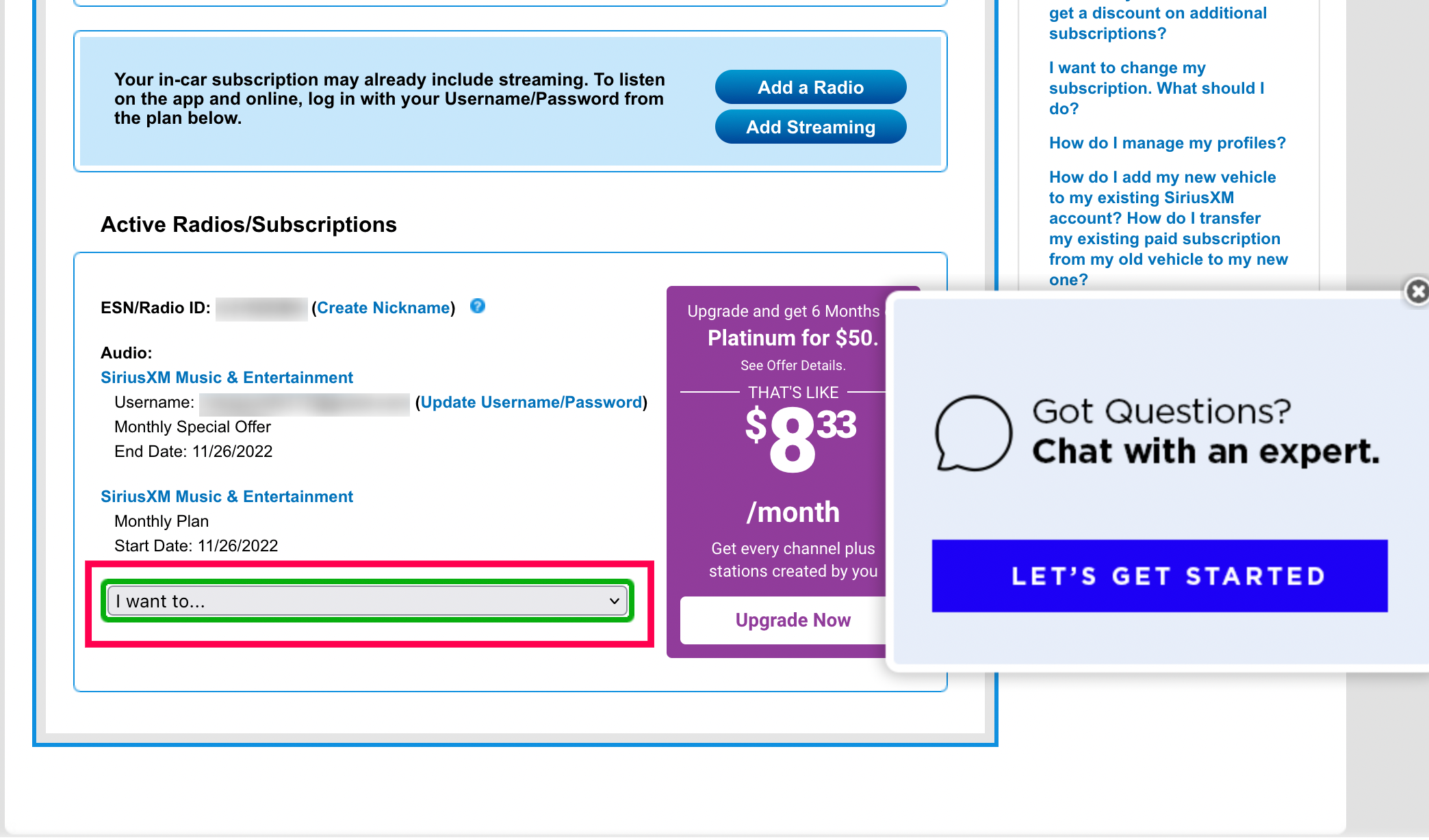
For those who subscribed directly through the SiriusXM website, the process involves navigating their proprietary Account Center.
- Authentication: Log in to the SiriusXM Online Account Center using your administrative credentials.
- Navigation: Locate the “Subscriptions” or “Manage Account” tab. This section is typically a front-end interface for the underlying billing database.
- The Cancellation Trigger: Click on the “Cancel Subscription” link. Note that this often triggers a pop-up modal or a redirect to a “Retention Script” page.
- Verification: Follow the prompts. Technically, many users find that the web portal may require a “Live Chat” session to finalize the command. This is a manual override programmed into the system to prevent automated script-based cancellations.
App-Based Management: iOS and Android
If your subscription is managed via the Apple App Store or Google Play Store, the technical workflow is entirely different. In this scenario, SiriusXM does not hold your billing data; the third-party platform acts as the intermediary.
- For iOS (Apple): Navigate to Settings > [Your Name] > Subscriptions. This interface communicates with Apple’s App Store API to toggle the
auto_renewstatus of the subscription tofalse. - For Android (Google): Open the Play Store app, tap the profile icon, and select “Payments & Subscriptions.” Here, the Google billing API allows you to terminate the recurring billing token associated with SiriusXM.
Interfacing with Automated Chatbots and AI
SiriusXM has increasingly deployed automated chatbots to handle Tier 1 support. When interacting with these bots, use precise, command-line-style language. Phrases like “Cancel my service” or “Agent” are recognized as intent-based triggers in their Natural Language Processing (NLP) engine, which can help bypass circular FAQ loops.
3. Overcoming Digital Friction: Dark Patterns in UX Design

In the realm of software design, “Dark Patterns” refer to user interfaces crafted to trick or impede users. When attempting to cancel a service, you may encounter several of these technical hurdles.
Recognizing “The Roach Motel” Design
A common dark pattern in subscription software is the “Roach Motel,” where it is incredibly easy to get into a subscription but difficult to get out. Technically, this is achieved by making the “Cancel” button less visually prominent (low color contrast) or burying it under multiple layers of the site’s information architecture. By analyzing the CSS and HTML structure of such pages, one can see that “Keep My Subscription” buttons often use high-visibility primary classes, while “Cancel” buttons use secondary or even hidden classes.
The Role of Retention Algorithms
Modern subscription software uses “Save Offers” triggered by specific user actions. If the system detects you are moving toward the cancellation page, it may dynamically inject a discount code or a “limited time offer” into the DOM (Document Object Model). These are not static advertisements; they are data-driven interventions designed to interrupt the user’s journey toward the “Submit Cancellation” API call. Recognizing these as algorithmic functions rather than personal offers can help a user maintain their objective.
4. Digital Security and Post-Cancellation Hygiene
Once the technical cancellation is confirmed, the process is not truly over. Maintaining digital security and ensuring that your financial data is no longer accessible is the final critical step.
Revoking Payment Permissions
If you used a digital wallet or a service like PayPal to pay for SiriusXM, it is a best practice to revoke the “Pre-approved Payment” token within that platform’s security settings. This acts as a secondary firewall. Even if the service provider’s billing system experiences a “glitch” and attempts a secondary charge, the payment gateway will reject the request because the authorization token has been invalidated at the source.
Managing Third-Party Linked Accounts
Many users link their SiriusXM accounts to smart home devices (like Amazon Alexa or Google Home) or automotive software interfaces (like Android Auto or Apple CarPlay).
- API De-authorization: Log in to your Amazon or Google account security settings.
- Third-Party Access: Locate the list of apps with access to your account.
- Removal: Remove SiriusXM’s permissions. This ensures that the app can no longer ping your location or access your user profile data.
Confirmation via Digital Documentation
Always ensure you receive a cancellation confirmation number. From a technical audit perspective, this number is a unique transaction ID within the provider’s database. Save this as a PDF or a screenshot. If a billing dispute arises, this ID is the primary key used by database administrators to track the status of your account at a specific timestamp.
5. The Evolution of Subscription Software Regulation
The difficulty of canceling digital services has reached such a level that technical and legal standards are beginning to merge. The “Click-to-Cancel” proposed rules by various trade commissions aim to mandate that the technical process of canceling a subscription must be as simple as the process of signing up.
API Standardization
The future of tech subscriptions likely involves standardized APIs for cancellation. Imagine a “Subscription Dashboard” on your OS level that communicates via a universal protocol to all your SaaS providers. This would eliminate the need to navigate disparate and intentionally confusing web interfaces.

Technical Accountability
As consumers become more tech-savvy, the demand for transparent software design grows. Companies that utilize heavy-handed technical hurdles to prevent cancellation often suffer from “Brand Technical Debt,” where their software’s reputation for being difficult to manage outweighs the utility of the service itself.
In conclusion, canceling a SiriusXM subscription is a masterclass in navigating modern digital architecture. By understanding the underlying software layers—from account databases to UX dark patterns—users can efficiently manage their digital footprints. The technical proficiency to navigate these systems is an essential skill in an era where our lives are increasingly mediated by recurring software contracts. Stay diligent, document every digital transaction, and use the platform’s own logic to ensure your exit is as seamless as your entry.
aViewFromTheCave is a participant in the Amazon Services LLC Associates Program, an affiliate advertising program designed to provide a means for sites to earn advertising fees by advertising and linking to Amazon.com. Amazon, the Amazon logo, AmazonSupply, and the AmazonSupply logo are trademarks of Amazon.com, Inc. or its affiliates. As an Amazon Associate we earn affiliate commissions from qualifying purchases.