
In the rapidly evolving landscape of digital finance, peer-to-peer (P2P) payment applications have become indispensable tools for managing everyday transactions. Among the most prominent and widely adopted is Cash App, developed by Block, Inc. (formerly Square, Inc.). Far more than just a simple money transfer service, Cash App has grown into a versatile financial platform, offering everything from instant payments to direct deposits, investing capabilities, and even a customizable debit card.
For the uninitiated, navigating the myriad features of a comprehensive financial application like Cash App can seem daunting. This guide aims to demystify its functionalities, providing a clear, step-by-step tutorial on how to leverage Cash App effectively, securely, and to its full potential. We’ll delve into the setup process, core features, advanced offerings, and crucial security measures, ensuring you’re equipped to make the most of this powerful digital tool. Whether you’re looking to split a dinner bill, invest in your first stock, or simply manage your spending, understanding “how do you use Cash App” is key to streamlining your financial interactions in the digital age.
Getting Started with Cash App: Your Gateway to Digital Finance
Embarking on your Cash App journey begins with a straightforward setup process. Like any modern financial application, it prioritizes user-friendliness while maintaining robust security protocols. Understanding these initial steps is crucial for a smooth and secure experience.
Downloading and Account Creation
The very first step is to acquire the application itself. Cash App is available for free on both iOS (Apple App Store) and Android (Google Play Store) devices. Simply search for “Cash App” and download it to your smartphone.
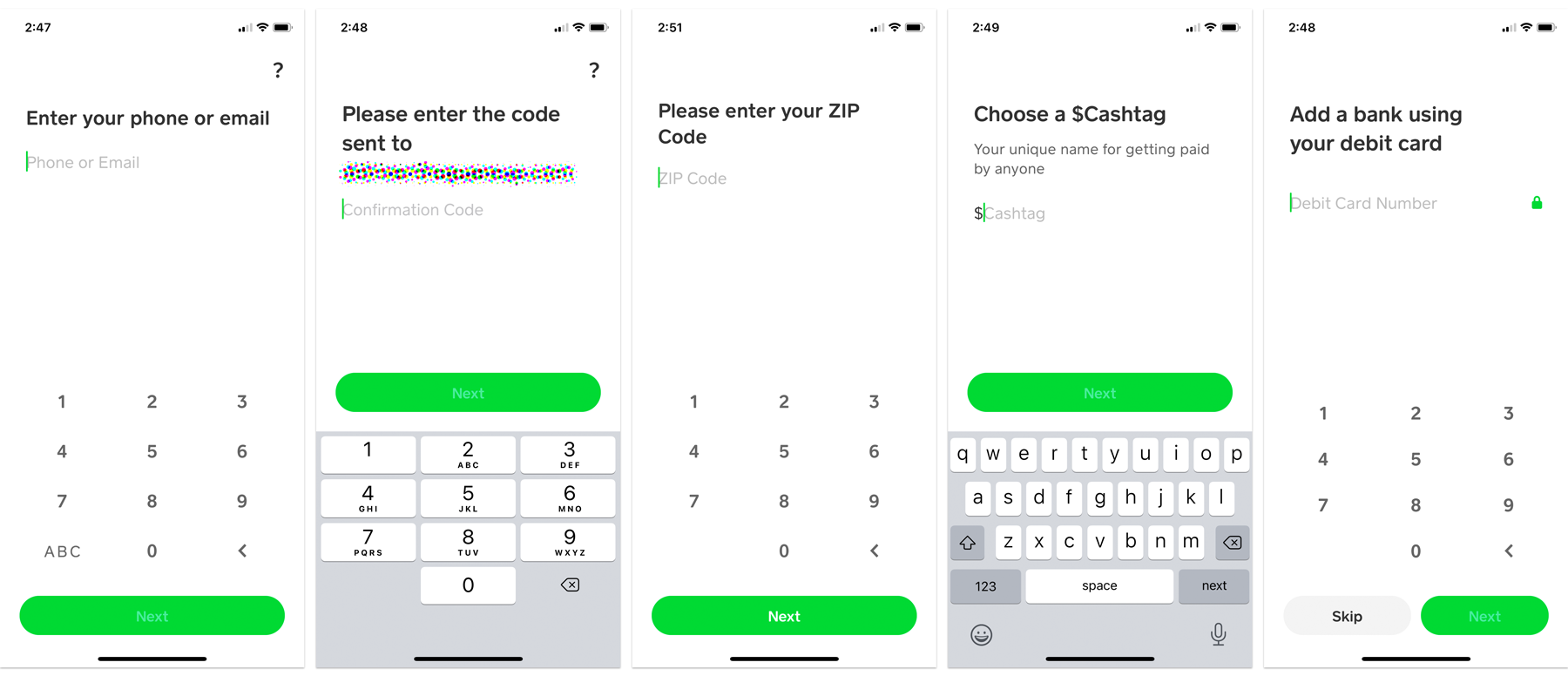
Upon opening the app for the first time, you’ll be prompted to create an account. This typically involves entering your phone number or email address, which will be used for verification purposes. A unique verification code will be sent to your chosen contact method; enter this code into the app to proceed. This initial verification establishes your primary contact for all future communications and transactions within Cash App.
Next, you’ll be asked to enter your name. While you can opt for a display name or a pseudonym, using your legal name is recommended, especially for features requiring identity verification or for linking to bank accounts. Finally, you’ll choose a unique username, known as a “$Cashtag.” This “$Cashtag” acts as your unique identifier within the Cash App ecosystem, allowing others to easily send you money without needing your phone number or email address. Selecting a memorable yet professional “$Cashtag” is advisable, as it often becomes your public alias for financial interactions.
Linking Bank Accounts and Debit Cards
For Cash App to function as a true financial tool, it needs to connect with your existing banking infrastructure. This is where linking a bank account and/or a debit card comes into play. These links are essential for adding funds to your Cash App balance, cashing out funds to your bank, and facilitating transactions directly from your linked card.
To link a bank account, navigate to the “Banking” tab (represented by a house icon) or your profile icon, then select “Linked Banks.” You’ll be guided through a secure process, often involving logging into your bank’s online portal directly through Cash App’s encrypted interface or manually entering your account and routing numbers. This step is critical for transferring larger sums to and from your Cash App balance.
Linking a debit card is generally quicker and serves as the primary method for adding funds instantly or making payments directly from your bank account via Cash App. Go to your profile icon, select “Linked Banks,” and then “Link Debit Card.” You’ll enter your debit card number, expiration date, CVV, and zip code. It’s important to note that credit cards can also be linked, but Cash App charges a 3% fee for sending money using a credit card, which is why a debit card is usually preferred for everyday transactions.
Navigating the Interface
Cash App’s interface is designed for intuitive use, though a quick overview can enhance your efficiency. The main screen typically displays your current Cash App balance and prominent buttons for “Send” and “Request” money.
- Clock Icon (Activity): This tab shows a chronological history of all your transactions – money sent, received, direct deposits, Cash Card purchases, and more. It’s your financial ledger within the app.
- House/Bank Icon (Banking): Here you can manage your linked banks and cards, view your Cash App balance, and access features like direct deposit setup and the Cash Card.
- Bitcoin Icon (Investing): This section is dedicated to buying and selling Bitcoin and stocks, allowing users to participate in basic investment activities directly from the app.
- Card Icon (Cash Card): This tab allows you to manage your Cash Card, customize its design, enable/disable it, and view its activity.
- Profile Icon (Top Right): Access your account settings, “$Cashtag,” linked accounts, privacy settings, and customer support options.
Familiarizing yourself with these main sections will allow you to quickly access the desired features and manage your digital finances with ease.
Core Functionalities: Sending and Receiving Money
At its heart, Cash App is a peer-to-peer payment service, designed to simplify the transfer of funds between individuals. This core functionality is central to its appeal and everyday utility.
Sending Money to Friends and Family
Sending money via Cash App is remarkably simple and fast. From the main screen, enter the amount you wish to send. Tap the “Pay” button. You’ll then be prompted to enter the recipient’s “$Cashtag,” phone number, or email address. It’s crucial to double-check this information to ensure you’re sending money to the correct person, as Cash App transactions are generally instant and irreversible. You can also add a memo to the payment, specifying the reason for the transfer (e.g., “Dinner,” “Rent,” “Gift”). Once confirmed, tap “Pay” again, and the funds will be transferred almost instantly from your Cash App balance or linked debit card.
A key advantage of Cash App is the speed of these transactions. Unlike traditional bank transfers that can take days, Cash App payments typically clear within seconds, making it ideal for immediate needs.
Requesting Money and Splitting Bills
Just as easily as you can send money, you can also request it. This feature is particularly useful for splitting bills, collecting money for group activities, or simply reminding someone they owe you. On the main screen, enter the amount you wish to request and tap the “Request” button. Similar to sending money, you’ll then select the person or people you want to request money from using their “$Cashtag,” phone number, or email. Add a note if necessary (e.g., “Your share of the pizza”), and send the request. The recipient will receive a notification and can approve the payment directly from their app. This seamless process eliminates awkward conversations and simplifies financial reconciliation among friends and family.
Understanding Your Cash App Balance
Your Cash App balance is the sum of money held directly within your Cash App account. Funds added from your linked bank account, received from others, or processed through direct deposit accumulate here. This balance can be used to send money, make purchases with your Cash Card, or be withdrawn to your linked bank account.
To add money to your Cash App balance, navigate to the “Banking” tab. Select “Add Cash,” enter the desired amount, and choose whether to add from your linked debit card or bank account. Similarly, to withdraw funds, select “Cash Out” from the “Banking” tab. You can choose between a “Standard Deposit” (1-3 business days, free) or “Instant Deposit” (immediately, 0.5%-1.75% fee). Understanding the difference between these options allows you to manage your funds according to your urgency and preference.
Beyond P2P: Advanced Features and Financial Tools
Cash App’s evolution has extended its capabilities far beyond simple P2P transfers, transforming it into a more comprehensive financial ecosystem. These advanced features cater to a broader range of user needs, from spending and saving to basic investing.
The Cash Card: A Debit Card for Your Balance
One of Cash App’s standout features is the Cash Card – a customizable, free debit card linked directly to your Cash App balance. This Visa debit card allows you to spend your Cash App funds anywhere Visa is accepted, both online and in physical stores. Users can personalize their Cash Card with unique designs, including custom drawings and colors, adding a touch of personal flair to their financial tools.
Ordering a Cash Card is straightforward: navigate to the “Cash Card” tab (card icon) and follow the prompts to design and order your card. Once activated, you can manage it directly from the app, including locking/unlocking the card, viewing transactions, and setting up ATM withdrawals. The Cash Card also grants access to “Boosts,” a feature designed to provide instant discounts at various retailers and restaurants when you use your Cash Card.
Direct Deposit for Paychecks
For many users, Cash App has become a primary banking alternative, thanks to its direct deposit functionality. You can set up your paycheck, tax refunds, and other government benefits to be deposited directly into your Cash App account. This offers the convenience of receiving funds up to two days earlier than traditional banks in some cases.
To set up direct deposit, go to the “Banking” tab, tap on “Direct Deposit,” and you’ll find your Cash App account and routing numbers. You can then provide these details to your employer’s payroll department or the relevant agency. This feature significantly enhances Cash App’s utility, making it a viable option for managing regular income and expenses without relying on a traditional bank account for basic transactions.
Investing in Stocks and Bitcoin
Venturing into the world of investments is often perceived as complex, but Cash App simplifies this for its users. The app allows you to buy and sell fractional shares of stocks and invest in Bitcoin directly from your balance, making it accessible even for those with limited capital.
Under the “Investing” tab (Bitcoin icon), you can browse popular stocks, search for specific companies, and buy as little as $1 worth of shares. The same applies to Bitcoin; you can purchase any amount of Bitcoin directly through the app, holding it in your Cash App balance. While this feature democratizes access to investing, it’s crucial to remember that all investments carry risk. Cash App provides a convenient platform, but users should conduct their own research or consult financial advisors for significant investment decisions.
Boosts and Savings
“Boosts” are an exclusive feature for Cash Card users, offering instant discounts and rewards at specific merchants. These aren’t loyalty points or cashback programs that require redemption; instead, the discount is applied immediately at the point of sale. Users can choose a “Boost” within the app before making a purchase, and the savings are reflected instantly when they use their Cash Card. The selection of Boosts changes regularly, offering deals on coffee, food delivery, online shopping, and more.
While Cash App doesn’t offer a traditional high-yield savings account, the combination of its balance management and Boosts can contribute to savings. By strategically using Boosts, users can effectively reduce their everyday spending, indirectly saving money on purchases they would make anyway.
Ensuring Security and Support
With any financial application, security is paramount. Cash App employs multiple layers of protection, but user vigilance is equally important. Understanding how to protect your account and what to do if issues arise is crucial.
Protecting Your Account
Cash App implements several security measures:
- Login Verification: Every login attempt from a new device requires verification via a code sent to your registered phone number or email.
- PIN/Touch ID/Face ID: You can set up a PIN, Touch ID, or Face ID to authorize payments and access sensitive app sections, adding an extra layer of security.
- Encryption: All transactions and personal data within the app are encrypted.
However, user practices play a vital role:
- Strong, Unique Passwords: Use a complex password for your email or phone number associated with Cash App.
- Beware of Phishing: Be suspicious of unsolicited emails, texts, or calls claiming to be from Cash App asking for your password, PIN, or personal information. Cash App will never ask for your PIN.
- Public Wi-Fi Caution: Avoid making financial transactions over unsecured public Wi-Fi networks.
- Regular Monitoring: Periodically review your activity feed for any unauthorized transactions.
Dealing with Disputes and Scams
Despite robust security, scams can occur. Common Cash App scams include fake customer support, lottery scams, and payment reversal tricks. If you suspect you’ve been scammed or have an unauthorized transaction:
- Contact the Recipient: If you know the recipient, try to resolve it directly first.
- Dispute Transaction: For unauthorized transactions or scams, navigate to the transaction in your activity feed, tap on it, and look for an option to report or dispute the transaction. Provide as much detail as possible.
- Block Users: You can block users who send you suspicious requests.
It’s important to understand that Cash App transactions are generally instant and irreversible, making recovery challenging in many scam scenarios. Exercise extreme caution when sending money to unknown individuals or for offers that seem too good to be true.
Contacting Cash App Support
If you encounter issues that cannot be resolved through the in-app features, Cash App offers customer support.
- In-App Support: The most direct way to get help is through the app itself. Go to your profile icon, scroll down to “Support,” and browse the FAQ or contact the support team directly.
- Website Support: The Cash App website also has extensive FAQ sections and contact options.
- Social Media: Cash App has an active presence on social media platforms, though these are generally for general inquiries rather than sensitive account issues.
When contacting support, be prepared to provide your “$Cashtag,” transaction details, and any relevant screenshots. Never share your full bank account number, PIN, or login password with anyone, even those claiming to be Cash App support.
Maximizing Your Cash App Experience: Tips and Best Practices
To truly master Cash App and integrate it seamlessly into your digital life, consider these tips and best practices that enhance efficiency, security, and overall utility.
Organizing Transactions
While Cash App doesn’t offer robust budgeting tools, keeping your activity feed tidy can provide a clear overview of your spending and income.
- Descriptive Memos: Always add clear and concise memos to your transactions (e.g., “Lunch with Sarah,” “July Rent,” “Groceries”). This helps you quickly identify the purpose of each payment later.
- Regular Review: Periodically review your transaction history. This not only helps track your spending but also allows you to quickly spot any unauthorized or suspicious activity.
- Export Data (Limited): For more detailed financial analysis, you may be able to export some transaction data to a spreadsheet, which can then be imported into personal finance software.
Leveraging Boosts for Savings
The Cash Card’s “Boosts” feature is a powerful, yet often underutilized, way to save money on everyday purchases.
- Check Boosts Regularly: The available Boosts change frequently. Before making a purchase, quickly check the Cash Card tab to see if there’s an active Boost for that merchant.
- Plan Purchases: If you frequently shop at certain stores or use specific services, actively look for Boosts that align with your spending habits. Activating the right Boost can lead to significant savings over time.
- One Boost at a Time: Remember you can only have one Boost active at a time. Be strategic about which one you enable before making a purchase.
Staying Informed About Updates
Cash App is a dynamic platform that frequently introduces new features, security enhancements, and policy updates.
- App Updates: Ensure your app is always updated to the latest version. These updates often contain critical security patches and new functionalities.
- Cash App Communications: Pay attention to official emails or in-app notifications from Cash App regarding changes or new features. This keeps you informed about how to better use the service and any adjustments to terms of service.
- Follow Official Channels: Follow Cash App’s official social media accounts or blog for announcements and tips.
By proactively managing your transactions, strategically using features like Boosts, and staying current with app developments, you can unlock the full potential of Cash App as a comprehensive and convenient digital finance tool.
Conclusion
Cash App has transcended its initial purpose as a simple peer-to-peer payment application, evolving into a sophisticated digital financial platform. From the straightforward process of sending and receiving money to more advanced capabilities like direct deposit, stock and Bitcoin investing, and the practical utility of the Cash Card with its unique “Boosts,” Cash App offers a robust suite of tools for managing your money in the digital age.
Understanding “how do you use Cash App” means more than just knowing how to tap “Send” or “Request.” It encompasses mastering the setup, navigating its intuitive interface, leveraging its diverse features, and, crucially, prioritizing security in all your interactions. By following the guidelines outlined in this comprehensive tutorial, users can confidently and efficiently utilize Cash App to streamline their financial transactions, explore investment opportunities, and enhance their overall digital finance experience. As technology continues to reshape how we interact with our money, platforms like Cash App stand at the forefront, empowering users with accessible, fast, and versatile financial solutions.
aViewFromTheCave is a participant in the Amazon Services LLC Associates Program, an affiliate advertising program designed to provide a means for sites to earn advertising fees by advertising and linking to Amazon.com. Amazon, the Amazon logo, AmazonSupply, and the AmazonSupply logo are trademarks of Amazon.com, Inc. or its affiliates. As an Amazon Associate we earn affiliate commissions from qualifying purchases.