
In the modern era of the “subscription economy,” digital services often blend into the background of our daily technological interactions. Amazon Prime, arguably the most pervasive membership program in the world, has evolved from a simple shipping perk into a massive multi-platform ecosystem. Because Amazon integrates its services across various apps, smart devices, and web interfaces, it is surprisingly common for users to be unsure of their current membership status. Whether you have recently transitioned between trial periods, shared a “Household” account, or managed multiple email aliases, identifying your Prime status requires a technical understanding of the Amazon user interface (UI) and its backend account management tools.
This guide provides a deep dive into the technical pathways for verifying your Amazon Prime status, managing your digital footprint across the Amazon software suite, and utilizing advanced tools to audit your active subscriptions.
Navigating the User Interface: Desktop vs. Mobile App
The primary method for verifying any digital subscription is through the service’s native UI. Amazon employs a complex information architecture that varies significantly between its desktop browser experience and its mobile application environment. Understanding where the membership data is cached and how to access the “Accounts & Lists” hierarchy is the first step in digital verification.
Accessing Account Settings via Browser
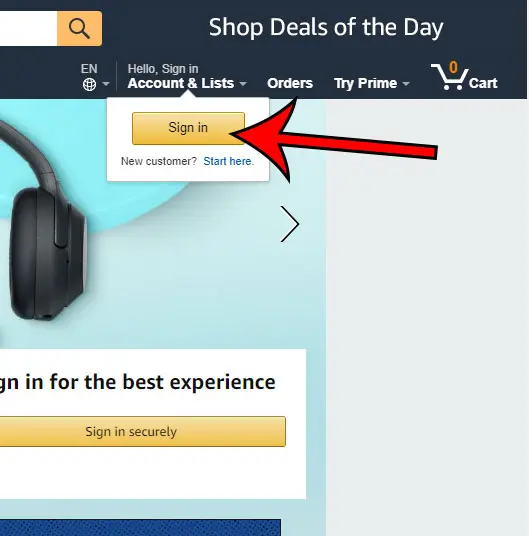
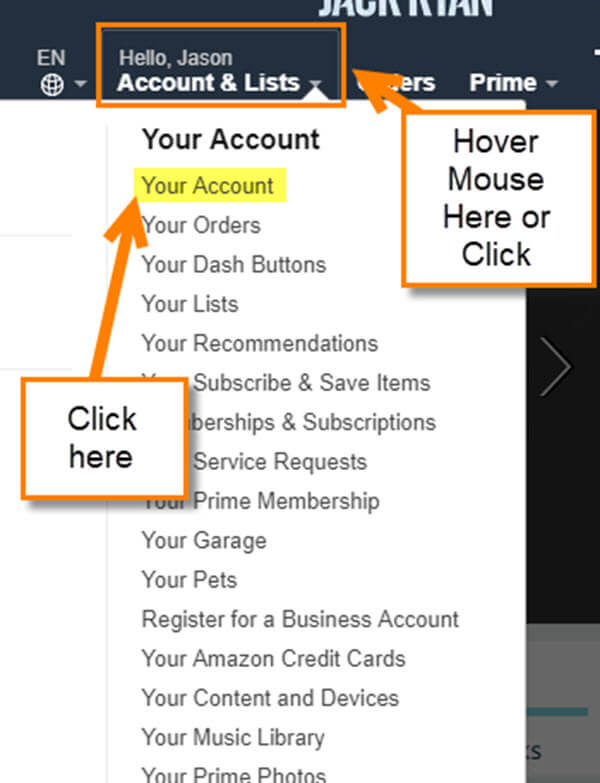
For users on a desktop or laptop, the web interface offers the most granular view of account metadata. To verify your status, you must navigate to the top-right corner of the Amazon homepage. Hovering over the “Account & Lists” dropdown triggers a JavaScript menu that reveals the “Prime Membership” link.
Technically, this page serves as a central dashboard that pulls data from Amazon’s membership database. Once clicked, the Prime central hub displays your “Membership Type,” the “Next Payment Date,” and the specific “Plan” (e.g., Monthly, Annual, or Student). If you are not a member, the UI will typically present a “Try Prime” call-to-action (CTA). One key technical indicator of an active status is the presence of the “Prime” logo next to the user’s name in the global navigation bar, which is a UI element dynamically rendered based on the account’s subscription tag in the backend.
Utilizing the Amazon Shopping App for Instant Verification
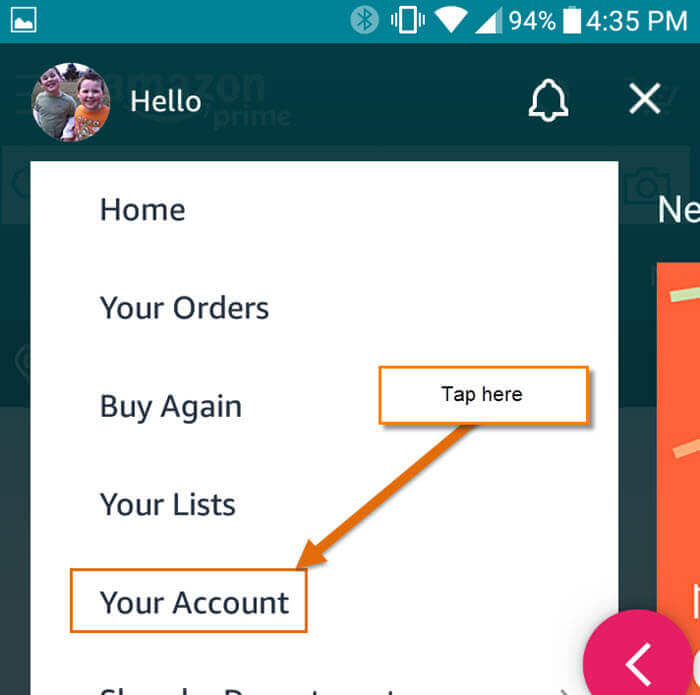
On mobile devices (iOS and Android), the verification process follows a different UX flow designed for touch interfaces. By tapping the “Person” icon in the bottom navigation bar, users enter their profile dashboard. From here, selecting “Your Account” opens a comprehensive list of settings.
Under the “Account Settings” header, the “Manage Prime Membership” option provides a mobile-optimized view of the same data found on the desktop. The app often uses biometric authentication (FaceID or Fingerprint) to access these sensitive settings, ensuring that the verification process is secure. If you are signed into the app but do not see the Prime badge on the home screen’s search bar or within your profile, it is a strong technical signal that the specific account currently logged into the device does not have an active Prime entitlement.
Identifying Prime Membership Through Associated Digital Services
Amazon Prime is not a monolithic service; it is a bundle of distinct digital products, each with its own app and API. Sometimes, the most efficient way to confirm your Prime status is to test the permissions of these satellite applications. If the central Amazon app is ambiguous, the technical gates on Prime Video, Amazon Music, or Amazon Photos will provide a definitive “Yes” or “No.”
Prime Video: The Gateway to Content Licensing
Prime Video operates as a standalone streaming platform with its own subscription logic. However, it is deeply integrated with the main Prime membership. To check your status here, navigate to the “Settings” or “My Stuff” section of the Prime Video app.
Technically, Prime Video uses a “digital rights management” (DRM) check to determine which content you can access. If your account is tagged as a Prime member, the “Included with Prime” banner will appear on thousands of titles. If you are prompted to “Start your 30-day free trial” when attempting to play a non-premium movie, your Prime status is likely inactive or associated with a different email address.
Amazon Photos and Music: Assessing Cloud Storage and Streaming Access
Another technical litmus test involves Amazon’s cloud services. Prime members receive unlimited full-resolution photo storage via Amazon Photos. If you can upload high-resolution RAW files without receiving a “Storage Full” notification or a prompt to upgrade to a paid 100GB/1TB plan, the system recognizes an active Prime entitlement.
Similarly, Amazon Music provides a tiered experience. While there is a free version, Prime members have access to a significantly larger catalog (albeit often in shuffle mode) without an additional Music Unlimited subscription. Checking the “Subscription” tab within the Music app settings will clarify whether your access is granted “via Prime” or if you are on a “Free” or “Unlimited” tier.
Technical Verification via Billing and Email Metadata
When UI checks fail—perhaps due to a technical glitch or an old cached session—following the digital paper trail is the most accurate fallback. This involves auditing financial transactions and searching through your communication metadata.
Decoding Digital Invoices and Transaction History
Every Prime renewal generates a unique digital invoice with a specific transaction ID. By navigating to “Your Orders” and filtering by “Digital Orders” or “Local Store Orders,” you can view the history of your membership payments.
In terms of technical accounting, these transactions are usually labeled as “AMZN Mktp US” or “Amazon Prime” on credit card statements. However, for a more precise check, you should look at the “Payments & Transactions” section within the Amazon settings. This area tracks the “Payment Method” currently linked to the Prime API. If a credit card has expired, the system may put the membership into a “Grace Period” or “On Hold” status, which explains why some features might work while others are restricted.
Searching Email Headers and Confirmation Notifications
Amazon’s automated notification system sends out transactional emails for every membership milestone. By searching your email client (Gmail, Outlook, etc.) for specific keywords like “Your Prime Membership,” “Membership Confirmation,” or “Amazon Prime Renewal,” you can find the most recent automated receipt.
Advanced users can look at the email headers to ensure the communication is authentic and originates from @amazon.com. These emails contain links that lead directly to the “Manage Membership” portal, bypassing the need to navigate the manual UI. This is particularly useful if you manage multiple email aliases and are unsure which one is the “primary” for the Prime service.
Troubleshooting and Resolving Common Membership Discrepancies
Sometimes, a user may believe they have Prime, but the system indicates otherwise. This discrepancy usually stems from technical overlaps in account management or device synchronization issues.
Managing Multiple Accounts and Device Synchronicity
In a household with multiple users, “account drift” is common. One family member may have the subscription, while another is using a sub-account or an entirely separate account. Amazon’s “Household” feature allows two adults to share Prime benefits, but they must be explicitly linked via the “Amazon Household” settings.
Technically, if you are not seeing Prime benefits, check the “Switch Accounts” feature in the main menu. It is possible that your browser or app is logged into an old account or a business account rather than your personal Prime-enabled one. Clearing your browser cookies and re-authenticating (logging out and back in) forces the app to pull a fresh “token” from Amazon’s servers, which often resolves status sync issues.
Securing Your Digital Footprint: Shared Memberships and Family Vaults
If you are certain you are paying for Prime but cannot access the benefits, there may be a security issue or a “Family Vault” configuration error. Amazon allows for limited sharing of certain benefits (like shipping and video), but not all (like Kindle Lending Library in some regions).
From a digital security perspective, ensure that your account hasn’t been compromised or that a “ghost” trial hasn’t expired. Reviewing the “Login & Security” settings is vital. If you see unauthorized devices listed in your “Managed Devices” section, it could indicate that your membership is being utilized elsewhere, potentially hitting device limits for streaming or music.
The Future of Digital Identity and Subscription Management
As we move toward a more integrated digital future, the way we identify and manage subscriptions like Amazon Prime is shifting. The tech industry is moving toward “Centralized Identity Management,” where your Prime status might eventually be linked to a broader digital ID.
AI-Driven Subscription Auditing Tools
New software tools and AI-driven “FinTech” apps now offer the ability to scan your digital footprint to identify active subscriptions. Apps like Rocket Money or specialized browser extensions can plug into your financial APIs to flag recurring Amazon charges. These tools use machine learning to categorize transactions, providing a secondary layer of verification outside of the Amazon ecosystem itself.
Consolidating the Tech Stack for Better Digital Hygiene
Maintaining “digital hygiene” is essential for modern tech users. This involves regularly auditing your “Tech Stack”—the collection of apps and services you pay for. To ensure you always know your Amazon Prime status, it is best practice to consolidate your accounts under a single, secured email address protected by Multi-Factor Authentication (MFA).
By understanding the technical architecture of Amazon’s UI, utilizing the specific APIs of satellite apps like Prime Video, and auditing your transaction metadata, you can maintain total control over your digital memberships. Knowing if you have Prime is no longer just about checking a box; it is about navigating a complex digital landscape with technical proficiency and oversight.
aViewFromTheCave is a participant in the Amazon Services LLC Associates Program, an affiliate advertising program designed to provide a means for sites to earn advertising fees by advertising and linking to Amazon.com. Amazon, the Amazon logo, AmazonSupply, and the AmazonSupply logo are trademarks of Amazon.com, Inc. or its affiliates. As an Amazon Associate we earn affiliate commissions from qualifying purchases.