
In the modern landscape of business finance, efficiency is the cornerstone of scalability. For entrepreneurs, small business owners, and financial officers, the manual entry of transactions is no longer just a tedious chore—it is a strategic liability. The integration of banking institutions with accounting software like QuickBooks represents a fundamental shift from reactive bookkeeping to proactive financial management. By establishing a direct link between your financial institution and your accounting ledger, you create a real-time data pipeline that powers informed decision-making, ensures tax compliance, and provides a clear window into your organization’s liquidity.

Linking a bank account to QuickBooks is more than a technical configuration; it is the implementation of a financial tool designed to eliminate human error and provide a single source of truth for your business’s economic health. This guide explores the strategic necessity of this integration, the step-by-step process of implementation, and the advanced optimization techniques required to maintain a pristine financial ecosystem.
The Strategic Importance of Financial Automation in Modern Business
In the traditional accounting model, financial data often lagged weeks or even months behind reality. This delay forced business leaders to make critical decisions based on outdated “rearview mirror” data. By linking your bank account directly to QuickBooks, you transition to a model of real-time visibility.
Streamlining Cash Flow Management
Cash flow is the lifeblood of any enterprise. When bank feeds are linked, every debit and credit is reflected in your accounting software almost as soon as it clears the bank. This immediacy allows for precise cash flow forecasting. Instead of guessing how much capital is available for reinvestment or payroll, you have a live dashboard showing actual balances and pending obligations. This level of transparency is essential for managing working capital, identifying seasonal trends, and ensuring that the business remains solvent during lean periods.
Eliminating Manual Entry Errors
Human error is the most common cause of financial discrepancies. Transposed numbers, forgotten receipts, and duplicate entries can lead to skewed Profit and Loss statements and Balance Sheets. Automation mitigates these risks by pulling data directly from the source—the bank. When the raw data is imported automatically, the role of the business owner shifts from “data entry clerk” to “financial reviewer.” This shift significantly reduces the time spent on reconciliation and ensures that the books are audit-ready at all times.
Enhancing Financial Security and Oversight
A linked account provides a layer of oversight that is difficult to maintain manually. By seeing transactions daily, business owners can quickly identify unauthorized charges, duplicate billings, or suspicious activity. In the context of digital security, QuickBooks utilizes bank-level encryption (128-bit or higher) to protect the data stream, making the automated feed often more secure than the manual handling of paper statements and physical checks.
Pre-Connection Checklist: Preparing Your Financial Data
Before initiating the connection between your bank and QuickBooks, it is vital to perform a strategic assessment of your accounts. Not every account should necessarily be linked, and some preparation is required to ensure a smooth integration.
Choosing the Right Account Types
The primary objective of linking accounts is to track business performance. Therefore, it is a cardinal rule of business finance to keep personal and professional accounts separate. Only link accounts that are strictly used for business operations—this includes checking accounts, savings accounts, and business credit cards. Linking a personal account creates “commingling” of funds, which complicates tax filings and can jeopardize the corporate veil in the event of legal action.
Identifying the Direct Connection Method
QuickBooks typically offers two ways to connect: a direct web-connect (Standard Feed) or a more robust API-based connection (Open Banking). Most major financial institutions—such as Chase, Wells Fargo, and Bank of America—have streamlined these connections. Before you begin, ensure you have your online banking credentials ready and that you have administrative access to both the bank account and the QuickBooks file.
Reviewing Historical Data Needs
When you first link an account, QuickBooks will ask how much historical data you wish to import. Generally, the software can pull the last 90 days of transactions, though some banks allow for a longer look-back period. If you are starting a new fiscal year, it is strategically sound to import data from the first day of that year to ensure continuity in your financial reporting.
Step-by-Step Implementation: Integrating Your Bank with QuickBooks
The technical process of linking the account is designed to be intuitive, yet it requires precision to ensure the data maps correctly to your Chart of Accounts.
Navigating the Banking Dashboard
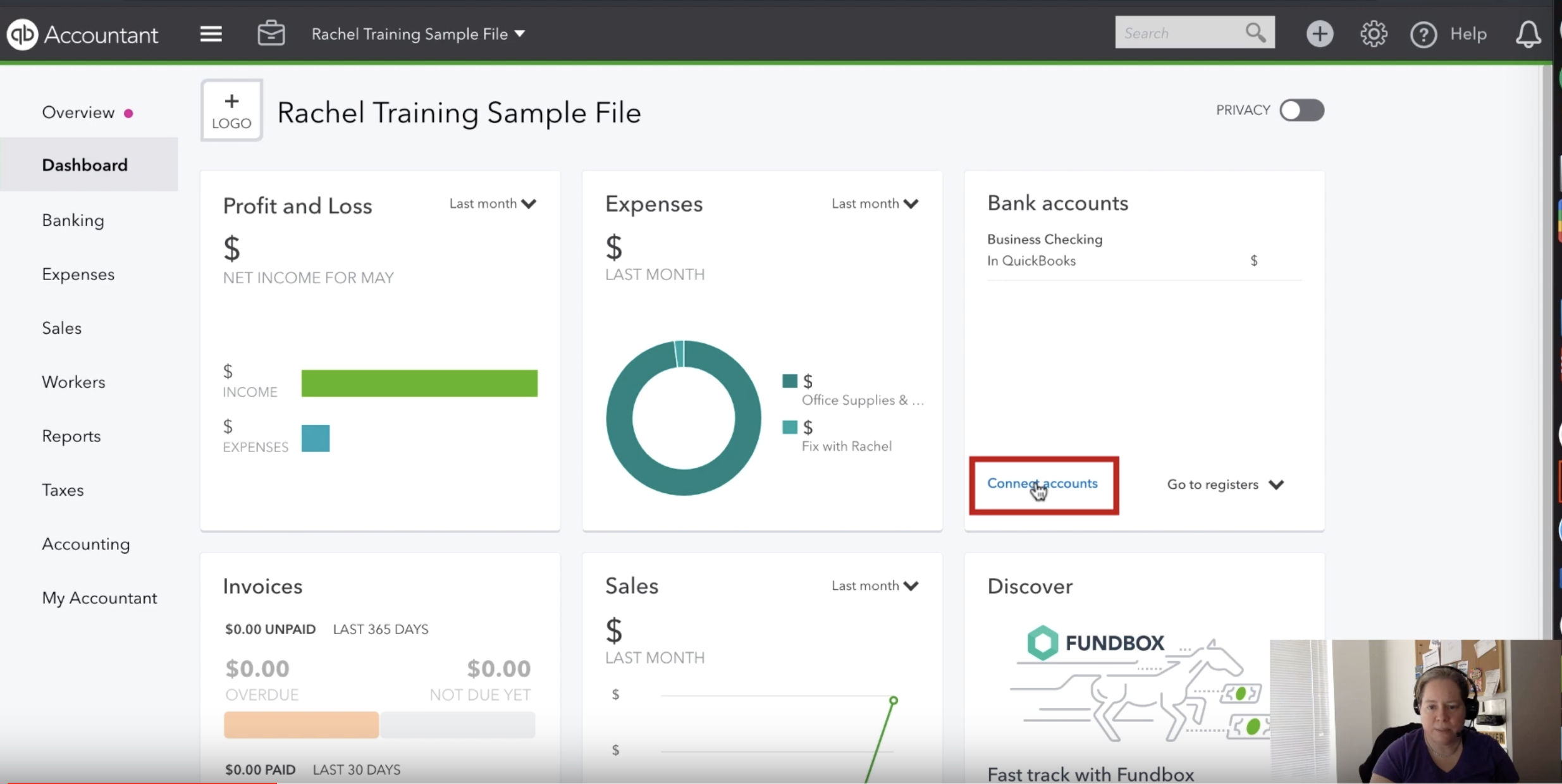
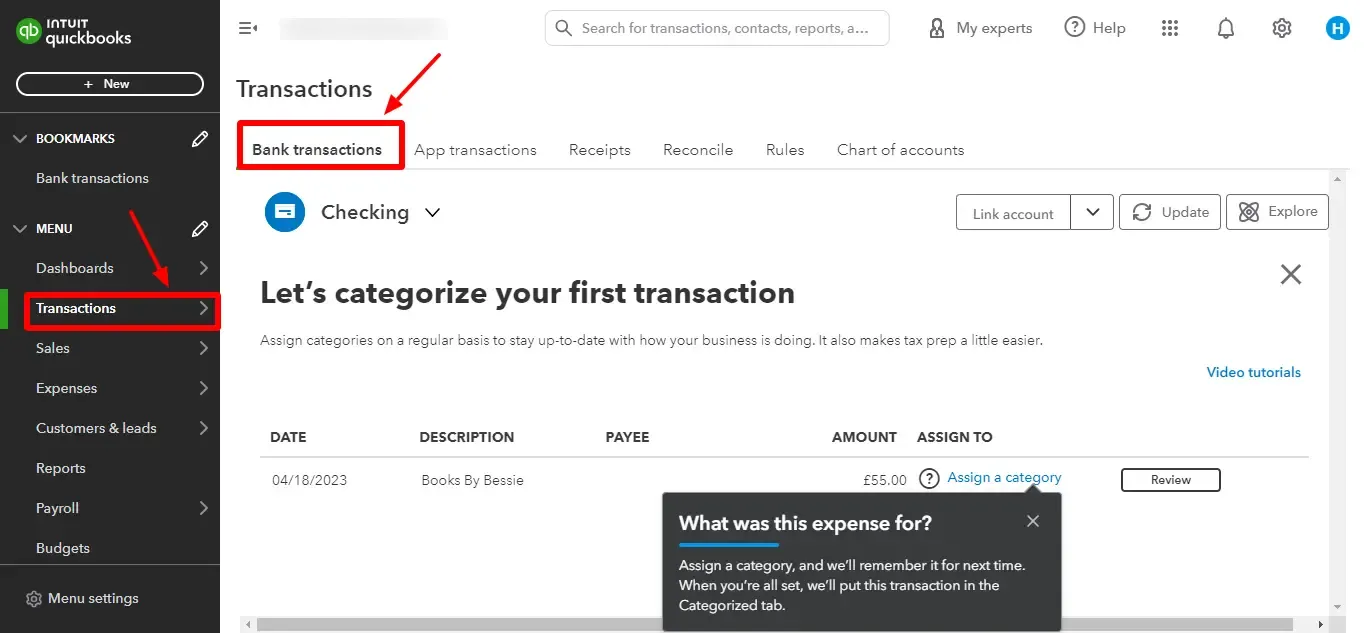
To begin, navigate to the “Banking” or “Transactions” tab within the QuickBooks interface. Here, you will find the option to “Connect Account” or “Link Account.” You will be prompted to search for your financial institution. It is important to select the specific URL that matches your online banking login page, as many banks have separate portals for personal and commercial banking.
Authenticating and Mapping Accounts
Once you select your bank, you will be required to enter your credentials. This process is handled through a secure bridge; QuickBooks does not “store” your password in a way that is accessible to human users. After authentication, you will see a list of all accounts associated with that login.
Strategic mapping is the next critical step. You must associate each bank account with a corresponding account in your QuickBooks Chart of Accounts. If the account does not yet exist in your records, you should create it as a “Bank” or “Credit Card” type account. Proper mapping ensures that your Balance Sheet accurately reflects your liquid assets and liabilities.
Handling Multi-Factor Authentication (MFA)
Security is paramount in business finance. Most modern banks require Multi-Factor Authentication (MFA), such as a code sent via SMS or an app-based notification. During the initial link and occasionally during subsequent updates, QuickBooks will prompt you to complete this MFA step. While this may feel like an interruption, it is a necessary safeguard to protect your financial data from unauthorized access.
Optimizing the Feed: Managing Transactions and Reconciliations
Linking the account is only the beginning. The true value of this financial tool is realized in how you manage the incoming data stream.
Setting Up Automated Rules
QuickBooks uses machine learning to suggest categories for your transactions, but for high-volume businesses, manual categorization is still time-consuming. This is where “Bank Rules” become a powerful asset. You can create logic-based rules that tell QuickBooks: “Whenever a transaction from ‘Staples’ appears, categorize it as Office Supplies.”
By building a robust library of rules, you can automate up to 80% of your bookkeeping. However, the strategic approach is to review these rules periodically to ensure they still align with your tax strategy and departmental budgeting.
The Art of Daily Reconciliation
Linking your bank account does not replace the need for reconciliation; it simply makes it easier. Reconciliation is the process of ensuring that your QuickBooks balance matches your actual bank balance. With a linked feed, you can perform “mini-reconciliations” daily by matching downloaded transactions against the invoices and bills you’ve recorded in the software. This habit ensures that at the end of the month, the final reconciliation is a five-minute task rather than a weekend-long ordeal.
Long-Term Benefits: Data-Driven Decision Making
Once the link is established and the feed is optimized, the business shifts into a state of high-fidelity financial reporting.
Real-Time Financial Reporting
With automated data, your Profit and Loss statement is always current. You can run a report on Tuesday morning and see exactly where your expenses stand for the month to date. This allows for “course correction” in real-time. If you see that “Marketing Spend” is higher than budgeted by the second week of the month, you can adjust your strategy immediately rather than waiting for a monthly report that arrives too late to make a difference.
Tax Readiness and Compliance
One of the greatest stressors in business finance is the annual tax season. A linked bank account ensures that every deductible expense is captured. Because the data comes directly from the bank, the “paper trail” is digital and easily searchable. In the event of an audit, having a reconciled, bank-linked ledger provides a high degree of credibility and transparency, demonstrating that the business maintains rigorous financial controls.
Scaling Through Financial Intelligence
As a business grows, its financial complexity increases. A linked QuickBooks account serves as the foundation for more advanced financial tools, such as integrated payroll, automated accounts payable, and sophisticated inventory management. By mastering the link between your bank and your accounting software, you are not just “doing the books”—you are building a scalable financial infrastructure that supports long-term growth and stability.
In conclusion, the integration of your bank account with QuickBooks is a transformative step for any business. It replaces manual labor with automated precision, turns static data into actionable insights, and provides the financial clarity necessary to navigate the complexities of the modern marketplace. By following a strategic approach to setup and maintenance, you ensure that your business finance remains a source of strength rather than a source of stress.
aViewFromTheCave is a participant in the Amazon Services LLC Associates Program, an affiliate advertising program designed to provide a means for sites to earn advertising fees by advertising and linking to Amazon.com. Amazon, the Amazon logo, AmazonSupply, and the AmazonSupply logo are trademarks of Amazon.com, Inc. or its affiliates. As an Amazon Associate we earn affiliate commissions from qualifying purchases.