
In the modern financial landscape, the ability to quickly access and organize your banking documentation is more than just a convenience; it is a fundamental pillar of sound personal and business finance management. Whether you are preparing for tax season, applying for a mortgage, or simply conducting a monthly audit of your spending habits, knowing how to efficiently retrieve your bank statements from Chase is an essential skill. As one of the largest financial institutions in the world, Chase offers a robust digital infrastructure that allows customers to manage their documents with high levels of security and accessibility.

Understanding the nuances of digital statements—from retrieval methods to long-term storage strategies—empowers you to take full control of your financial narrative. This guide explores the technical steps required to access your records and examines the broader role these documents play in your overall financial health.
The Importance of Digital Record Keeping in Modern Personal Finance
In an era where digital transactions occur in seconds, the monthly bank statement remains the definitive “source of truth” for your financial life. While real-time transaction feeds in banking apps are helpful for daily monitoring, the formal bank statement serves a variety of higher-level functions that require official documentation.
Tracking Cash Flow and Budgeting
A bank statement is a curated summary of your financial behavior over a specific period, usually 28 to 31 days. By reviewing these statements, you can identify patterns that might be invisible during daily check-ins. For those using a zero-based budgeting system or the 50/30/20 rule, the statement provides the raw data necessary to verify that your actual spending aligns with your intended financial goals. It categorizes credits (deposits) and debits (withdrawals), allowing for a clear view of your net cash flow.
Preparation for Tax Season and Audits
For freelancers, small business owners, and even individual taxpayers, bank statements are critical for tax compliance. They serve as evidence for deductible expenses and as a record of taxable income. If the IRS or a local tax authority ever audits your filings, having a well-organized archive of Chase bank statements can be the difference between a seamless process and a financial nightmare. Modern digital statements are generally accepted as official records, provided they are downloaded in their original PDF format.
Verification for Credit and Lending
When applying for significant credit products, such as a home mortgage or a car loan, lenders require proof of liquidity and a stable income history. Usually, this involves providing the last two to six months of bank statements. Lenders look for “large deposits” that might indicate undisclosed loans and verify that your balance can support the down payment and closing costs. Knowing how to quickly generate these documents ensures that your loan application process remains on track without administrative delays.
Accessing Your Chase Bank Statements: Step-by-Step Instructions
Chase provides two primary digital avenues for retrieving your statements: the Chase Online website and the Chase Mobile app. Both platforms are designed with a focus on user experience, but the steps vary slightly depending on your device.
Downloading Statements via Chase Online Banking
For most users, the desktop website is the most efficient way to download and save multiple statements at once.
-
Log In: Navigate to the official Chase website and enter your credentials. Ensure you are on a secure, private connection to protect your financial data.
-
Navigate to Statements: Once on your dashboard, look for the “Statements & Documents” link, which is typically found in the top navigation bar or within the “More” menu next to a specific account.
-
Select the Account: If you have multiple accounts (e.g., a Total Checking account, a Sapphire Preferred credit card, and a Savings account), use the dropdown menu to select the specific account you need.
-
Choose the Period: Chase typically provides the last seven years of statements online. You can view them by year and month.
-
Download as PDF: Click on the specific statement date. A PDF will open or automatically download. It is highly recommended to save these files with a standardized naming convention (e.g., “2023-12-Chase-Checking.pdf”) for easy retrieval later.
Utilizing the Chase Mobile App for On-the-Go Access
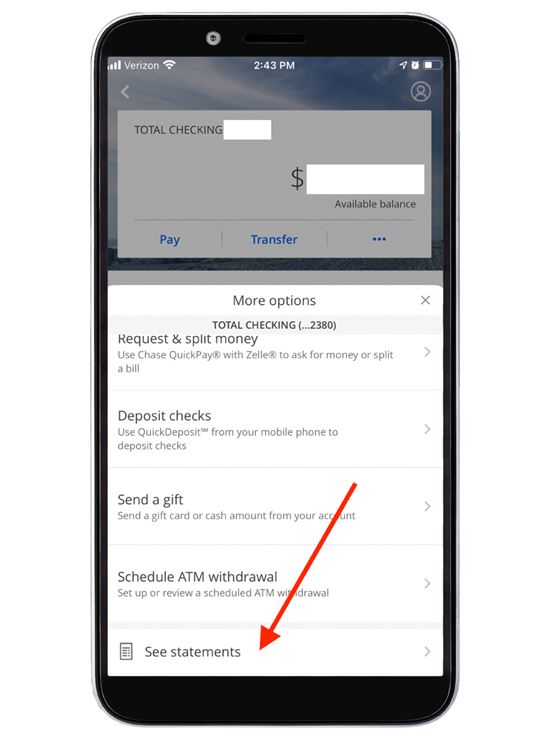
If you are at a dealership or a mortgage broker’s office and need a statement immediately, the Chase Mobile app is your best tool.
-
Open the App: Use Biometric login (FaceID or Fingerprint) for a secure start.
-
Select the Account: Tap on the specific bank or credit card account you are interested in.
-
Find the Documents Section: Scroll down or tap on the “Statements & Documents” icon, often located in the “Account Services” or “Account Actions” section.
-
View and Share: Tap on “Statements” to see the list of available months. Once you open a statement, you can use your phone’s native “Share” feature to email the PDF, save it to a cloud drive like iCloud or Google Drive, or send it directly to a wireless printer.
Managing Paperless Settings and Notifications
To streamline your finances, Chase encourages the use of paperless statements. By opting into paperless billing, you reduce physical clutter and decrease the risk of mail fraud or identity theft. Within the “Statements & Documents” menu, you can manage your “Paperless preferences.” Once enabled, Chase will send you a secure email notification each month as soon as your new statement is ready for viewing, ensuring you never miss a cycle.
Troubleshooting and Special Requests for Historical Data
While the digital portal is robust, there are instances where a simple download might not suffice. Understanding how to navigate these exceptions is key to comprehensive financial management.
Retrieving Archived Statements
Chase currently maintains online access to statements for up to seven years. If you require records older than this—perhaps for a long-term legal dispute, an estate settlement, or a deep historical audit—you will need to request them specifically. This can be done by contacting Chase customer service or visiting a local branch. Note that there may be a research fee per statement for documents that have been moved to deep archives.
Understanding Statement Cycles and Closing Dates
A common point of confusion is the difference between a calendar month and a statement cycle. Your Chase statement might run from the 15th of one month to the 14th of the next. When a lender asks for “the September statement,” they usually mean the statement that closed in September. Always check the “Statement Period” dates at the top of the document to ensure you are providing the correct timeframe.
Requesting Certified Copies
For some international legal matters or specific government applications, a standard PDF printout may not be accepted. In these cases, you may need a “Certified” or “Original” statement. To obtain this, you should visit a Chase branch and ask a banker to print and provide a teller-stamped copy of your statement. This adds an extra layer of verification that the document is a true and accurate representation of the bank’s records.
Integrating Bank Statements into Your Financial Strategy
Beyond mere record-keeping, your bank statements are a goldmine of data that can be used to optimize your financial strategy.
Leveraging Export Features for Accounting Software
For those who manage their finances through tools like QuickBooks, Quicken, or specialized budgeting apps, Chase offers more than just PDF statements. On the “Download Activity” page, you can export your transaction history in various formats, including .CSV, .QFX, and .OFX. This allows you to import your raw data directly into your accounting software, eliminating manual entry and reducing the margin for error. This is particularly valuable for business owners who must reconcile their books every month.
Identifying Unusual Activity and Enhancing Security
Reviewing your statement line-by-line once a month is one of the most effective ways to spot “gray charges”—subscriptions you forgot to cancel, small recurring fees, or fraudulent transactions that are small enough to miss on a daily basis. Chase’s digital statements highlight interest earned and fees charged, providing a clear window into how much the bank is costing you or paying you. If you spot an error, the statement provides the necessary transaction ID and date to initiate a formal dispute.

Maximizing the Value of Your Financial Documentation
A bank statement is a historical record, but its utility is forward-looking. By maintaining an organized digital archive of your Chase statements, you are building a financial legacy that facilitates easier transitions in life—whether that is buying a home, starting a business, or planning for retirement.
The transition to digital-first banking has made the process of getting a bank statement from Chase faster and more secure than ever before. By utilizing the web portal for deep dives and the mobile app for quick access, you can ensure that your financial data is always at your fingertips. Remember that security is paramount; always protect your downloaded statements with strong passwords and encrypted storage. Your bank statements are a comprehensive map of your journey through the economy—treat them with the importance they deserve, and they will serve as a powerful tool for your long-term financial success.
aViewFromTheCave is a participant in the Amazon Services LLC Associates Program, an affiliate advertising program designed to provide a means for sites to earn advertising fees by advertising and linking to Amazon.com. Amazon, the Amazon logo, AmazonSupply, and the AmazonSupply logo are trademarks of Amazon.com, Inc. or its affiliates. As an Amazon Associate we earn affiliate commissions from qualifying purchases.