
In the dynamic world of digital finance, apps like Cash App have revolutionized how we interact with our money, offering unparalleled convenience for sending, receiving, and managing funds. However, the smooth flow of digital transactions can sometimes hit unexpected roadblocks, leaving users frustrated with the perplexing question: “Why won’t Cash App let me send money?” This isn’t just a minor inconvenience; it’s a critical technical hurdle that can disrupt personal plans, urgent payments, or business operations. Understanding the underlying technical reasons behind these failures is crucial for effectively troubleshooting the issue and ensuring future seamless transactions.

This comprehensive guide delves into the various technological and security-related factors that can prevent Cash App from processing your payment. From fundamental app mechanics to intricate security protocols and common user-related errors, we’ll dissect each potential cause, providing insights and actionable steps to get your transactions back on track. As a core piece of financial technology, Cash App’s functionality relies on a complex interplay of software integrity, network stability, and stringent security measures designed to protect users and prevent fraud. When any component of this intricate system falters or flags a discrepancy, the ability to send money can be temporarily, or in some cases, permanently, impeded. By exploring these technical facets, users can gain a clearer understanding of how the app operates and what steps they can take to resolve common sending issues, empowering them to navigate the digital finance landscape with greater confidence and efficiency.
Understanding Cash App’s Core Mechanics and Security Protocols
Before diving into troubleshooting, it’s essential to grasp the fundamental technical infrastructure and security mechanisms that underpin Cash App’s operations. These systems are designed not only for functionality but, critically, for safeguarding user funds and personal data. Any deviation from these protocols can trigger an automatic refusal of a transaction.
The Role of Linked Accounts and Funding Sources
Cash App primarily facilitates transactions by linking to external financial instruments, predominantly debit cards and bank accounts. When you initiate a transfer, the app technically communicates with these linked accounts to verify fund availability and authorize the debit. If there’s a technical hiccup in this communication, or if the linked account itself faces issues, the transaction will fail. This could manifest as a temporary service outage with your bank, an expired debit card registered with Cash App, or even incorrect card details entered during setup. The app acts as an intermediary, and its ability to function is directly tied to the health and validity of its connection to your external financial institutions. A secure, stable, and verified link is paramount for any transaction. Furthermore, the type of linked account matters; some prepaid cards or credit cards may have different acceptance policies or incur additional fees, which can sometimes lead to transaction rejections if not properly understood or if the card issuer imposes restrictions on Cash App transactions.
Verification Requirements and Identity Integrity
Like all reputable financial technology platforms, Cash App operates under strict Know Your Customer (KYC) and Anti-Money Laundering (AML) regulations. To ensure the integrity of its network and comply with legal requirements, Cash App mandates various levels of identity verification. For basic functionalities, a phone number or email is sufficient. However, for higher sending limits or accessing features like Cash Card and Bitcoin, users must provide more robust identification, such as their full name, date of birth, and the last four digits or even the full Social Security Number (SSN). Failure to complete these verification steps, or if the provided information doesn’t match official records, can severely restrict your account’s ability to send money. The system uses algorithms to cross-reference submitted data with public and private databases. Any inconsistency or perceived attempt to circumvent these checks will result in a transaction block, as the app prioritizes regulatory compliance and security over immediate user convenience in such instances. This digital gatekeeping is a fundamental technical control point.
Transaction Limits and Their Purpose
To mitigate risk and comply with regulatory guidelines, Cash App imposes both daily and weekly transaction limits. For unverified accounts, these limits are relatively low (e.g., $250 in a 7-day period). Once an account is fully verified with an SSN, these limits significantly increase. Encountering a “Why won’t Cash App let me send money?” message might simply mean you’ve hit one of these internal technical thresholds. These limits are not arbitrary; they are a critical security feature designed to prevent large-scale fraud, money laundering, and illicit financial activities. The app’s backend systems continuously track your transaction volume against these predefined limits. Attempting to send an amount that exceeds your current limit will result in an immediate automated rejection. It’s a system-level control that, while sometimes frustrating, serves a vital purpose in maintaining the platform’s security and regulatory standing, thereby protecting all users.
Common Technical Glitches and User-Related Issues
While Cash App’s underlying systems are robust, everyday technical glitches and simple user errors frequently account for transaction failures. These issues often stem from the interaction between the user, their device, and the app itself, rather than complex security protocols.
Outdated App Version and Operating System Compatibility
Software evolution is constant. Cash App frequently releases updates to introduce new features, enhance security, and fix bugs. Using an outdated version of the app can lead to compatibility issues with Cash App’s servers or even your device’s operating system. Older versions might lack critical security patches, rendering them vulnerable or simply incompatible with the latest server-side API calls. Similarly, if your phone’s operating system (iOS or Android) is significantly out of date, it might not properly support the current Cash App version, leading to crashes, freezes, or failed transactions. The app relies on a stable and up-to-date software environment to function correctly. A quick check of your app store for available updates and ensuring your phone’s OS is current can often resolve these seemingly mysterious sending issues. The technical stack requires consistency across all components.
Network Connectivity Problems
Digital transactions are entirely dependent on a stable internet connection. Whether you’re using Wi-Fi or mobile data, a weak, intermittent, or non-existent signal can prevent Cash App from communicating with its servers. This means the app cannot verify funds, authorize transactions, or confirm recipient details. You might experience error messages like “transaction failed” or “network error.” It’s a basic technical requirement often overlooked. Before troubleshooting more complex issues, always check your internet connection. Try switching between Wi-Fi and mobile data, or moving to an area with better signal strength. The app needs a continuous data stream to process financial operations, and even brief drops in connectivity can interrupt and invalidate a transaction attempt. This is a common point of failure for any online application.
Incorrect Recipient Details or Account Errors
One of the most straightforward yet common reasons for transaction failure is human error in entering recipient details. Cash App identifies users by their unique Cashtag, phone number, or email address. A single typo in any of these identifiers means you’re attempting to send money to a non-existent account or an unintended recipient. The app’s system will reject such a transaction because it cannot locate a valid destination for the funds. Furthermore, if the recipient’s Cash App account itself is experiencing issues – for instance, if their account is restricted, frozen, or has not completed necessary verification steps – your attempt to send money to them might also fail. While the error originates from the recipient’s side, the sending transaction is technically blocked by Cash App’s system because it cannot securely deliver the funds. Always double-check recipient information, preferably by requesting their Cashtag directly.
System Flags for Insufficient Available Balance
While fundamentally a money-related issue, the technical rejection of a transaction due to insufficient funds is a system-level response. When you attempt to send money, Cash App’s system queries your linked bank or debit card to confirm the availability of the specified amount. If the balance is insufficient, or if there’s a temporary hold on your funds by your bank, the transaction will be declined by the banking institution, and Cash App will relay this failure message back to you. It’s the app’s technical process of verifying and being denied authorization by the funding source that leads to the failure. This isn’t necessarily a Cash App bug, but rather the app’s proper execution of its role as an intermediary, receiving a denial from the primary financial institution. Always ensure your linked account has sufficient available funds before initiating a transfer.
Security Flags and Account Restrictions
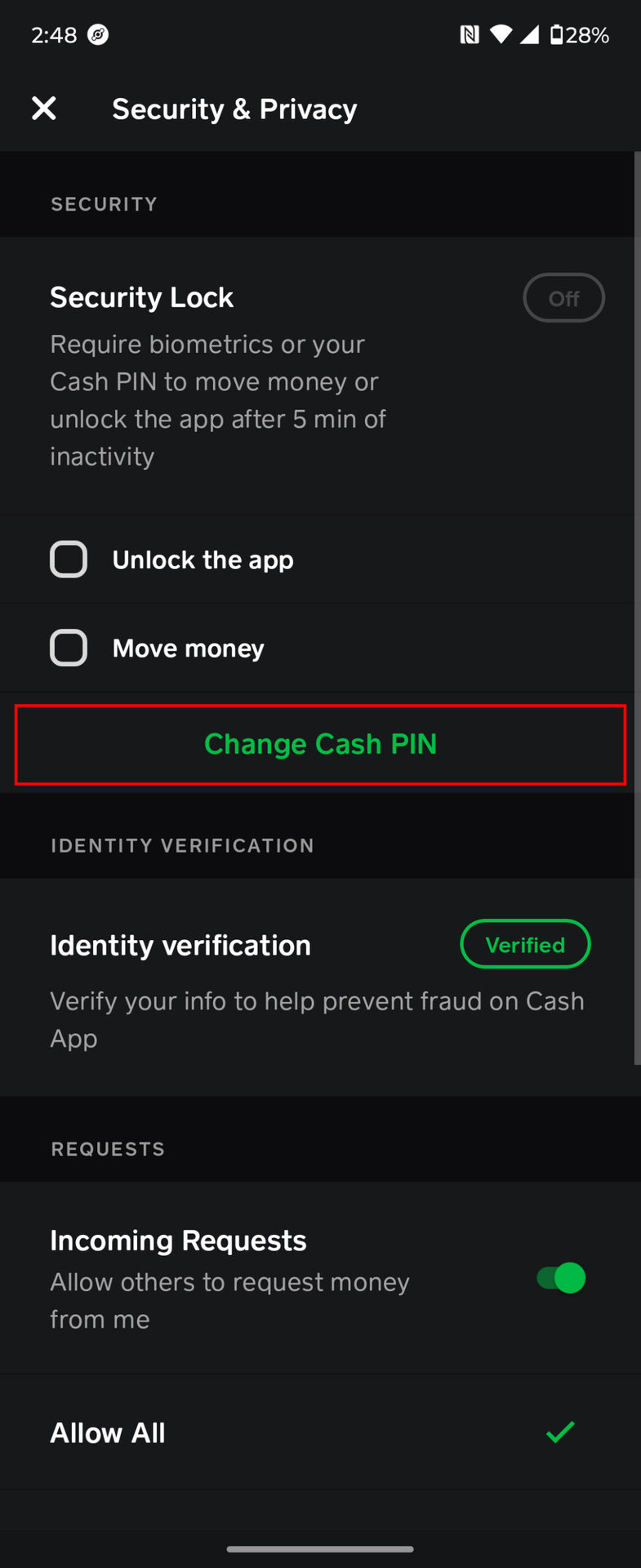
Cash App employs sophisticated algorithms and security protocols to detect and prevent fraudulent activities. These systems are designed to protect users and the platform, but they can sometimes inadvertently flag legitimate transactions, leading to temporary account restrictions or transaction failures.
Suspicious Activity Detection and Fraud Prevention
Cash App’s security systems are constantly monitoring for patterns indicative of fraud. This includes unusual transaction amounts, frequent transfers to multiple new recipients, sending money from a new device, or attempts to send money across geographical boundaries that deviate from typical user behavior. If the system detects anything that triggers its fraud detection algorithms, it may automatically block a transaction or temporarily freeze your account. This is a technical defense mechanism, acting as a digital watchdog. While frustrating when you’re the legitimate user, these flags are crucial for preventing widespread scams and unauthorized access. Resolving such a flag usually requires direct communication with Cash App support to verify your identity and explain the nature of the “suspicious” transaction. The system is designed to err on the side of caution when security is at stake.
Identity Verification Failures (KYC/AML)
Beyond initial setup, Cash App’s system may periodically re-verify user identity, especially if there are changes to account details, suspicious login attempts, or an increase in transaction volume. If the system detects inconsistencies during these re-verification checks – perhaps an updated address doesn’t match previous records, or a security question is answered incorrectly – it can lead to immediate account restrictions. These restrictions often include the inability to send money. These are not arbitrary blocks; they are system responses to potential identity compromise or non-compliance with ongoing KYC/AML regulations. Reinstating full functionality often requires providing updated documentation or completing additional verification steps directly through the app or with customer support.
Account Violations and Terms of Service Breaches
Cash App has strict Terms of Service (ToS) that users agree to upon signing up. These terms outline acceptable uses of the platform and prohibited activities, which include using the app for illegal transactions, sending money for gambling in restricted regions, or engaging in activities that violate platform policies (e.g., impersonation, spamming). If Cash App’s internal systems detect a violation of these terms, it can lead to immediate account restrictions, including the inability to send money, or even a permanent account ban. The detection of such violations is often automated, triggered by keywords in transaction notes, reports from other users, or pattern analysis by AI. Understanding and adhering to the ToS is critical to maintaining an unrestricted account. When a user breaches these technical agreements, the platform is programmed to respond with appropriate sanctions.
Temporary Holds and Freezes
For various reasons, Cash App may place a temporary hold on your account or freeze specific transactions. This could be due to a pending review of a large transaction, a dispute filed by another user, or an ongoing investigation triggered by their security protocols. Unlike a permanent ban, a temporary hold is usually resolvable. During a hold, your ability to send money will be suspended. The system implements these holds as a protective measure, providing a buffer period for issues to be resolved or for further investigation to take place. Notifications regarding such holds are typically sent directly to the user via the app or email, detailing the reason and necessary steps to resolve it. These are system-initiated interventions designed to maintain the integrity and security of the financial ecosystem within the app.
Troubleshooting Steps and Best Practices
When faced with a transaction failure, a systematic approach to troubleshooting can often quickly resolve the issue. These steps focus on app functionality, account integrity, and user best practices.
Basic Diagnostics: Reinstall, Restart, Clear Cache
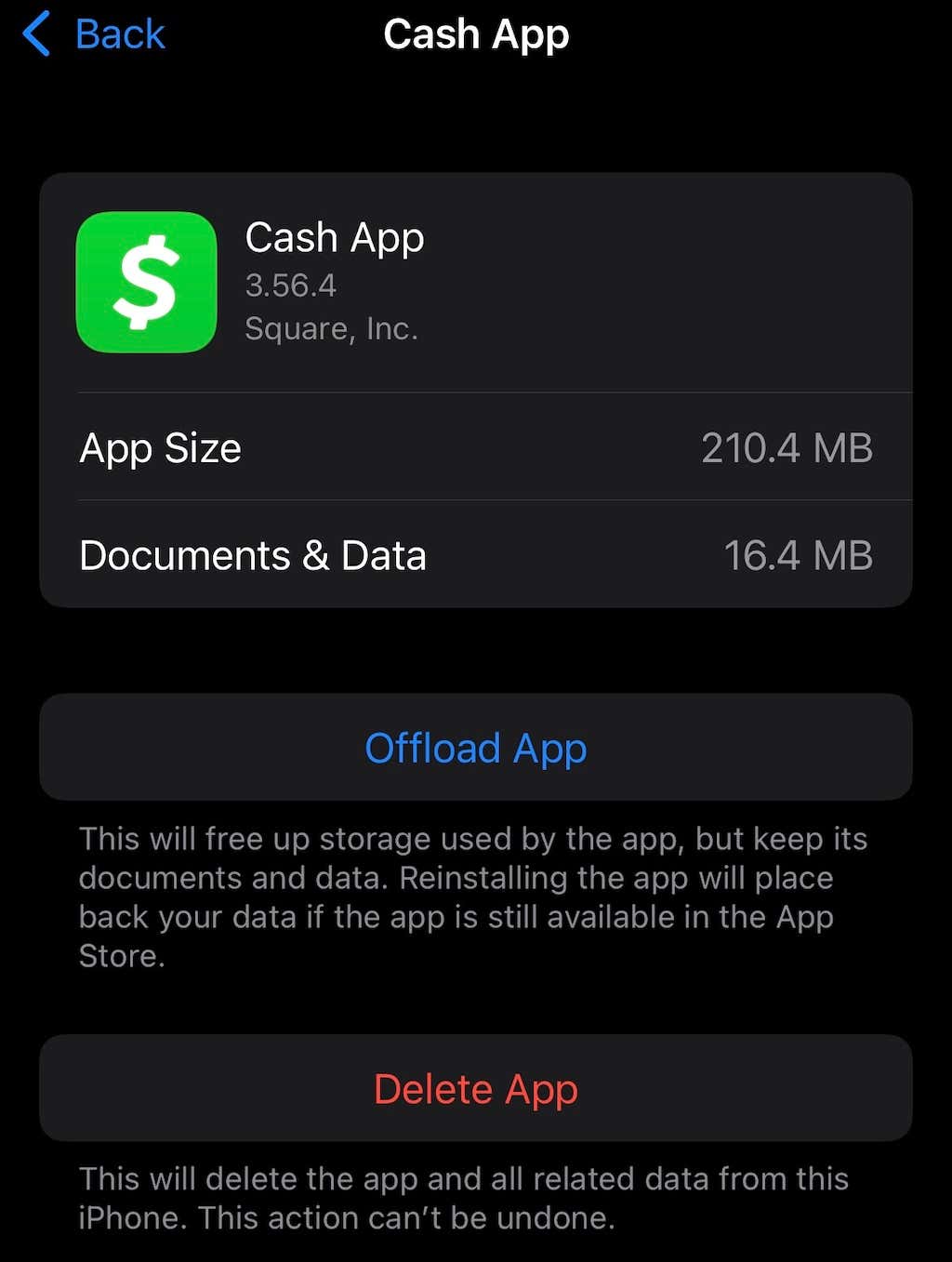
Many technical issues can be resolved with fundamental IT troubleshooting. First, try restarting your phone; this can clear temporary glitches in your device’s operating system or network connections. Next, if the problem persists, try clearing Cash App’s cache. On Android, you can usually do this through your phone’s app settings. On iOS, you typically need to offload or delete and reinstall the app, which clears all cached data. Finally, ensure you are running the latest version of Cash App by checking for updates in your app store. If all else fails, a complete deletion and fresh reinstallation of the app can resolve corrupted files or persistent software bugs. These actions reset the app’s state, often resolving conflicts or data corruption that might be preventing transactions.
Verifying Account Information and Recipient Details
Accuracy is paramount in digital transactions. Double-check all linked bank account and debit card information within your Cash App settings to ensure it is current and correct. Verify that your personal information (name, address, SSN if applicable) aligns with your official records. Crucially, before initiating any send, meticulously confirm the recipient’s Cashtag, phone number, or email address. A common best practice is to always ask for the recipient’s Cashtag directly to avoid typos. If you’ve sent money to the wrong person, it’s often irreversible. Verifying these details meticulously before each transaction reduces the risk of rejection due to incorrect data entry.
Contacting Cash App Support: When and How
If you’ve exhausted all basic troubleshooting steps and still cannot send money, it’s time to contact Cash App’s customer support. This is especially important if you suspect an account restriction, a security flag, or an unknown technical error. You can typically reach support directly through the app (Profile Icon > Support) or via their official website. Be prepared to provide specific details: the exact error message you’re receiving, the amount you’re trying to send, the recipient’s details (if comfortable), and the steps you’ve already taken to troubleshoot. Cash App support staff have access to your account’s backend data and can identify specific system flags, restrictions, or technical anomalies that are not visible to the end-user. They can guide you through specific verification processes or resolve internal system blocks.
Ensuring Digital Security for Future Transactions
Prevention is always better than cure. To minimize future “why won’t Cash App let me send money?” scenarios, adopt robust digital security practices. Use a strong, unique password for your Cash App account and enable two-factor authentication (2FA) for an added layer of protection. Be wary of phishing attempts or suspicious links that could compromise your login credentials. Regularly review your transaction history for any unauthorized activity. Keep your device’s operating system and Cash App updated to benefit from the latest security patches. By maintaining a secure digital environment and staying vigilant against potential threats, you significantly reduce the risk of account compromises or system-imposed restrictions that hinder your ability to send money.
In conclusion, the inability to send money via Cash App, while frustrating, is almost always rooted in discernible technical, security, or user-related factors. By systematically addressing these potential causes – from ensuring app and device integrity to understanding security protocols and meticulously verifying transaction details – users can proactively resolve most issues. When in doubt, leveraging Cash App’s dedicated support channels remains the most direct route to understanding and rectifying complex problems. Adhering to best practices in digital hygiene and account management will ensure that Cash App continues to be a reliable tool for your digital financial needs, minimizing disruptions and maximizing convenience.
aViewFromTheCave is a participant in the Amazon Services LLC Associates Program, an affiliate advertising program designed to provide a means for sites to earn advertising fees by advertising and linking to Amazon.com. Amazon, the Amazon logo, AmazonSupply, and the AmazonSupply logo are trademarks of Amazon.com, Inc. or its affiliates. As an Amazon Associate we earn affiliate commissions from qualifying purchases.