
In the evolving landscape of digital finance, tools like Cash App have become indispensable for millions, offering a streamlined way to manage personal funds, send and receive money, and even dabble in investing. At the heart of leveraging Cash App’s full potential lies the fundamental need to fund your account. Whether you’re looking to pay a friend, make an online purchase, or take advantage of its investment features, understanding the various methods for “uploading” money into your Cash App balance is crucial. This comprehensive guide delves into the diverse avenues available, ensuring you can seamlessly integrate Cash App into your financial routine. We’ll explore the primary, most convenient methods, uncover less conventional but equally useful alternatives, and provide essential best practices for managing your funds securely and efficiently within the platform.
Understanding Cash App and Its Core Functionality
Before diving into the specifics of funding, it’s beneficial to grasp what Cash App is and why it has become such a prominent player in personal finance. Developed by Block, Inc. (formerly Square, Inc.), Cash App has carved out a significant niche as a mobile payment service that simplifies financial transactions for individuals.
What is Cash App?
At its core, Cash App is a peer-to-peer (P2P) payment application that allows users to send and receive money with remarkable ease. Beyond its foundational P2P functionality, Cash App has expanded its offerings significantly. Users can acquire a Cash App Card, a customizable Visa debit card linked directly to their Cash App balance, enabling them to make purchases online and in physical stores. The platform also facilitates direct deposits, allowing users to receive paychecks, tax refunds, and government benefits directly into their Cash App account. Furthermore, Cash App offers basic investment capabilities, enabling users to buy and sell stocks and Bitcoin directly within the app, broadening its appeal from a simple payment tool to a more comprehensive personal finance hub.
Why Fund Your Cash App Account?
The reasons for uploading money to your Cash App account are multifaceted and extend beyond mere convenience. A funded Cash App balance empowers users to:
-
Send Money to Friends and Family: The most common use case, allowing instant transfers without handling cash or dealing with traditional bank transfer delays.
-
Make Purchases: Utilize the Cash App Card for everyday spending, both online and in brick-and-mortar establishments.
-
Access Boosts: Cash App’s unique “Boosts” offer instant discounts at various merchants when using the Cash App Card, making a funded account a gateway to savings.
-
Invest in Stocks and Bitcoin: For those interested in micro-investing, a positive Cash App balance is required to buy fractional shares of stocks or portions of Bitcoin.
-
Pay Bills and Services: While not a primary bill-pay service, a funded Cash App can be used for various payments where debit cards are accepted.
-
Utilize Direct Deposit: Having funds readily available from your paycheck or benefits allows for immediate access and management within the app.
Effectively, funding your Cash App account unlocks its full suite of features, transforming it into a versatile tool for managing your daily finances.
Primary Methods for Funding Your Cash App Account
The most common and straightforward ways to add money to your Cash App account involve linking external financial instruments or receiving funds directly. These methods form the backbone of Cash App’s operational utility.
Linking a Bank Account (Via Debit Card)
The most prevalent method for funding your Cash App is by linking an external bank account. While Cash App technically links to your bank account, the actual mechanism for instant “cash-ins” (adding money) primarily uses your linked debit card. This distinction is important for understanding transfer speeds and functionality.
-
Process:
-
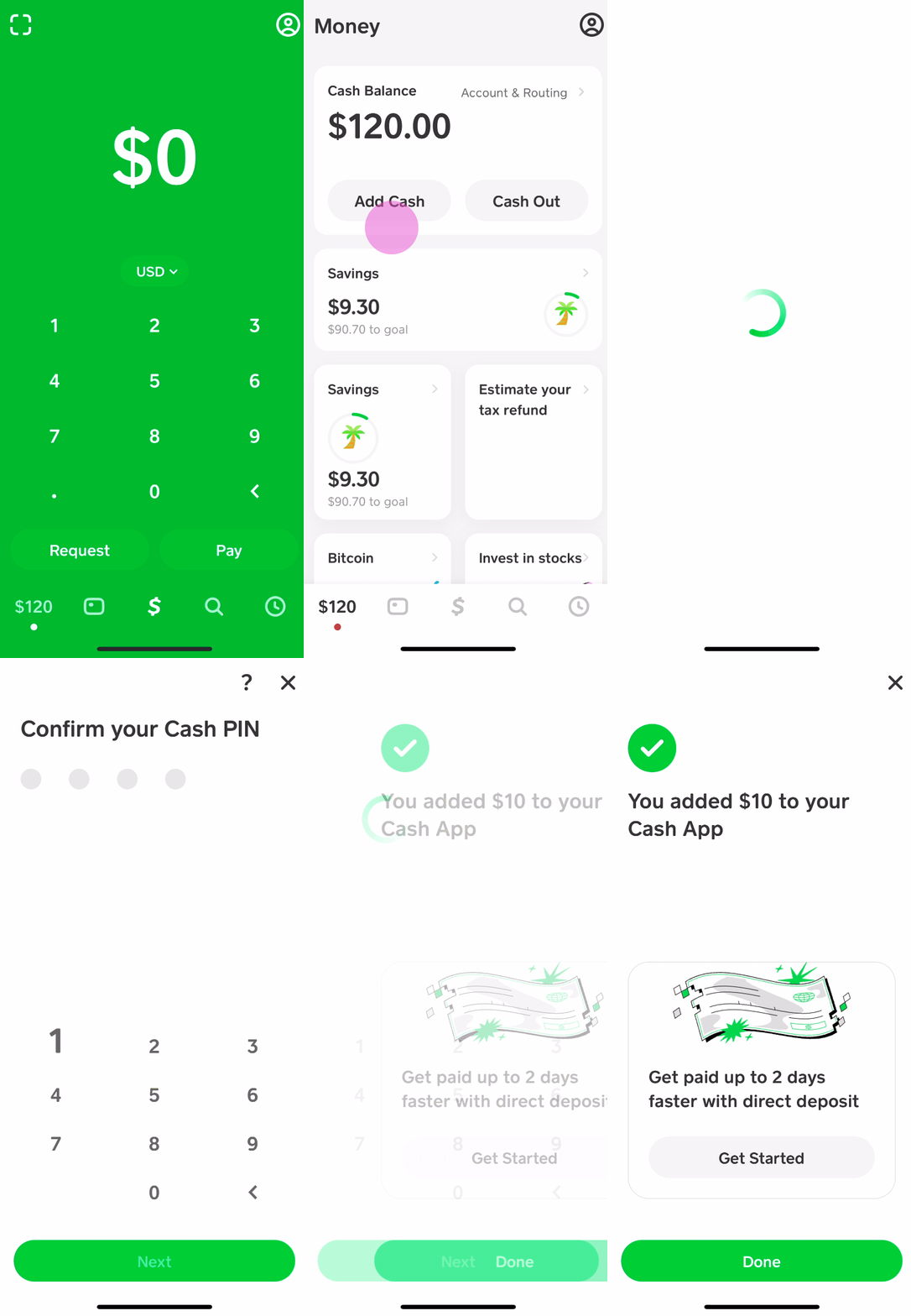
Open the Cash App and tap the Banking tab (the house icon or dollar sign icon).
-
Tap “Add Cash.”
-
Enter the desired amount you wish to add.
-
Confirm your selection, and the funds will be instantly transferred from your linked debit card to your Cash App balance.
-
-
Key Insight: This method relies on the immediate transaction capabilities of debit cards, making it the fastest way to manually transfer funds from your bank account to Cash App. While you can link your bank account directly for standard transfers out of Cash App, adding money in for instant access almost exclusively uses the debit card functionality. Ensure your linked debit card is active and has sufficient funds.
Direct Deposit
For a more automated and regular inflow of money, setting up direct deposit to your Cash App account is an excellent option. This is particularly useful for receiving paychecks, government benefits (like tax refunds or social security), or other recurring payments.
-
Process:
-
In the Cash App, navigate to the Banking tab.
-
Tap “Direct Deposit.”
-
You will find your Cash App account and routing numbers.
-
Provide these details to your employer’s payroll department, government agency, or any other institution that issues direct deposits.
-
They will typically require you to fill out a direct deposit form, which can often be downloaded directly from the Cash App itself.
-
-
Key Insight: Direct deposit to Cash App functions much like direct deposit to a traditional bank account. It provides a reliable and fee-free way to receive funds, often making them available up to two days earlier than many traditional banks, depending on the payer’s processing. This streamlines your financial flow directly into the app you use for daily spending and management.
Receiving Money from Others
While not a direct “upload” from your own external accounts, receiving money from other Cash App users is a fundamental way to fund your balance. Given Cash App’s P2P nature, this is an incredibly common and instant method of acquiring funds.
-
Process:
-
Share your Cashtag (your unique Cash App username, e.g., $YourName) or your phone number/email linked to Cash App with the sender.
-
The sender initiates a payment to you from their Cash App account.
-
The funds appear almost instantly in your Cash App balance.
-
-
Key Insight: This method is central to Cash App’s utility for splitting bills, receiving payments for goods/services, or simply getting money from friends and family. It’s often the quickest way to top up your balance when another Cash App user is involved.
Alternative and Less Common Ways to Add Funds
Beyond the primary methods, Cash App also offers solutions for those who prefer to deal in physical cash or have funds tied up in other digital assets. These alternatives broaden the accessibility of the platform.
Using Cash App Paper Money Deposits (Retail Locations)
For users who primarily deal in cash, Cash App provides a convenient way to convert physical currency into a digital balance through partner retail stores. This eliminates the need for a traditional bank account or debit card for initial funding.
-
Process:
-
Open Cash App and tap the Banking tab.
-
Tap “Add Cash.”
-
Select “Cash App Paper Money Deposit” (or a similar option if available).
-
The app will show you nearby participating retailers (e.g., Walmart, Walgreens, 7-Eleven, Dollar General).
-
Go to the chosen retailer’s cashier and inform them you wish to deposit cash to your Cash App account.
-
The cashier will scan a barcode generated by your Cash App (found within the “Paper Money Deposit” section) and take your cash.
-
The funds are typically added to your Cash App balance instantly or within a few minutes.
-
-
Key Insight: This method is invaluable for the unbanked or underbanked, as well as anyone who receives payments in physical cash. It bridges the gap between traditional currency and digital finance, offering flexibility and accessibility. Be aware of potential deposit limits and check with the retailer for any associated fees, though Cash App generally does not charge for this service.
Transferring from Other Financial Apps/Services

While Cash App doesn’t have a universal “transfer from other app” button, you can effectively move funds from other digital wallets or online payment services to your Cash App by leveraging your linked bank account.
-
Process (Indirect):
-
Withdraw funds from the other financial app (e.g., PayPal, Venmo, Google Pay) to your linked bank account.
-
Once the funds are in your bank account, use the “Add Cash” feature in Cash App (via your linked debit card) to transfer them into your Cash App balance.
-
-
Key Insight: This is not a direct, one-step transfer, but rather a two-step process that uses your primary bank account as an intermediary. It requires patience as transfers from other apps to your bank account can take 1-3 business days unless instant transfer options are used (which may incur fees). It’s a viable option when consolidating funds from various digital sources.
Selling Stocks or Bitcoin within Cash App
If you’ve been using Cash App’s investment features, another way to “fund” your spendable balance is by selling your invested assets. This isn’t adding new money from an external source but rather converting existing digital assets into liquid cash within the app.
-
Process:
-
Navigate to the Investing tab in Cash App.
-
Select “Stocks” or “Bitcoin.”
-
Choose the asset you wish to sell.
-
Follow the prompts to sell your desired amount.
-
The proceeds from the sale will be added to your Cash App balance, typically within a few business days for stocks and much faster for Bitcoin.
-
-
Key Insight: This method is useful for realizing gains or simply freeing up capital from your investment portfolio for immediate spending or withdrawal. It integrates the investment and payment aspects of Cash App, offering a holistic financial experience.
Best Practices for Managing Your Cash App Funds
Effectively funding your Cash App is only one piece of the puzzle. Responsible management, security awareness, and understanding the platform’s financial nuances are equally vital for a positive experience.
Security Measures and Protecting Your Account
Safeguarding your funds on Cash App should be a top priority. Digital convenience comes with the responsibility of vigilance.
-
Enable Security Locks: Always set up a PIN, Touch ID, or Face ID to protect access to your Cash App account.
-
Monitor Transactions: Regularly review your transaction history for any unauthorized activity. Report suspicious transactions immediately.
-
Beware of Scams: Be cautious of unsolicited requests for money, “too good to be true” offers, or messages from unknown senders. Cash App will never ask for your PIN or full sign-in code.
-
Use Strong Passwords: If your Cash App is linked to an email or phone number also used for other services, ensure those accounts have strong, unique passwords.
-
Official Support Channels: Only interact with Cash App support through official channels within the app or on their verified website.
Understanding Limits and Fees
Cash App, like any financial service, operates with certain limits and may apply fees for specific services. Being aware of these helps in planning your transactions.
-
Sending/Receiving Limits: Unverified accounts often have lower limits for sending and receiving money. Verifying your identity (by providing your full name, date of birth, and the last four digits of your Social Security Number) significantly increases these limits.
-
Cash Card Spending Limits: Your Cash App Card will have daily, weekly, and monthly spending limits.
-
ATM Withdrawal Limits: If you use your Cash App Card for ATM withdrawals, there will be daily and weekly limits.
-
Instant Deposit Fees: While standard bank transfers out of Cash App are free, instant transfers to an external bank account usually incur a 0.5%–1.75% fee. Adding cash via debit card is typically free.
-
Bitcoin Fees: Buying and selling Bitcoin on Cash App may involve a small service fee and a spread fee (the difference between the buy and sell price).
Monitoring Your Transactions and Balances
Proactive monitoring of your Cash App balance and transaction history is a fundamental aspect of sound financial management.
-
Regular Checks: Periodically check your Cash App balance to ensure it aligns with your expectations and to avoid overdrafts if using the Cash Card.
-
Transaction History: Utilize the in-app transaction history to track all inflows and outflows. This helps reconcile your spending, identify recurring payments, and spot any discrepancies.
-
Notifications: Enable push notifications for transactions to stay informed in real-time about money entering or leaving your account.
Troubleshooting Common Funding Issues
Despite the convenience, users might occasionally encounter issues when attempting to fund their Cash App account. Knowing how to address these can save time and frustration.
What to Do If a Deposit Fails
A failed deposit can be frustrating. Here are common reasons and troubleshooting steps:
-
Incorrect Card Information: Double-check that your linked debit card number, expiration date, and CVV are entered correctly.
-
Insufficient Funds: Ensure your linked bank account or debit card has enough money to cover the amount you’re trying to add.
-
Bank Restrictions: Sometimes, your bank may flag a Cash App transaction as suspicious, especially large amounts or first-time transfers. Contact your bank to approve the transaction.
-
Daily Limits Exceeded: You might have hit your daily, weekly, or monthly limits for adding cash. Check your Cash App limits.
-
Outdated App: Ensure your Cash App is updated to the latest version.
-
Network Issues: A poor internet connection can sometimes interrupt transactions. Try again with a stable connection.
If none of these resolve the issue, it’s time to reach out for direct assistance.
Contacting Cash App Support
When self-troubleshooting doesn’t yield results, Cash App’s customer support is the next step.
-
In-App Support: The most efficient way to contact support is directly through the Cash App. Navigate to your profile icon (top right corner), scroll down, and tap “Support” or “Cash Support.” This allows you to chat with a representative or find answers in their extensive FAQ section.
-
Website Support: You can also visit Cash App’s official support website for assistance.
-
Phone Support (Limited): While Cash App primarily relies on in-app and email support, limited phone support options may be available for specific issues. Always verify the number through official Cash App channels to avoid scams.
Provide clear and concise details about your issue, including dates, times, amounts, and any error messages you received, to help the support team resolve your query efficiently.
Conclusion
Cash App has firmly established itself as a versatile and user-friendly financial tool, simplifying everything from peer-to-peer payments to micro-investing. The ability to seamlessly “upload” money to your account is the gateway to unlocking its full potential. Whether you prefer the instant gratification of a debit card transfer, the regularity of direct deposit, the convenience of cash deposits at retail stores, or the strategic redeployment of investment funds, Cash App offers multiple pathways to keep your balance topped up. By understanding these various methods, adhering to best practices for security and financial awareness, and knowing how to troubleshoot common issues, users can confidently integrate Cash App into their daily financial lives, making money management more accessible, efficient, and engaging. As digital finance continues to evolve, platforms like Cash App empower individuals with greater control and flexibility over their personal funds.
aViewFromTheCave is a participant in the Amazon Services LLC Associates Program, an affiliate advertising program designed to provide a means for sites to earn advertising fees by advertising and linking to Amazon.com. Amazon, the Amazon logo, AmazonSupply, and the AmazonSupply logo are trademarks of Amazon.com, Inc. or its affiliates. As an Amazon Associate we earn affiliate commissions from qualifying purchases.