
In the rapidly evolving landscape of digital finance, peer-to-peer (P2P) payment applications have become indispensable tools for managing personal transactions. Among these, Cash App stands out as a prominent player, offering a seamless and intuitive platform for sending, receiving, and investing money. At the heart of its functionality lies the ability to securely link a debit or credit card, transforming a standalone app into a powerful financial conduit. This guide delves into the technical intricacies and best practices for linking your card to Cash App, ensuring a secure, efficient, and optimized user experience.
Understanding Cash App and Its Core Functionality
Before diving into the mechanics of linking a card, it’s crucial to grasp what Cash App is and why linking a financial instrument is fundamental to its operation. Cash App, developed by Block, Inc., is more than just a payment service; it’s a versatile financial application designed for the modern digital economy.
What is Cash App?
Cash App serves primarily as a mobile payment service, enabling users to transfer money to one another instantly. Beyond P2P transfers, it offers a suite of financial services, including direct deposit, stock and Bitcoin investing, and the Cash Card — a customizable, free debit card linked directly to your Cash App balance. Its user-friendly interface and integrated features have made it a go-to solution for millions seeking a simplified approach to personal finance management. From splitting restaurant bills with friends to receiving your paycheck, Cash App streamlines numerous financial interactions.
Why Link a Card? The Gateway to Digital Transactions
Linking a card to Cash App is the foundational step that unlocks most of its features. Without a linked card, your Cash App experience is severely limited, primarily to receiving funds into your Cash App balance. The moment a card is connected, however, your app transforms into a dynamic financial tool.
-
Funding Transactions: A linked debit card is essential for adding money to your Cash App balance directly from your bank account. This allows you to then send money to friends, make purchases, or invest.
-
Instant Transfers: While standard transfers from Cash App to a bank account can take 1-3 business days, linking a debit card enables “Instant Deposit,” where funds are immediately transferred to your bank account for a small fee.
-
Backup Funding: For sending money, if your Cash App balance is insufficient, a linked debit card can serve as a backup, ensuring your payments go through without interruption.
-
Security and Verification: Linking a card also plays a role in verifying your identity and securing your account, contributing to Cash App’s anti-fraud measures. It creates a verifiable link between your digital identity and a traditional financial institution.
Types of Cards Supported: Debit vs. Credit
Cash App supports linking most U.S.-issued bank cards. However, there’s a critical distinction in how different card types function within the app:
-
Debit Cards: These are the primary and most recommended type of card to link. Debit cards, tied directly to your bank account, are used for:
-
Adding funds to your Cash App balance.
-
Sending money to others (drawing directly from your bank if your Cash App balance is low).
-
Instant Deposits to your bank account.
-
Verification purposes.
The seamless integration of debit cards is central to Cash App’s instant transfer capabilities and low-cost operations.
-
-
Credit Cards: While Cash App does allow linking credit cards, their functionality is more restricted. You can use a linked credit card to send money, but usually, a 3% fee is applied to these transactions. You cannot use a credit card to add funds to your Cash App balance or for Instant Deposits to your bank. The fee associated with credit card payments is standard practice across many P2P apps, designed to offset the processing costs incurred by the credit card networks. It’s generally advisable to use a debit card for most Cash App transactions to avoid these additional charges. Prepaid cards and most ATM-only cards are generally not supported due to their limited verification capabilities and lack of routing information.
The Step-by-Step Guide to Linking Your Card
Linking a card to Cash App is a straightforward process designed for user convenience. Following these steps will ensure a smooth integration of your financial institution with the Cash App platform.
Initial App Setup and Account Creation
If you’re new to Cash App, the first step is to download the application from your device’s app store (iOS or Android). Upon opening, you’ll be prompted to create an account, which typically involves:
-
Entering a Phone Number or Email: This will be your primary identifier and is used for verification.
-
Entering a Verification Code: A one-time code sent to your phone or email to confirm your identity.
-
Choosing a $Cashtag: This is your unique username within Cash App, allowing others to easily send you money.
-
Linking a Bank Account (Optional initially, but good practice): This can be done later, but it’s often an early prompt. For our purpose, we’ll focus specifically on linking a card.
Navigating to the Banking Section
Once your account is set up and you’re logged into the main screen, locating the correct section to link your card is simple:
-
Tap the Banking Tab: Look for an icon resembling a house or a bank building at the bottom left of your Cash App home screen. This is your “Banking” or “My Cash” tab.
-
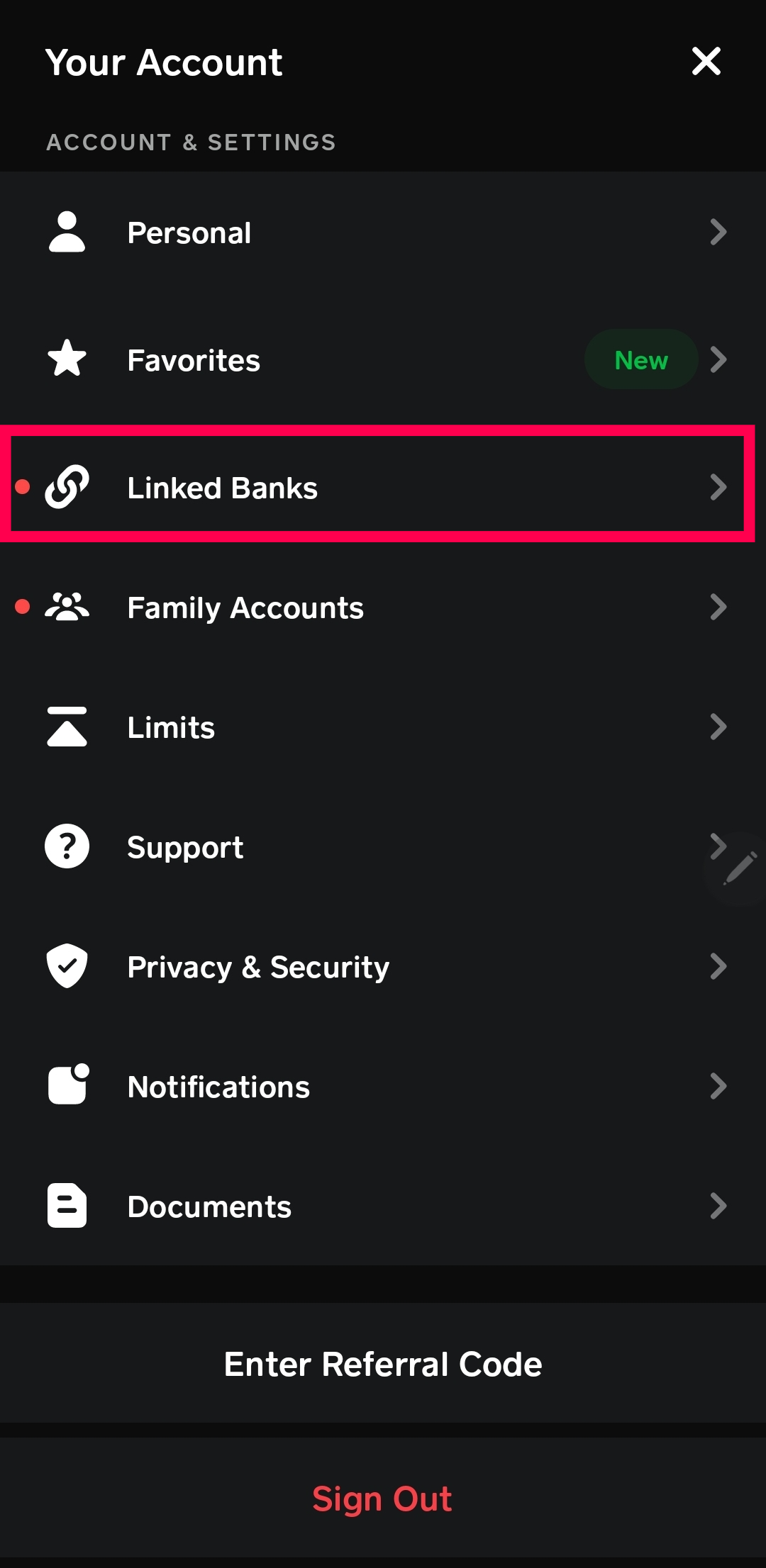
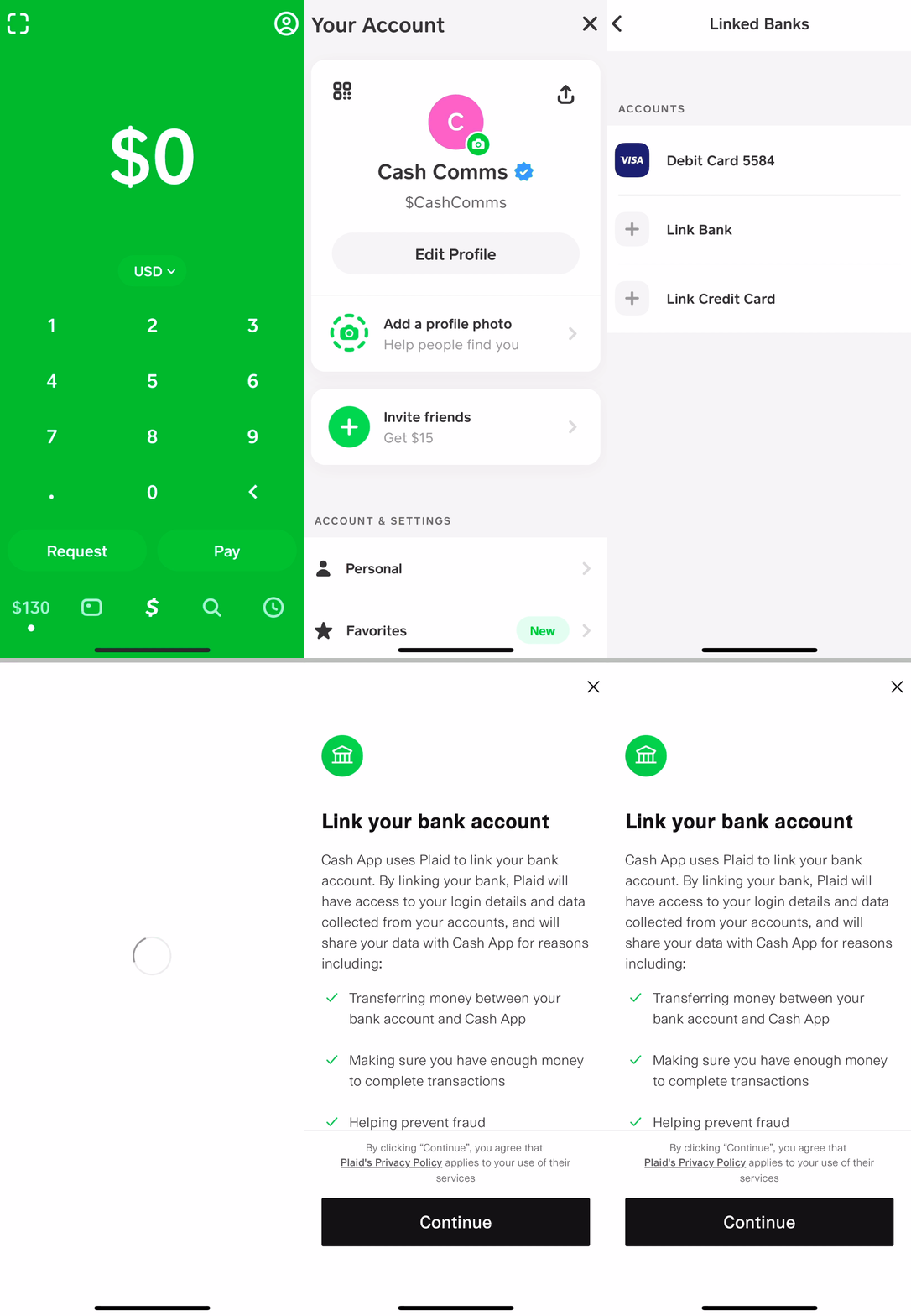
Locate “Link Bank” or “Link Debit Card”: Within the Banking tab, you’ll see options related to your Cash App balance, direct deposits, and potentially a “Link Bank” or “Link Debit Card” button. Tap this option to proceed. If you already have a bank linked, you might see an option to “Add a Bank” or “Replace Bank.”
Entering Card Details Manually
Cash App usually offers two methods for linking: manual entry or connecting via your bank’s online portal. For cards, manual entry is the most common.
-
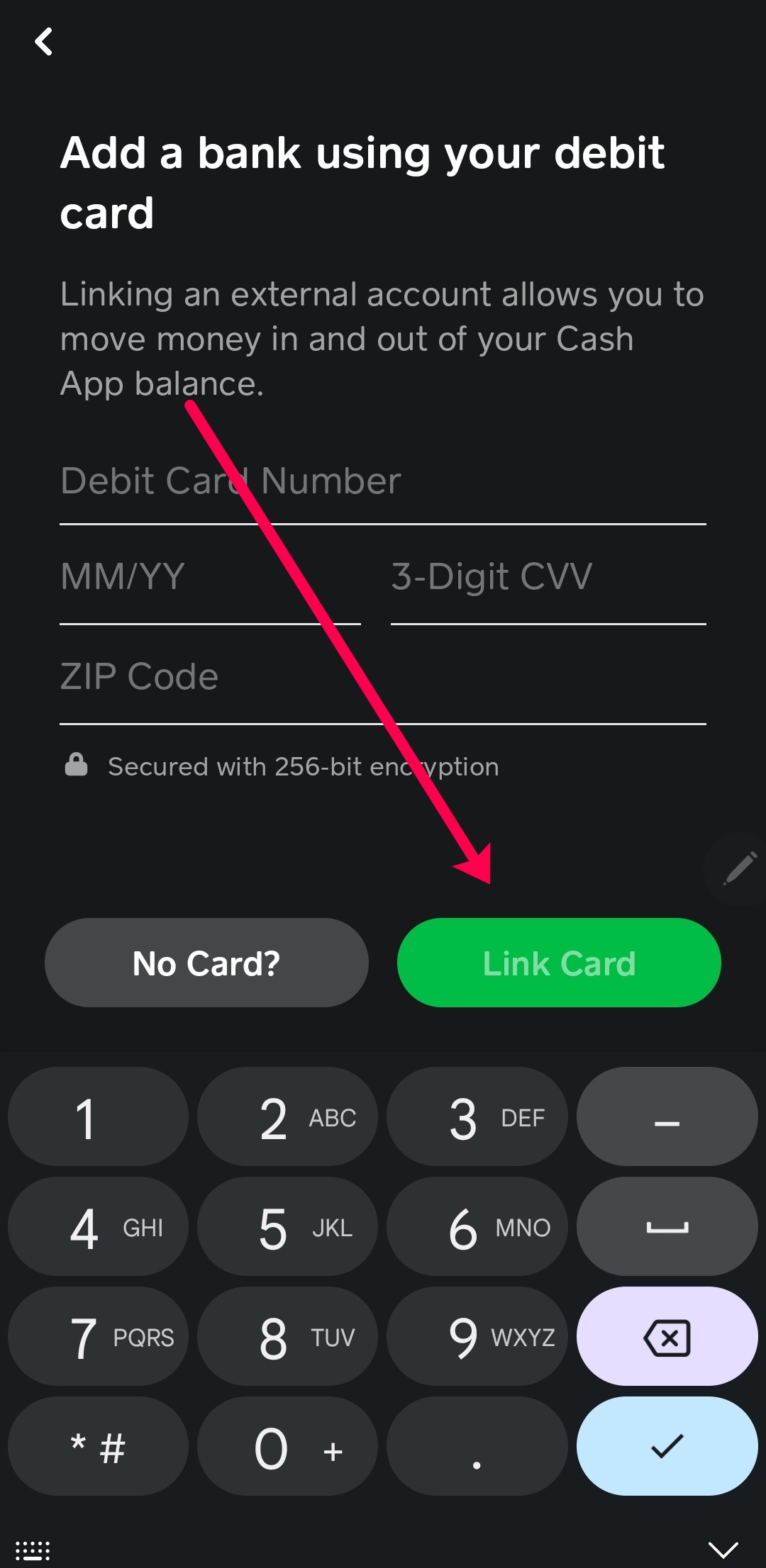
Select “Link Debit Card” (or similar): After tapping the appropriate option, you’ll be presented with a form to input your card details.
-
Input Card Number: Carefully enter the 16-digit number found on the front of your debit or credit card. Double-check for accuracy.
-
Enter Expiry Date: Input the month and year your card expires (e.g., 12/25 for December 2025).
-
Enter CVV/CVC Code: This is the 3- or 4-digit security code typically found on the back of your card (for Visa/Mastercard/Discover) or the front (for Amex).
-
Enter ZIP Code: Provide the billing ZIP code associated with your card. This is a crucial security measure to verify you are the legitimate cardholder.
-
Tap “Link Card”: Once all details are entered, tap the “Link Card” button. Cash App will then attempt to verify the card with your bank.
Verification Process
After submitting your card details, Cash App communicates with your bank to verify the card’s authenticity and your ownership.
-
Instant Verification: For most debit cards, this process is almost instantaneous. If the details match, your card will be successfully linked, and you’ll receive a confirmation.
-
Micro-deposits (Less Common for Cards): In some rare cases, particularly if there are verification issues, Cash App might employ a micro-deposit method, where small, random amounts (e.g., $0.01, $0.05) are sent to your bank account. You would then need to confirm these amounts within the app. This is more common when directly linking a bank account without a card.
-
Security Checks: During this phase, Cash App’s fraud detection systems are active, looking for any suspicious activity or mismatched information. Should an issue arise, you may be prompted to try again, verify your identity further, or contact Cash App support.
Optimizing Your Cash App Experience with Linked Cards
Once your card is successfully linked, a world of enhanced financial capabilities opens up. Understanding these features allows you to fully leverage Cash App’s potential.
Sending and Receiving Money Instantly
The most fundamental benefit of a linked card is the ability to send and receive money effortlessly.
-
Sending Funds: When you initiate a payment to another Cash App user, you can choose to draw funds from your Cash App balance or directly from your linked debit card if your balance is insufficient. This provides flexibility and ensures payments always go through.
-
Receiving Funds: Money sent to your $Cashtag automatically lands in your Cash App balance. From there, you can either keep it in the app for future transactions or instantly transfer it to your linked debit card’s associated bank account.
Making In-Store and Online Payments
Beyond P2P, a linked card (especially if you order a Cash Card) extends your payment capabilities.
-
Cash Card Integration: Your Cash Card is a physical and virtual debit card directly linked to your Cash App balance. It uses the funds available in your Cash App. When you make a purchase with your Cash Card, the funds are drawn from your Cash App balance. If you don’t have enough balance, and a linked debit card is set as a “backup,” Cash App may draw funds directly from your linked bank account.
-
Boosts: Cash Card users can also activate “Boosts,” which are instant discounts at specific merchants (e.g., 10% off at a coffee shop). These boosts are funded by Cash App itself and require you to use your Cash Card.
-
Online Payments: The Cash Card can be used for online purchases wherever Visa is accepted, much like any other debit card.
Utilizing Direct Deposit and Cash Card Features
For those looking to integrate Cash App deeper into their financial lives, direct deposit and the Cash Card offer significant advantages.
-
Direct Deposit: By providing your unique Cash App routing and account numbers to your employer, you can have your paycheck directly deposited into your Cash App balance. This streamlines receiving income and offers immediate access to your funds, which can then be used for spending via the Cash Card or instantly transferred to your bank.
-
Cash Card Ordering and Customization: Ordering a free, customizable Cash Card is simple through the app. This card allows you to spend your Cash App balance anywhere Visa debit cards are accepted, providing a tangible link to your digital funds. The ability to customize the card’s design adds a personal touch to your financial tools.
Ensuring Security While Linking Your Financial Information
The security of your financial data is paramount. Cash App employs robust measures, but user vigilance is equally critical when linking sensitive information like card details.
Cash App’s Security Protocols
Cash App utilizes industry-standard security practices to protect your information:
-
Encryption: All data transmitted between your device and Cash App’s servers is encrypted, safeguarding your card details and personal information from interception.
-
Fraud Detection: Sophisticated fraud detection systems monitor transactions and account activity for suspicious patterns.
-
PCI DSS Compliance: As a payment processor, Cash App adheres to Payment Card Industry Data Security Standard (PCI DSS) requirements, ensuring secure handling of cardholder data.
-
Account Protection: Features like PIN protection, fingerprint ID, or facial recognition can be enabled to secure access to your app.
Best Practices for Users: Strong Passwords, Two-Factor Authentication
While Cash App has its own security, your proactive measures are crucial:
-
Strong, Unique Passwords: Use a complex password for your Cash App account that isn’t reused on other services. A combination of uppercase and lowercase letters, numbers, and symbols is ideal.
-
Enable Two-Factor Authentication (2FA): If available, activate 2FA. This adds an extra layer of security, requiring a second verification step (like a code from your phone) in addition to your password, significantly reducing the risk of unauthorized access.
-
Keep Your Device Secure: Use a strong passcode or biometric authentication on your smartphone. Be wary of public Wi-Fi networks for financial transactions.
-
Monitor Activity: Regularly review your Cash App transaction history and bank statements for any unrecognized activity. Report discrepancies immediately.
-
Official App Only: Always download Cash App from official app stores (Apple App Store or Google Play Store) to avoid malicious imitations.
Recognizing and Avoiding Scams
Unfortunately, the popularity of P2P apps like Cash App has made them targets for scammers.
-
Phishing Attempts: Be suspicious of unsolicited emails or messages claiming to be from Cash App, especially those asking for your login credentials or card details. Cash App will never ask for your PIN or full card number via email or social media.
-
Fake Customer Support: Only use the official Cash App support channels within the app or on their official website. Scammers often set up fake support lines to trick users into revealing information.
-
“Payment Pending” Scams: Be wary of requests to send money to “unlock” a larger payment you’re supposedly receiving. Legitimate payments do not require you to send money first.
-
“Cash Flipping” or Gifting Scams: Avoid schemes promising to multiply your money if you send an initial amount. These are almost always scams.
Never share your PIN, verification codes, or personal financial details with anyone outside the secure confines of the official app interface.
Troubleshooting Common Issues and FAQs
Even with a straightforward process, users might encounter issues. Knowing how to troubleshoot and what to expect can save time and frustration.
Card Linkage Errors
Several reasons can cause a card to fail during linkage:
-
Incorrect Information: Double-check the card number, expiry date, CVV, and ZIP code. Even a single digit error will prevent linkage.
-
Unsupported Card Type: Ensure you’re not trying to link an unsupported card (e.g., certain prepaid cards, ATM-only cards, international cards).
-
Bank Restrictions: Sometimes, your bank might decline the authorization request from Cash App due to security settings or daily limits. Contact your bank to confirm there are no restrictions on linking to third-party apps.
-
Expired Card: Ensure your card is not expired.
-
App Glitch: Occasionally, a temporary app glitch might occur. Try restarting the app, clearing its cache, or even reinstalling it.
Updating or Removing a Linked Card
Managing your linked cards is as easy as linking them:
-
To Update: If your card expires or you get a new one with the same account, you’ll typically need to remove the old card and add the new one. Cash App doesn’t usually allow direct editing of card numbers.
-
To Remove:
-
Navigate to the “Banking” or “My Cash” tab.
-
Tap on the linked bank/card.
-
Scroll down and select “Remove Card” or “Replace Bank.”
This is useful if you change banks, lose a card, or simply want to switch the primary funding source.
-
Contacting Cash App Support
If you’ve exhausted troubleshooting steps and still face issues, contacting Cash App support is the next logical step.
-
In-App Support: The most secure and recommended method is to contact support directly through the app. Go to your profile icon (top right), scroll down, and select “Support.” This allows you to explain your issue and attach relevant screenshots securely.
-
Official Website: You can also find support options on the official Cash App website.
-
Social Media (Caution): While Cash App has official social media accounts, be extremely cautious. Do not share sensitive personal or financial information publicly or in DMs, as scammers often impersonate support staff on these platforms. Stick to the in-app or website support for sensitive issues.
Successfully linking a card to Cash App is the gateway to a powerful and convenient digital financial experience. By understanding the process, optimizing your usage, and maintaining robust security practices, you can leverage Cash App effectively for all your P2P and digital spending needs.
aViewFromTheCave is a participant in the Amazon Services LLC Associates Program, an affiliate advertising program designed to provide a means for sites to earn advertising fees by advertising and linking to Amazon.com. Amazon, the Amazon logo, AmazonSupply, and the AmazonSupply logo are trademarks of Amazon.com, Inc. or its affiliates. As an Amazon Associate we earn affiliate commissions from qualifying purchases.