
In the rapidly evolving landscape of digital finance, mobile payment applications like Cash App have become indispensable tools for managing personal transactions, sending money to friends and family, and even investing. At the core of fully leveraging Cash App’s extensive functionalities lies the crucial step of linking a bank account. This process transforms Cash App from a standalone digital wallet into a robust financial hub, enabling seamless transfers between your traditional banking institution and your digital funds. This comprehensive guide will delve into the technical underpinnings, step-by-step procedures, and security considerations involved in integrating your bank account with Cash App, ensuring a secure and efficient user experience within the broader FinTech ecosystem.
Understanding Cash App’s Core Functionality and Digital Ecosystem
Cash App, developed by Block, Inc., stands as a prominent peer-to-peer (P2P) payment service that allows users to send and receive money via a mobile application. Beyond simple transfers, it has expanded its suite of offerings to include direct deposit, investing in stocks and Bitcoin, and a customizable debit card known as the Cash Card. The technological architecture supporting these features necessitates a secure and reliable link to external financial institutions, primarily your bank account.
What is Cash App and Why Link a Bank Account?
At its heart, Cash App is an application that digitizes and streamlines financial interactions. It provides a unique identifier, known as a $Cashtag, and allows users to hold a balance within the app. However, its true power is unlocked when it can interact with your traditional bank account. Linking a bank account enables you to:
-
Fund your Cash App balance: Transfer money from your bank account to your Cash App for spending or sending.
-
Cash out funds: Move money from your Cash App balance directly back to your bank account.
-
Enable direct deposit: Receive paychecks or government benefits directly into your Cash App, bypassing a traditional bank account if desired.
-
Facilitate larger transactions: While small balances can be managed within the app, substantial financial activity often requires the backing of a linked bank account for larger transfers and withdrawals.
Without a linked bank account, Cash App’s utility is significantly limited, primarily functioning as a standalone wallet that can only receive funds from other Cash App users or through limited methods like paper checks via direct deposit. The integration with a bank account essentially extends Cash App’s reach into the conventional financial system, acting as a digital bridge.
Security Protocols and Data Encryption
Given the sensitive nature of financial transactions, the security of user data and linked accounts is paramount for any FinTech application. Cash App employs a multi-layered security architecture designed to protect user information and prevent unauthorized access. When you link a bank account, several technical safeguards are actively at play:
-
End-to-end encryption: All data transmitted between your device, Cash App’s servers, and the banking institution’s systems is encrypted. This ensures that sensitive information, such as account numbers and routing details, is scrambled and unreadable to unauthorized parties during transit.
-
PCI Data Security Standard (PCI DSS) compliance: As a payment processor, Cash App adheres to stringent industry standards for securing cardholder data, which indirectly benefits the security of linked bank accounts.
-
Fraud detection algorithms: Advanced algorithms continuously monitor transactions and user behavior for patterns indicative of fraudulent activity. Machine learning models analyze vast datasets to identify and flag suspicious transactions in real-time.
-
Secure API integrations: When connecting to banking institutions, Cash App typically utilizes secure Application Programming Interfaces (APIs), often facilitated by third-party aggregators like Plaid. These APIs establish encrypted connections, allowing Cash App to communicate with your bank’s system without ever storing your bank login credentials on its own servers. Instead, they operate on token-based authentication, where a unique, single-use token facilitates the connection after initial verification.
The Role of Bank Accounts in Digital Wallets
In the broader context of digital wallets, bank accounts serve as the primary conduits for liquidity and interoperability with the traditional financial system. While digital wallets can store value independently, their practical utility for most users hinges on their ability to seamlessly interact with real-world funds. A linked bank account provides:
-
A stable funding source: Ensures that users can always replenish their digital wallet balance, preventing service interruptions.
-
A reliable withdrawal destination: Offers a secure and regulated pathway for users to convert their digital funds back into tangible currency, accessible through ATMs or traditional banking services.
-
Regulatory compliance: For many jurisdictions, the ability to trace funds back to a regulated financial institution (like a bank) is crucial for anti-money laundering (AML) and know-your-customer (KYC) compliance, enhancing the trustworthiness and legality of the digital wallet service.
-
Enhanced user trust: Users generally feel more secure knowing their digital funds are backed by and can be withdrawn into a familiar, regulated banking environment.
A Step-by-Step Technical Guide to Linking Your Bank Account
The process of linking a bank account to Cash App is designed for user convenience, but understanding the underlying technical steps can aid in troubleshooting and ensuring a smooth integration.
Initial Access and Navigation
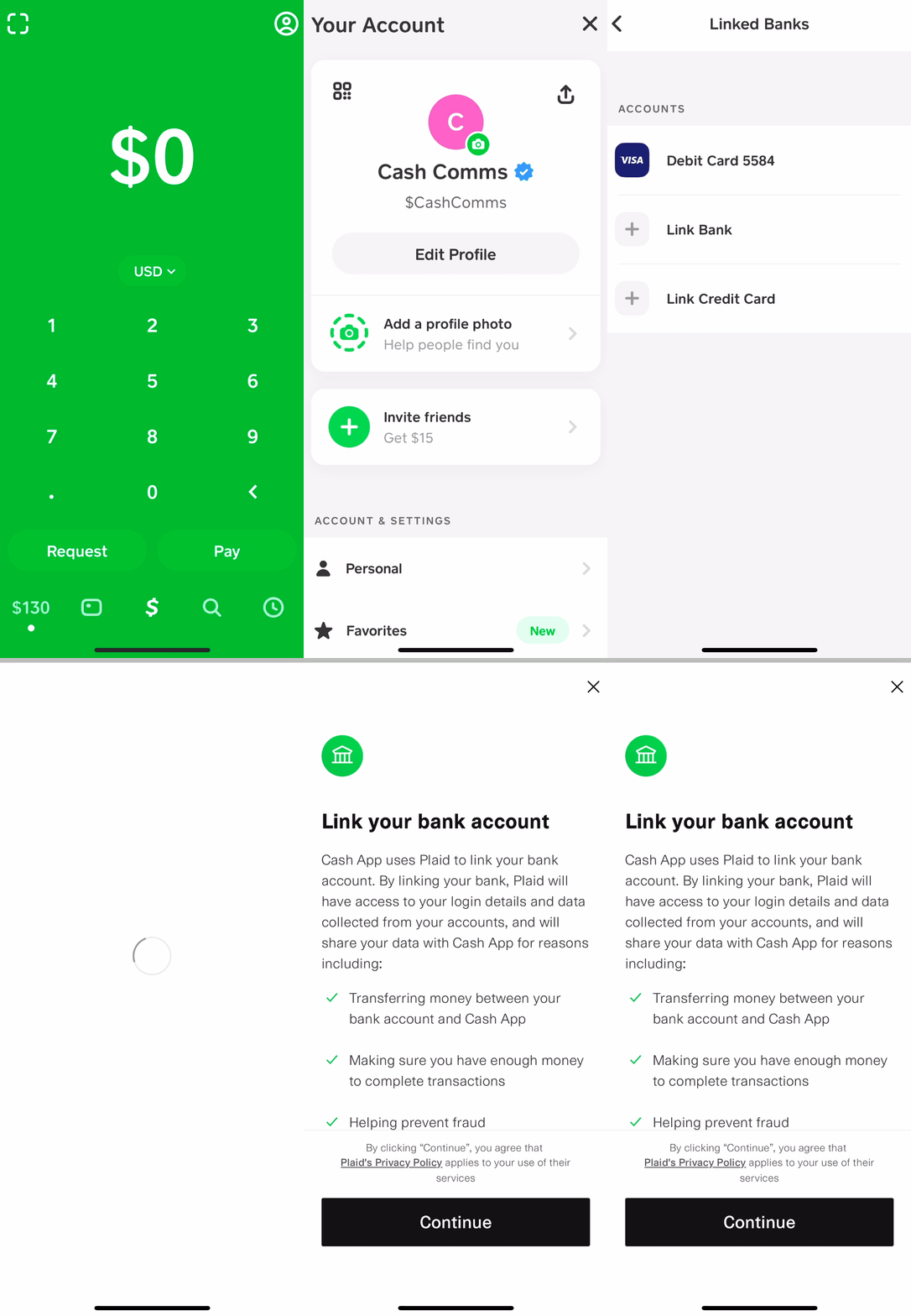
The journey begins within the Cash App interface itself.
-
Launch the Cash App: Ensure you are using the latest version of the application on a compatible mobile device (iOS or Android). Outdated app versions can sometimes lead to connectivity issues or missing features.
-
Navigate to the Banking/Money Tab: Typically represented by a house icon or a dollar sign icon at the bottom navigation bar. This section serves as the central hub for managing your Cash App balance, Cash Card, and linked accounts.
-
Locate the “Link Bank” Option: Within the banking tab, you will usually find an option explicitly labeled “Link Bank” or “Add Bank.” This initiates the connection workflow.
The Linking Process: Manual vs. Automated
Cash App offers two primary methods for linking a bank account, each with different technical implications:
Automated Linking via Plaid (Recommended)
Most modern FinTech apps, including Cash App, leverage third-party financial data aggregators like Plaid for automated bank linking.
-
Technology behind Plaid: Plaid acts as a secure intermediary between your bank and Cash App. When you select your bank from a list within Cash App, you are redirected to Plaid’s secure portal (often embedded within the app). You then enter your online banking credentials (username and password) directly into Plaid’s encrypted interface.
-
Token-based authentication: Plaid does not share your actual bank login credentials with Cash App. Instead, it establishes a secure, token-based connection with your bank. This token grants Cash App limited, read-only access to your account information (like balance and transaction history, necessary for verification) and the ability to initiate transfers, without ever exposing your sensitive login details to Cash App’s servers.
-
Advantages: This method is quick, highly secure, and minimizes manual data entry errors. It also supports instant verification.
Manual Linking
If your bank isn’t listed or you prefer not to use your online banking credentials, you can opt for manual linking.
-
Information required: This involves manually entering your bank’s routing number and your account number. These are unique identifiers for your specific bank and account, respectively.
-
Technical challenges: This method is prone to human error if numbers are miskeyed. It also requires an additional verification step.
Verification Procedures
Regardless of the linking method, verification is a critical technical step to confirm account ownership and prevent fraud.
Instant Verification (Automated Linking)
When using Plaid, instant verification is often possible.
- Mechanism: Plaid can immediately confirm your identity and account ownership by verifying your login credentials and accessing basic account information through the secure API connection. This process typically takes mere seconds.
Micro-Deposit Verification (Manual Linking)
If you link manually, Cash App employs a micro-deposit system.
-
Mechanism: Cash App initiates two small, random deposits (typically a few cents) into your linked bank account. These deposits will appear in your bank statement usually within 1-2 business days.
-
User action: You then return to Cash App, navigate to the linked bank account section, and enter the exact amounts of these two micro-deposits. This verifies that you have legitimate access to the bank account, as only the account owner would be able to see and confirm these small transactions.
-
Technical considerations: This process relies on standard Automated Clearing House (ACH) network protocols for interbank transfers, which inherently have a delay.
Troubleshooting Common Technical Glitches
Even with robust systems, technical issues can arise during the linking process.
-
API errors: If Plaid or the bank’s API experiences a temporary outage or overload, the linking process might fail. Retrying after some time or checking service status pages can help.
-
Connectivity issues: A weak internet connection on your device can disrupt data transmission. Ensure stable Wi-Fi or cellular data.
-
Outdated app version: Older versions of Cash App might have bugs or lack compatibility with newer banking APIs. Always keep your app updated.
-
Bank-specific restrictions: Some banks have additional security layers or restrictions on third-party access, which might intermittently cause linking issues. Contacting your bank’s technical support might be necessary in rare cases.
-
Incorrect credentials/data entry: Double-check online banking credentials for automated linking and routing/account numbers for manual linking. Simple typos are common culprits.
Optimizing Your Cash App Experience: Beyond Basic Linking
Linking a bank account is just the first step. Understanding how to manage and leverage this connection can significantly enhance your digital finance experience within Cash App.
Leveraging Linked Accounts for Advanced Features
The integration with your bank account is the foundation for many of Cash App’s powerful features:
-
Direct deposits: By providing your unique Cash App routing and account number (found in the Banking tab), employers or government agencies can deposit funds directly into your Cash App balance, often faster than traditional banks. This relies on the established ACH network.
-
Cash Card functionality: Your Cash Card (a Visa debit card linked to your Cash App balance) draws funds directly from your Cash App. The linked bank account ensures you can always top up your Cash App balance to use the card effectively.
-
Investing: Cash App allows fractional share investing in stocks and Bitcoin. While purchases can be made with your Cash App balance, funds often originate from a linked bank account, especially for recurring investments. The backend systems facilitate these micro-transactions using your linked bank as the source.
Managing Multiple Bank Accounts and Primary Account Settings
Cash App typically allows you to link multiple bank accounts, offering flexibility in how you manage your funds.
-
Adding additional accounts: The process is identical to linking the first account. You navigate to the banking section and select “Add another bank.”
-
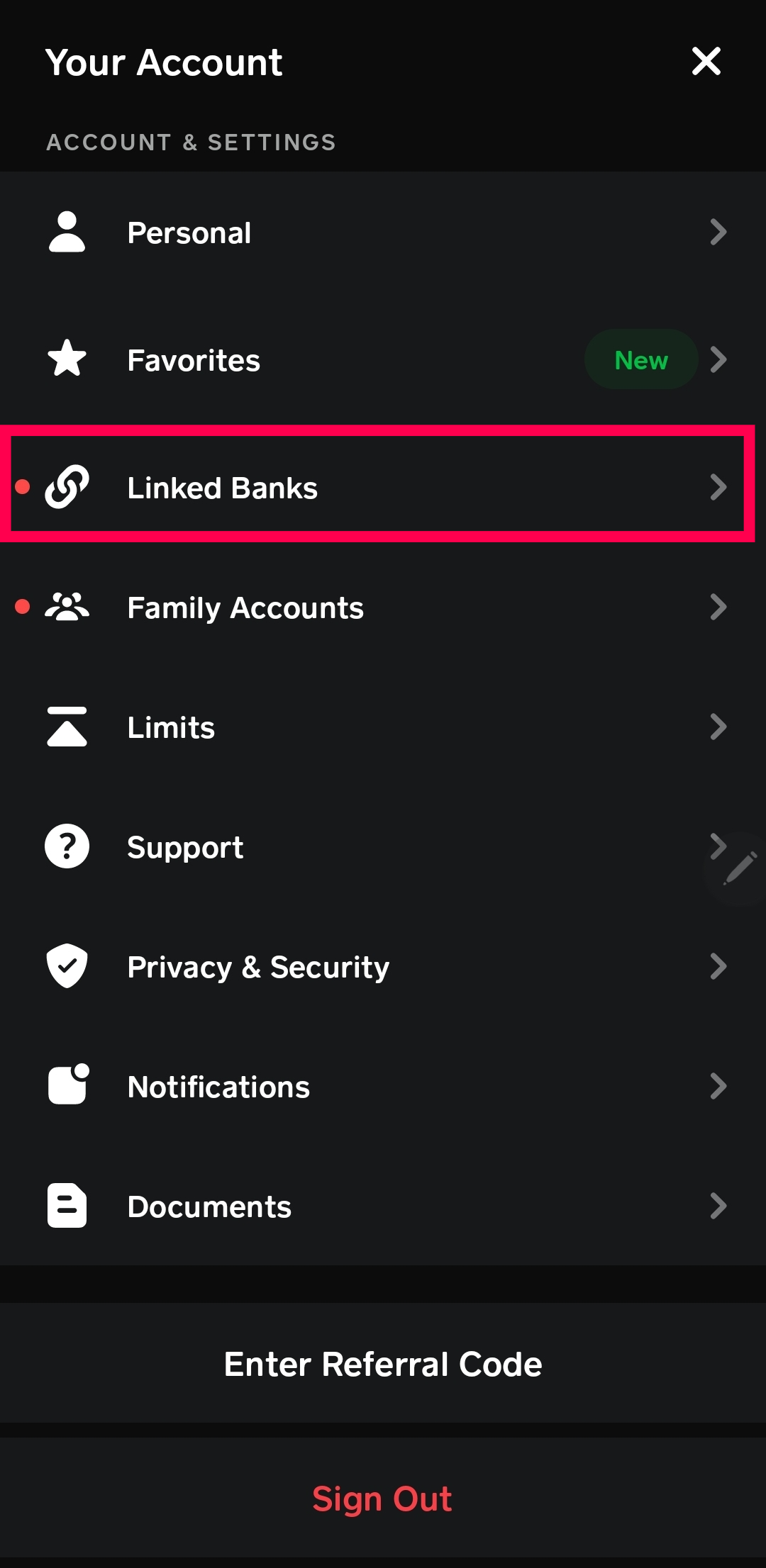
Setting a primary account: You can designate one linked bank account as your “primary” account for faster transfers or automatic withdrawals. This is typically configured within the “Linked Banks” section, allowing users to select their preferred default for transactions. The app’s logic will prioritize this account for certain actions.
-
Removing linked accounts: For security or convenience, you can easily unlink a bank account from within the app. This severs the token-based connection, preventing further transfers to or from that specific bank account via Cash App.
Digital Security Best Practices for Linked Accounts
While Cash App employs robust security, user vigilance is crucial.
-
Enable two-factor authentication (2FA): This adds an extra layer of security, requiring a code from your phone in addition to your password, even if someone compromises your password. This is a fundamental cryptographic security measure.
-
Use strong, unique passwords: Avoid common passwords and use a complex combination of letters, numbers, and symbols. A password manager can help generate and store these securely.
-
Monitor transaction history: Regularly review your Cash App and bank statements for any unauthorized transactions. Cash App provides detailed activity logs.
-
Recognize phishing attempts: Be wary of suspicious emails, texts, or calls claiming to be from Cash App. Never click on unverified links or provide your login credentials or bank details outside the official app. Fraudsters often use sophisticated social engineering techniques to trick users into revealing sensitive information.
-
Keep your device secure: Use device passcodes, biometrics (fingerprint/face ID), and keep your operating system updated to patch security vulnerabilities.
The Broader Implications of Digital Payment Integration
The seamless integration of bank accounts into applications like Cash App is not merely a convenience feature; it signifies profound shifts in the financial technology landscape.
Evolution of FinTech and App Interoperability
Cash App’s bank linking mechanism is a testament to the maturation of the FinTech industry. It exemplifies:
-
API-driven finance: The reliance on secure APIs (like those provided by Plaid) for data exchange between financial institutions and third-party applications has democratized access to financial data, enabling innovative services that were previously difficult to build.
-
Open banking principles: While not fully adopted in the US as in Europe, the underlying philosophy of open banking—allowing consumers to securely share their financial data with third-party providers—is evident in how Cash App integrates with traditional banks.
-
Consolidated financial management: Users are increasingly looking for single applications that can manage various aspects of their financial lives, from payments to investing. Bank linking is foundational to achieving this holistic view and control.
User Experience (UX) and Interface (UI) Design Considerations
The intuitive nature of adding a bank account to Cash App is a direct result of thoughtful UX/UI design.
-
Simplified workflows: The step-by-step process, clear prompts, and minimal navigation ensure that users, regardless of their technical proficiency, can complete the task efficiently.
-
Visual cues and feedback: Icons, progress bars, and confirmation messages provide continuous feedback to the user, assuring them that the process is progressing as expected.
-
Accessibility: The design accounts for various user needs, including options for manual entry, to ensure a broad accessibility.
-
Trust indicators: The use of familiar bank logos and clear security disclosures (e.g., “Powered by Plaid” with security explanations) helps build trust during a sensitive transaction.

Future Trends in App-Based Financial Management
The technology underpinning Cash App’s bank integration points towards future innovations in FinTech:
-
AI-powered insights: Deeper integration could allow AI algorithms to analyze transaction data from linked bank accounts to offer personalized financial advice, budget recommendations, or identify saving opportunities within the app itself.
-
Hyper-personalization: Future apps may offer even more granular control and customization over how funds are moved and managed across different linked accounts, tailoring services to individual financial habits.
-
Seamless cross-platform experiences: Expect even greater interoperability, where financial data and transaction capabilities can seamlessly extend from your mobile app to smartwatches, voice assistants, and other connected devices, all powered by robust backend banking integrations.
-
Enhanced security via biometrics and blockchain: Advanced biometric authentication methods and potentially blockchain-based identity verification could further fortify the security of linked accounts, minimizing fraud risks.
In conclusion, adding a bank account to Cash App is a pivotal step in harnessing the full power of this digital payment platform. It’s a process underpinned by sophisticated technical architecture, rigorous security protocols, and user-centric design principles, reflecting the ongoing evolution of financial technology. By understanding these mechanisms, users can not only complete the task effectively but also engage more confidently and securely with their digital finances.
aViewFromTheCave is a participant in the Amazon Services LLC Associates Program, an affiliate advertising program designed to provide a means for sites to earn advertising fees by advertising and linking to Amazon.com. Amazon, the Amazon logo, AmazonSupply, and the AmazonSupply logo are trademarks of Amazon.com, Inc. or its affiliates. As an Amazon Associate we earn affiliate commissions from qualifying purchases.