
Instagram, a ubiquitous digital platform, has evolved far beyond its initial premise of simple photo sharing. It now serves as a dynamic space for personal expression, community building, and digital presence management. Amidst its myriad features, the “archive” function stands out as a particularly elegant and powerful tool, often misunderstood in its full technical implications. Far from a mere “delete” button, archiving an Instagram post offers users a nuanced way to manage their digital footprint without permanent loss. This functionality, embedded within the app’s architecture, provides a flexible solution for curating one’s profile, managing content lifecycle, and maintaining privacy. Understanding what technically transpires when you archive a post is crucial for any user looking to exercise greater control over their online narrative and leverage the platform’s capabilities to their fullest.

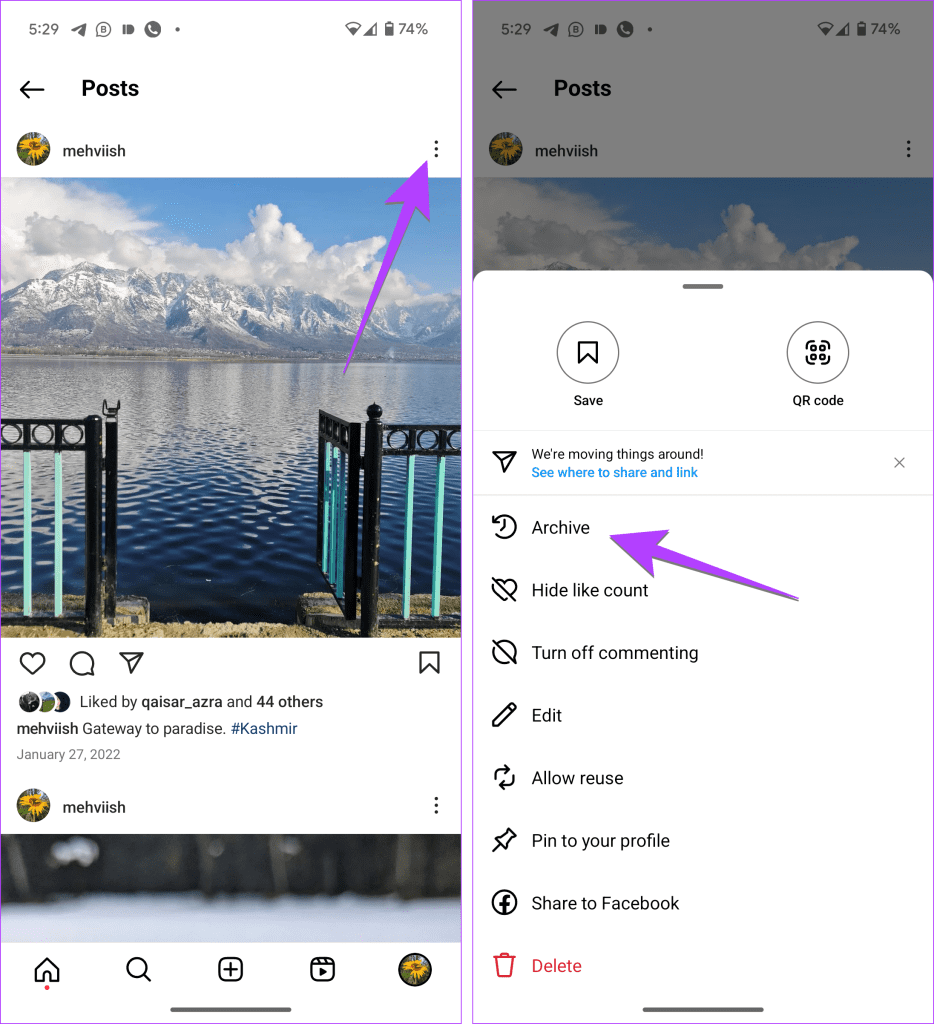
At its core, archiving on Instagram is an act of moving content from public visibility to a private, accessible repository within your account. It’s a digital safe-deposit box for your posts, allowing for temporary removal from your profile grid and public feeds while retaining all associated data. This distinction from permanent deletion is fundamental, offering a powerful layer of control over your published content. For individuals and businesses alike, mastering the archive feature unlocks new possibilities for content strategy, aesthetic curation, and responsive digital asset management, all without severing the historical ties to your valued creations.
The Technical Mechanics of Instagram Archiving
The archive feature on Instagram is a testament to sophisticated software design, offering a unique blend of content management and data preservation. It’s not just a superficial toggle but an intricate process that impacts how a post interacts with the platform’s backend and frontend systems. Grasping these technical mechanics is key to appreciating the utility and robustness of the feature.
Post Visibility and Profile Presentation
When an Instagram post is archived, its primary and most immediate effect is a shift in visibility. Technically, the post is withdrawn from all public-facing aspects of your Instagram presence. This means:
-
Removal from Profile Grid: The post will instantly disappear from your main profile grid, where followers and visitors typically browse your content. This is the most noticeable change, allowing for a clean, curated look without permanently removing historical content.
-
Disappearance from Feeds: The post will no longer appear in the feeds of your followers. If a follower scrolls back through their feed history, they will not encounter the archived post. This applies retroactively and proactively; once archived, its public distribution ceases.
-
Unsearchable via Hashtags and Locations: Any hashtags or location tags associated with the archived post will no longer lead to it in public searches. The post essentially becomes invisible to the platform’s discovery algorithms and search indexes for external users.
-
Loss of Direct URL Access for Public: While the post technically still exists on Instagram’s servers, its direct public URL will effectively become inaccessible to anyone without direct authorization to view your account’s archived content.
This immediate and comprehensive removal from public view is engineered to give users precise control over what content is actively presented as part of their current digital persona.
Data Retention and Retrieval Pathways
A cornerstone of the archive feature is its commitment to data retention. Unlike deletion, which purges content and its associated metadata from Instagram’s primary accessible databases (though copies might persist on backup servers for a period), archiving meticulously preserves everything.
-
Server-Side Preservation: When you archive a post, it’s moved from the live public database associated with your profile to a dedicated, private archive storage area linked directly to your account. This ensures that the digital asset (the photo or video) and all its metadata remain intact on Instagram’s secure servers.
-
Comprehensive Data Preservation: This includes the original image/video file, the caption, all comments received, the number of likes, the identity of those who liked it, any tags (people, products), location data, and timestamp information. Essentially, the post is frozen in time, exactly as it was when it was live.
-
Accessible Archive Interface: Instagram provides a specific, private interface within the app for you to access all your archived content. This is typically found within your profile settings, under a section like “Your activity” or directly labeled “Archive.” Here, you can browse all your archived posts, stories, and even live videos, offering a comprehensive historical record.
-
Seamless Restoration Process: The technical pathway for restoring an archived post is as straightforward as archiving it. With a few taps, a user can move a post from the archive back to their live profile. Upon restoration, the post reappears exactly as it was, including all original likes, comments, and its original position on the profile grid based on its initial publication date. This reinstatement process is designed to be instantaneous and lossless.
Distinguishing Archive from Deletion: A Technical Comparison
Understanding the nuanced technical differences between archiving and deleting is paramount for effective content management on Instagram.
| Feature Aspect | Archiving a Post | Deleting a Post |
| :——————- | :———————————————————– | :————————————————————— |
| Data Persistence | Retained: All content and metadata (image, caption, likes, comments) are preserved on Instagram’s servers, accessible only by the account owner. | Purged: Content and metadata are removed from active databases and become inaccessible. Copies may exist on backup systems for a limited time for recovery or compliance. |
| Visibility | Moves from public view to a private, account-specific repository. | Permanently removed from public and private view. Cannot be recovered by the user. |
| Recoverability | Fully Recoverable: Can be restored to the live profile with all original data intact. | Irrecoverable by User: Once deleted, it cannot be brought back by the user through Instagram’s interface. |
| Storage Location | Shifts within Instagram’s active database infrastructure to a designated archive partition. | Marked for permanent removal and eventual erasure from primary storage. |
| Impact on Analytics | Historical insights remain accessible within your private data, but the post ceases to contribute to live, public-facing metrics. | Historical insights are lost for the deleted post, as the underlying data is removed. |
| Purpose | Temporary hiding, content curation, re-evaluation, privacy management without loss. | Permanent removal of content, often due to irrelevance, error, or privacy concerns that demand finality. |
Technically, archiving involves a change in the status and access privileges of a digital asset within the system, while deletion involves a command for removal and eventual data destruction.
User Experience and Algorithmic Considerations
Beyond the core technical mechanics, archiving an Instagram post also has subtle yet significant implications for user experience and the platform’s intricate algorithms. These aspects are crucial for anyone managing a dynamic online presence, where every interaction and content piece contributes to an overarching digital narrative.
Impact on Engagement Metrics and Analytics
When a post is archived, its public engagement activity effectively ceases, but its historical data is preserved for the account owner.
-
Public Metrics Pause: The post will no longer accumulate new likes, comments, or shares from the public. Any existing likes and comments will be “frozen” and will not be visible to others.
-
Instagram Insights Preservation: For professional or creator accounts, Instagram Insights will retain the historical data for an archived post. This means you can still access metrics like reach, impressions, saves, and interaction data from the period the post was live. This is invaluable for content analysis, allowing users to retrospectively evaluate performance without the post being publicly visible.
-
No Negative Impact on Overall Account Metrics: Archiving a post does not negatively impact your overall account’s reach or engagement metrics directly. It merely removes that specific post from contributing to current public engagement figures. The preserved data allows for internal analysis without public repercussions.
Algorithmic Influence and Discoverability
Instagram’s algorithm dictates content distribution and discoverability. The act of archiving impacts this in specific ways:
-
Cessation of Algorithmic Distribution: Once archived, a post is immediately removed from consideration by the Instagram algorithm for distribution in user feeds, the Explore page, or through hashtag searches. It ceases to contribute to the “freshness” or “relevance” signals the algorithm uses for active content.
-
Neutral Effect on Account Score: Archiving a post is generally considered a neutral action by the algorithm. Unlike frequent deletions, which might (though not definitively proven) signal low-quality content or account instability, archiving is interpreted as a content management action. It doesn’t typically penalize your account’s overall algorithmic score or the reach of your other, live posts.
-
Focus on Active Content: By archiving less relevant or older content, users can subtly steer the algorithm to focus its distribution efforts on their more current, high-quality, and strategically important posts that remain live. This can contribute to a more optimized algorithmic performance for active content.
Privacy Implications and Notifications
The archive feature is inherently designed with user privacy in mind, particularly regarding audience awareness.
-
No Follower Notifications: When you archive a post, your followers are not notified. There are no public alerts, messages, or indicators that a post has been moved to your archive. The removal is silent and seamless from the audience’s perspective.
-
Enhanced Content Control: This lack of notification is a significant privacy advantage. It allows users to manage their content without drawing unwanted attention to the changes or having to explain why a post has disappeared. It provides a discreet way to edit one’s public narrative.
-
Private Access Only: The archived section of your account is entirely private. No one but you (the account owner) has access to view the contents within your archive. This makes it a secure repository for content you wish to retain but not display publicly.
Strategic Applications for Digital Presence Management
Understanding the technical nuances of Instagram’s archive feature paves the way for its strategic application in managing a sophisticated digital presence. It transforms from a simple “hide” button into a powerful instrument for intentional content curation and lifecycle management.
Aesthetic Curation and Profile Evolution
The visual appeal of an Instagram profile is paramount. The archive feature is a technical enabler for dynamic aesthetic management.
-
Maintaining a Cohesive Aesthetic: Influencers, artists, and brands often curate their Instagram grid to reflect a specific mood, color palette, or thematic consistency. As aesthetics evolve or campaign themes change, older posts might no longer align with the current visual strategy. Archiving allows for their removal without permanent deletion, preserving them for potential future use or personal review.
-
Seasonal Content Management: For businesses, seasonal promotions or holiday-specific content can clutter a profile once their relevance expires. Archiving allows for the temporary removal of such posts, ensuring the profile always presents the most current and relevant offerings, while enabling easy re-activation for the next season.
-
Rebranding or Theme Shifts: When undergoing a significant rebranding or a major shift in content themes, archiving provides a surgical way to cleanse the existing profile, presenting a fresh face without losing the historical record of past endeavors. This is crucial for managing perceptions during transitional phases.
Content Auditing and Lifecycle Management
The archive serves as an excellent tool for content governance and managing the natural lifecycle of digital assets.
-
Removing Outdated or Sensitive Content: As opinions evolve, or information becomes obsolete, certain posts might no longer accurately represent an individual or brand. Rather than deleting and losing all historical data, archiving provides a safe intermediate step. This is especially useful for managing content that, while not offensive, no longer aligns with current values or factual accuracy.
-
Performance-Based Content Management: For content creators, data from Instagram Insights can reveal underperforming posts. Instead of immediately deleting them (and thus losing their insights data), archiving allows for their removal from the active feed while retaining the data for further analysis. This helps in understanding what resonates with the audience and what doesn’t, informing future content strategy.
-
Review and Re-evaluation of Content: Sometimes, a post might be temporarily taken down for review – perhaps to update a caption, modify a tag, or simply reconsider its suitability. Archiving facilitates this temporary removal, allowing for a re-evaluation process without the pressure of permanent deletion.
Temporary Hiding for Content Refresh or Re-evaluation
Beyond long-term strategic decisions, the archive is incredibly useful for short-term content adjustments.
-
Pre-Release Content Staging: While Instagram doesn’t have a true staging environment, some users might post content and then archive it immediately as a form of “private staging” to check how it looks on their profile before making it permanently live.
-
Addressing Minor Errors: If a minor error is spotted in a live post (e.g., a typo in the caption, a wrong tag), instead of deleting and reposting (which resets engagement), archiving allows for quick removal, correction, and then restoration, often with minimal disruption to the existing engagement metrics.
-
Content Refresh Cycles: For evergreen content that might be periodically refreshed, archiving old versions allows for new iterations to be posted without redundancy, while retaining the older versions for historical reference or comparison.
Best Practices and Advanced Tech Tips for Utilizing the Archive
To truly harness the power of Instagram’s archive feature, it’s essential to integrate it into a comprehensive digital content management strategy. This involves not just understanding how to archive, but when and why to do so, guided by data and clear objectives.
Integrating Archiving into a Content Strategy Workflow
Treating archiving as an integral part of your content lifecycle workflow can significantly enhance your digital presence management.
-
Scheduled Content Audits: Establish a routine for reviewing your Instagram profile – perhaps monthly or quarterly. During these audits, identify posts that are outdated, no longer align with your brand/persona, or have performed poorly. The archive provides a systematic way to clean up your feed without deleting valuable historical data.
-
Thematic Content Cycles: For those who manage seasonal campaigns or thematic content series, plan to archive relevant posts once their cycle concludes. This keeps your feed fresh and focused on current initiatives, allowing for easy retrieval when the theme becomes relevant again.
-
Post-Campaign Cleanup: After a marketing campaign or collaboration concludes, consider archiving posts related to it. This cleans up your grid, making way for new content, while preserving the campaign’s historical record for future reference or analysis.
Decision Framework: Archive vs. Delete Based on Data Needs
The choice between archiving and deleting is a critical one, and it should be informed by your data retention needs and the nature of the content.
-
Choose Archive When:
-
You want to preserve all associated data (likes, comments, insights) for future analysis or potential restoration.
-
The content might become relevant again in the future (e.g., seasonal, thematic).
-
The content no longer aligns with your current image but isn’t problematic enough to warrant permanent removal.
-
You need to temporarily remove content for review or minor edits.
-
You want to clean up your profile aesthetically without losing the content.
-
-
Choose Delete When:
-
The content is permanently irrelevant, offensive, or poses a genuine privacy/security risk that demands irreversible removal.
-
You are absolutely certain you will never need the content or its associated data again.
-
You need to clear up storage space (though for Instagram posts, this is rarely a practical concern as the user isn’t directly managing server space).
-
This framework emphasizes that archiving is the default choice for most content management scenarios, reserving deletion for only the most definitive removals.
Leveraging Third-Party Tools and Instagram’s Archive for Comprehensive Management
While Instagram’s native archive feature is robust, it can be part of a broader content management ecosystem.
-
Integration with Content Management Systems (CMS): For larger brands or agencies using external CMS platforms for social media scheduling and analytics, the archive feature acts as a native “unpublish” function. Data from archived posts can still be cross-referenced with your CMS’s historical data, providing a more complete picture of content performance over time.
-
Data Backup and Export: While Instagram itself doesn’t offer direct export of archived posts in their original format with engagement data, understanding what’s preserved in the archive can inform your overall data backup strategy. If you occasionally download your Instagram data, archived posts’ metadata will be included in that export, providing an offline record.
-
Streamlined Auditing with Analytics Tools: External analytics tools can provide deeper insights into your Instagram performance. By combining their data with your knowledge of archived posts, you can conduct more thorough content audits, identifying trends in archived vs. live content and making more informed decisions about what to publish and what to keep private.

Conclusion
The Instagram archive feature is more than just a hidden folder; it’s a sophisticated technical mechanism that empowers users with unparalleled control over their digital content lifecycle. By distinguishing itself fundamentally from deletion, it offers a crucial layer of flexibility, allowing for aesthetic curation, strategic content shifts, and discreet management of one’s online narrative without incurring permanent data loss.
From a technical standpoint, archiving involves a precise manipulation of visibility and access within Instagram’s robust server infrastructure, preserving every byte of data associated with a post while instantly removing it from public view. This preservation extends to engagement metrics and historical insights, providing invaluable data for analysis even for content no longer actively displayed. For the user, this translates to a powerful tool for crafting a dynamic and evolving digital presence, free from the constraints of permanent publication.
Ultimately, mastering “what happens when you archive a post on Instagram” means understanding its role as a flexible, data-preserving feature within the platform’s ecosystem. It enables users to maintain a thoughtful, curated, and responsive online identity, making it an indispensable asset for anyone serious about managing their digital footprint in today’s fast-paced online world. Embrace the archive; it’s a testament to mindful digital presence.
aViewFromTheCave is a participant in the Amazon Services LLC Associates Program, an affiliate advertising program designed to provide a means for sites to earn advertising fees by advertising and linking to Amazon.com. Amazon, the Amazon logo, AmazonSupply, and the AmazonSupply logo are trademarks of Amazon.com, Inc. or its affiliates. As an Amazon Associate we earn affiliate commissions from qualifying purchases.