
In an increasingly wireless world, the humble USB-A connector remains a ubiquitous and foundational element of our digital lives. From charging our smartphones to transferring gigabytes of data between devices, this rectangular port and its corresponding plug have been a steadfast companion for decades. Despite the emergence of newer, more versatile standards like USB-C, the USB-A connector continues to hold a significant place in the ecosystem of personal computing and peripheral connectivity. Understanding what USB-A is, its history, its operational principles, and its enduring relevance is key to appreciating the intricate web of modern technology that powers our daily interactions. This article delves deep into the specific characteristics and broader context of the USB-A, shedding light on why it has persisted and what its future might entail in a rapidly evolving technological landscape.
The Enduring Legacy of USB-A: A Foundation of Connectivity
The Universal Serial Bus (USB) standard was conceived in the mid-1990s by a consortium of seven companies – Compaq, DEC, IBM, Intel, Microsoft, NEC, and Nortel – with the ambitious goal of simplifying and standardizing the connection of peripherals to personal computers. Before USB, connecting devices was a convoluted affair, involving a confusing array of serial ports, parallel ports, PS/2 connectors, and proprietary interfaces, each with its own drivers and compatibility headaches. USB was designed to be truly “universal,” offering a single, simple, hot-pluggable, and easily configurable interface for a wide range of devices.
Defining the Universal Serial Bus
At its core, USB is a standard that specifies the cables, connectors, and communication protocols used to connect, communicate, and supply power between computers and electronic devices. It replaced a multitude of legacy serial and parallel ports, offering higher speeds, greater flexibility, and the ability to power devices directly through the data cable. The “Universal” aspect aimed to unify data transfer and power delivery into one coherent system, drastically simplifying the user experience and reducing the complexity for hardware manufacturers.
The Ubiquitous Connector
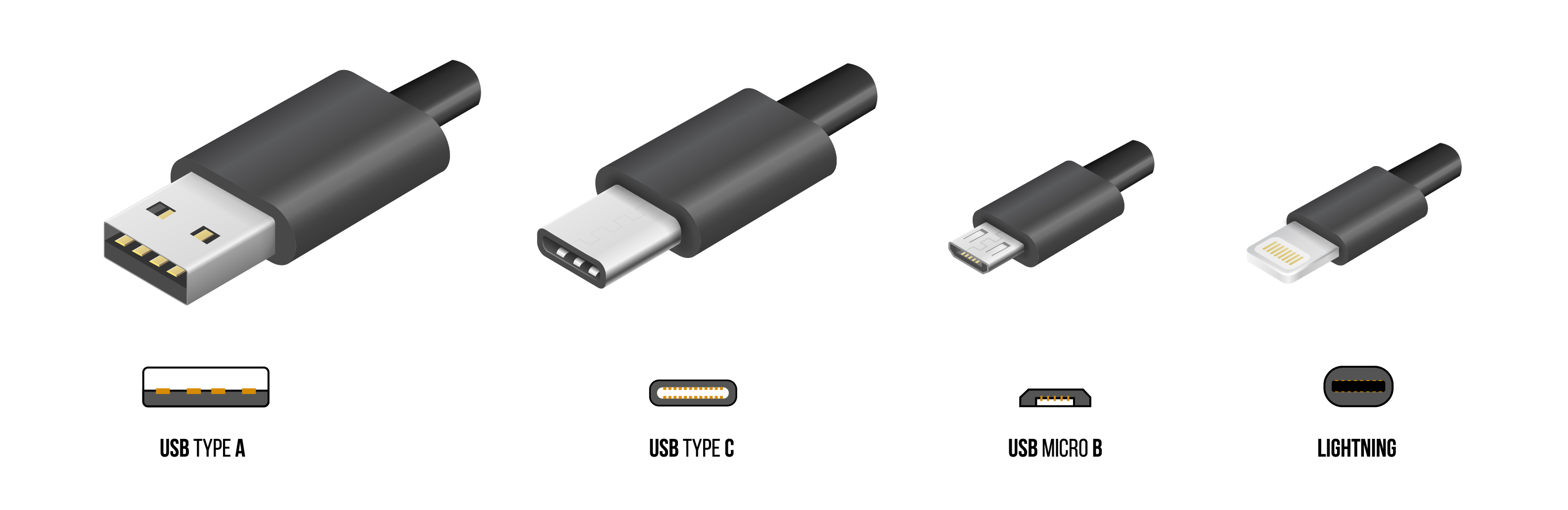
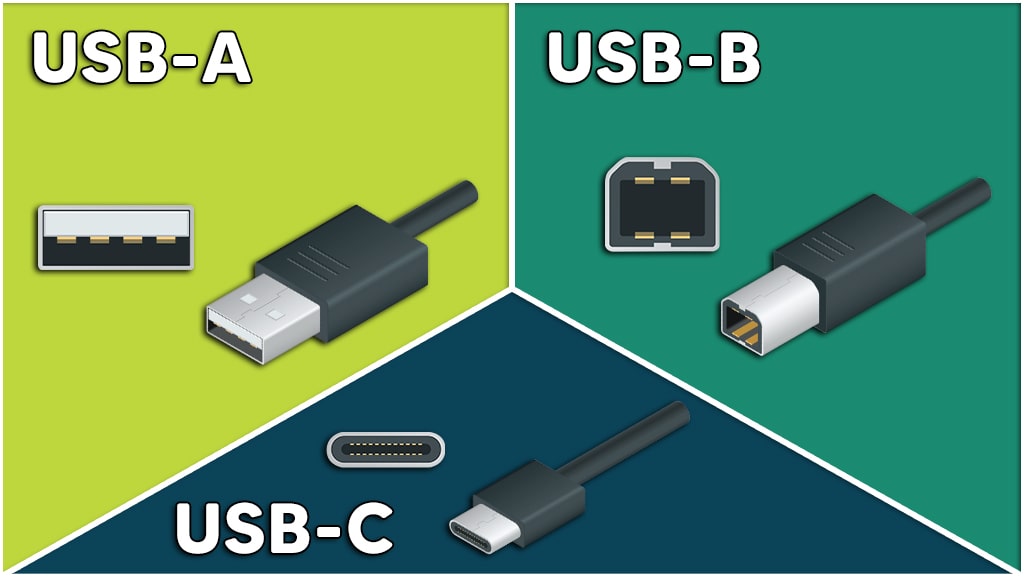
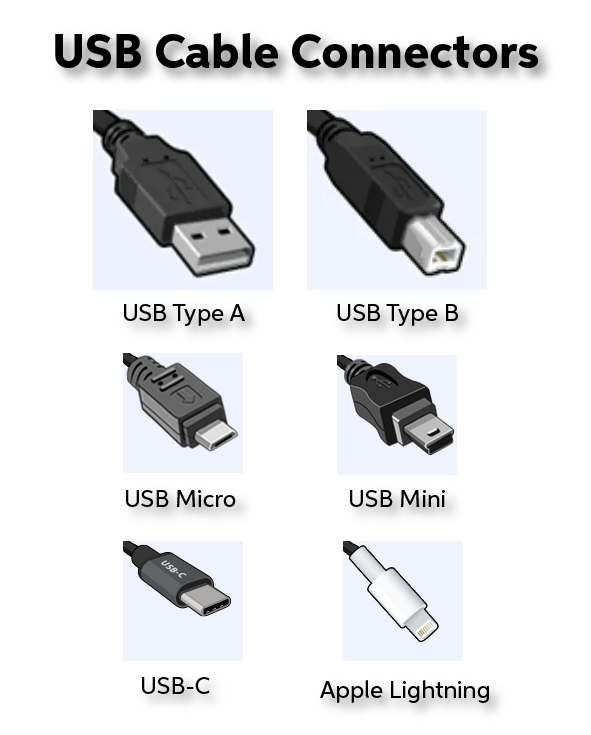
Among the various physical connector types developed for the USB standard – including USB-B, USB-Mini, USB-Micro, and USB-C – the USB-A connector quickly became the most recognizable and dominant. It is the rectangular, flat connector that you typically find on one end of most USB cables that plug into a computer, charger, or hub. Its design became synonymous with the host side of a connection, meaning it’s the port you’d plug a mouse, keyboard, flash drive, or printer cable into. Its widespread adoption solidified its position as the de facto standard for connecting peripherals for well over two decades, making it an inescapable part of the computing experience.
A Brief Historical Context
The first commercial version of USB, USB 1.0, was released in 1996, offering data transfer rates of up to 12 Mbit/s. While revolutionary for its time, it was USB 1.1 (released in 1998) and especially USB 2.0 (released in 2000) that truly pushed USB into mainstream adoption. USB 2.0 introduced “High Speed” data transfer at 480 Mbit/s, an incredible leap that accommodated faster devices like external hard drives and digital cameras. Throughout these evolutions, the physical design of the USB-A connector remained largely unchanged, a testament to its initial robust and functional design, allowing for seamless backward compatibility between different generations of USB devices and ports.
Anatomy of a USB-A Connector: Design and Functionality
The physical characteristics of the USB-A connector are perhaps its most distinguishing feature. Its robust, rectangular form factor is instantly recognizable and has been intentionally designed to be durable and simple to use, albeit with one notorious caveat.
Distinctive Physical Design
The USB-A plug features a flat, rectangular metal shield that encloses four internal pins (or nine for USB 3.0/3.1/3.2 versions). This design ensures that the cable can only be inserted in one orientation into a matching USB-A port. The port itself is also rectangular, designed to receive the plug snugly. This keyed design, while preventing incorrect electrical connections, is also the source of much frustration for users who often try to insert it upside down before flipping it over – a minor, yet persistent, design flaw often cited against it. Despite this, its mechanical simplicity contributes to its durability and cost-effectiveness in manufacturing.
The Pinout: Data and Power Delivery
The basic USB-A connector, as used with USB 1.x and 2.0, contains four pins:
-
Pin 1 (VCC): Provides +5V DC power, typically used for charging devices or powering peripherals.
-
Pin 2 (D-): The data minus line, used for differential data transmission.
-
Pin 3 (D+): The data plus line, also used for differential data transmission.
-
Pin 4 (GND): The ground return for the power supply.
This four-pin configuration allows for both power delivery and bi-directional data transfer simultaneously. With the advent of USB 3.0 (also known as USB 3.1 Gen 1 or USB 3.2 Gen 1), the USB-A connector gained additional pins. USB 3.0-compatible USB-A plugs and ports incorporate five extra pins, typically located deeper within the connector, making a total of nine pins. These additional pins (two for SuperSpeed data transmit, two for SuperSpeed data receive, and one ground) enable significantly faster data transfer rates without altering the outer physical dimensions of the connector, thereby preserving backward compatibility with older USB 2.0 ports and plugs.
How it Facilitates Communication
When a USB-A device is plugged into a USB-A host port (like on a computer), a handshake process begins. The host detects the newly connected device and queries it to determine its type and power requirements. The USB standard operates on a master-slave architecture, where the host (e.g., computer) initiates all communication, and the connected device (e.g., printer, flash drive) responds. Power is supplied constantly, enabling many peripherals to operate without a separate power adapter. Data transfer occurs through the D+ and D- lines, utilizing a half-duplex differential signaling method for USB 1.x/2.0, or full-duplex with dedicated SuperSpeed lines for USB 3.x. This robust communication protocol, combined with the power delivery capabilities, is what makes USB-A so incredibly versatile and functional for such a wide array of devices.
The Evolution of USB Standards and USB-A’s Place Within It
The journey of USB has been marked by continuous innovation, primarily focusing on increasing data transfer speeds and power delivery capabilities. The USB-A connector has been a constant presence throughout much of this evolution, adapting to new standards while retaining its physical form.
From USB 1.0 to USB 2.0: Speed and Adoption
The initial USB 1.0 and 1.1 standards offered “Low Speed” (1.5 Mbit/s) and “Full Speed” (12 Mbit/s) modes. These speeds were adequate for input devices like keyboards and mice, but insufficient for higher-bandwidth applications. The true breakthrough came with USB 2.0, introduced in 2000. It delivered a significant jump to “High Speed” mode, topping out at 480 Mbit/s. This advancement made USB a viable interface for external hard drives, digital cameras, and other demanding peripherals, driving its mass adoption and cementing the USB-A connector’s status as the industry standard.
The Dawn of SuperSpeed: USB 3.0 and its Iterations
In 2008, the USB Implementers Forum (USB-IF) unveiled USB 3.0, a standard designed to meet the growing demand for even faster data transfer. It introduced “SuperSpeed” at 5 Gbit/s, a tenfold increase over USB 2.0. To achieve this, as mentioned earlier, the USB-A connector for USB 3.0 was enhanced with five additional pins, usually identifiable by a blue-colored internal tab in the port.
Subsequent revisions further refined the standard, often causing some confusion with nomenclature:
-
USB 3.1 Gen 1: This is simply a rebranding of USB 3.0, still offering SuperSpeed 5 Gbit/s.
-
USB 3.1 Gen 2: Introduced “SuperSpeed+” with a blistering 10 Gbit/s.
-
USB 3.2: This standard further complicates things, essentially encompassing previous iterations and introducing new speed tiers while also supporting the existing USB-A connector type for some of its modes:
-
USB 3.2 Gen 1×1: Rebranding of USB 3.1 Gen 1 / USB 3.0 (5 Gbit/s).
-
USB 3.2 Gen 2×1: Rebranding of USB 3.1 Gen 2 (10 Gbit/s).
-
USB 3.2 Gen 1×2: Uses two lanes for 10 Gbit/s (primarily with USB-C).
-
USB 3.2 Gen 2×2: Uses two lanes for 20 Gbit/s (primarily with USB-C).
-
Crucially, throughout these high-speed advancements, the USB-A connector has largely retained its physical form, with compatible cables still plugging into older USB-A ports, albeit operating at the lower speed supported by the port.
Understanding Backward Compatibility
One of USB-A’s most significant strengths is its backward compatibility. A USB 3.0/3.1/3.2 Type-A plug can be inserted into a USB 2.0 or 1.1 Type-A port, and it will function, albeit at the slower speed of the older port. Similarly, an older USB 2.0 Type-A plug can be inserted into a USB 3.x Type-A port. This interoperability ensures that legacy devices remain functional with newer computers and vice versa, significantly extending the lifespan and utility of peripherals and preventing premature obsolescence. This commitment to backward compatibility has been a cornerstone of USB’s success and a major factor in the continued prevalence of the USB-A connector.
Why USB-A Persists: Advantages and Limitations in a Modern World
Despite the rise of USB-C and the increasing emphasis on sleeker, reversible connectors, the USB-A connector continues to be a fixture in almost every computing environment. Its persistence is due to a combination of inherent advantages and historical momentum, though it also comes with notable limitations.
Unparalleled Compatibility and Accessibility
The most significant advantage of USB-A is its sheer ubiquity. Billions of devices, from mice and keyboards to printers, external hard drives, webcams, and flash drives, utilize USB-A. This massive installed base means that almost every computer, smart TV, gaming console, and car infotainment system still features at least one USB-A port. This widespread compatibility makes it incredibly accessible and convenient; users rarely have to worry about whether a new peripheral will connect to their existing setup, eliminating the need for numerous adapters. This broad compatibility also keeps manufacturing costs down for accessory makers, as they can continue to produce USB-A cables and devices without retooling.
Robustness and Simplicity
The robust, rectangular design of the USB-A connector contributes to its durability. Unlike some more delicate connectors, the USB-A is relatively resistant to wear and tear from repeated insertions and removals. Its simple, non-reversible design, while a minor annoyance, also means there’s less complexity in the manufacturing process for both the plugs and the ports, contributing to its widespread adoption and lower cost. For many years, this simplicity was favored for its reliability in a variety of environments, from home offices to industrial settings.
The Inconvenience of Orientation
The most common criticism leveled against the USB-A connector is its non-reversible design. Users frequently attempt to insert the plug upside down, often requiring two or three tries to get the correct orientation. While a minor inconvenience, it’s a persistent design flaw that became more pronounced with the rise of the fully reversible USB-C connector. This “three-try” phenomenon has become a running gag in the tech community, highlighting a usability drawback that newer standards have successfully addressed.
Speed Ceilings Compared to Newer Standards
While USB 3.x with its SuperSpeed capabilities offered a substantial improvement over USB 2.0, even the fastest USB 3.2 Gen 2×1 (10 Gbit/s) over USB-A cannot match the performance ceiling of USB-C connectors. USB-C, especially when combined with USB 3.2 Gen 2×2 (20 Gbit/s) or Thunderbolt (up to 40 Gbit/s), offers vastly superior data transfer rates, along with much higher power delivery capabilities (up to 100W, or even 240W with USB-PD 3.1) and alternate mode support (e.g., DisplayPort, HDMI). For cutting-edge applications requiring maximum bandwidth or power delivery, USB-A falls short compared to its modern counterparts.
Looking Ahead: The Future of USB-A in a USB-C Dominated Landscape
The technological landscape is undeniably shifting towards USB-C as the predominant connector for new devices. However, this does not spell the immediate demise of USB-A. Instead, we are likely to see a period of coexistence, with USB-A continuing to serve important roles.
Coexistence, Not Replacement
Major manufacturers, particularly in the PC and laptop segments, are increasingly integrating USB-C ports into their newer models. Many flagship smartphones and tablets have already fully transitioned to USB-C. Despite this trend, a full transition across all devices will take many years, if it ever fully occurs. The sheer volume of existing USB-A peripherals and the continuing need for compatibility with older systems means that USB-A ports will remain a standard feature on many computers, especially desktops and business-oriented laptops, for the foreseeable future. Consumers will still demand the ability to connect their existing accessories without needing an adapter for every device.
Adapters and Hubs: Bridging the Gap
As the number of USB-C-only devices grows, adapters and hubs will play a crucial role in bridging the gap between old and new technologies. USB-C to USB-A adapters and multi-port hubs featuring both USB-A and USB-C ports are already commonplace. These accessories allow users with newer, slimmer laptops that primarily feature USB-C to connect their legacy USB-A peripherals, ensuring continued functionality. While not ideal for all situations, these solutions facilitate a gradual transition and prevent a sudden obsolescence of perfectly functional older devices.
Niche Applications and Legacy Devices
USB-A will likely persist longest in niche applications and for legacy devices where its simplicity and low cost are more critical than cutting-edge speed or reversibility. Think of budget peripherals, embedded systems, automotive infotainment, and charging ports where the existing infrastructure is extensive and costly to upgrade. Many industrial control systems, medical devices, and other specialized equipment often rely on proven, stable, and widely available connectors like USB-A due to long development cycles and strict certification requirements. For such applications, the benefits of transitioning to a newer standard might not outweigh the costs and risks.
The Gradual Transition
The phasing out of USB-A, if it ever happens completely, will be a gradual process, akin to the slow disappearance of the 3.5mm headphone jack or optical drives from modern laptops. It will be driven by continued innovation, miniaturization of devices, and a collective industry push towards a truly universal, high-performance, and reversible connector in the form of USB-C. Until then, the USB-A connector will remain a reliable workhorse, continuing to power and connect countless devices around the globe, a testament to its foundational role in modern computing. Its legacy is etched into the design of our devices, symbolizing a significant step forward in making technology accessible and user-friendly for everyone.
aViewFromTheCave is a participant in the Amazon Services LLC Associates Program, an affiliate advertising program designed to provide a means for sites to earn advertising fees by advertising and linking to Amazon.com. Amazon, the Amazon logo, AmazonSupply, and the AmazonSupply logo are trademarks of Amazon.com, Inc. or its affiliates. As an Amazon Associate we earn affiliate commissions from qualifying purchases.