
In an increasingly connected world, smart home security cameras like those offered by Ring have become ubiquitous. From doorbell cameras to floodlight cams, these devices promise enhanced peace of mind, remote monitoring, and a tangible layer of security for homes and properties. However, for many prospective users, the initial question isn’t just “which Ring camera should I buy?” but rather, “who installs Ring cameras?” The answer isn’t singular; it spans a spectrum from the enthusiastic do-it-yourself (DIY) enthusiast to the seasoned professional installer, each path offering its own set of advantages and considerations. Understanding these options is crucial for ensuring your smart home security system is not only operational but optimally positioned and securely configured to deliver on its promise.
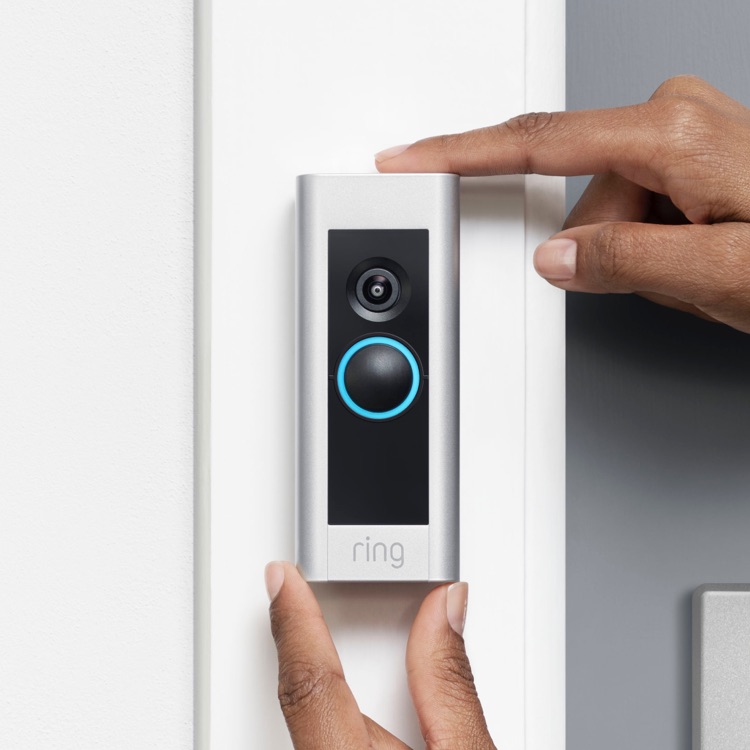
The successful deployment of a Ring camera system goes beyond simply mounting a device to a wall. It involves considerations of network infrastructure, power sources, optimal viewing angles, integration with existing smart home ecosystems, and, critically, ongoing digital security. This article delves into the various avenues available for Ring camera installation, examining the technical nuances, benefits, and potential pitfalls of each, all firmly within the domain of technology and its practical application in the modern home.
The DIY Approach: Empowering the Tech-Savvy Homeowner
For a significant segment of Ring camera owners, the installation process begins and ends with their own hands. Ring, much like many smart home manufacturers, designs its products with user-friendliness in mind, aiming to make DIY installation as accessible as possible. This approach empowers homeowners with direct control over their security setup and offers a rewarding learning experience.
Understanding Ring’s User-Friendly Design Philosophy
Ring’s ecosystem is predicated on intuitive design. Most of their battery-powered devices, like the Ring Video Doorbell or Stick Up Cam, are engineered for a straightforward setup process that requires minimal technical expertise. The Ring app itself serves as a comprehensive guide, walking users through each step from initial device pairing and Wi-Fi connection to mounting instructions and motion zone configuration. This app-guided setup leverages augmented reality elements and clear visual instructions, significantly lowering the barrier to entry for many users. The philosophy is clear: security technology should be accessible, not intimidating.
Tools and Basic Know-How
While Ring strives for simplicity, a successful DIY installation often requires a handful of basic tools and a fundamental understanding of your home’s environment. Common tools include a drill (for mounting brackets), a screwdriver, a ladder (for higher placements), and potentially a stud finder. For wired devices, an understanding of basic electrical principles or the ability to safely turn off power at the breaker is paramount. Knowledge of your home’s Wi-Fi network—its password, signal strength in various locations, and router placement—is also critical, as most Ring devices rely heavily on a stable wireless connection. Identifying suitable mounting surfaces (wood, stucco, brick) and understanding how to anchor devices securely are also essential skills for a robust installation.
Step-by-Step Installation Overview
A typical DIY Ring camera installation generally follows these steps:
-
Unboxing and Charging: Unpack the device and charge any removable batteries if applicable.
-
In-App Setup: Download the Ring app, create an account, and follow the prompts to add a new device. This usually involves scanning a QR code on the device and connecting it to your home Wi-Fi network.
-
Mounting Location Selection: Test the Wi-Fi signal at potential installation spots using the app’s signal strength indicator. Choose a location that provides optimal viewing coverage and strong Wi-Fi.
-
Physical Mounting: Secure the mounting bracket to the chosen surface using the provided screws and anchors. Attach the Ring device to the bracket.
-
Power Connection (for wired models): For devices like the Ring Video Doorbell Pro or Floodlight Cam, connect the existing doorbell wiring or outdoor light wiring to the Ring device, ensuring power is off during this process.
-
Final Configuration: Customize motion zones, privacy zones, notification settings, and integrate with other smart home devices via the app.
-
Testing: Thoroughly test the camera’s live view, motion detection, two-way talk, and night vision features to ensure everything is working correctly.
Advantages and Disadvantages of DIY
The DIY path offers several compelling advantages:
-
Cost Savings: Eliminates the expense of professional labor.
-
Immediate Gratification: You can install the camera as soon as you receive it, without waiting for an appointment.
-
Learning Experience: Provides hands-on knowledge of your security system and home infrastructure.
-
Flexibility: You decide when and how the installation is performed.
However, there are also notable disadvantages:
-
Potential for Errors: Incorrect wiring, poor Wi-Fi placement, or insecure mounting can lead to system failures, reduced security, or even damage.
-
Time-Consuming: The process can take several hours, especially for multiple cameras or complex wiring.
-
Lack of Specialized Tools/Expertise: Some installations, particularly those involving hardwired devices or difficult-to-reach spots, might require tools or knowledge beyond a typical homeowner’s arsenal.
-
Safety Concerns: Working on ladders, dealing with electrical wiring, or drilling into unknown wall structures carries inherent risks.
Professional Installation: The Expertise You Can Trust
For those who lack the time, tools, technical confidence, or simply prefer to delegate complex tasks, professional installation offers a convenient and often superior solution. Enlisting experts ensures that the Ring system is installed correctly, securely, and optimized for peak performance.
When to Call in the Experts
Professional installation becomes highly recommended in several scenarios:
-
Complex Setups: When installing multiple cameras across a large property, integrating them into a broader smart home system, or requiring extensive wiring.
-
Wired Camera Models: Devices like the Ring Video Doorbell Pro/Elite or Floodlight Cam require connection to existing electrical wiring. If you’re uncomfortable with electrical work, an electrician or skilled professional is essential.
-
Difficult Mounting Locations: High eaves, uneven surfaces, or areas requiring specialized access equipment are best handled by professionals.
-
Lack of DIY Confidence: If you’re unsure about drilling, wiring, or network configuration, a professional can alleviate stress and prevent costly mistakes.
-
Desire for Optimal Positioning/Integration: Experts can advise on the best camera angles, motion detection zones, and seamless integration with other smart devices, ensuring comprehensive coverage and functionality.
Types of Professional Installers
The landscape of professional Ring camera installers includes several options:
-
Ring-Certified Installers/Partners: Ring partners with various third-party companies and individual technicians who are trained and certified specifically for Ring product installation. These installers possess in-depth knowledge of the entire Ring ecosystem and can provide tailored advice and support. Services like Amazon Home Services often connect users with these certified professionals.
-
Local Electricians/Handymen (with Tech Experience): Many independent electricians or experienced handymen have broadened their skill sets to include smart home technology. If they have a track record of installing similar low-voltage devices and understand network connectivity, they can be a viable option, especially for simpler wired installations.
-
Home Security Companies: Larger home security providers often offer Ring camera installation as part of their broader security system packages or as a standalone service. These companies might also provide ongoing monitoring and maintenance plans.
What to Expect from Professional Service
When you hire a professional installer, you can expect a comprehensive service package:
-
Site Assessment: The installer will evaluate your property, Wi-Fi coverage, power availability, and potential blind spots to recommend optimal camera placements and device types.
-
Wiring Expertise: For hardwired cameras, they will safely connect the devices to your home’s electrical system, adhering to all local codes.
-
Optimal Placement Advice: Professionals leverage their experience to choose locations that maximize coverage, minimize false alerts, and deter potential intruders effectively, while also considering privacy.
-
System Integration: They ensure seamless integration with your existing smart home hub (e.g., Alexa, Google Home) and other Ring devices.
-
Post-Installation Testing and Training: Thorough testing of all features (live view, motion detection, two-way talk, night vision) and a walkthrough of the Ring app’s functionalities, including troubleshooting tips.
-
Customer Support: Many professional services offer warranties on their work and ongoing support for any issues that may arise.
Cost Considerations for Professional Installation
The cost of professional installation varies widely based on several factors:
-
Number of Cameras: More devices naturally increase labor time.
-
Complexity of Installation: Hardwired installations, difficult access points, or extensive wiring runs will be more expensive than simple battery-powered mounts.
-
Location: Labor rates differ geographically.
-
Installer Rates: Independent contractors might have different pricing structures than larger companies or certified partners. Expect to pay anywhere from $100-$300+ per camera for a standard professional installation, with potential discounts for multiple units.
The Hybrid Model: A Blend of DIY and Expert Consultation
For some, the ideal solution lies in a hybrid approach, combining the cost-effectiveness and control of DIY with the reassurance and expertise of professional guidance. This model allows homeowners to tackle simpler aspects themselves while bringing in experts for complex challenges or to validate their work.

Pre-Installation Consultation
Even if you plan to perform the physical installation yourself, consulting with a professional beforehand can be invaluable. A pre-installation consultation might involve:
-
Site Survey: An expert can visit your property (or review photos/floor plans) to advise on optimal camera types and placements for maximum security and minimal blind spots.
-
Network Assessment: They can evaluate your Wi-Fi network’s strength and coverage, recommending solutions like mesh systems or extenders if necessary.
-
System Design: For comprehensive security, a professional can help design an integrated system, advising on where to place different types of Ring devices (doorbell, floodlight, stick-up cam) to work in concert.
-
Tool and Material Guidance: They can recommend specific tools or accessories you might need for your DIY project.
This consultative approach ensures that even a DIY setup is well-planned and leverages professional insights, minimizing the chances of errors and optimizing the system’s effectiveness from the outset.
Post-Installation Troubleshooting and Optimization
Sometimes, a DIY installation might encounter unexpected hurdles. The camera might not connect to Wi-Fi, motion detection might be inconsistent, or the live view could be lagging. In these scenarios, professional help can be crucial for:
-
Diagnosis: Identifying the root cause of connectivity issues, power problems, or software glitches.
-
Troubleshooting: Fixing wiring mistakes, reconfiguring network settings, or addressing device malfunctions.
-
Optimization: Fine-tuning motion zones, adjusting sensitivity, ensuring privacy settings are correctly applied, or integrating the camera more effectively with other smart home devices.
This allows homeowners to gain the satisfaction of doing much of the work themselves, with the safety net of expert assistance for problem-solving or system fine-tuning.
Key Technological Considerations for Installation Success
Regardless of who installs your Ring cameras, several technological factors are paramount to ensuring a successful and effective security system. Overlooking these can lead to frustration, compromised security, and a poor user experience.
Network Infrastructure and Wi-Fi Strength
The cornerstone of any smart home device, especially security cameras that stream video, is a robust and reliable Wi-Fi network. Ring cameras are heavily reliant on a strong wireless signal for continuous operation, quick alerts, and high-quality video streaming.
-
Signal Range and Interference: Walls, large appliances, and distance from the router can significantly degrade Wi-Fi signal. Installers must assess signal strength at each camera’s location.
-
Bandwidth: Multiple cameras streaming high-definition video can strain network bandwidth. Ensure your internet plan can handle the load.
-
Wi-Fi Extenders or Mesh Systems: For larger homes or properties with weak spots, Wi-Fi extenders or a mesh Wi-Fi system may be necessary to ensure consistent connectivity across all devices. A professional can help identify and implement the most effective network solution.
Powering Your Ring Devices
Ring offers various power options, each with distinct installation implications:
-
Battery-Powered: Most flexible in terms of placement, as no wiring is needed. Installation involves simply mounting and periodically recharging or swapping batteries.
-
Solar-Powered: Utilizes a separate solar panel to trickle-charge a battery-powered device, reducing the frequency of manual recharges. Requires placement in direct sunlight.
-
Hardwired: Devices like the Ring Video Doorbell Pro or Floodlight Cam connect directly to your home’s existing electrical wiring. This provides continuous power but requires more complex installation, often necessitating an electrician or someone comfortable working with household electricity. Correct voltage and wiring connections are critical here.
Optimal Camera Placement for Maximum Coverage and Security
Strategic placement is not just about mounting; it’s about maximizing the camera’s utility while respecting privacy.
-
Viewing Angles: Consider the camera’s field of view. Doorbell cameras are ideal for front door activity, while floodlight cams offer broad coverage of driveways or backyards.
-
Motion Detection Zones: Configure specific “activity zones” within the camera’s view to focus on relevant areas (e.g., your walkway) and ignore irrelevant motion (e.g., a busy street), reducing false alerts.
-
Height and Angle: Mount cameras high enough to prevent tampering but low enough to capture clear facial features. Angle them slightly downward to cover a broader area.
-
Privacy Considerations: Be mindful of neighboring properties; avoid pointing cameras directly into their windows or private spaces. Ring offers privacy zones to black out sensitive areas.
-
Avoiding Blind Spots: Ensure overlapping coverage if using multiple cameras to eliminate areas an intruder could exploit.
Integration with Other Smart Home Ecosystems
A key advantage of Ring products is their integration capabilities. Proper installation ensures these integrations function seamlessly.
-
Alexa and Google Assistant: Correct setup allows for voice control (e.g., “Alexa, show me the front door camera”) and notification announcements.
-
Ring Alarm System: Integrating cameras with a Ring Alarm system creates a unified security solution, triggering recordings upon alarm activation.
-
Other Smart Devices: Ensure your Ring devices can communicate effectively with other smart lights, locks, or thermostats for enhanced automation and security routines.
Ensuring Digital Security Post-Installation
Physical installation is only one half of the security equation; digital security is equally vital. After mounting and powering your Ring cameras, several steps are crucial to protect your privacy and data.
Initial Setup and Account Security
-
Strong Passwords: Use unique, complex passwords for your Ring account and Wi-Fi network.
-
Two-Factor Authentication (2FA): Enable 2FA immediately on your Ring account to add an extra layer of security, requiring a code from your phone in addition to your password.
-
Unique Logins: Avoid reusing passwords from other online accounts.
Firmware Updates and Maintenance
-
Automatic Updates: Ensure your Ring app and devices are configured to receive automatic firmware updates. These updates often include critical security patches that address vulnerabilities and improve performance.
-
Regular Checks: Periodically check for manual updates if automatic updates are not enabled, or if you suspect an issue.
Privacy Settings and Data Management
-
Customizing Motion Zones and Activity Zones: Fine-tune these settings to capture only relevant activity and avoid recording public areas unnecessarily.
-
Understanding Data Storage: Familiarize yourself with Ring’s cloud storage policies, how long your videos are stored, and how to access and delete them.
-
Sharing Access: Be cautious when sharing access to your Ring devices with others. Use Ring’s “Shared Users” feature, which allows you to grant specific permissions without giving away your main account credentials.

Conclusion
The question “who installs Ring cameras?” has a multifaceted answer, reflecting the diverse needs and technical aptitudes of modern homeowners. Whether you choose the hands-on satisfaction of a DIY installation, the comprehensive assurance of professional service, or a balanced hybrid approach, the ultimate goal remains the same: a securely and effectively installed Ring system that delivers reliable smart home security.
Understanding the technical considerations—from robust network infrastructure and appropriate power sources to optimal camera placement and meticulous digital security practices—is paramount for any path chosen. By carefully evaluating your comfort level, the complexity of your setup, and the resources available, you can confidently deploy your Ring cameras, transforming them from mere gadgets into a vital component of your home’s safety and your family’s peace of mind.
aViewFromTheCave is a participant in the Amazon Services LLC Associates Program, an affiliate advertising program designed to provide a means for sites to earn advertising fees by advertising and linking to Amazon.com. Amazon, the Amazon logo, AmazonSupply, and the AmazonSupply logo are trademarks of Amazon.com, Inc. or its affiliates. As an Amazon Associate we earn affiliate commissions from qualifying purchases.