
In the vast and ever-evolving landscape of digital connectivity, few interfaces have made as significant an impact as Thunderbolt. Often seen as a premium feature on high-end computers and professional workstations, Thunderbolt is far more than just another port. It represents a confluence of speed, versatility, and power, meticulously engineered to streamline workflows, expand capabilities, and simplify the way we connect our digital lives. From professional content creators handling massive data sets to everyday users seeking a cleaner, more efficient setup, understanding Thunderbolt is key to unlocking the full potential of modern computing. This article delves into the intricacies of Thunderbolt, exploring its origins, technical prowess, evolutionary journey, and the profound impact it has on the tech ecosystem.
Unveiling Thunderbolt: More Than Just a Port
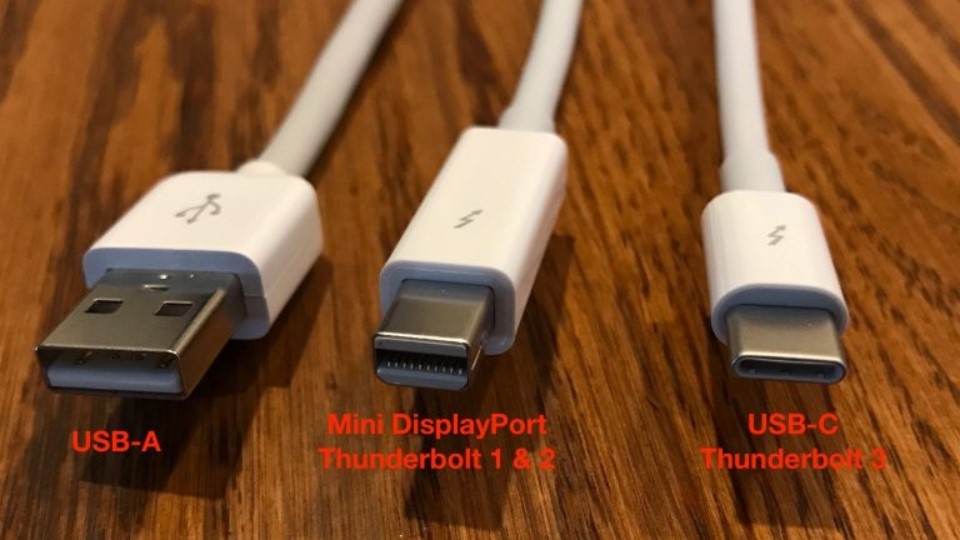
At its core, Thunderbolt is a hardware interface developed by Intel in collaboration with Apple, designed to connect peripherals to a computer. However, to simply call it a “port” would be a disservice to its sophisticated architecture. Thunderbolt integrates multiple communication protocols—PCI Express (PCIe) for data transfer, DisplayPort for video output, and increasingly, USB—into a single, compact cable and connector. This integration is what grants Thunderbolt its unique power and flexibility, allowing it to perform tasks that would typically require multiple, dedicated ports.
The Genesis of a High-Performance Interface
The concept of Thunderbolt emerged from a need to overcome the limitations of existing connection standards. As digital media grew in size and complexity, and peripheral devices became more powerful, traditional interfaces like USB and FireWire began to bottleneck performance. Intel’s initial vision for a unified optical fiber-based interconnect, codenamed Light Peak, eventually evolved into the copper-based Thunderbolt. Launched commercially in 2011, Thunderbolt was first adopted by Apple, quickly becoming a hallmark of their professional-grade Mac computers before expanding to a wider array of Windows PCs and other devices. Its creation marked a pivotal moment, promising an era of high-speed, versatile external connectivity previously unattainable.
Core Principles: Speed, Versatility, and Simplicity
The design philosophy behind Thunderbolt revolves around three fundamental pillars. Firstly, speed is paramount. Thunderbolt consistently offers significantly higher bandwidth than conventional USB standards, enabling lightning-fast data transfers, especially crucial for external SSDs, high-resolution monitors, and complex peripheral setups. Secondly, versatility is a defining characteristic. A single Thunderbolt port can simultaneously handle external displays, high-speed storage, network connections, audio interfaces, and even external graphics cards. This multi-functionality dramatically reduces cable clutter and simplifies connectivity. Finally, simplicity is achieved through its universal nature. With the adoption of the USB-C connector for Thunderbolt 3 and beyond, the interface became reversible and capable of power delivery, further streamlining the user experience by making it easier to connect and manage a multitude of devices with a single, elegant solution.
Key Features and Technological Prowess
Thunderbolt’s distinction from other connectivity standards lies in its specific set of features that collectively deliver unparalleled performance and utility. These attributes are what make it an indispensable tool for professionals and power users alike.
Blazing Fast Data Transfer Speeds
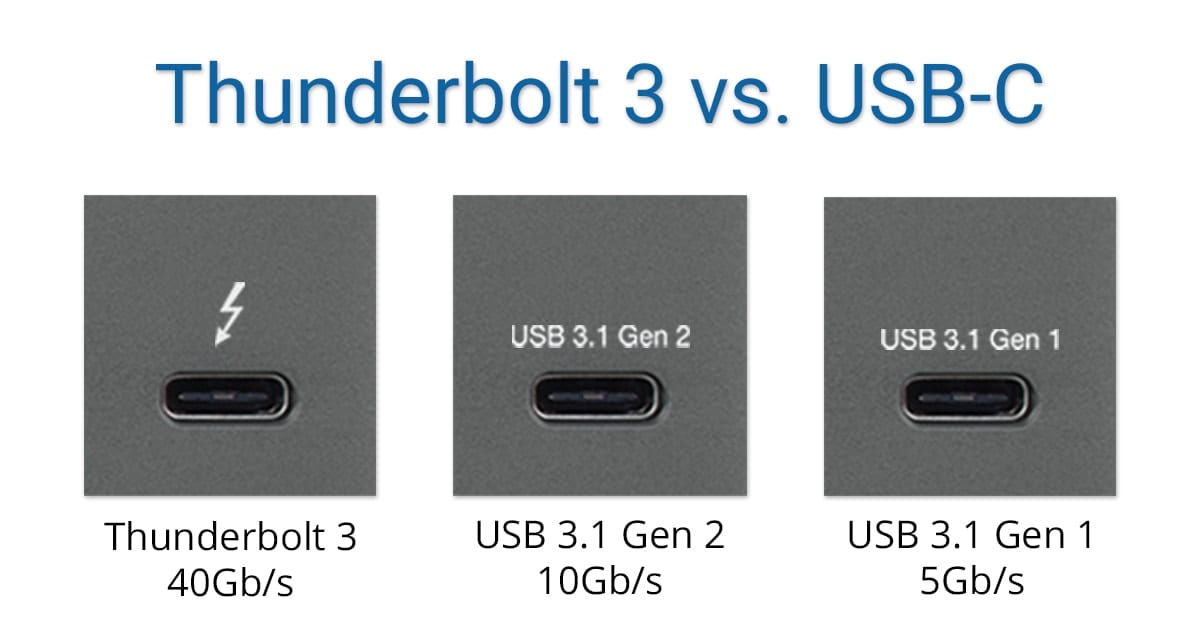
The most immediately apparent advantage of Thunderbolt is its extraordinary data transfer rate. Thunderbolt 3, for instance, boasts a bi-directional bandwidth of up to 40 Gigabits per second (Gbps). To put this into perspective, this is eight times faster than USB 3.0 (5 Gbps) and four times faster than USB 3.1 Gen 2 (10 Gbps). This immense speed is critical for tasks involving large files, such as editing 4K/8K video, working with massive CAD files, or running virtual machines directly from an external drive. It significantly reduces wait times, allowing users to spend more time creating and less time transferring. With Thunderbolt 4 maintaining this 40 Gbps, and Thunderbolt 5 pushing the envelope to 80 Gbps (and up to 120 Gbps for display-specific workloads), the interface continues to set benchmarks for external data transfer.
Universal Connectivity: One Port to Rule Them All
Thunderbolt’s true genius lies in its ability to consolidate multiple functions into a single port. Utilizing the USB-C connector shape, Thunderbolt ports are backward compatible with USB-C devices and cables. However, a Thunderbolt port goes beyond basic USB functionality. It can transmit PCIe data for external GPUs, high-speed SSDs, and network adapters; DisplayPort signals for connecting up to two 4K monitors or a single 8K monitor; and, of course, standard USB data. This “single cable” solution dramatically reduces the number of ports required on a laptop or desktop, leading to sleeker designs and a much cleaner desk setup, as a single cable can connect to a docking station that then branches out to all other peripherals.
Power Delivery and Daisy-Chaining Capabilities
Beyond data and video, Thunderbolt also supports power delivery. Thunderbolt 3 and 4 ports can supply up to 100 watts of power to connected devices, enabling a single cable to charge a laptop while simultaneously connecting it to a monitor, external drives, and other peripherals. This feature is particularly beneficial for modern ultrabooks and professional laptops that rely on USB-C for charging. Furthermore, Thunderbolt supports daisy-chaining, allowing users to connect multiple Thunderbolt devices in a series, using only a single port on the host computer. A single Thunderbolt port can typically support up to six devices in a daisy chain, along with two high-resolution displays, offering immense expandability without clutter. Each device in the chain can offer its own functionality, such as power, data, and video pass-through, simplifying complex setups.
Display Support: Driving Multiple High-Resolution Screens
For visual professionals and multi-monitor enthusiasts, Thunderbolt’s display capabilities are a major draw. Thunderbolt 3 and 4 can natively drive up to two 4K displays at 60Hz or a single 5K/6K/8K display through a single port, depending on the version and specific host implementation. This is achieved by carrying DisplayPort signals directly through the Thunderbolt cable. The ability to power multiple high-resolution external monitors from a single port simplifies workstation setups, especially for tasks like video editing, graphic design, and financial analysis, where screen real estate is critical. The upcoming Thunderbolt 5 further enhances this, supporting up to three 4K 144Hz displays.
The Evolution of Thunderbolt: From Version to Version
Like any successful technology, Thunderbolt has undergone significant evolution since its inception, with each iteration bringing increased capabilities and greater integration with prevailing industry standards. Understanding this progression is crucial to appreciating its current standing and future potential.
Thunderbolt 1 & 2: Early Innovations with Mini DisplayPort
The initial iterations of Thunderbolt, introduced in 2011 and 2013 respectively, utilized the Mini DisplayPort connector. Thunderbolt 1 offered 10 Gbps of bi-directional bandwidth, allowing for the connection of high-speed storage and displays. Thunderbolt 2 doubled this to 20 Gbps by aggregating the four 10 Gbps channels into a single logical channel, making it capable of handling 4K video streams while simultaneously transferring data. These versions, while revolutionary at the time, primarily found a home in Apple’s professional machines and a niche market of PC workstations, limited by their proprietary connector and relatively high cost. They laid the groundwork for future advancements but remained somewhat exclusive due to the connector type and early adoption curve.
Thunderbolt 3: The USB-C Revolution
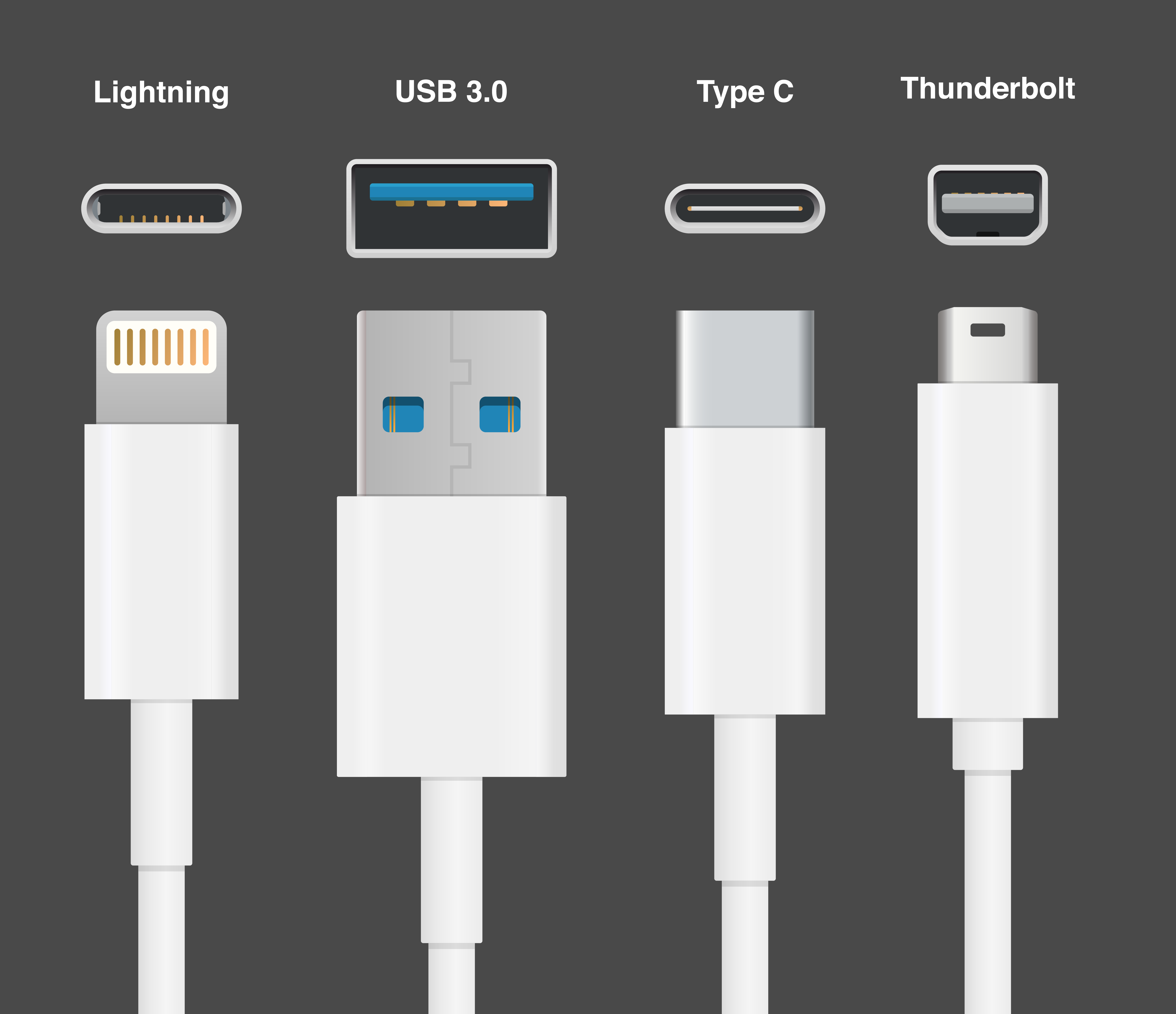
Thunderbolt 3, launched in 2015, marked a monumental leap forward, fundamentally changing the landscape of device connectivity. The most significant change was the adoption of the USB-C connector. This move instantly made Thunderbolt 3 universally compatible with USB-C ports and cables, though not all USB-C ports are Thunderbolt-enabled. Thunderbolt 3 pushed bandwidth to an impressive 40 Gbps, enabling two 4K displays or one 5K display, along with full 100W power delivery. Its integration with USB-C meant that a single port could truly be a “universal” port, handling power, data, and video simultaneously. This version saw much wider adoption across both macOS and Windows platforms, becoming a standard feature on many premium laptops and motherboards.
Thunderbolt 4: Refinements and Enhanced Reliability
Introduced in 2020, Thunderbolt 4 built upon the robust foundation of Thunderbolt 3, focusing on consistency, reliability, and security rather than a raw speed increase. While still maintaining 40 Gbps bandwidth, Thunderbolt 4 raised the minimum specifications for features. It mandated support for two 4K displays (or one 8K display), required PCIe data transfer rates of 32 Gbps (double that of Thunderbolt 3’s minimum), and ensured compatibility with a wider range of accessories. It also introduced Intel VT-d-based DMA protection, a crucial security feature to prevent physical memory access attacks. Thunderbolt 4 became the baseline for Intel’s Evo platform, ensuring a consistent premium user experience across compatible devices and further expanding its reach into the mainstream. It was less about groundbreaking speed and more about solidifying the standard and ensuring a more predictable, high-quality experience for users.
Thunderbolt 5: The Next Leap in Bandwidth
Announced in 2023, Thunderbolt 5 (based on the USB4 v2 standard) represents the next significant leap in performance. It promises a staggering bi-directional bandwidth of 80 Gbps, with the potential for asymmetrical bandwidth up to 120 Gbps for display-intensive workloads, and 40 Gbps for data. This dramatic increase is crucial for emerging technologies like 8K displays, high-refresh-rate gaming, and extremely demanding professional applications that require massive data throughput. Thunderbolt 5 will continue to use the USB-C connector, ensure backward compatibility, and maintain support for power delivery and daisy-chaining, setting a new benchmark for external connectivity in the years to come.
Thunderbolt vs. USB: A Critical Comparison
While Thunderbolt often utilizes the same physical USB-C connector as modern USB standards, it’s crucial to understand that they are distinct technologies with different capabilities, particularly in terms of performance and versatility.
Understanding the Differences in Performance and Features
The primary differentiator between Thunderbolt and USB lies in their underlying protocols and maximum bandwidth. USB (Universal Serial Bus) is designed for broad compatibility and various levels of performance, from charging phones to connecting external drives. Its speeds have evolved from USB 2.0 (480 Mbps) to USB 3.x (5-20 Gbps) and now USB4 (20-40 Gbps). Thunderbolt, on the other hand, integrates PCIe and DisplayPort directly into its core protocol, allowing it to offer consistently higher bandwidth and handle multiple data streams simultaneously.
For example, a standard USB-C port that supports USB 3.2 Gen 2×2 might offer 20 Gbps of data transfer. A Thunderbolt 3 or 4 port, while also using the USB-C physical connector, delivers 40 Gbps bi-directionally and can concurrently handle two 4K displays, connect an external GPU, and power devices. While USB4 now also offers up to 40 Gbps and integrates some aspects of Thunderbolt, Thunderbolt standards often mandate higher minimum performance requirements and full feature sets (like multi-display support and consistent PCIe bandwidth) that are optional or less guaranteed in generic USB4 implementations. This means a Thunderbolt-certified device often ensures a premium, high-performance experience that might not be consistent across all USB4 devices.
When to Choose Thunderbolt Over USB
The decision to opt for Thunderbolt over standard USB largely depends on your computing needs and the types of peripherals you use. If you are a professional working with large files (e.g., 4K/8K video editing, CAD, scientific simulations), require multiple high-resolution external monitors, plan to use an external GPU for gaming or compute-intensive tasks, or need a single-cable docking solution for a complex workstation, Thunderbolt is the unequivocal choice. Its ability to aggregate multiple high-bandwidth data streams ensures seamless performance without bottlenecks. For users with more modest needs—connecting a keyboard, mouse, printer, or a basic external hard drive—a standard USB port (including USB-C ports with only USB capabilities) will suffice and is typically more cost-effective.
The Convergence and Coexistence of Standards
The adoption of the USB-C connector by both Thunderbolt 3/4/5 and modern USB standards has led to some confusion but also a beneficial convergence. All Thunderbolt ports are fully compatible with USB-C devices and cables, meaning you can plug a standard USB-C drive into a Thunderbolt port and it will work. However, the reverse is not true: a Thunderbolt device requires a Thunderbolt port to achieve its full potential. The emergence of USB4, which incorporates core elements of the Thunderbolt 3 protocol, further blurs the lines, as USB4 can also offer up to 40 Gbps and supports PCIe and DisplayPort tunneling. Despite this, Thunderbolt continues to differentiate itself with stricter certification requirements, guaranteed feature sets, and often, higher baseline performance, ensuring a premium experience. Moving forward, both standards will coexist, with Thunderbolt serving the high-performance, professional segment and USB providing broad, accessible connectivity for the general market.
Practical Applications and Ecosystem Impact
The practical implications of Thunderbolt extend far beyond mere technical specifications. Its capabilities have fundamentally reshaped workflows across various industries and enhanced the overall user experience for a wide range of consumers.
Professional Workflows: Content Creation and Data Science
For professionals in fields like video production, graphic design, audio engineering, and data science, Thunderbolt is a game-changer. High-resolution video editors can connect external SSDs that offer NVMe-level speeds, allowing them to edit raw 4K or even 8K footage directly from external storage without performance degradation. This eliminates the need for large internal drives, making laptops more portable and cost-effective. Audio engineers can connect high-fidelity audio interfaces with minimal latency, while graphic designers benefit from driving multiple high-resolution displays. Data scientists and researchers can utilize Thunderbolt to connect external high-speed storage for massive datasets or even powerful external GPUs to accelerate computations and machine learning tasks, transforming a standard laptop into a powerful workstation.
External GPUs and Gaming Performance
One of the most exciting applications of Thunderbolt, particularly for gamers and those needing desktop-level graphics performance on a laptop, is the ability to connect external Graphics Processing Units (eGPUs). A Thunderbolt eGPU enclosure allows users to plug in a full-sized desktop graphics card into their laptop, dramatically boosting graphical prowess. This means a thin-and-light ultrabook, which typically has integrated or low-power discrete graphics, can be transformed into a high-performance gaming rig or a workstation capable of rendering complex 3D models when docked. While some performance overhead exists due to the Thunderbolt interface, it still provides a significant upgrade over integrated graphics, offering a flexible solution for users who need both portability and raw graphical power.
Docking Stations and Peripheral Expansion
Thunderbolt docking stations are perhaps the most common and beneficial application for the average user. A single Thunderbolt cable connecting a laptop to a dock can expand its connectivity to a myriad of peripherals: multiple monitors, external hard drives, Ethernet, USB devices, card readers, and audio jacks, all while simultaneously charging the laptop. This creates an incredibly clean and efficient workspace, allowing users to simply plug in one cable and have instant access to their entire desktop setup. For remote workers, hybrid professionals, or anyone who frequently connects and disconnects their laptop, a Thunderbolt dock streamlines the entire process, eliminating the hassle of plugging in multiple cables every time.
Future Implications for Device Connectivity
As technology continues to advance, the role of Thunderbolt is only set to grow. The increasing demand for higher bandwidth, driven by richer content (8K video, VR/AR), faster storage technologies, and the proliferation of powerful external peripherals, ensures Thunderbolt’s continued relevance. With Thunderbolt 5 pushing speeds to new heights, it will facilitate even more demanding applications, potentially enabling external components to rival internal ones more closely. Its integration with future USB standards, while ensuring backward compatibility and broad adoption, will continue to make it the premium choice for performance-critical scenarios, cementing its position as a cornerstone of high-performance digital connectivity for years to come. As devices become thinner and more port-constrained, unified, high-bandwidth solutions like Thunderbolt will be indispensable.
aViewFromTheCave is a participant in the Amazon Services LLC Associates Program, an affiliate advertising program designed to provide a means for sites to earn advertising fees by advertising and linking to Amazon.com. Amazon, the Amazon logo, AmazonSupply, and the AmazonSupply logo are trademarks of Amazon.com, Inc. or its affiliates. As an Amazon Associate we earn affiliate commissions from qualifying purchases.