
In the vast digital landscape of social media, Facebook stands as an undeniable giant, connecting billions of users across the globe. From sharing life’s milestones with friends and family to running sophisticated ad campaigns for businesses, its utility is immense. However, like any complex technological platform, users occasionally encounter issues ranging from minor glitches to critical account problems. When these arise, the immediate thought is often: “How can I reach Facebook support?” This seemingly simple question often leads to a labyrinthine search, revealing that direct, human-to-human support is not as straightforward as with many other services. This guide aims to demystify the process, offering insights and actionable strategies to connect with Facebook’s support ecosystem effectively.

Understanding Facebook’s Support Ecosystem: A Digital Maze
Facebook, now Meta Platforms, Inc., manages an unprecedented scale of users and data. This sheer volume inherently shapes its approach to user support, prioritizing automated and self-service solutions over direct human interaction for most general inquiries. Understanding this foundational principle is the first step in successfully navigating their system.
The Self-Service First Approach
Facebook’s primary line of defense against the tidal wave of user queries is its robust Help Center. This comprehensive repository of articles, FAQs, and troubleshooting guides is designed to empower users to resolve issues independently. Before attempting to find a contact form or a phone number (which are largely non-existent for general users), Facebook expects you to leverage these resources. This approach is efficient for common problems, leveraging AI and keyword matching to direct users to relevant solutions, minimizing the need for manual intervention from their support staff.
Common Reasons for Needing Support
The reasons users seek support are incredibly diverse, reflecting the multifaceted nature of the platform. They can generally be grouped into a few key areas:
-
Technical Glitches: App crashes, feature malfunctions, login issues, display problems.
-
Account Security & Access: Hacked accounts, forgotten passwords, suspicious activity, identity verification.
-
Content & Policy Violations: Reporting inappropriate content, appealing content removals, dealing with harassment, intellectual property disputes.
-
Billing & Payments (for advertisers/businesses): Ad account issues, payment failures, suspicious charges.
-
Feature-Specific Help: Issues with Marketplace, Groups, Pages, Events, etc.
Each category often has a slightly different pathway for resolution, with the system attempting to route severe issues (like account security) more directly than simple technical questions.
The Scale of Facebook’s User Base and its Impact on Support
With billions of active users monthly, providing personalized, real-time support for every query would be an insurmountable logistical and financial challenge for any company. This scale necessitates automation and a tiered support system where only the most critical and complex issues, or those requiring manual review, reach human eyes. This reality often leads to user frustration, as the expectation of immediate, human-centric support clashes with Facebook’s operational necessity for scalable, automated solutions.
Navigating the Help Center: Your First Port of Call
Given Facebook’s “self-service first” philosophy, the Help Center is unequivocally where you must begin your journey. It’s not merely a collection of FAQs; it’s a dynamic knowledge base updated regularly to address emerging issues and platform changes.
Accessing the Help Center
The Help Center is readily accessible from both the Facebook website and the mobile app.
-
On the Web: Click the small downward-facing arrow or your profile picture in the top-right corner, then select “Help & Support,” followed by “Help Center.”
-
On Mobile: Tap the menu icon (three horizontal lines or your profile picture), scroll down to “Help & Support,” and then tap “Help Center.”
Bookmark this page, as it will be your most frequent destination for troubleshooting.
Utilizing Search and Categories
Once in the Help Center, you’ll find a prominent search bar. This is your most powerful tool. Type in concise keywords related to your issue (e.g., “account hacked,” “reset password,” “ad payment issue,” “marketplace fraud”). The system will suggest articles as you type.
Beyond search, the Help Center is structured into categories that mirror the platform’s functionalities:
-
Using Facebook: General usage, profiles, settings.
-
Privacy & Safety: Account security, privacy settings, reporting.
-
Policies & Reporting: Community Standards, intellectual property.
-
Gaming: Facebook Gaming issues.
-
Business Help: For Pages, Ads, and Business Manager.
Explore these categories if your search yields too many results or if you’re unsure of the exact terminology for your problem. Often, simply browsing related articles can shed light on an issue you hadn’t fully defined.
Troubleshooting Common Issues Independently
Many common problems, such as login difficulties, privacy settings adjustments, or basic feature usage questions, can be resolved entirely by following the step-by-step instructions found within the Help Center articles. These guides are often accompanied by screenshots and clear explanations, making them highly effective for independent troubleshooting. Before escalating, commit to thoroughly reviewing relevant articles and attempting all suggested fixes.
Reporting Specific Problems and Account Issues
When the Help Center’s self-service options fall short, you’ll need to move into the realm of structured reporting. This is where you formally submit an issue to Facebook for review. It’s critical to use the correct reporting channel, as misdirection can lead to delays or your report being ignored.
Reporting Bugs and Technical Glitches
If you’ve identified a clear bug – something that isn’t working as intended and isn’t a user error – Facebook provides a “Report a Problem” feature.
-
On the Web: Click the downward-facing arrow or your profile picture > “Help & Support” > “Report a Problem.” You’ll often be given a choice to “Something Went Wrong” or “Help Us Improve.” Choose “Something Went Wrong.”
-
On Mobile: Menu icon > “Help & Support” > “Report a Problem.”
When reporting a bug, be extremely descriptive. Explain what you were doing, what happened, what you expected to happen, and include screenshots or screen recordings. This information is invaluable for their development teams. Do not expect an immediate personal reply; bug reports often feed into development queues rather than triggering direct support contact.
Dealing with Account Access and Security Concerns
This is perhaps the most critical area where users need assistance. If your account has been hacked, you can’t log in, or you suspect unauthorized activity, Facebook provides dedicated recovery flows.
-
Hacked Account: Visit
facebook.com/hacked. This page guides you through a multi-step process to secure your account, remove unauthorized posts, and potentially regain access. It’s designed to verify your identity and help you reset your password. -
Forgot Password/Can’t Log In: The standard login page offers a “Forgot password?” link. This initiates a recovery process, usually involving sending a code to your associated email or phone number. Ensure your recovery information is up-to-date.
-
Identity Verification: If Facebook flags your account for suspicious activity or requires you to confirm your identity (e.g., after an appeal), you might be prompted to upload a government-issued ID. This is a secure process, but it can take time for manual review.
For security concerns, always go through Facebook’s official channels. Never respond to emails or messages claiming to be from Facebook asking for your password or personal information directly.
Addressing Policy Violations and Content Disputes
If you encounter content that violates Facebook’s Community Standards (e.g., hate speech, harassment, nudity, spam), or if your own content has been removed unfairly, you’ll use specific reporting and appeal mechanisms.
-
Reporting Content: On almost every piece of content (post, comment, profile, page), you’ll find a “…” menu. Clicking this usually reveals an option like “Find support or report [item].” Follow the prompts to categorize the violation. This often leads to a quick review by automated systems or human moderators.
-
Appealing Decisions: If your content was removed or your account restricted, Facebook will typically notify you with a link to appeal the decision. This is your chance to explain why you believe the decision was incorrect. Appeals are reviewed by human moderators, but response times can vary.
Remember that reporting is anonymous for the person whose content you report.
Beyond the Standard Channels: Exploring Alternative Avenues
While the Help Center and specific reporting forms are the primary methods, some situations or user types might find success through alternative, albeit less direct, avenues.
Leveraging Facebook’s Business Support (if applicable)
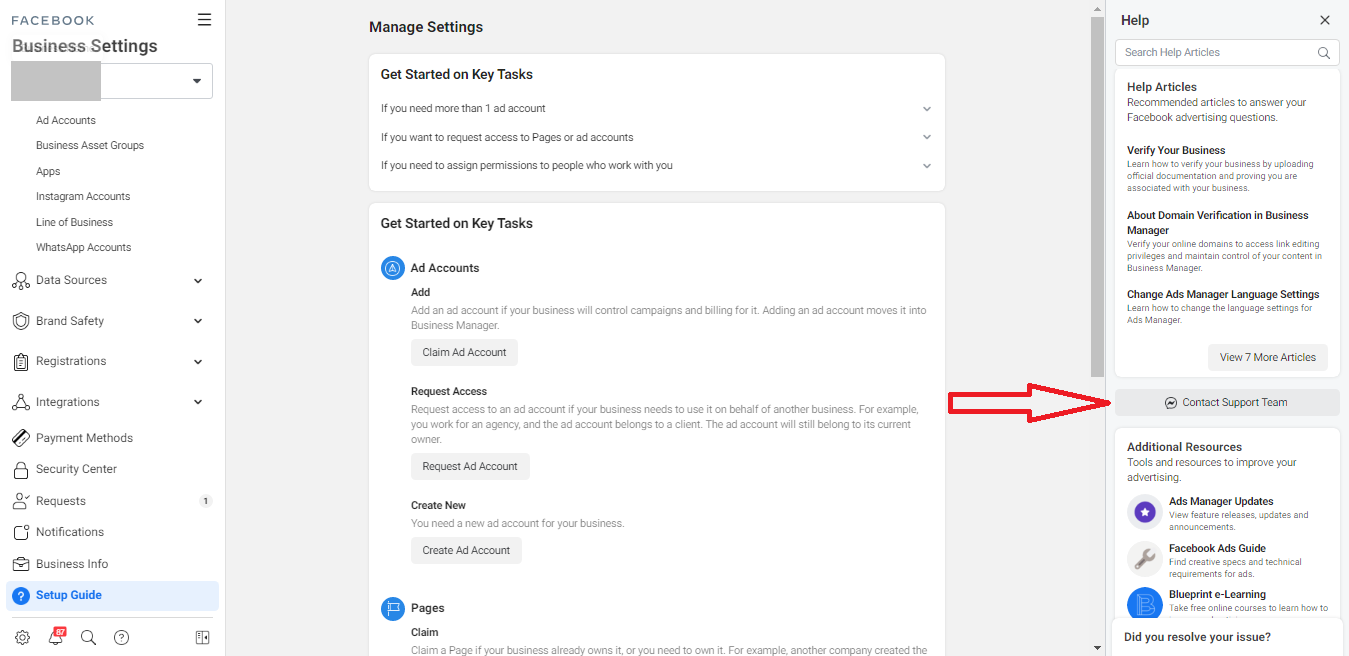
For those who manage Facebook Pages, ad accounts, or utilize Business Manager, there are often more direct support options available.
-
Business Help Center:
facebook.com/business/helpoffers dedicated resources for advertisers and businesses. -
Business Support Chat: Within the Business Help Center, or directly through Ad Manager, qualifying business accounts often have access to a live chat feature with a Facebook representative. This is usually the closest you’ll get to real-time human support. Look for a “Chat” button or “Contact Support” options. This option is not always available to all business accounts; it depends on ad spend, account history, and region.
-
Account Representatives: Larger advertisers might even have a dedicated account representative from Facebook, who serves as a primary point of contact for strategic and technical support.
If you have a business tie to Facebook, always try these dedicated business channels first, as they are generally more responsive.
Exploring Community Forums and Groups
While not official Facebook support, community forums and dedicated Facebook Groups can be incredibly valuable resources, particularly for technical issues or questions about specific features.
-
Official Facebook Community: Sometimes, Facebook will link to official community spaces where users can help each other.
-
Unofficial Tech Support Groups: Many large, active Facebook Groups exist where experienced users, developers, or digital marketers share solutions and troubleshoot common problems. A quick search for “Facebook support group” or “Facebook tech help” might reveal a helpful community. Just exercise caution with personal information in such groups.
These communities can offer quick workarounds or identify if an issue is widespread, saving you the frustration of waiting for Facebook’s official response.
The Role of Social Media (Twitter, etc.)
In rare instances, and typically for widespread outages or highly visible issues, reaching out via other social media platforms like Twitter can sometimes garner attention. Facebook (Meta) has official accounts (e.g., @Meta, @FacebookApp, @MetaforBusiness) that occasionally respond to public inquiries or acknowledge systemic problems. This is not a reliable support channel for individual account issues, but if you’re experiencing a major platform-wide problem, a well-worded public tweet might be seen. Be professional and concise; avoid spamming their accounts.
Tips for Effective Communication and Problem Resolution
When you do manage to submit a report or an appeal, the quality of your communication significantly impacts the likelihood and speed of resolution.
Be Specific and Detailed
Vague reports like “Facebook is broken” are useless. Instead, provide a clear narrative:
-
What is the problem? (e.g., “My profile picture isn’t loading.”)
-
When did it start? (e.g., “Since yesterday, June 10th.”)
-
What steps did you take? (e.g., “I tried uploading a new picture, clearing my cache, and restarting the app.”)
-
What device are you using? (e.g., “iPhone 15, iOS 17.5, Facebook app version X.Y.Z” or “Chrome browser, Windows 11.”)
-
What is the expected outcome? (e.g., “I expect my profile picture to display normally.”)
Provide Screenshots and Evidence
A picture is worth a thousand words. Whenever possible, include screenshots or screen recordings that clearly illustrate the problem. Highlight error messages, missing features, or unusual displays. This visual evidence dramatically speeds up diagnosis.
Be Patient and Persistent
Facebook’s support processes can be slow. After submitting a report or appeal, you might not receive an immediate response, and follow-ups can take days or even weeks. Avoid submitting multiple identical reports, as this can clutter the system and potentially delay your original submission. Instead, patiently monitor your “Support Inbox” within the Help & Support section of Facebook, where you’ll find updates on your cases. If a reasonable amount of time passes without a response, you might consider submitting a new, updated report, referencing your previous submission.

Understanding Limitations
Finally, it’s crucial to manage expectations. Not every issue will have a satisfactory resolution, especially if it involves user error, a misunderstanding of platform policies, or a feature that Facebook has intentionally changed. There are also limitations to what support can do for highly sensitive issues like recovering accounts with insufficient verification. Understanding these limitations can prevent further frustration and help you determine if an issue is truly resolvable through official channels.
Reaching Facebook support effectively is less about finding a direct hotline and more about strategically navigating a sophisticated, automated system. By starting with self-service resources, meticulously detailing your problems, and utilizing the correct reporting channels, you significantly increase your chances of finding a solution and getting the help you need within the vast ecosystem of Facebook.
aViewFromTheCave is a participant in the Amazon Services LLC Associates Program, an affiliate advertising program designed to provide a means for sites to earn advertising fees by advertising and linking to Amazon.com. Amazon, the Amazon logo, AmazonSupply, and the AmazonSupply logo are trademarks of Amazon.com, Inc. or its affiliates. As an Amazon Associate we earn affiliate commissions from qualifying purchases.