
In an increasingly data-driven world, the ability to quickly and accurately calculate percentages is a fundamental skill. From figuring out discounts during a sale, calculating tips at a restaurant, understanding interest rates, or analyzing statistical data, percentages are everywhere. While the underlying mathematical concept remains constant, the tool we use to derive these figures has evolved significantly. The humble calculator, whether a standalone gadget, a software application on your computer, or an integrated feature on your smartphone, stands as a technological marvel that simplifies complex arithmetic into a few button presses. This article serves as a comprehensive guide to mastering percentage calculations on various types of calculators, ensuring you can harness this essential tech tool with confidence and precision.

The Ubiquitous Role of Calculators in Everyday Math
Before diving into the mechanics, it’s worth acknowledging the pervasive influence of calculators in our daily lives. These devices have transformed how we interact with numbers, making advanced computations accessible to everyone, regardless of their mathematical prowess. Understanding how to leverage this technology for percentage calculations is a cornerstone of digital literacy.
From Manual Computation to Digital Efficiency
Historically, calculating percentages involved tedious manual methods, often prone to error. Imagine trying to figure out a 17.5% tax on a complex bill without a calculator, or rapidly comparing various discount offers. The invention and widespread adoption of calculators, from mechanical adding machines to today’s sophisticated digital devices, marked a significant leap in computational efficiency. They liberated individuals and professionals from the drudgery of longhand arithmetic, allowing more focus on analysis and decision-making rather than on the calculation itself. This technological shift streamlined countless processes in commerce, education, science, and personal finance, solidifying the calculator’s place as an indispensable tech gadget.
Types of Calculators: A Tech Overview
The term “calculator” encompasses a broad spectrum of devices, each with specific design principles and capabilities. Understanding these distinctions can help you choose the right tool for the job when performing percentage calculations:
-
Basic Calculators: These are the most common, featuring fundamental operations (+, -, x, /, %). They are perfect for straightforward percentage calculations and everyday use. Their interfaces are typically simple, with large, clearly labeled buttons.
-
Scientific Calculators: Equipped with advanced functions (trigonometry, logarithms, statistics), scientific calculators are standard in academic and engineering fields. While they can certainly handle percentages, their interface might be slightly more crowded with specialized buttons.
-
Financial Calculators: Designed for complex financial calculations (loan amortization, bond yields, cash flow analysis), these calculators often have dedicated buttons or functions for percentage changes, interest, and present/future value computations.
-
Smartphone Calculator Apps: Almost all modern smartphones come with built-in calculator apps. These often have both a basic mode and a scientific mode (accessible by rotating the phone horizontally). They offer convenience and integrate well with other phone features.
-
Online Calculators and Software: Websites and desktop software offer specialized calculators for various purposes, often with enhanced interfaces, graphing capabilities, and integration with data analysis tools. They can be particularly useful for complex scenarios or for visualizing percentage changes.
Regardless of the type, the core principles of calculating percentages remain largely consistent, making the skill transferable across platforms.
Mastering Basic Percentage Calculations on Any Calculator
The foundation of using any calculator for percentages lies in understanding the mathematical operation and how it translates to button presses.
The Core Formula: Understanding the Math Behind the Buttons
At its heart, finding a percentage of a number is about determining a fraction of that number, where the fraction is expressed out of 100.
The fundamental formula is:
P% of N = (P / 100) * N
Where P is the percentage value and N is the total number.
For example, 25% of 200 means (25 / 100) * 200 = 0.25 * 200 = 50.
Your calculator automates this division by 100 when you use the “%” button, or you can manually perform the division.
Step-by-Step: Finding a Percentage of a Number
Let’s illustrate with a common scenario: finding 20% of 150.
Method 1: Using the Percentage (%) Button (if available)
-
Enter the number: Type
150. -
Press the multiplication button: Press
x(or*). -
Enter the percentage value: Type
20. -
Press the percentage button: Press
%. -
Press the equals button: Press
=(orEnter).- Result: You should get
30.
- Result: You should get
- How it works: When you press
20%, many calculators internally convert20into0.20and then multiply150by0.20. Some calculators might display30immediately after pressing%without needing the=button.
Method 2: Manual Division by 100 (Universal Method)
This method works on any calculator, even those without a dedicated ‘%’ button.
-
Enter the percentage value: Type
20. -
Divide by 100: Press
/(division) then type100. -
Press the multiplication button: Press
x(or*). -
Enter the total number: Type
150. -
Press the equals button: Press
=(orEnter).- Result: You should get
30.
- Result: You should get
Step-by-Step: Calculating a Number as a Percentage of Another
Another common calculation is determining what percentage one number is of another. For example, “30 is what percent of 120?”
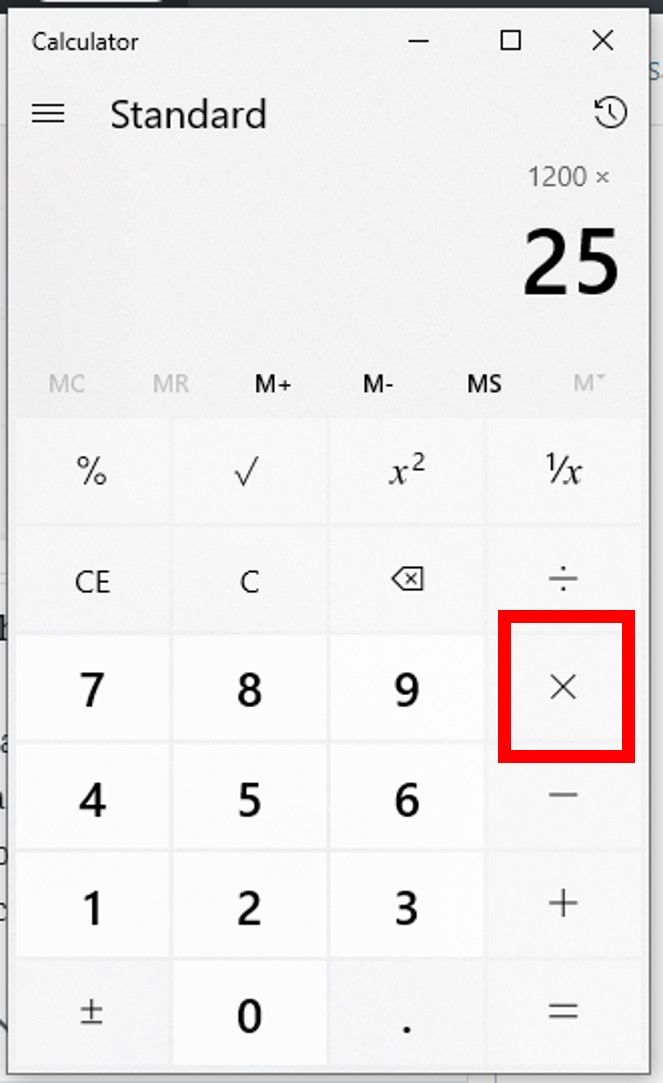
The formula here is:
(Part / Whole) * 100 = Percentage
-
Enter the “part” number: Type
30. -
Press the division button: Press
/. -
Enter the “whole” number: Type
120. -
Press the multiplication button: Press
x(or*). -
Enter 100: Type
100. -
Press the equals button: Press
=(orEnter).- Result: You should get
25. So, 30 is 25% of 120.
- Result: You should get
Advanced Percentage Scenarios and Calculator Techniques
Beyond basic computations, calculators excel at handling more complex percentage-related tasks crucial for financial planning and everyday decision-making.
Adding or Subtracting a Percentage (Markups/Discounts)
Calculators simplify the process of applying markups (like sales tax or profit margins) or discounts.
-
Adding a Percentage (e.g., Adding 15% sales tax to $100):
Method A (Direct using % button):
-
Enter
100. -
Press
+. -
Enter
15. -
Press
%. -
Press
=.- Result:
115. (Some calculators display15after%, then115after=).
- Result:
Method B (Manual multiplication):
-
Enter
100. -
Press
x. -
Enter
1.15(100% + 15% = 115% or 1.15 as a decimal). -
Press
=.- Result:
115.
- Result:
-
-
Subtracting a Percentage (e.g., 25% discount on $200):
Method A (Direct using % button):
-
Enter
200. -
Press
-. -
Enter
25. -
Press
%. -
Press
=.- Result:
150. (Some calculators display50after%, then150after=).
- Result:
Method B (Manual multiplication):
-
Enter
200. -
Press
x. -
Enter
0.75(100% – 25% = 75% or 0.75 as a decimal). -
Press
=.- Result:
150.
- Result:
-
Finding the Original Number Before a Percentage Change
This is a slightly trickier but incredibly useful calculation, often encountered when trying to reverse-engineer a price after a discount or tax. For example, “An item costs $120 after a 20% discount. What was the original price?”
Here, the $120 represents 80% (100% – 20%) of the original price.
The formula is:
Original Number = Final Number / (1 – Percentage as a decimal) (for discounts)
Original Number = Final Number / (1 + Percentage as a decimal) (for markups/tax)
For our example:
-
Determine the remaining percentage: 100% – 20% = 80%. Convert to decimal:
0.80. -
Enter the final number: Type
120. -
Press the division button: Press
/. -
Enter the decimal equivalent of the remaining percentage: Type
0.80. -
Press the equals button: Press
=.- Result:
150. The original price was $150.
- Result:
Leveraging Advanced Calculator Features and Digital Tools
Modern technology offers more than just basic arithmetic. Understanding advanced calculator features and digital alternatives can further enhance your computational efficiency.
Scientific Calculators and Memory Functions
Scientific calculators, while primarily known for complex mathematical operations, often come equipped with memory functions (M+, M-, MR, MC). These can be invaluable for multi-step percentage calculations where you need to store intermediate results. For instance, if you’re calculating a percentage of a sum of several numbers, you can add each number to memory (M+), then recall the total (MR) to perform the percentage calculation. This minimizes manual re-entry and reduces the chance of error. Familiarize yourself with your calculator’s memory functions to unlock this productivity boost.
Smartphone Calculator Apps: More Than Just Buttons
Smartphone calculator apps go beyond replicating physical calculators. They often include:
-
History Logs: View past calculations, which is incredibly useful for double-checking work or recalling previous results.
-
Unit Conversions: Many apps integrate unit conversion features (e.g., currency, length, weight), which, while not directly percentage-related, speaks to their versatility as all-in-one numerical tools.
-
Accessibility Features: Larger buttons, voice input, and high-contrast modes enhance usability for a broader audience.
-
Scientific/Basic Toggle: Easily switch between simple and advanced modes by rotating your phone or tapping a button.
These features make smartphone calculators powerful and convenient tools for managing percentages on the go.
Online Calculators and Specialized Tools
For situations requiring more specific or complex percentage analysis, online calculators and specialized software offer robust solutions. Websites dedicated to personal finance, business analysis, or scientific research often provide tailored percentage calculators. Examples include:
-
Tip Calculators: Automatically calculate tips and split bills.
-
Loan Calculators: Determine monthly payments based on interest rates (a form of percentage).
-
Investment Return Calculators: Analyze percentage gains or losses on investments.
-
Discount Calculators: Quickly find sale prices with multiple discounts.
These digital tools can offer a more intuitive interface, visual feedback, and sometimes even integration with data sources, making them ideal for specific, recurring tasks or when greater analytical depth is required. The convenience of accessing these tools from any internet-connected device makes them a vital part of the modern digital toolkit.
Conclusion
The ability to proficiently find a percentage of a number on a calculator is an essential tech skill that transcends various aspects of life, from personal finance and shopping to professional tasks and academic pursuits. By understanding the core mathematical principles and mastering the different functionalities of various calculator types – be it a basic handheld device, a smartphone app, or a specialized online tool – you empower yourself with computational efficiency. The journey from manual arithmetic to digital precision highlights the incredible progress in technology. Embrace your calculator as more than just a gadget; see it as a powerful extension of your numerical intelligence, ready to tackle any percentage challenge with speed and accuracy. Regular practice and an adventurous approach to exploring your calculator’s features will ensure you remain adept at this indispensable skill in an increasingly number-centric world.
aViewFromTheCave is a participant in the Amazon Services LLC Associates Program, an affiliate advertising program designed to provide a means for sites to earn advertising fees by advertising and linking to Amazon.com. Amazon, the Amazon logo, AmazonSupply, and the AmazonSupply logo are trademarks of Amazon.com, Inc. or its affiliates. As an Amazon Associate we earn affiliate commissions from qualifying purchases.