
In the world of personal finance, few tools are as fundamental—and yet as frequently misunderstood—as the percentage. Whether you are calculating the interest on a high-yield savings account, determining the impact of inflation on your purchasing power, or simply trying to figure out the gratuity at a business lunch, the ability to work out percentages on a calculator is a non-negotiable skill.
While modern smartphones and financial software have automated many of these tasks, a deep understanding of the manual mechanics behind these calculations is essential for any savvy investor or budgeter. This guide provides a comprehensive breakdown of how to master percentage calculations on any standard or financial calculator, framed through the lens of maximizing your financial health.
1. The Fundamentals of Percentage Calculations in Personal Finance
To master the calculator, one must first master the logic. The term “percent” literally translates to “by the hundred.” When we discuss percentages in a financial context, we are looking at a ratio that describes a portion of a whole. In money management, this ratio represents everything from your debt-to-income ratio to your portfolio’s annual return.
Understanding the “Per Cent” Concept
Every percentage can be viewed as a fraction of 100. If an investment returns 7%, it means for every $100 you invested, you earned $7. On a calculator, the most direct way to handle this is to treat the percentage as a decimal. Before you even touch the buttons, remember that 7% is the same as 0.07, and 25% is 0.25. This conversion is the “secret sauce” that allows you to perform complex financial modeling on even the most basic four-function calculator.
Decimal Conversions for Rapid Calculation
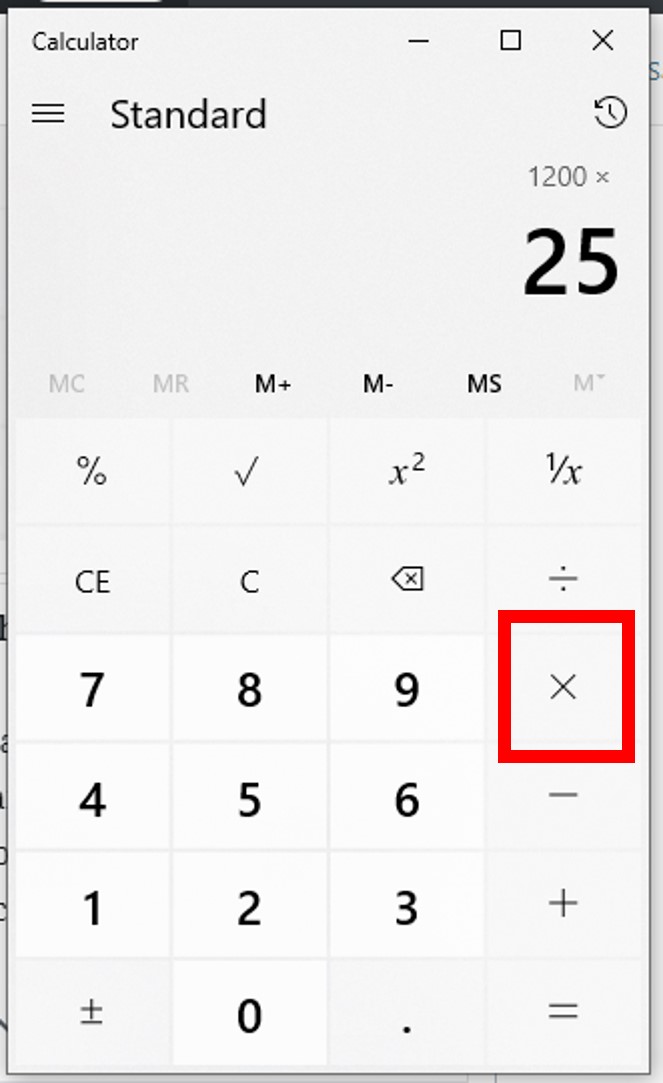
While many calculators have a dedicated “%” button, relying on it can sometimes lead to input errors, especially on older models or different software interfaces. The most professional way to work out a percentage is to convert the percentage to a decimal by dividing by 100.
For example, to find 15% of $4,500:
- Enter the total amount ($4,500).
- Multiply (×) by the percentage in decimal form (0.15).
- Press equals (=) to get $675.
This method is superior for financial planning because it allows you to chain calculations together, such as applying a tax rate and then a discount in a single string of operations.
2. Practical Applications: Discounts, Sales Tax, and Budgeting
In daily money management, the most frequent use of a calculator is for determining “leakage”—the small amounts of money that leave your pocket via taxes, fees, or impulse purchases. Mastering these quick calculations ensures you are never caught off guard at a register or when reviewing a bank statement.
Mastering Retail Savings and Markdowns
When you see a “30% off” sign, the goal isn’t just to know what the discount is, but what the final price will be. There are two ways to do this on a calculator.
- The Two-Step Method: Calculate the discount (Price × 0.30) and subtract that from the original price.
- The One-Step Efficiency Method: If an item is 30% off, you are paying 70% of the price. Simply multiply the price by 0.70.
If a designer suit costs $800 and is on sale for 30% off, typing 800 × 0.70 immediately gives you the $560 price tag. This efficiency is vital for comparing deals in real-time.
Calculating Taxes and Gratuities with Precision
Sales tax and tips are additions to a base cost. To add a percentage on a calculator, you use a variation of the one-step method. If you are in a state with an 8% sales tax, you are paying 108% of the item’s price.
- Enter the base price.
- Multiply by 1.08.
- The result is the total cost including tax.
This “1.XX” formula is a staple of business finance. It prevents the need to calculate the tax separately and then add it back to the original sum, reducing the risk of rounding errors that can plague large-scale budgeting.

3. Advanced Financial Modeling: Interest Rates and Investment Growth
When we move from daily spending to long-term wealth building, percentages become more dynamic. We are no longer just looking at a “piece” of a number; we are looking at how money grows or shrinks over time.
Simple vs. Compound Interest Calculations
Understanding the difference between simple and compound interest is what separates the average earner from the wealthy investor. Simple interest is calculated only on the principal.
- Simple Interest Formula: $Principal times Rate times Time$.
On a calculator, if you have $10,000 at 5% simple interest for 3 years, you would calculate10,000 × 0.05 × 3.
However, most financial instruments (like 401ks or credit cards) use compound interest. To calculate the effect of compounding over one year on a basic calculator, you apply the percentage to the new balance each period. If you want to see the “Effective Annual Rate,” you must factor in how often interest is applied—knowledge that allows you to accurately compare a 5.1% APY savings account with a 5.0% account compounded monthly.
Analyzing Dividend Yields and ROI
Return on Investment (ROI) is the ultimate metric for any money-focused individual. To calculate the percentage return on a calculator:
- Subtract the original cost from the current value (this is your profit).
- Divide that profit by the original cost.
- Multiply by 100 to get the percentage.
Example: You bought a stock for $150 and sold it for $180.
180 - 150 = 30
30 / 150 = 0.2
0.2 × 100 = 20%
Seeing that 20% gain on your screen provides a much clearer picture of performance than just looking at the $30 profit, as it allows you to compare that investment’s efficiency against other assets in your portfolio.
4. Optimizing Business Finance: Profit Margins and Markup
For entrepreneurs and those with side hustles, the percentage is the difference between a thriving business and a failing one. Many beginners confuse “markup” with “margin,” a mistake that can lead to pricing products at a loss.
Gross Profit Margin vs. Net Profit
Your profit margin is the percentage of the selling price that is profit. If you sell a digital product for $100 and it costs you $40 to produce, your profit is $60.
To find the margin: (60 / 100) × 100 = 60%.
Calculators are essential here for “reverse engineering” your prices. If you know you need a 40% margin to cover your overhead, you can’t just add 40% to your cost. You must divide your cost by the inverse of your desired margin (Cost / 0.60). Mastering this calculator sequence is critical for maintaining solvency in any business venture.
Determining Sustainable Markup Percentages
Markup is the percentage added to the cost to get the selling price. While margin is based on the sale price, markup is based on the cost. If a product costs $50 and you want a 50% markup, you calculate 50 × 1.50 = $75.
Using your calculator to constantly monitor the spread between your markup and your actual net margin is a high-level financial habit that ensures your “Online Income” or “Side Hustle” is actually generating a return worth your time.
5. Common Pitfalls and Calculator Shortcuts to Avoid Errors
Even the most seasoned financial professionals can make mistakes when punching numbers into a keypad. Human error is the leading cause of “financial friction”—those small mistakes that aggregate into significant losses.
The “Percent Key” vs. Manual Division
The “%” key on many calculators behaves differently depending on the brand (Casio vs. TI vs. Apple iPhone). On some, pressing 100 + 10% will give you 110. On others, it might result in 100.1.
The Professional Fix: Avoid the “%” button for complex addition or subtraction. Instead, use the decimal multipliers (1.10 for adding 10%, 0.90 for subtracting 10%). This is a universal language across all calculators and spreadsheet software like Excel, ensuring your financial data remains consistent regardless of the tool you are using.

Sanity Checking Your Financial Data
Always perform a “sanity check” after a calculation. If you are calculating a 5% interest payment on a $200,000 mortgage and your calculator shows $100,000, you immediately know a decimal was misplaced. Financial literacy isn’t just about getting the right answer; it’s about having an intuitive sense of what the answer should look like.
Before hitting the final “=” button, round the numbers in your head. 5% is half of 10%. 10% of 200,000 is 20,000. Therefore, 5% must be 10,000. If your calculator doesn’t show something close to that, stop and re-evaluate your inputs.
By mastering these calculator techniques, you are doing more than just solving math problems; you are taking command of your financial destiny. Whether it’s through optimizing your investments or tightening your monthly budget, the humble calculator—when used with percentage proficiency—is the most powerful weapon in your financial arsenal.
aViewFromTheCave is a participant in the Amazon Services LLC Associates Program, an affiliate advertising program designed to provide a means for sites to earn advertising fees by advertising and linking to Amazon.com. Amazon, the Amazon logo, AmazonSupply, and the AmazonSupply logo are trademarks of Amazon.com, Inc. or its affiliates. As an Amazon Associate we earn affiliate commissions from qualifying purchases.