
Cash App has become an indispensable tool for millions, simplifying peer-to-peer payments, investing, and even banking services. Its intuitive interface often makes sending and receiving money feel seamless. However, like any sophisticated piece of technology, Cash App can occasionally encounter technical hurdles that prevent transactions from completing. When the frustrating message “Why won’t Cash App let me send money?” echoes in your mind, it’s typically a sign to dive into the underlying technical architecture, security protocols, or connectivity issues that might be at play. This article will deconstruct these technical reasons, offering insights and a comprehensive troubleshooting guide exclusively from a technology perspective.

Deconstructing the Technical Foundations of Cash App Transactions
Understanding why Cash App might be refusing a transaction begins with appreciating the complex technological ecosystem that underpins every digital payment. It’s far more than just tapping a button; it involves a symphony of software, secure data transmission, and server interactions.
The Intricate Dance of App Software and Server Communication
At its core, Cash App is an application that resides on your mobile device, but its true power lies in its ability to communicate with Square’s (Cash App’s parent company) robust server infrastructure. When you initiate a transaction, your app sends a request to Cash App’s servers. These servers then validate your account, check your balance, process the payment, and confirm the transaction with the recipient’s account. Any disruption in this communication chain—be it a glitch in the app’s code, server downtime, or network latency—can result in a failed transfer. Modern applications are continuously updated, and sometimes a new patch might introduce unforeseen bugs or conflicts with older operating systems or device configurations, leading to unexpected operational failures.
Understanding Encryption and Data Integrity in Digital Payments
Security is paramount in financial technology. Cash App employs state-of-the-art encryption technologies to protect your financial data during transit and at rest. Every piece of information, from your login credentials to transaction details, is encrypted to prevent unauthorized access. This digital security isn’t just about protecting you; it’s also about maintaining data integrity. If the system detects any anomaly or potential compromise in the encryption or data packets during a transaction, it will often automatically halt the transfer as a protective measure. This proactive approach, while sometimes inconvenient, is crucial for safeguarding user funds against cyber threats and ensuring that only legitimate, untampered transactions are processed.
The Importance of a Stable Network Environment
While often overlooked, the quality and stability of your internet connection play a critical role in the success of any digital transaction. Cash App requires a continuous and reliable connection to its servers to execute commands and transmit data securely. A fluctuating Wi-Fi signal, an overloaded mobile data network, or even interference can interrupt the communication process. Such interruptions might lead to transaction timeouts, incomplete data transfers, or errors that cause the app to abort the payment. From a technical standpoint, a consistent network connection ensures that data packets are sent and received without corruption or delay, allowing the server to process requests efficiently.
Common Software and Connectivity Issues Hindering Transfers
Beyond the foundational mechanics, several recurring technical issues often explain why Cash App users encounter difficulties sending money. These range from simple software problems to more complex network or device-specific conflicts.
Outdated Application Versions and Operating System Conflicts
One of the most frequent culprits for app malfunctions is running an outdated version of the Cash App itself or an operating system (OS) that is no longer fully supported. Developers release updates to introduce new features, improve performance, and—critically—patch security vulnerabilities and fix bugs. If your app or OS is not up to date, you might experience compatibility issues that prevent core functions, like sending money, from working correctly. An older app might not be able to communicate effectively with the latest server protocols, or an outdated OS might lack the necessary frameworks for the app to execute its processes without error. Regularly checking for and installing updates for both your device’s OS and the Cash App is a fundamental technical maintenance practice.
Network Instability: Wi-Fi vs. Mobile Data Considerations
As discussed, a stable network is essential. However, the type of network can also play a role. Public Wi-Fi networks, while convenient, are often less secure and can be prone to intermittent connectivity or bandwidth limitations that can disrupt Cash App transactions. Even your home Wi-Fi might experience congestion if too many devices are connected or if your router is outdated. Mobile data, while generally more secure, can also be subject to dead zones, network throttling, or tower congestion, particularly in densely populated areas. From a technical standpoint, the packet loss or latency introduced by unstable networks can prevent the complete exchange of data required for a successful transaction, leading to errors or timeouts. Experimenting with different network types (e.g., switching from Wi-Fi to mobile data or vice-versa) can help diagnose if the issue is network-specific.
Device-Specific Problems: Cache, Storage, and RAM Management
Your smartphone or tablet’s internal health also significantly impacts app performance. Over time, apps accumulate cache data—temporary files designed to speed up loading times. While generally beneficial, an excessive or corrupted cache can sometimes interfere with an app’s normal operation, leading to glitches. Similarly, if your device is running low on internal storage, it might struggle to process new data or temporary files required for Cash App to function smoothly. Insufficient RAM (Random Access Memory) can also cause apps to slow down, freeze, or crash, especially during resource-intensive operations like financial transactions. These are technical limitations directly related to the device’s hardware and software management, requiring routine digital hygiene such as clearing app caches, freeing up storage, and restarting the device to refresh RAM.
Cash App’s Digital Security Protocols and Their Impact on Transactions
Beyond general technical glitches, Cash App implements sophisticated digital security protocols designed to protect users and prevent fraud. These measures, while crucial for security, can sometimes inadvertently block legitimate transactions.
Automated Fraud Detection Algorithms and Suspicious Activity Flags
Cash App utilizes advanced algorithms that continuously monitor transaction patterns for any signs of suspicious activity. These algorithms analyze various data points, including transaction size, frequency, recipient history, geographic location, and even the speed at which you type. If a transaction deviates significantly from your typical behavior—for instance, sending a large sum to a new recipient in an unusual location—the system might flag it as potentially fraudulent. This automated flag can lead to a temporary hold or even a complete blockage of the transaction, requiring manual review or additional verification steps. It’s a powerful but sometimes overzealous defense mechanism designed to prevent financial loss from scams or unauthorized access.
The Role of Account Verification and KYC (Know Your Customer) Technologies
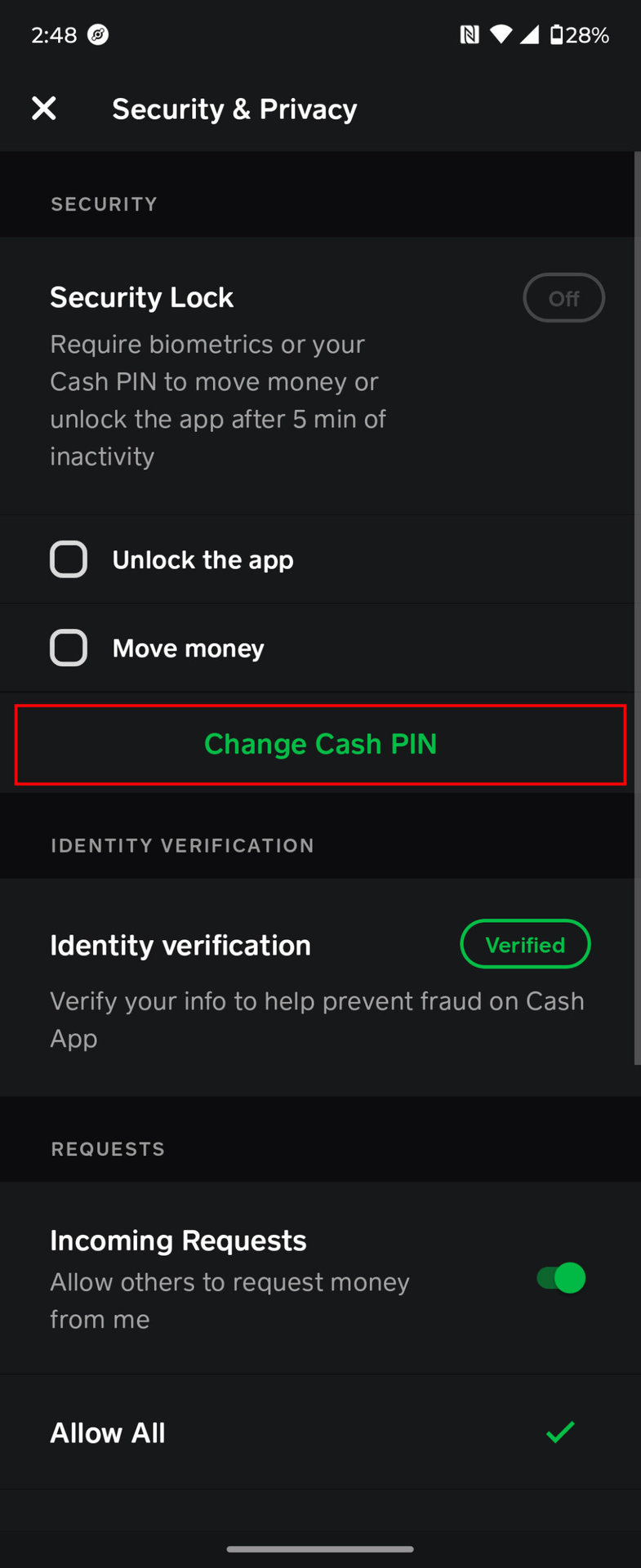
To comply with financial regulations and bolster security, Cash App requires users to verify their identity, a process known as KYC (Know Your Customer). This often involves linking a bank account, debit card, and providing personal information like your full name, date of birth, and the last four digits of your Social Security Number. If your account isn’t fully verified, or if the information provided is incomplete or doesn’t match official records, Cash App’s system might impose limits on your sending capabilities or block transactions entirely. This is a technical requirement to ensure that users are who they claim to be, thereby preventing money laundering and other illicit financial activities. An incomplete verification profile acts as a digital barrier to full app functionality.
Transaction Limits as a Security and Compliance Mechanism
Cash App enforces daily, weekly, and sometimes per-transaction limits on how much money users can send. These limits are not arbitrary; they are a technical and regulatory measure to manage risk, prevent fraud, and comply with financial regulations. For unverified accounts, these limits are typically lower. Once your account is fully verified through the KYC process, these limits are usually increased. If you attempt to send an amount that exceeds your current limit, Cash App’s system will automatically decline the transaction. This is a hard-coded security feature, and the only technical “fix” is to ensure your account is fully verified or to adjust your transaction amount to fall within the allowed parameters. Understanding your account’s specific limits, which are usually displayed within the app’s settings, is crucial.
A Comprehensive Tech-Focused Troubleshooting Guide
When facing a Cash App sending issue, a systematic technical troubleshooting approach can often resolve the problem without needing external support.
Basic App Refresh and Device Restart Techniques
The simplest solutions are often the most effective.
- Force Close Cash App: Swipe up from the bottom of your screen (iOS) or use the recent apps button (Android) to find Cash App, then swipe it away to force close it. This clears its active processes and can resolve minor software glitches.
- Restart Your Device: A full device restart can refresh your phone’s RAM, close rogue background processes, and re-initialize network connections. This is a foundational step in troubleshooting any app-related issue.
- Toggle Network Settings: Turn off Wi-Fi and mobile data for a minute, then turn them back on. This can force your device to re-establish a fresh, stable network connection.
Clearing Cache and Data to Resolve Software Conflicts
If a simple restart doesn’t work, corrupted or excessive cache data might be the culprit.
- Clear Cash App Cache (Android): Go to Settings > Apps > Cash App > Storage > Clear Cache. This removes temporary files without deleting your account data.
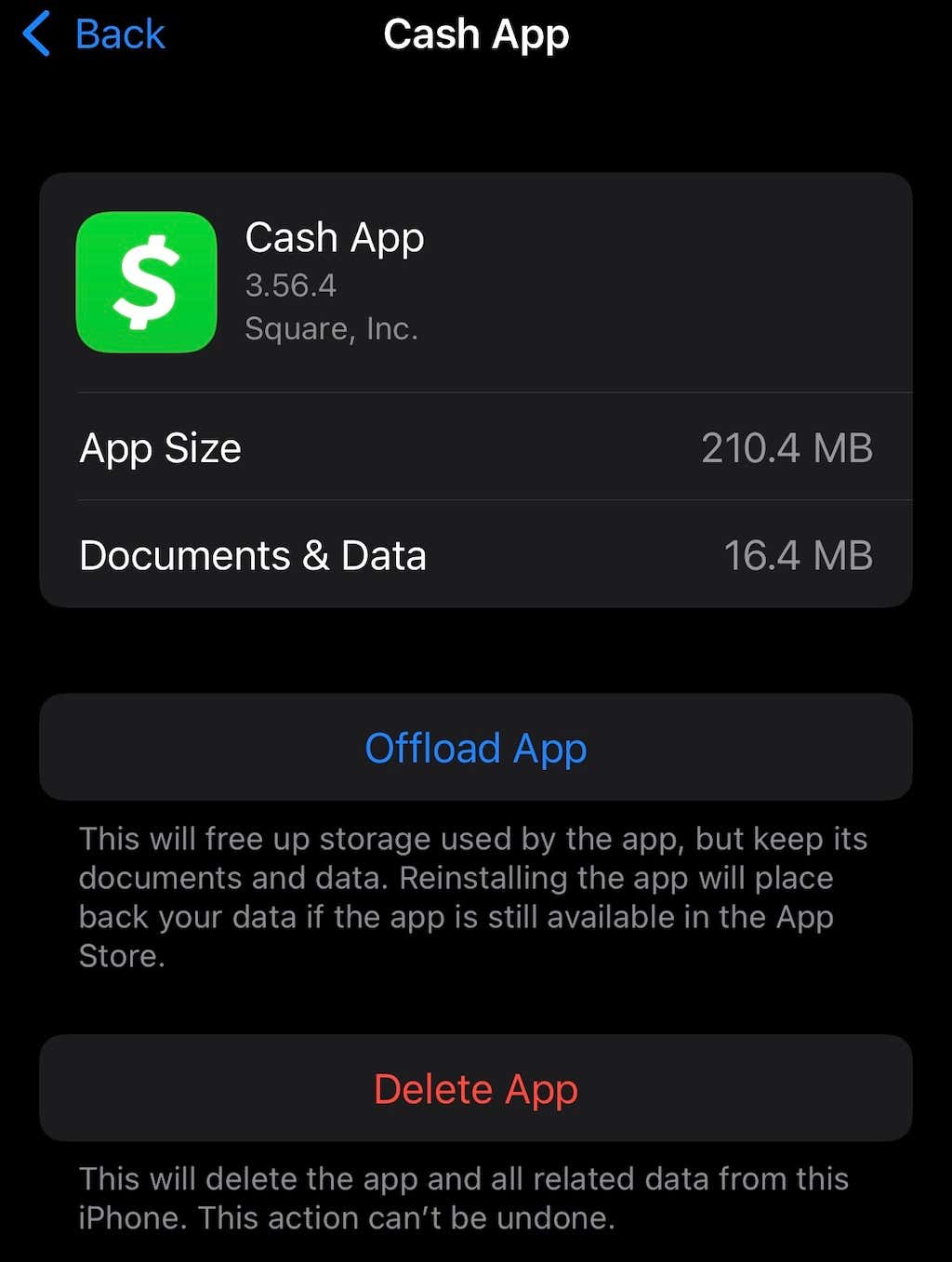
- Offload App (iOS): iOS doesn’t have a direct “clear cache” button for individual apps. Instead, you can “Offload App” (Settings > General > iPhone Storage > Cash App > Offload App), which removes the app but keeps its data. Reinstalling it will often give you a fresh cache. Alternatively, deleting the app and reinstalling it is a more thorough approach for both platforms (ensure you remember your login details).
Re-evaluating Network Settings and DNS Configuration
Sometimes, the issue isn’t with Cash App but with how your device connects to the internet.
- Test Different Networks: Try switching from Wi-Fi to mobile data, or vice versa. If one works and the other doesn’t, you’ve narrowed down the problem to a specific network.
- Reset Network Settings (Device): This can resolve deeper connectivity issues by resetting all network-related configurations on your device. On iOS: Settings > General > Transfer or Reset iPhone > Reset > Reset Network Settings. On Android: Settings > System > Reset options > Reset Wi-Fi, mobile & Bluetooth. (Note: This will delete saved Wi-Fi passwords).
- Consider a VPN: While not a solution for all problems, if your local network has unusual restrictions or routing issues, a reliable VPN can sometimes bypass these, providing a different route to Cash App’s servers.
Ensuring OS and App Compatibility
Always verify that your software environment is up-to-date.
- Check for Cash App Updates: Visit your device’s app store (Google Play Store for Android, Apple App Store for iOS) and search for “Cash App” to see if any updates are available. Install them immediately.
- Update Your Operating System: Go to your device’s settings to check for and install any pending iOS or Android updates. Running the latest OS ensures maximum compatibility and security.
Escalating Technical Issues to Cash App Support
If you’ve exhausted all self-troubleshooting options and the issue persists, it’s time to engage Cash App’s dedicated technical support. Preparing adequately can streamline the resolution process.
Gathering Essential Technical Information Before Contact
Before reaching out, compile as much relevant technical data as possible. This includes:
- Exact Error Message: Note down the precise wording of any error messages displayed by the app.
- Device Model and OS Version: E.g., iPhone 13 Pro, iOS 17.4; Samsung Galaxy S23, Android 14.
- Cash App Version: Found in the app’s settings or profile section.
- Internet Connection Type: (Wi-Fi, Mobile Data, specific carrier).
- Steps Taken to Troubleshoot: List all the troubleshooting steps you’ve already attempted (e.g., “restarted app, cleared cache, updated OS”).
- Date and Time of Failed Attempts: Specific timestamps can help support locate server logs related to your issue.
- Recipient Details (if applicable): The Cash Tag or phone number of the person you’re trying to send money to.
Navigating In-App Support Channels and Live Chat Features
Cash App primarily offers support through its in-app channels, which are designed to be the most secure and efficient way to connect with their team.
- In-App Chat: Go to your profile icon on the Cash App home screen, scroll down, and tap “Support” or “Cash App Support.” This typically leads to a chatbot that can direct you to common FAQs or connect you with a live agent.
- Email Support: If the in-app chat isn’t resolving the issue, you might be directed to email support. Be thorough and include all the technical information you gathered.
Avoid relying on external websites or phone numbers found through search engines, as these can often be scams. Always start with the official in-app support to ensure you’re connecting with genuine Cash App representatives.
Understanding the Debugging and Resolution Process
Once you’ve contacted support, understand that the resolution process might take some time.
- Initial Triage: Support agents will first review the information you provided and may ask for additional details to understand the technical context.
- Internal Escalation: Complex technical issues often need to be escalated to specialized engineering teams who can access server logs and diagnostic tools.
- Follow-Up: Be patient and responsive to any follow-up questions from the support team. They might ask you to perform additional tests or provide screenshots. The resolution could involve a server-side fix, a new app update, or specific instructions for you to implement on your device.
Experiencing issues sending money via Cash App can be frustrating, but by systematically approaching the problem from a technical standpoint—understanding the app’s architecture, troubleshooting common software and connectivity issues, recognizing the impact of digital security protocols, and effectively engaging technical support—you can often diagnose and resolve the underlying causes. Cash App’s robust infrastructure and security measures are designed to protect you, and knowing how to navigate them is key to a seamless digital payment experience.
aViewFromTheCave is a participant in the Amazon Services LLC Associates Program, an affiliate advertising program designed to provide a means for sites to earn advertising fees by advertising and linking to Amazon.com. Amazon, the Amazon logo, AmazonSupply, and the AmazonSupply logo are trademarks of Amazon.com, Inc. or its affiliates. As an Amazon Associate we earn affiliate commissions from qualifying purchases.