
For years, Venmo was synonymous with “free.” It was the digital equivalent of handing a friend a five-dollar bill for coffee or splitting a pizza without the awkwardness of counting out coins. However, as the platform has evolved from a simple peer-to-peer (P2P) social tool into a comprehensive financial ecosystem owned by PayPal, its fee structure has become increasingly complex. If you recently noticed a deduction from your transaction that you didn’t expect, you are not alone.
Understanding why Venmo charges fees requires a look at the intersection of convenience, banking regulations, and the platform’s business model. While many core features remains free, certain actions trigger costs that are often overlooked in the heat of a quick transaction.
Personal vs. Business Transactions: The Seller Fee Explained
One of the most common reasons users see an unexpected fee is the distinction between personal payments and business transactions. As Venmo has expanded to allow small business owners and freelancers to accept payments, they have implemented a fee structure similar to traditional point-of-sale systems.
The “Goods and Services” Toggle
When you send money to someone, Venmo offers a toggle to identify the payment as being for “Goods and Services.” If this is selected, the recipient is charged a seller fee. Currently, this fee is typically 1.9% of the transaction plus a fixed fee of $0.10. This is designed to cover the cost of payment processing and to provide “Purchase Protection” for both parties. If you are a buyer and you toggle this on, the recipient receives less than the total amount you sent. If you are the seller, this is the cost of doing business on the platform.
Official Business Profiles
For those who have created a formal Business Profile on Venmo, every payment received is subject to the 1.9% + $0.10 fee. Venmo justifies this cost by providing business-specific features, such as increased visibility in the social feed, professional tax reporting (including 1099-K forms), and the ability to accept contactless payments. While it may feel like an imposition for a small-scale hobbyist, it is a standard practice in the world of merchant services.
Purchase Protection Benefits
It is important to note that the fee isn’t just a “tax” on the transaction; it buys a level of security. Personal P2P payments are generally not refundable and offer no protection if a scam occurs. By paying the fee through the “Goods and Services” designation, the transaction becomes eligible for Venmo’s Purchase Protection program, which can assist if an item never arrives or is significantly different than described.
The Cost of Speed: Instant Transfers vs. Standard Withdrawals
In the modern economy, liquidity is king. Venmo understands that users often need their funds immediately rather than waiting several business days for the traditional banking system to catch up. This convenience, however, comes at a literal price.
The 1.75% Instant Transfer Fee
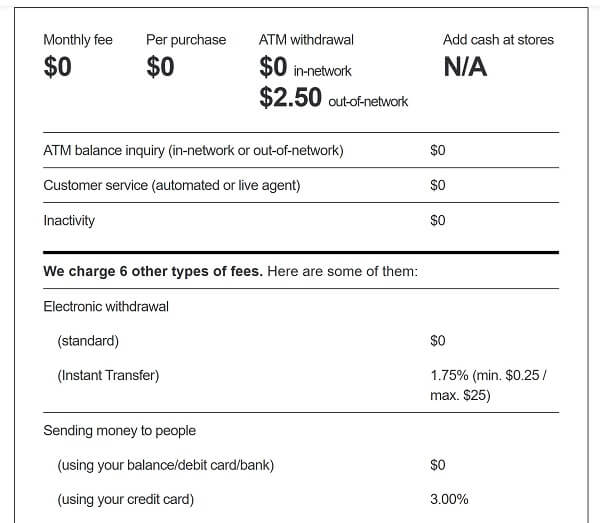
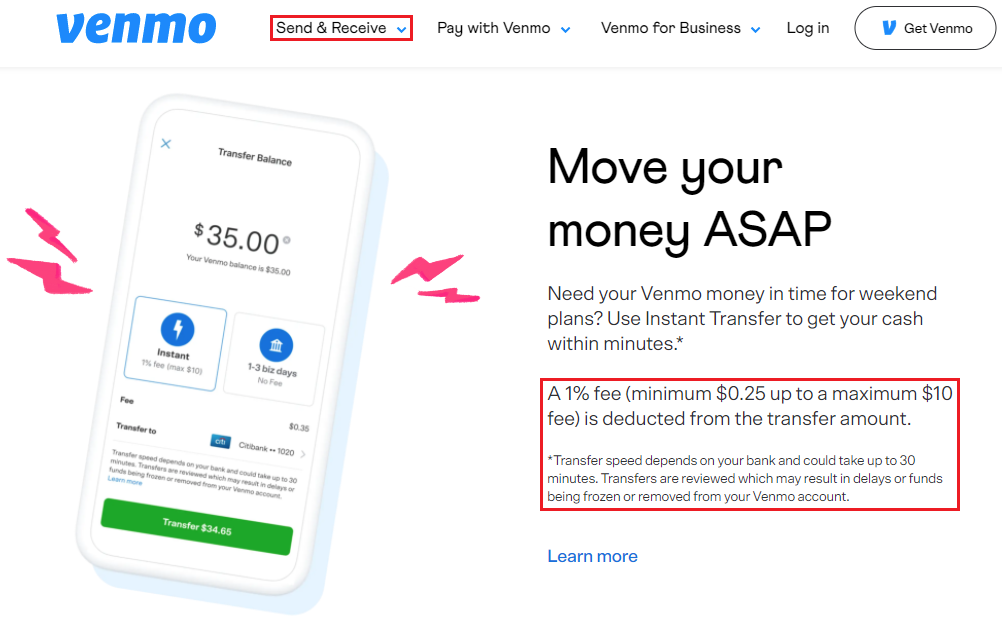
When you have a balance in your Venmo account and wish to move it to your linked debit card or bank account, you are presented with two choices. The “Instant Transfer” option typically lands the money in your account within minutes. For this service, Venmo charges 1.75% of the transfer amount, with a minimum fee of $0.25 and a maximum fee of $25.
This fee has seen incremental increases over the last few years as Venmo capitalizes on the high demand for real-time payment processing. For a $1,000 transfer, a $17.50 fee can feel significant, making it essential for users to weigh the urgency of their financial needs against the cost of the transfer.
Navigating the Standard Bank Transfer
The alternative to the Instant Transfer is the “Standard” transfer via the Automated Clearing House (ACH) network. This method is completely free. The trade-off is time; it generally takes one to three business days for the funds to appear in your bank account. If you see a fee deduction during a transfer, it is almost certainly because the “Instant” option was selected. To avoid this in the future, users must consciously select the standard 1-3 day option, which remains the most cost-effective way to manage a Venmo balance.
Why Do Instant Transfers Cost Money?
You might wonder why moving digital numbers costs anything at all. The reality is that the underlying banking infrastructure in the United States is aging. Real-time movement of money between different financial institutions requires specialized networks (like the RTP network or Visa Direct) that charge Venmo for every transaction. The 1.75% fee covers these backend costs while providing a profit margin for the platform.
Credit Cards and External Processing Costs
Venmo’s core appeal is the ability to send money using a variety of funding sources. However, not all funding sources are treated equally in the eyes of the platform’s accounting department.
The 3% Credit Card Surcharge
If you link a credit card to your Venmo account and use it to send money to a friend, you will be charged a flat 3% fee. This is not a fee that Venmo keeps entirely as profit; rather, it is a pass-through cost. When you use a credit card, the credit card issuer (Visa, Mastercard, American Express, etc.) charges Venmo an “interchange fee” to process the transaction. To keep P2P payments free for the majority of users who link bank accounts or debit cards, Venmo passes this 3% credit card cost directly to the user.
Avoiding the “Double Dip” of Cash Advance Fees
Beyond the 3% fee that Venmo charges, using a credit card on a P2P app can be even more expensive due to how bank issuers categorize the transaction. Many credit card companies view sending money on Venmo as a “cash advance” rather than a “purchase.”
If your bank categorizes it this way, you may be hit with an additional cash advance fee from your bank (often $10 or 5% of the amount) and a much higher interest rate that begins accruing immediately. To avoid these compounding costs, it is almost always better to fund Venmo transactions through a linked bank account or a traditional debit card, both of which carry a 0% fee for standard P2P sends.
Venmo Card Fees and ATM Usage
As Venmo has moved toward becoming a “neobank,” it has introduced physical hardware in the form of the Venmo Debit Card and the Venmo Credit Card. While these cards offer cashback rewards and ease of use, they introduce a new set of potential fees.
Out-of-Network ATM Charges
The Venmo Debit Card allows you to spend your Venmo balance at any merchant that accepts Mastercard. It also allows for ATM withdrawals. However, if you use an ATM that is not part of their partner network (MoneyPass), you will be charged a $2.50 fee by Venmo, in addition to whatever fee the ATM owner charges. This can result in paying $5.00 or more just to access $20 of your own money.
International and Miscellaneous Fees
While Venmo does not charge a fee for the card itself or for standard domestic purchases, there are costs associated with more “traditional” banking errors. For example, if you use the Venmo Credit Card, you are subject to late payment fees and interest rates common to the credit industry. Furthermore, while Venmo is primarily a U.S.-based service, any international implications or specialized over-the-counter cash withdrawals at banks will trigger specific service fees.
Strategic Ways to Use Venmo for Free
While the list of potential fees may seem daunting, it is entirely possible—and actually quite simple—to use Venmo without ever paying a cent to the company. It requires a shift from convenience-first thinking to a more strategic approach to personal finance.
Funding with Your Venmo Balance or Bank Account
The most effective way to avoid fees is to ensure your primary funding source is either a linked bank account or your existing Venmo balance. As long as you are sending money to friends and family (and not using the “Goods and Services” tag), these transactions are free. If you receive a payment, leave it in your Venmo balance to use for your next outgoing payment, creating a self-sustaining loop that bypasses the banking system entirely.
Practicing Patience with Transfers
To avoid the 1.75% Instant Transfer fee, users should plan their finances a few days in advance. By initiating a “Standard” transfer on a Monday or Tuesday, the funds are usually available by mid-week. Utilizing the free transfer option is a small behavioral change that can save frequent users hundreds of dollars in fees over the course of a year.
Disabling the “Goods and Services” Tag for Friends
Ensure that when you are splitting a dinner bill or paying a roommate for rent, the “Goods and Services” toggle is turned off. Many users accidentally leave this on, resulting in their friends receiving less than the intended amount. This toggle should only be used when you are actually purchasing an item from a stranger or a merchant where you require the protection of Venmo’s dispute resolution services.
By understanding the “why” behind Venmo’s fee structure, you can better navigate the app and keep your money where it belongs: in your pocket. Digital wallets are powerful tools for financial management, but like any tool, they require a bit of knowledge to operate efficiently and affordably.
aViewFromTheCave is a participant in the Amazon Services LLC Associates Program, an affiliate advertising program designed to provide a means for sites to earn advertising fees by advertising and linking to Amazon.com. Amazon, the Amazon logo, AmazonSupply, and the AmazonSupply logo are trademarks of Amazon.com, Inc. or its affiliates. As an Amazon Associate we earn affiliate commissions from qualifying purchases.