
In the modern financial landscape, your bank account number is the cornerstone of your personal economy. It serves as the unique identifier for your funds, allowing for the seamless execution of direct deposits, automated bill payments, and inter-bank transfers. For Chase customers—members of one of the largest financial institutions in the world—accessing this information quickly and securely is a fundamental aspect of managing personal liquidity.
While many users are accustomed to seeing the last four digits of their account number on receipts or mobile dashboards, the full sequence is often hidden behind layers of security to prevent unauthorized access. Understanding exactly where to find your Chase account number, whether through digital portals or physical documents, is essential for anyone looking to optimize their financial workflow or set up new payment structures.
Understanding Your Chase Account and Routing Numbers
Before diving into the “where,” it is vital to understand the “what.” A common point of confusion for many consumers is the distinction between an account number and a routing number. In the United States banking system, these two strings of digits work in tandem to ensure that money reaches the correct destination.
The Anatomy of Banking Identifiers
Your Chase account number is unique to your specific relationship with the bank. It identifies your particular checking, savings, or business account among millions of others. In contrast, the routing number (also known as an ABA routing transit number) is a nine-digit code that identifies the financial institution itself. Because Chase is a national entity, it utilizes several different routing numbers based on the geographic region where the account was originally opened.
When setting up a direct deposit or an ACH transfer, you will invariably be asked for both. Providing an incorrect routing number might send your funds to the wrong regional branch of Chase, while an incorrect account number will result in a failed transaction or, in rare cases, a deposit into someone else’s account.
Why You Need the Full Number
The primary reason you might need to locate your full account number is for the integration of financial tools. If you are connecting your Chase account to an investment platform like Vanguard or Fidelity, or a third-party payment processor like PayPal or Venmo, the last four digits shown on your debit card will not suffice. You need the complete, unmasked string to verify ownership and authorize the movement of capital.
Locating Your Account Number via Chase Online Banking
For the vast majority of users, the most convenient way to find an account number is through the Chase website. The online banking portal is designed to provide a comprehensive view of your financial health while maintaining strict security protocols.
Navigating the Account Dashboard
Once you have logged into your account on Chase.com using your secure credentials, you will be presented with a summary of all your active accounts, including checking, savings, credit cards, and loans. To find the account number:
-
Click on the specific account you are interested in (e.g., “Total Checking”).
-
Once the account activity page loads, look for the “Account services” or “See details” link, typically located near the top of the page below the account name.
-
By default, the account number is usually masked (e.g., (…1234)). You will see an option or an icon—often resembling an eye—that allows you to “Show” the full number.
Utilizing Electronic Statements (eStatements)
If you prefer a document-based approach, the online portal provides access to several years of monthly statements. These PDF documents are digital replicas of the paper statements traditionally sent through the mail.
To find your account number here, navigate to the “Statements & Documents” section. When you open a PDF statement for a specific month, your full account number is usually printed at the top of the first page, often in the header alongside your name and address. This is particularly useful because many employers and government agencies require a “voided check” or a formal statement to verify account details for direct deposits.
Finding the Account Number on the Chase Mobile App
As banking becomes increasingly mobile-centric, the Chase Mobile app has become the primary interface for millions of users. The app is streamlined for speed, making it perhaps the fastest way to retrieve your details while on the go.

Step-by-Step Access on Mobile
To find your account number on a smartphone (iOS or Android):
-
Open the Chase Mobile app and authenticate using your password, FaceID, or fingerprint.
-
Tap on the account you wish to view.
-
Scroll down to the “Account details” section or tap on the “See details” button.
-
Just like the desktop version, the number will initially be masked for security. Tap the “Show” button next to the account number to reveal the full string of digits.
Security and Convenience Features
The mobile app offers a unique advantage: the ability to quickly copy and paste the number directly into another application. This reduces the risk of manual entry errors when setting up external transfers. Furthermore, the app allows you to download a “Direct Deposit Form” pre-filled with your account and routing information. This is a professional and error-proof way to provide your banking details to an HR department or a new client.
Physical Methods and Traditional Financial Documents
Despite the digital revolution, physical documents remain a reliable source of truth for financial data. If you are not tech-savvy or currently lack internet access, your physical banking materials contain everything you need.
Reading a Personal Check
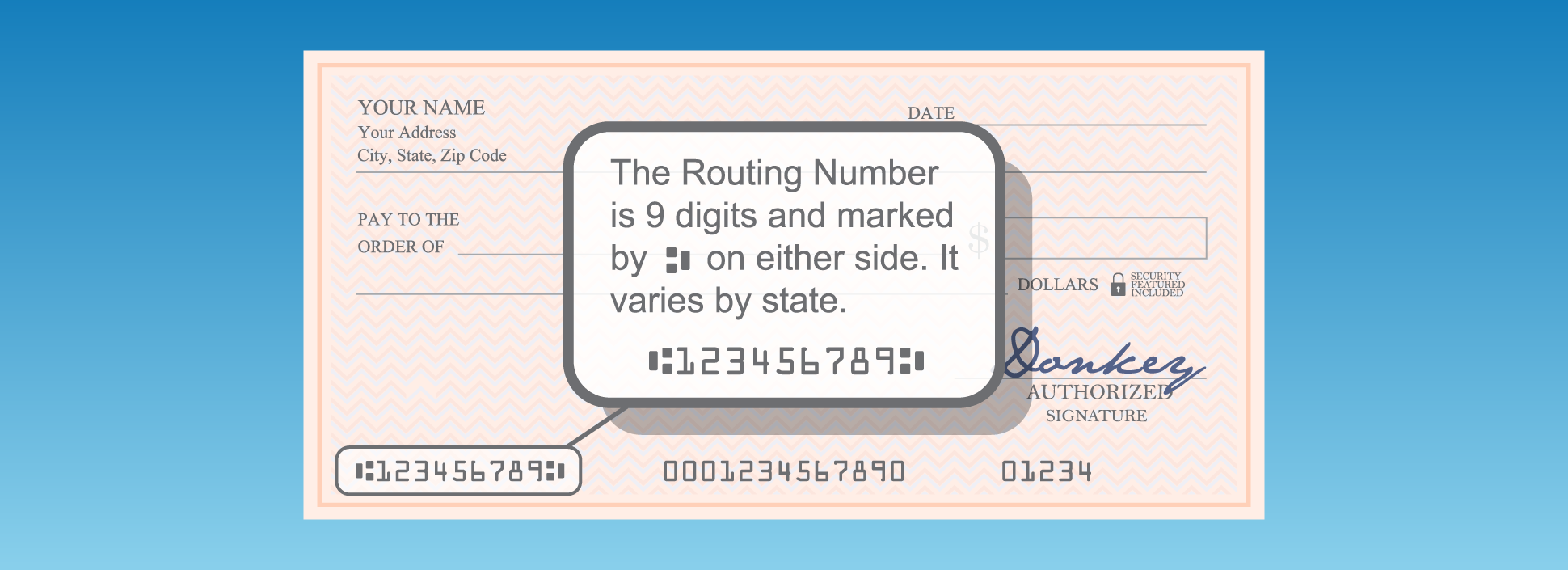
If you have a checkbook associated with your Chase account, it is perhaps the most straightforward way to identify your numbers. Look at the bottom of a check, where you will see three distinct groups of numbers printed in a specialized MICR (Magnetic Ink Character Recognition) font:
-
The Routing Number: This is the first nine-digit sequence on the left.
-
The Account Number: This is the middle sequence. It is often followed by a special symbol. Note that the check number itself (usually a 3 or 4-digit number) is also located at the bottom right; be careful not to confuse it with your account number.
-
The Check Number: The final set of digits on the far right.
Paper Statements and Welcome Packets
For those who have not opted into paperless billing, a monthly statement will arrive in the mail. The account number is prominently displayed on these documents. Additionally, if you recently opened your account, the welcome packet sent by Chase will contain a “Summary of Accounts” page which lists your new account number and the specific routing number assigned to your region.
Security Best Practices for Protecting Your Financial Data
Your account number, combined with your routing number, is essentially a key to your vault. While it is necessary to share this information for legitimate financial activities, it must be handled with extreme caution.
Guarding Against Unauthorized ACH Debits
An individual with access to your full account and routing numbers could theoretically initiate an ACH debit, pulling funds from your account without your immediate consent. This is why Chase, and other major banks, mask these numbers on public-facing screens.
When you find your account number, avoid storing it in unencrypted notes on your phone or in a plain text file on your computer. If you must write it down, ensure it is kept in a secure location, such as a locked filing cabinet or a password-protected digital vault.
Utilizing Multi-Factor Authentication
To prevent hackers from accessing your account number through the Chase portal, always enable Multi-Factor Authentication (MFA). By requiring a code sent to your mobile device in addition to your password, you create a secondary line of defense. This ensures that even if your login credentials are leaked, your full account details—and your capital—remain protected.
Monitoring for Suspicious Activity
Even with the best precautions, it is vital to monitor your account activity regularly. Chase offers “Account Alerts” that can notify you via text or email whenever a transaction exceeds a certain dollar amount or when an external transfer is initiated. If you ever suspect that your account number has been compromised, contact Chase identity theft protection services immediately to freeze the account and issue a new account number.

Conclusion: Mastering Your Financial Tools
Navigating the ecosystem of a major bank like Chase requires a balance of accessibility and security. Whether you are using the sophisticated Chase Mobile app, logging into the web portal, or referencing a traditional paper check, finding your account number is a straightforward process once you know where to look. By understanding the infrastructure of these identifiers and maintaining rigorous security standards, you can manage your personal finances with confidence, ensuring that your capital is always exactly where it needs to be.
aViewFromTheCave is a participant in the Amazon Services LLC Associates Program, an affiliate advertising program designed to provide a means for sites to earn advertising fees by advertising and linking to Amazon.com. Amazon, the Amazon logo, AmazonSupply, and the AmazonSupply logo are trademarks of Amazon.com, Inc. or its affiliates. As an Amazon Associate we earn affiliate commissions from qualifying purchases.