
Navigating the complexities of tax season can often feel like deciphering a foreign language, especially when it comes to investment income and losses. For many investors, understanding how to properly report capital gains and, more importantly, capital losses, is crucial for minimizing their tax liability. FreeTaxUSA has emerged as a popular and cost-effective solution for tax preparation, offering a streamlined process that can simplify even the most intricate financial situations. If you’ve sold investments for a loss, knowing precisely where to enter this information on FreeTaxUSA is key to unlocking potential tax benefits. This guide will walk you through the process, providing a professional and insightful overview of how to effectively report your capital losses using this widely utilized financial tool.
Understanding Capital Gains and Losses for Tax Purposes
Before diving into the specifics of FreeTaxUSA, it’s essential to have a solid grasp of what capital gains and losses entail and their significance in the realm of personal finance and taxation. This foundational knowledge will empower you to accurately report your investment activities and take full advantage of the tax code.
What Constitutes a Capital Gain or Loss?
A capital gain or loss occurs when you sell a capital asset, which is typically something you own for personal use or investment. Common examples include stocks, bonds, mutual funds, real estate (not your primary residence), collectibles, and even certain business property. The calculation is straightforward: it’s the difference between the asset’s sale price and its cost basis. The “cost basis” generally refers to the original purchase price plus any commissions, fees, or other expenses associated with acquiring or improving the asset.
If the sale price exceeds your cost basis, you have a capital gain. Conversely, if the sale price is less than your cost basis, you incur a capital loss. This distinction is critical because capital gains are taxable, while capital losses can often be used to offset those gains or even a limited amount of ordinary income.
Another vital distinction is between short-term and long-term capital gains and losses. This classification depends on how long you owned the asset before selling it. If you held the asset for one year or less, it’s considered short-term. If you held it for more than one year, it’s long-term. Short-term capital gains are taxed at your ordinary income tax rate, which can be as high as 37%. Long-term capital gains, on the other hand, typically benefit from more favorable tax rates, often 0%, 15%, or 20%, depending on your taxable income. This distinction applies equally to losses, with short-term losses first offsetting short-term gains, and long-term losses first offsetting long-term gains.
The Tax Benefits of Capital Losses
Capital losses are not merely unfortunate events; they are valuable tools for tax planning. The primary benefit of a capital loss is its ability to offset capital gains. If you have both capital gains and losses in the same tax year, the losses are first used to reduce capital gains of the same type (short-term losses against short-term gains, and long-term losses against long-term gains). After that, any remaining losses can be used to offset gains of the other type. For example, if you have a net short-term capital loss, it can offset a net long-term capital gain.
If your capital losses exceed your capital gains for the year, you can use up to $3,000 (or $1,500 if married filing separately) of the net capital loss to offset your ordinary income (such as wages, salaries, or business income). This deduction directly reduces your taxable income, potentially lowering your tax bill significantly. Any capital loss exceeding this $3,000 limit can be carried forward indefinitely to future tax years. This “loss carryover” can be used to offset capital gains and up to $3,000 of ordinary income in subsequent years, providing a persistent tax advantage. This carryover feature is a powerful incentive for accurate and thorough reporting of all capital losses.
It’s also important to be aware of the “wash sale rule.” This rule prevents taxpayers from claiming a capital loss on the sale of stock or securities if they buy substantially identical stock or securities within 30 days before or after the sale. The purpose is to prevent individuals from claiming a tax loss while effectively maintaining their investment position. FreeTaxUSA does not automatically detect wash sales, so it’s incumbent upon the taxpayer to adjust their cost basis accordingly if a wash sale occurred.
Navigating FreeTaxUSA for Investment Income and Losses
FreeTaxUSA is designed to simplify tax preparation, and its interface for reporting investment transactions, including capital gains and losses, is quite intuitive. However, understanding where to start and what information you’ll need is crucial for a smooth process.
Initial Setup and Income Entry
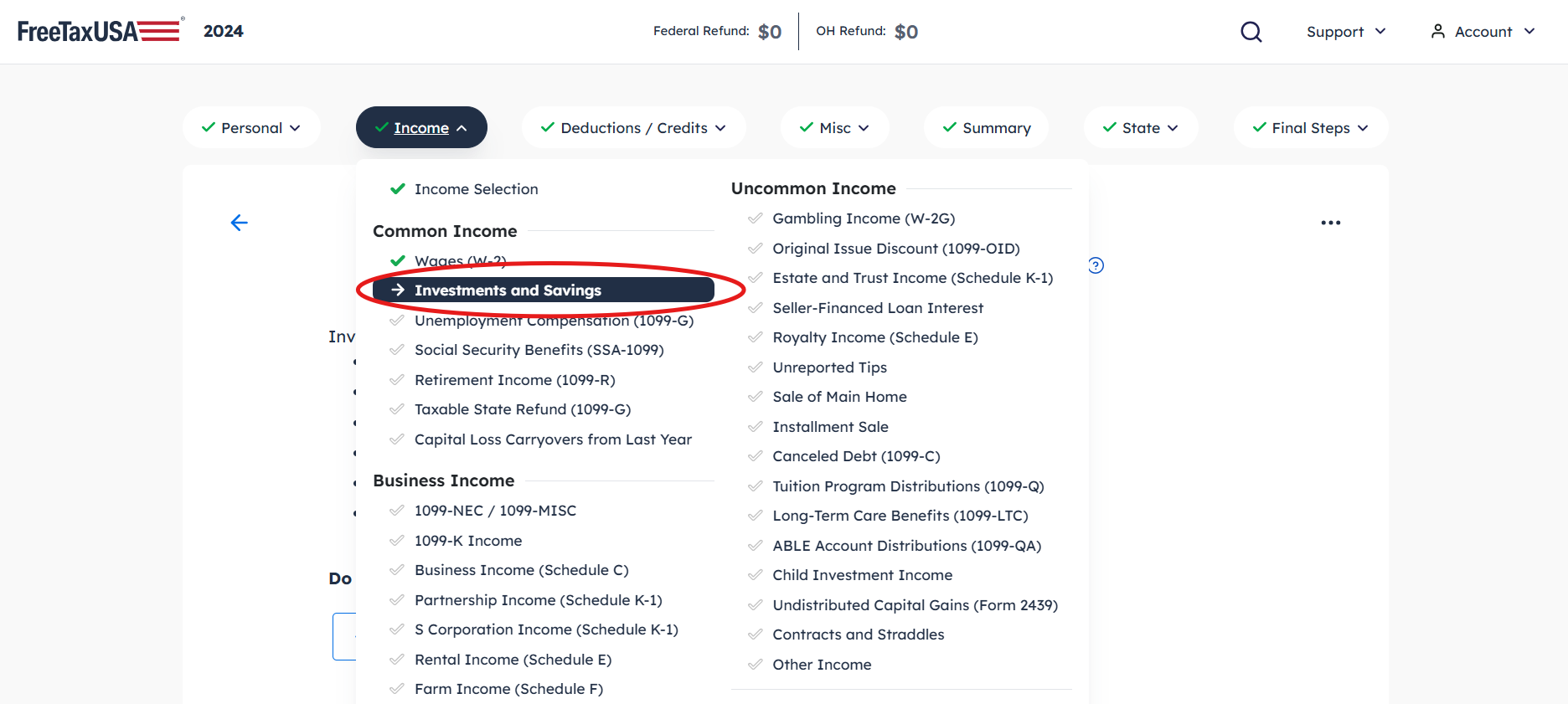
To begin, you’ll need to log into your FreeTaxUSA account or create a new one if you haven’t already. After selecting the appropriate tax year, you’ll typically navigate to the “Income” section of the software. This is usually where all forms of income, including wages, interest, dividends, and investment sales, are entered.
Within the “Income” section, look for categories related to investments. FreeTaxUSA often organizes these under headings like “Investment Income,” “Stocks, Mutual Funds, & Other Capital Gains,” or similar phrasing. The primary document you’ll need for reporting capital gains and losses is Form 1099-B, “Proceeds From Broker and Barter Exchange Transactions.” Your brokerage firm will send you this form, detailing all sales of stocks, bonds, mutual funds, and other securities during the tax year. It provides critical information such as the proceeds from the sale, the acquisition date, and the cost basis (though sometimes the cost basis may not be reported to the IRS, marked as “non-covered”).
Step-by-Step Entry for Sales of Stock, Mutual Funds, and Other Assets
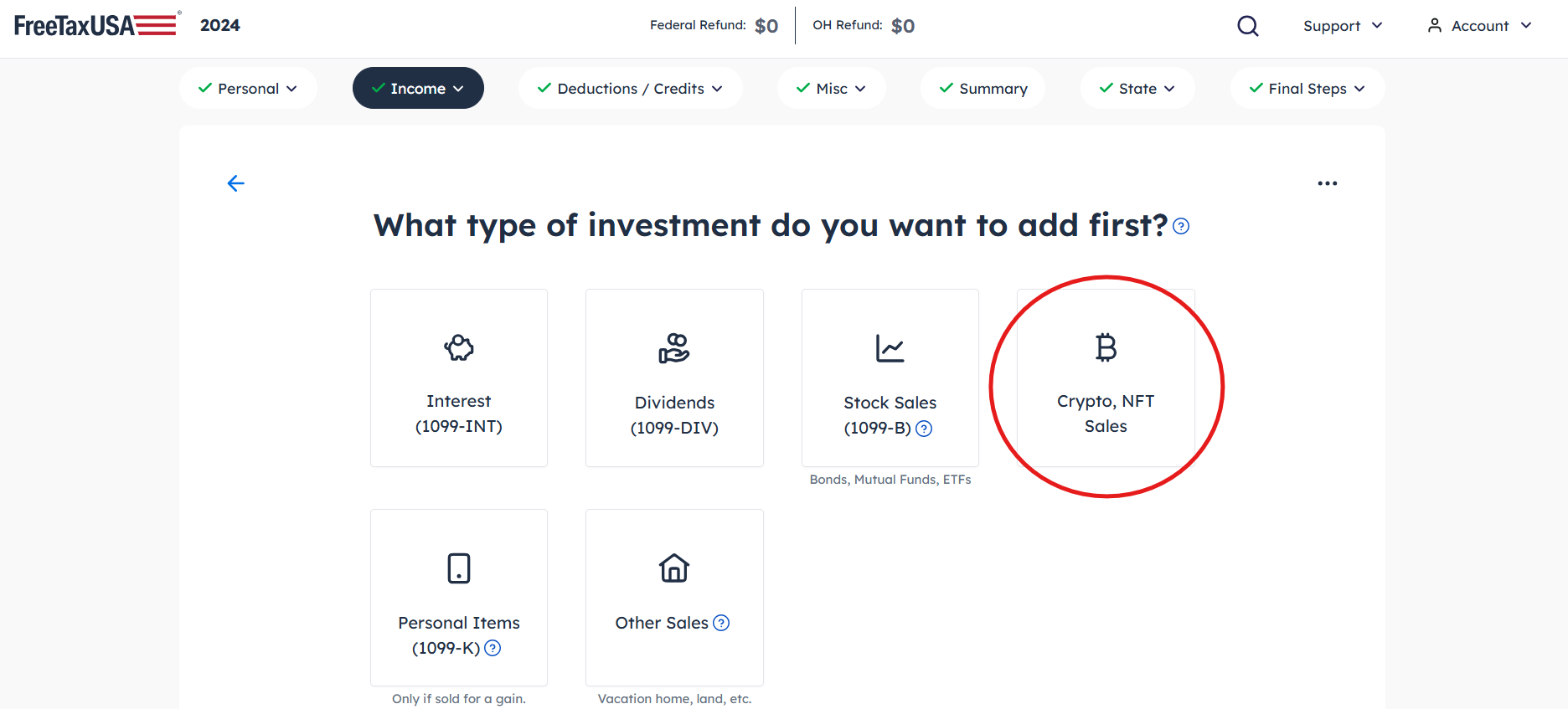
Once you’re in the correct section, FreeTaxUSA will prompt you to enter information from your Form 1099-B. The software is designed to guide you through each step.
- Choose the Right Section: Locate the specific entry point for “Stocks, Mutual Funds, Bonds, etc. (Form 1099-B).” FreeTaxUSA may ask if you received a 1099-B; confirm that you did.
- Select Entry Method: You’ll typically have the option to enter transactions individually or, if you have many, summarize them (though individual entry is usually recommended for accuracy, especially with losses). FreeTaxUSA doesn’t usually offer direct import from brokers like some premium tax software, so manual entry is the standard approach for most users.
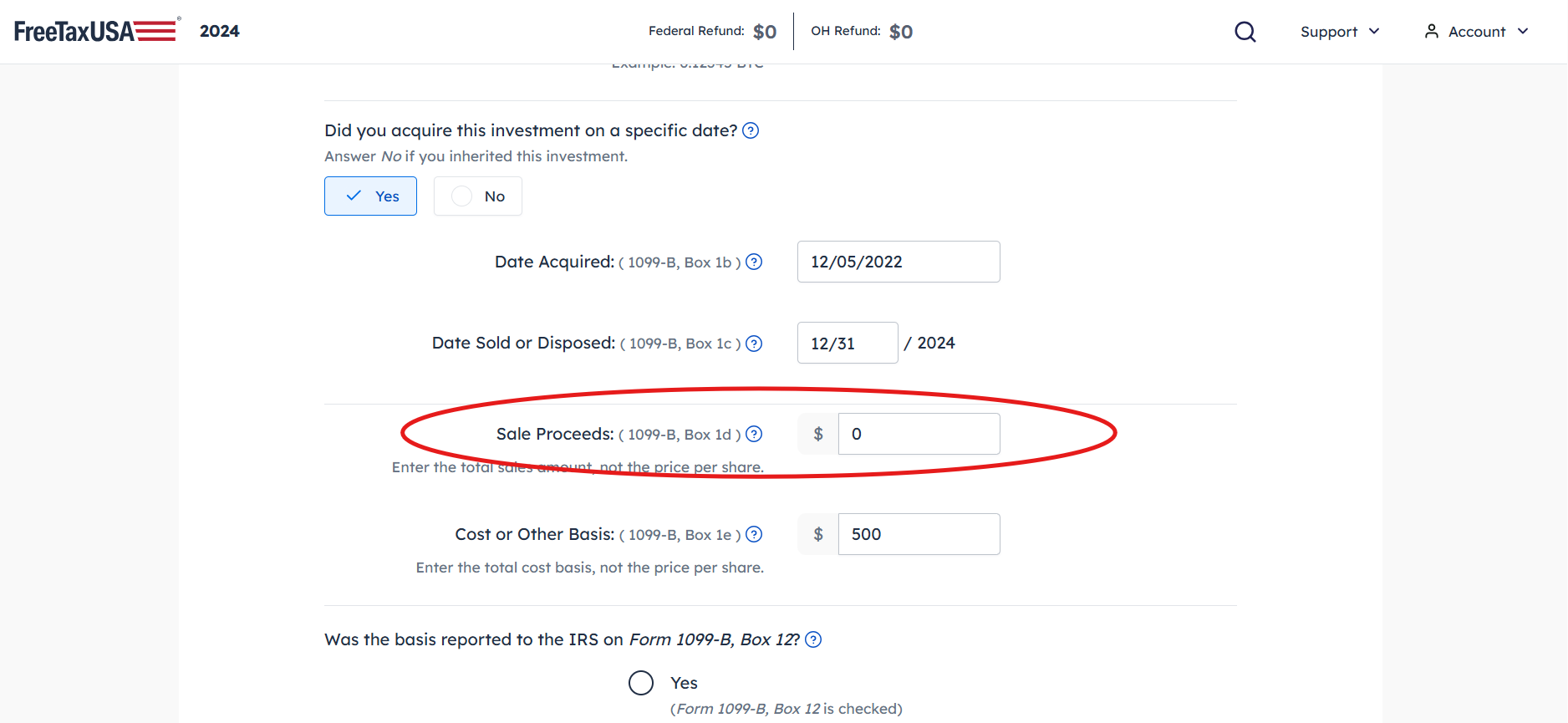
- Enter Individual Transactions: For each sale reported on your 1099-B, you will need to input the following details into FreeTaxUSA:
- Description of Property: Briefly describe the asset (e.g., “XYZ Corp Stock”).
- Date Acquired (Purchase Date): This determines whether the gain or loss is short-term or long-term.
- Date Sold (Sale Date): The date the asset was sold.
- Sales Price: The amount you received for the asset.
- Cost Basis: The original cost of the asset plus any adjustments. This is critical for calculating the gain or loss. Pay close attention to whether your 1099-B indicates if the cost basis was reported to the IRS (“covered transaction”) or not (“non-covered transaction”).
- Reporting Categories: FreeTaxUSA will use the dates you enter to automatically categorize the transaction as short-term or long-term. For each entry, it will compute the gain or loss based on your provided sales price and cost basis. If your 1099-B indicates “non-covered” for cost basis, you must manually provide this information, and FreeTaxUSA will adjust its reporting accordingly (often requiring additional steps on Schedule D).
By systematically entering each transaction, FreeTaxUSA aggregates all your capital gains and losses and prepares the necessary forms, primarily Schedule D (Capital Gains and Losses) and Form 8949 (Sales and Other Dispositions of Capital Assets).
Specifics of Entering Capital Losses on FreeTaxUSA
The beauty of tax software like FreeTaxUSA is its ability to automate complex calculations. When you accurately input your sales data, the software takes over the heavy lifting, ensuring your capital losses are applied correctly according to IRS rules.
How FreeTaxUSA Handles Losses Automatically
Once you’ve entered all your individual investment sales, including those that resulted in a loss, FreeTaxUSA automatically performs several crucial steps:
- Calculations: The software calculates the net gain or loss for each transaction based on the sales price and cost basis you entered.
- Netting Process: It then aggregates all your short-term gains and losses to determine your net short-term capital gain or loss. Similarly, it does the same for long-term transactions. Following IRS rules, it nets these amounts against each other. For instance, if you have a net short-term capital loss and a net long-term capital gain, the loss will reduce the gain.
- Automatic Application of Loss Carryover: If, after all netting, you still have a net capital loss for the year, FreeTaxUSA automatically applies the $3,000 (or $1,500) limit against your ordinary income. If the total net capital loss exceeds this amount, the software calculates the exact amount of the loss to be carried forward to the next tax year. This carryover amount is critical and will be automatically saved within your FreeTaxUSA account for subsequent tax filings, making future tax preparation even smoother.
This automation significantly reduces the chances of errors and ensures you receive the maximum allowable deduction for your capital losses without needing to manually perform intricate calculations or track carryover amounts.
Verifying Your Entries and Results
While FreeTaxUSA automates the calculations, the accuracy of the final result depends entirely on the information you provide. It’s paramount to review your entries carefully before filing.
- Reviewing Schedule D: After entering all investment sales, FreeTaxUSA will generate or allow you to preview your Schedule D (Capital Gains and Losses). This form summarizes all your capital gains and losses, showing how they were netted against each other and the final result. Take the time to ensure that all transactions are listed correctly, and that the short-term and long-term classifications are accurate based on your holding periods.
- Checking Form 8949: Form 8949 provides a detailed breakdown of each individual capital asset sale. FreeTaxUSA will populate this form based on your entries. Verify that the acquisition dates, sale dates, sales prices, and cost bases match your 1099-B statements. Pay particular attention to “non-covered” transactions where you manually entered the cost basis, ensuring those figures are correct.
- Capital Loss Carryover Worksheet: If you have a capital loss carryover from a prior year, or if your current year’s losses exceed the $3,000 deduction limit, FreeTaxUSA will generate a Capital Loss Carryover Worksheet. Review this to confirm that the carryover amount to the next year is calculated correctly. This worksheet often appears towards the end of the tax forms generated.
- Common Entry Errors: Be vigilant for common mistakes, such as transposing numbers when entering dates or amounts, misclassifying short-term vs. long-term (especially when a sale occurs exactly one year from acquisition), or incorrect cost basis adjustments due to corporate actions (like stock splits or mergers) or wash sales that you need to account for. If your broker reported an adjusted basis on your 1099-B, ensure you use that figure.
Double-checking these details can save you from potential IRS inquiries or missed tax savings. If anything looks incorrect, go back to the investment income section and make the necessary adjustments.
Beyond Entry: Optimizing Your Capital Loss Strategy
Simply entering your capital losses into FreeTaxUSA is a good start, but a more proactive approach to managing your investments can maximize their tax benefits. Strategic use of capital losses is a cornerstone of effective financial planning.
Tax-Loss Harvesting Explained
Tax-loss harvesting is a sophisticated but widely practiced strategy that involves intentionally selling investments at a loss to offset capital gains and, potentially, a portion of your ordinary income. This strategy is most effective when executed towards the end of the tax year, allowing investors to take stock of their portfolio’s performance and make calculated moves.
The goal is to realize losses that can reduce your current year’s capital gains, thereby lowering your taxable investment income. If you have more losses than gains, you can use up to $3,000 of the net loss to reduce your ordinary income. The remaining losses can be carried forward to future years, providing ongoing tax advantages. This strategy works best when you have losing positions that you are comfortable selling, perhaps to rebalance your portfolio or invest in assets with better growth prospects.
A critical consideration when tax-loss harvesting is the wash sale rule, as mentioned earlier. To claim a loss, you must not repurchase the same or a “substantially identical” security within 30 days before or after the sale. If you do, the loss is disallowed, and the basis of the new shares is adjusted. To avoid a wash sale while maintaining market exposure, investors often buy a different but similar security (e.g., an S&P 500 index fund instead of a total market index fund, or a different company in the same sector). FreeTaxUSA will not alert you to a wash sale you initiated outside the system, so careful tracking of your trades is essential.
Record Keeping and Documentation
Meticulous record keeping is not just a good practice; it’s a necessity for tax purposes, particularly for investment activities. The IRS can audit tax returns for up to three years after filing, and in some cases, even longer. If questioned, you’ll need solid documentation to support your reported capital gains and losses.
Here’s what you should keep:
- Brokerage Statements: Monthly or quarterly statements from your brokerage firm provide a comprehensive overview of your transactions, including purchases, sales, dividends, and interest.
- Trade Confirmations: These documents are sent after each buy or sell order and provide precise details of the transaction, including the date, price, number of shares, and commissions. These are crucial for proving your cost basis and sale proceeds.
- Form 1099-B: Retain all 1099-B forms you receive. These are the primary documents the IRS relies on, and your entries in FreeTaxUSA should directly correspond to them.
- Records of Cost Basis Adjustments: If you’ve had to adjust the cost basis of an investment due to stock splits, mergers, dividend reinvestment, or wash sales, keep clear records of these adjustments. For “non-covered” securities where the basis isn’t reported to the IRS by your broker, your personal records are the sole proof of your cost.
Organizing these documents electronically or in a physical file makes it easy to retrieve them if needed for auditing purposes or for calculating future capital gains and losses, especially if you have loss carryovers. FreeTaxUSA helps by generating the necessary tax forms, but the underlying proof must come from your personal records.
In conclusion, accurately entering capital gains and losses on FreeTaxUSA is a straightforward process once you understand the underlying tax rules and the software’s navigation. By diligently reporting your transactions and leveraging the capabilities of FreeTaxUSA, you can ensure compliance with tax regulations while effectively managing your investment tax liability. Remember, precision in entering data and maintaining thorough records are your best allies in maximizing your tax savings and navigating the complexities of investment taxation.
aViewFromTheCave is a participant in the Amazon Services LLC Associates Program, an affiliate advertising program designed to provide a means for sites to earn advertising fees by advertising and linking to Amazon.com. Amazon, the Amazon logo, AmazonSupply, and the AmazonSupply logo are trademarks of Amazon.com, Inc. or its affiliates. As an Amazon Associate we earn affiliate commissions from qualifying purchases.