
In an increasingly interconnected world, where digital threats loom large and sophisticated, the first line of defense for any network—be it a small home office or a sprawling enterprise—is often a firewall. While software firewalls offer a layer of protection on individual devices, hardware firewalls serve as the robust gatekeepers for entire networks, scrutinizing traffic at a fundamental level before it even reaches individual machines. Their strategic placement is paramount to their effectiveness, acting as a critical choke point for all incoming and outgoing data. Understanding where these formidable guardians are typically installed is key to appreciating their role in a comprehensive digital security posture.
This article delves into the common installation points for hardware firewalls, exploring the rationale behind these placements and the factors that influence deployment decisions, all within the realm of digital security and network architecture.
Understanding the Role of Hardware Firewalls
Before examining their installation points, it’s crucial to grasp what hardware firewalls are and why they are indispensable for network security. They are not merely an optional component but a foundational element of a resilient infrastructure.
What is a Hardware Firewall?
A hardware firewall is a physical device that acts as a barrier between your internal network and external networks, most commonly the internet. Unlike software firewalls, which run on individual computers and protect only that specific device, a hardware firewall protects all devices connected to the network segment it controls. It is a dedicated piece of equipment, often a router-like appliance, equipped with its own operating system and specialized processors designed for high-speed packet inspection and filtering.
Its primary function is to enforce a set of predefined security rules, allowing legitimate traffic to pass while blocking malicious or unauthorized data. This can involve stateful packet inspection, network address translation (NAT), virtual private network (VPN) termination, and intrusion prevention/detection system (IPS/IDS) capabilities, depending on the sophistication of the device. By operating at the network layer, hardware firewalls provide a centralized point of control and protection, offloading security tasks from individual servers and workstations.
Why Hardware Firewalls are Essential for Network Perimeter Security
Hardware firewalls serve as the cornerstone of network perimeter security for several compelling reasons. Firstly, they provide a dedicated, always-on defense mechanism that is independent of any single computer’s uptime or performance. This ensures continuous protection even if an internal server or workstation crashes. Secondly, their specialized hardware and optimized software allow them to process large volumes of traffic with minimal latency, crucial for maintaining network performance while enforcing stringent security policies.
Moreover, they act as the initial point of defense against external threats. By scrutinizing all incoming connections before they can penetrate the internal network, they effectively block common attacks like port scans, denial-of-service (DoS) attempts, and unauthorized access attempts. This “first line of defense” capability is invaluable, preventing threats from even reaching internal systems where a software firewall might be the only other protection. For businesses, compliance with various regulatory standards (like HIPAA, PCI DSS, GDPR) often mandates robust network segmentation and perimeter protection, making hardware firewalls a non-negotiable component of their infrastructure.
Primary Installation Points for Hardware Firewalls
The strategic placement of a hardware firewall is critical to its effectiveness. While there can be variations based on network complexity, most installations fall into a few primary categories.
At the Network Perimeter (The Gateway Defender)
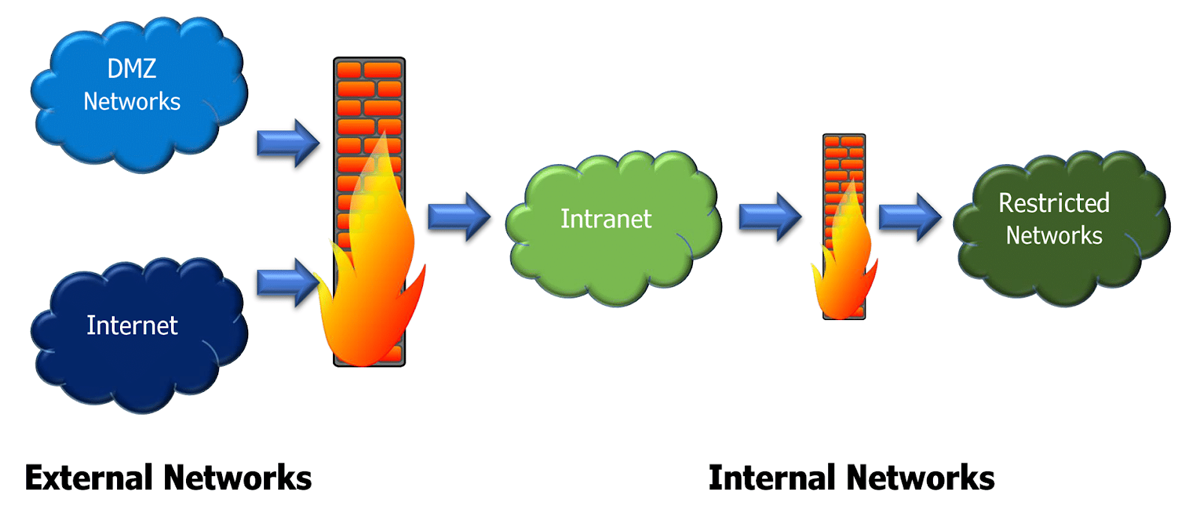
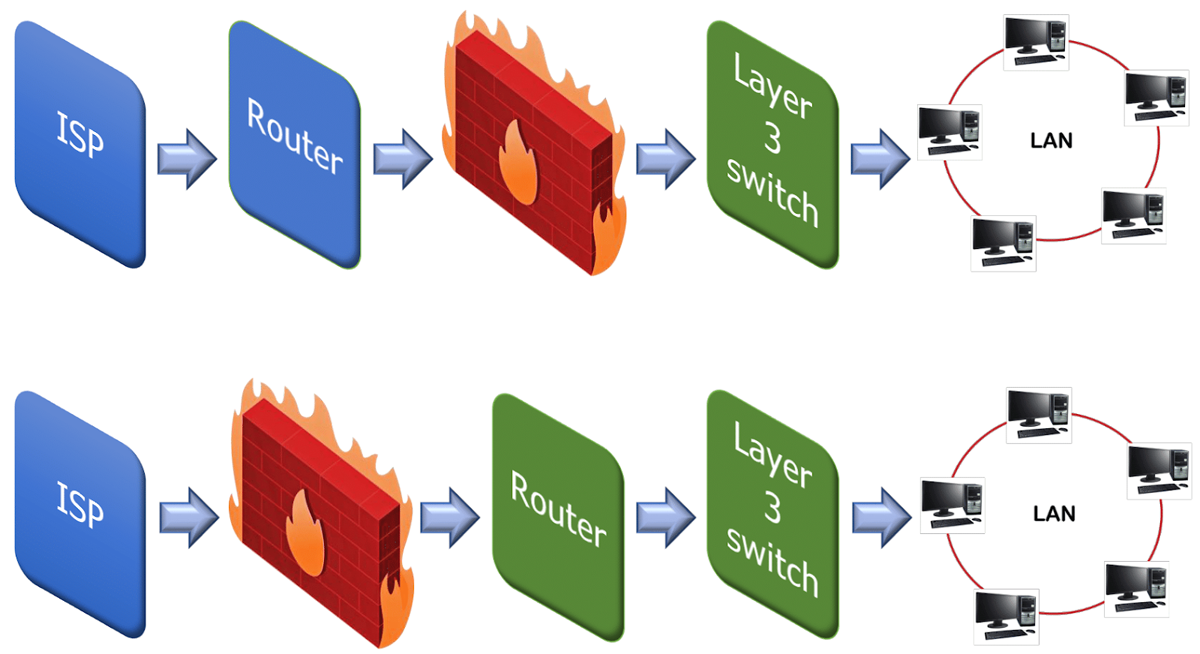
This is by far the most common and fundamental installation point for a hardware firewall. In this setup, the firewall is positioned directly between the organization’s internal network (Local Area Network or LAN) and the external network, typically the Internet Service Provider’s (ISP) connection. It essentially acts as the primary gateway, inspecting all traffic flowing into and out of the entire network.
The typical configuration involves the internet-facing port of the firewall connected to the ISP’s modem or router, and an internal-facing port connected to the organization’s core switch or router, which then distributes network access to all internal devices. This strategic placement ensures that every single packet originating from or destined for the internet must first pass through the firewall’s scrutiny. It’s here that rules are applied to block unauthorized external access, prevent malware from entering, and control what internal users can access externally. Many organizations also create a Demilitarized Zone (DMZ) behind this perimeter firewall, where publicly accessible servers (like web servers, email servers, or DNS servers) are placed. This isolates them from the internal LAN, providing an additional layer of security should a public-facing server be compromised.
Protecting Specific Network Segments (Internal Segmentation)
While the perimeter firewall protects the entire network from external threats, larger organizations, especially those dealing with sensitive data or stringent compliance requirements, often employ additional hardware firewalls for internal network segmentation. These firewalls are installed within the internal network, separating different departments, critical servers, or data zones from one another.
For example, a company might install a hardware firewall between its finance department’s network segment and the general employee network, or between its production servers and its development environment. This “segmentation firewall” prevents threats that might have bypassed the perimeter firewall or originated from within the internal network (e.g., an infected internal workstation) from spreading laterally to critical systems. It enforces a principle known as “least privilege” by ensuring that only necessary traffic can flow between segments. This approach significantly limits the blast radius of a security breach, protecting high-value assets even if a less critical segment is compromised. Compliance standards like PCI DSS often mandate strict segmentation for systems processing credit card data, making internal hardware firewalls a critical component of their architecture.
In Data Centers and Cloud Environments (Hybrid Security)
Modern IT infrastructure often extends beyond on-premise networks to include private data centers and public cloud platforms. Hardware firewalls play a crucial role in securing these environments, though their form factor might vary.
In a traditional private data center, physical hardware firewalls are installed at the data center’s ingress/egress points, similar to a network perimeter firewall, but on a much larger scale, handling massive amounts of traffic. They also perform internal segmentation within the data center, protecting racks of servers, storage area networks (SANs), and hypervisor clusters. For cloud environments (like AWS, Azure, Google Cloud), the concept shifts slightly. While the cloud providers offer their own network security groups and virtual firewalls, many organizations deploy dedicated virtual hardware firewalls (often called “Next-Generation Firewalls as a Service” or “cloud firewalls”) from third-party vendors. These are essentially software versions of traditional hardware firewalls, running within the cloud infrastructure, offering advanced features like application awareness, intrusion prevention, and centralized management across hybrid cloud deployments. This allows organizations to extend their familiar security policies and visibility from their on-premise hardware firewalls directly into their cloud assets, creating a consistent security posture.
Factors Influencing Firewall Placement Decisions
Deciding where to install a hardware firewall is not arbitrary; it’s a strategic decision influenced by several key factors. These considerations ensure that the firewall provides optimal protection without hindering network performance or operational efficiency.

Network Architecture and Size
The complexity and scale of a network significantly dictate firewall placement. For small offices or home networks, a single perimeter firewall (often integrated into a consumer-grade router) might suffice. However, as networks grow into large enterprises with multiple sites, numerous users, and diverse applications, the need for multiple firewalls for internal segmentation becomes apparent. A flat network architecture might rely heavily on a robust perimeter firewall, whereas a highly segmented, multi-tiered architecture will strategically distribute firewalls to protect each segment. The presence of VPNs, remote offices, and wireless networks also influences where firewalls need to be placed to secure these access points.
Security Policies and Compliance Requirements
Organizational security policies and external regulatory compliance mandates are paramount drivers for firewall placement. Industries dealing with sensitive data (e.g., healthcare with HIPAA, finance with PCI DSS, or any global business with GDPR) have strict requirements for data segregation, access control, and logging. These regulations often dictate not just that a firewall must be present, but where it must be positioned to isolate specific types of data or systems. For instance, PCI DSS requires firewalls to protect cardholder data environments (CDEs), often necessitating both perimeter and internal segmentation firewalls. Security policies might also dictate a “zero-trust” approach, where every network segment is considered untrusted until explicitly verified, leading to a distributed firewall architecture.
Performance and Scalability Needs
Hardware firewalls are powerful, but they are not limitless. The volume of traffic they need to inspect, the complexity of the rules they must apply, and the advanced features enabled (like IPS/IDS, deep packet inspection, SSL decryption) all consume processing power. Placing a single firewall where traffic throughput is extremely high, or where latency is unacceptable (e.g., for real-time applications), might lead to performance bottlenecks. Therefore, network designers must consider the firewall’s capacity and throughput capabilities. For highly demanding environments, multiple firewalls might be deployed in a high-availability cluster, or traffic might be distributed across several firewalls. Future scalability is also a concern; the chosen placement should allow for easy upgrades or expansion as network traffic and security requirements evolve.
Budget and Resource Allocation
Finally, practical considerations like budget constraints and available technical expertise play a significant role. Enterprise-grade hardware firewalls with advanced features can be substantial investments, both in terms of initial purchase and ongoing maintenance, licensing, and professional services. Small businesses might opt for more affordable all-in-one security appliances, while large corporations might invest in high-end, modular firewall solutions. The availability of skilled personnel to configure, monitor, and manage complex firewall deployments is also critical. A highly segmented network with numerous firewalls requires a deeper level of expertise than a simple perimeter defense. Organizations must balance desired security posture with realistic financial and human resource capabilities.
The Installation Process and Best Practices
Installing a hardware firewall is more than just plugging in cables; it’s a methodical process that requires careful planning and adherence to best practices to ensure maximum effectiveness and network integrity.
Pre-installation Planning and Network Mapping
Before any physical installation begins, thorough planning is essential. This involves a comprehensive understanding of the existing network architecture, including IP addressing schemes, VLAN configurations, routing protocols, and traffic flow patterns. A detailed network diagram identifying all devices, their roles, and their interconnections is invaluable. The planning phase also defines the security zones that the firewall will create (e.g., internal LAN, DMZ, guest network) and the specific security policies and rules that will govern traffic between these zones. This includes identifying necessary ports to be opened, services to be allowed, and traffic types to be blocked. Without this groundwork, the firewall might either be ineffective or disrupt legitimate business operations.
Physical Installation and Initial Configuration
The physical installation typically involves mounting the firewall appliance in a server rack within a secure data closet or data center. Power connections are established, and network cables are connected to the appropriate ports (e.g., WAN port to the ISP’s device, LAN port to the internal switch). Once powered on, the initial configuration involves connecting to the firewall’s console interface (via a serial cable, dedicated management port, or web interface) to assign basic network settings like management IP addresses, subnet masks, and default gateways. This stage also includes updating the firmware to the latest stable version to ensure all security patches are applied and new features are available.
Rule Set Creation and Optimization
This is arguably the most critical phase. Based on the pre-defined security policies, granular firewall rules are created. These rules typically specify source and destination IP addresses, ports, protocols, and actions (allow, deny, log). Common rule sets include:
-
Ingress Rules: What traffic is allowed into the network from the internet (e.g., only specific ports for public servers).
-
Egress Rules: What traffic is allowed out of the network to the internet (e.g., blocking access to known malicious sites).
-
Internal Rules: For segmentation firewalls, what traffic is allowed between different internal segments.
-
NAT (Network Address Translation): Configuring how internal private IP addresses are translated to public IP addresses for internet access.
-
VPN Tunnels: Setting up secure tunnels for remote access or site-to-site connectivity.
Best practices dictate a “deny-all” approach, meaning all traffic is blocked by default, and only explicitly permitted traffic is allowed. Rules should be ordered logically, with more specific rules preceding broader ones. Regular review and optimization of rule sets are crucial to remove outdated rules and adapt to changing network requirements, preventing “rule bloat” which can degrade performance and introduce security gaps.
Monitoring, Logging, and Maintenance
A firewall is not a “set it and forget it” device. Continuous monitoring and logging are vital for detecting security incidents, analyzing traffic patterns, and troubleshooting network issues. Hardware firewalls generate extensive logs detailing denied connections, allowed connections, security alerts, and system events. These logs should be regularly reviewed, ideally integrated with a Security Information and Event Management (SIEM) system, to identify potential threats or policy violations.
Ongoing maintenance includes regular firmware updates to patch vulnerabilities and enhance features, periodic backups of configuration files, and performance monitoring. Routine audits of firewall rules and overall security posture are also essential to ensure the firewall remains effective against evolving threat landscapes. Neglecting these aspects can render even the most sophisticated firewall largely ineffective.
Conclusion
The question “where are hardware firewalls typically installed?” reveals a fundamental aspect of digital security: their strategic placement is as important as their existence. From safeguarding the network perimeter as the first line of defense against external threats to segmenting internal networks for enhanced protection of critical assets, hardware firewalls are deployed at critical junctures to enforce security policies and control the flow of data.
Whether it’s a dedicated appliance at the ISP gateway, an internal firewall segmenting sensitive departments, or a virtualized instance in a cloud environment, their location is dictated by a complex interplay of network architecture, security policies, performance requirements, and budgetary considerations. A well-placed and diligently managed hardware firewall remains an indispensable component of a robust and resilient cybersecurity strategy, ensuring that organizations can confidently navigate the complexities of the digital world. It’s not just about having a firewall, but intelligently deploying and maintaining it to maximize its protective capabilities.
aViewFromTheCave is a participant in the Amazon Services LLC Associates Program, an affiliate advertising program designed to provide a means for sites to earn advertising fees by advertising and linking to Amazon.com. Amazon, the Amazon logo, AmazonSupply, and the AmazonSupply logo are trademarks of Amazon.com, Inc. or its affiliates. As an Amazon Associate we earn affiliate commissions from qualifying purchases.