
In the modern landscape of digital consumption, the subscription model has become the cornerstone of household financial planning. Among these, Amazon Prime stands as a titan, serving millions of users globally. However, for many, the “set it and forget it” nature of recurring payments leads to a common financial pitfall: the surprise charge. Understanding exactly when your Amazon Prime membership renews is more than just a matter of scheduling; it is an essential component of personal cash flow management and digital budget optimization.
Managing your Prime renewal requires a proactive approach to your personal finances. Because Amazon utilizes an automatic renewal system, the burden of monitoring the billing cycle falls squarely on the consumer. By mastering the timing of these payments, you can better allocate your monthly or annual funds, avoid overdraft fees, and ensure that you are receiving the maximum return on investment for the service.

Understanding the Amazon Prime Billing Cycle
The timing of your Amazon Prime renewal is dictated entirely by the date you initially signed up for the service or the date your last free trial ended. Unlike a standard utility bill that might arrive on the first of every month, Amazon Prime operates on a personalized cycle. This cycle is typically divided into two main categories: monthly and annual memberships.
Determining Your Specific Renewal Date
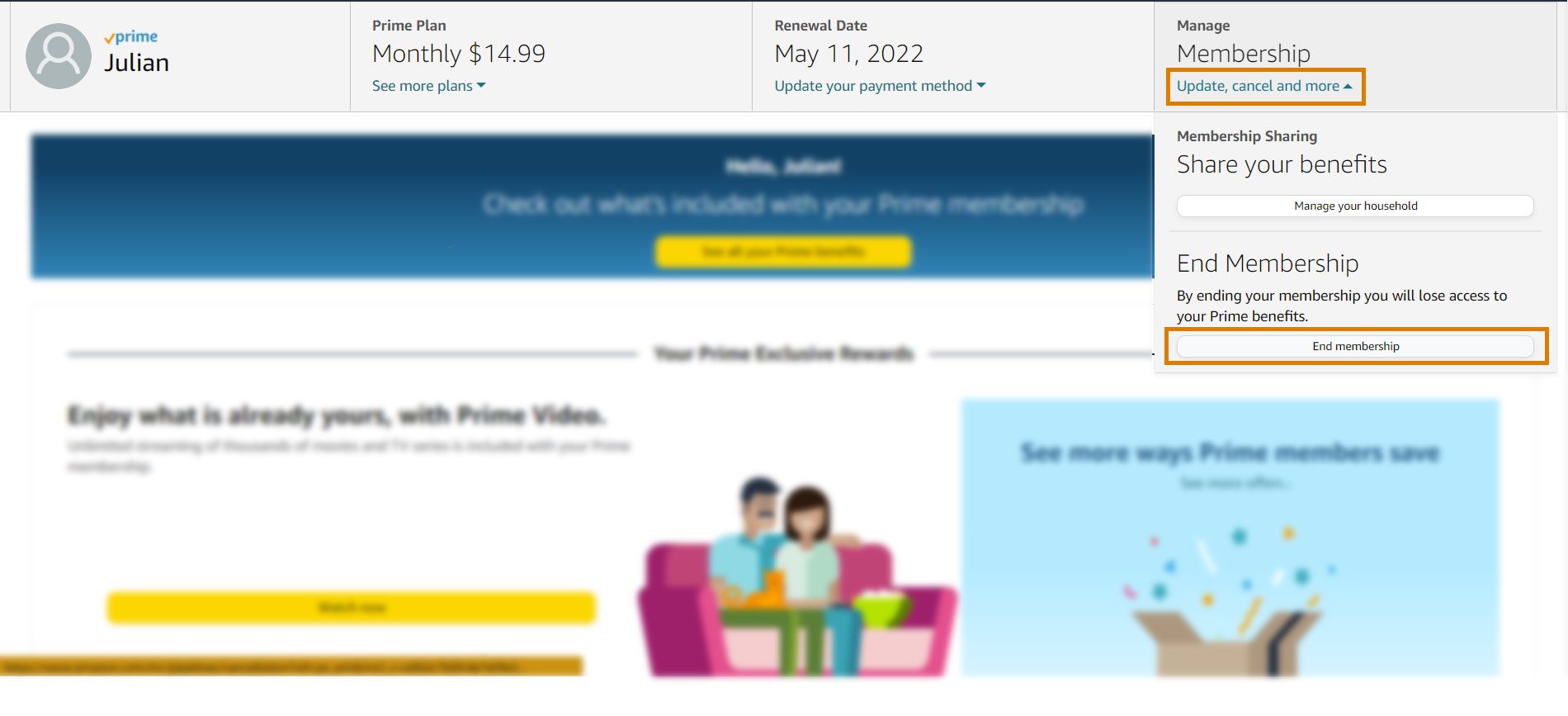
To find your specific renewal date, you must navigate to the “Manage Membership” section within your Amazon account settings. This portal serves as the financial dashboard for your subscription. It displays the date of your next scheduled payment, the amount you will be charged, and the payment method currently on file.
For annual members, this date occurs exactly one year from the date of your last payment. For monthly members, the renewal happens every 30 days. It is important to note that if your renewal date falls on the 31st of a month and the following month only has 30 days, Amazon typically adjusts the billing date to the last day of that shorter month. This subtle shift can sometimes catch budget-conscious consumers off guard if they are tracking their expenses to the exact day.
The Impact of Free Trials on Renewal Timing
Many users begin their Prime journey with a 30-day free trial. Financially speaking, this is the most critical period for monitoring. Amazon requires a credit card or debit card to initiate a trial, and the system is designed to transition seamlessly into a paid membership the moment the 30-day period expires. If you do not cancel the trial at least 24 hours before it ends, you will be charged the full price of the membership (either monthly or annually, depending on what you selected at sign-up) on the 31st day. This transition represents a significant jump in expenditure that must be accounted for in your monthly budget.
Managing Your Subscription to Optimize Cash Flow
From a personal finance perspective, the choice between a monthly and an annual Prime membership is a question of liquidity versus long-term savings. When your membership renews, the impact on your bank account varies significantly based on which plan you have chosen.
Monthly vs. Annual: A Cost-Benefit Analysis
As of current pricing structures, the annual Amazon Prime membership offers a substantial discount compared to the monthly plan. When you pay for a full year upfront, you are essentially “locking in” a lower rate in exchange for a larger immediate outflow of cash.
For those who have the liquidity to handle a triple-digit charge once a year, the annual plan is the superior financial choice, often saving the user around $40 over the course of twelve months. However, for individuals who operate on a tight monthly budget, the higher monthly rate of $14.99 may be more manageable than a $139 annual lump sum. When your membership renews, you should evaluate your current financial standing. If you find yourself with a surplus during your renewal month, switching from monthly to annual can yield a high “internal rate of return” on your savings.
Utilizing “Remind Me” Features for Financial Planning
Amazon provides a “Remind Me” feature within the membership settings. This tool is invaluable for financial planning. By enabling this, Amazon will send you an email three days before your membership is set to renew. This three-day window is crucial for several reasons:
-
Budget Reallocation: It allows you to ensure there are sufficient funds in your linked account to cover the charge.
-
Audit of Usage: It prompts a quick mental audit—are you actually using the Prime benefits enough to justify the next year’s or month’s expense?
-
Cancellation Window: It gives you the necessary time to cancel the service before the funds are legally committed for the next cycle.
Evaluating the ROI of Your Prime Membership Before Renewal
Every time a subscription is about to renew, it represents an opportunity to conduct a mini-audit of your discretionary spending. A professional approach to personal finance involves questioning every recurring cost to ensure it still provides value.
Calculating Your “Break-Even” Point
To determine if you should let your Prime membership renew, you can calculate your break-even point. Prime offers several financial benefits, most notably “free” shipping. If you were to pay for standard shipping on your average number of Amazon orders, would that total exceed the cost of the membership?
Furthermore, consider the ancillary financial benefits. Prime Video, Prime Reading, and Amazon Music are substitutes for other paid subscriptions like Netflix, Kindle Unlimited, or Spotify. If using Prime allows you to cancel one of these other services, the renewal becomes much more financially attractive. Conversely, if you are paying for Prime but also paying for three other streaming services you use more frequently, your Prime renewal might be an unnecessary drain on your wealth-building potential.
Hidden Financial Perks to Consider
Before deciding to stop a renewal, consider the integrated financial tools Amazon Prime offers. For instance, the Amazon Prime Rewards Visa Signature Card offers 5% back on Amazon purchases, but this is often contingent upon having an active Prime membership. If you spend $3,000 a year on Amazon, that 5% back totals $150—effectively paying for the annual membership itself. When the renewal date approaches, look at your “Year in Review” (often available in account insights) to see how much you actually saved in shipping and earned in rewards.
Strategies for Handling Accidental Renewals and Refunds
Even with the best planning, sometimes a renewal happens when you didn’t intend for it to. Understanding the financial recourse available can help you recover those funds quickly.
Amazon’s Refund Policy for Unused Benefits
Amazon has a relatively consumer-friendly policy regarding accidental renewals. If your Prime membership renews and you are charged the annual or monthly fee, you are generally eligible for a full refund if you have not used any of the Prime benefits since the renewal date. This includes not placing any orders with Prime shipping and not streaming any content on Prime Video.
If you notice a charge on your bank statement that you didn’t expect, the first step is to avoid using any Amazon services immediately. Log into your account and initiate the cancellation. The system will often automatically detect that benefits haven’t been used and offer a full refund of the most recent charge. From a cash flow perspective, this refund can take 3-5 business days to process, so it is still better to prevent the charge in the first place.
The “Pause” vs. “Cancel” Financial Strategy
If you are facing a temporary financial crunch, you might not want to cancel Prime permanently, as you might lose access to certain grandfathered rates or promotional bundles. While Amazon doesn’t have a traditional “pause” button for the membership fee, you can strategically cancel and rejoin.
Because Amazon does not charge a “re-initiation fee,” you can cancel your membership before the renewal date to save cash during a lean month and then sign up again later. This is a common tactic for seasonal shoppers who may only need Prime during the holiday season or for specific “Prime Day” events. By timing your renewal to coincide with periods of high shopping volume, you maximize the utility of every dollar spent on the subscription.

The Broader Context of Subscription Management
When does Amazon Prime renew? The answer is more than a date on a calendar; it is a recurring financial event that requires oversight. In the broader context of personal finance, managing a Prime renewal is a microcosm of professional wealth management. It involves monitoring outflows, calculating ROI, and maintaining the discipline to cut services that no longer serve your financial goals.
By treating your Amazon Prime renewal date as a scheduled financial review, you transform a passive expense into an active choice. Whether you decide to let it renew to capitalize on shipping savings and rewards, or choose to cancel to bolster your savings account, being aware of the timing puts you in control of your financial narrative. Always remember that in the digital economy, the most expensive subscription is the one you pay for but do not use. Monitor your renewal, audit your usage, and ensure that your money is always working as hard as you are.
aViewFromTheCave is a participant in the Amazon Services LLC Associates Program, an affiliate advertising program designed to provide a means for sites to earn advertising fees by advertising and linking to Amazon.com. Amazon, the Amazon logo, AmazonSupply, and the AmazonSupply logo are trademarks of Amazon.com, Inc. or its affiliates. As an Amazon Associate we earn affiliate commissions from qualifying purchases.