
In our increasingly digital world, we constantly encounter terms like “megabyte” and “gigabyte.” From choosing a new smartphone with sufficient storage to understanding data plans or downloading the latest software, these units of measurement are fundamental to our daily technological interactions. Yet, for many, the precise distinction and practical implications of a megabyte (MB) versus a gigabyte (GB) remain somewhat abstract. This article aims to demystify these common terms, providing a clear, insightful, and engaging explanation of their differences, their origins, and why understanding them is crucial in today’s data-driven landscape.
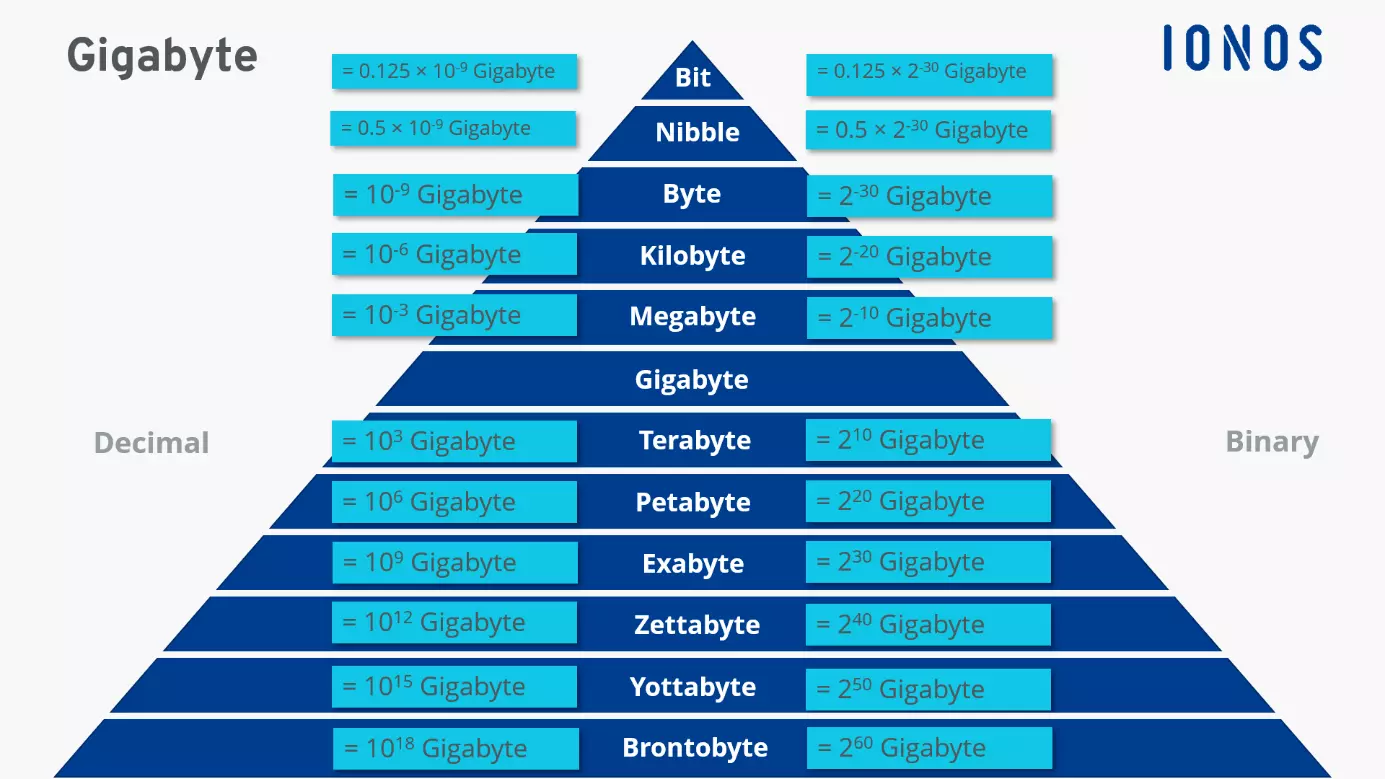
At its core, both a megabyte and a gigabyte are units used to quantify digital information, representing how much data a file contains or how much storage capacity a device possesses. They are part of a hierarchical system that begins with the smallest possible unit of data: the bit. By understanding this foundational structure, we can better appreciate the exponential growth in data storage and processing capabilities that have come to define modern technology.
The Foundation of Digital Measurement: Bits and Bytes
To grasp the difference between a gigabyte and a megabyte, we must first understand the fundamental building blocks of digital information: bits and bytes. These tiny units are the bedrock upon which all digital data is constructed.
Understanding Bits: The Smallest Unit
The “bit” is the smallest and most basic unit of information in computing and digital communications. The term “bit” is a portmanteau of “binary digit.” In the binary system, which computers use to process information, a bit can exist in one of two states: either 0 or 1, representing “off” or “on” in an electrical circuit. These 0s and 1s are the language of computers, forming the basis for all data, from text and images to videos and complex software. A single bit, on its own, doesn’t convey much meaning, but when combined in sequences, they can represent complex information.
Bytes: Grouping the Bits
While bits are the smallest unit, they are rarely used in practical terms for measuring file sizes or storage capacity because they are too granular. Instead, bits are grouped together into larger units called “bytes.” Conventionally, one byte is equal to eight bits. This grouping allows for a more meaningful representation of data. For instance, a single byte can represent a single character of text, like a letter, a number, or a symbol, in encoding schemes like ASCII. Because it takes 8 bits to make a byte, a byte can represent 2^8 (256) different possible values. This makes the byte a convenient and practical unit for measuring the size of small files.
The Kilobyte (KB): A Small Step Up
As technology advanced and files grew larger, the byte quickly became too small a unit for convenient measurement. This led to the introduction of prefixes from the metric system, slightly adapted for the binary nature of computers. The next unit in the hierarchy is the kilobyte (KB).
Here’s where a common point of confusion arises. In the metric system, “kilo” typically means 1,000. However, in computing, due to the binary system, units are often based on powers of 2. Thus, one kilobyte (KB) is traditionally understood as 1,024 bytes (which is 2^10). While the difference between 1,000 and 1,024 might seem minor at this level, it compounds significantly as units get larger. A small text document, for example, might be a few kilobytes in size.
Scaling Up: Megabytes (MB) and Gigabytes (GB)
With the foundation of bits, bytes, and kilobytes established, we can now precisely define megabytes and gigabytes and understand their relationship to each other. These are the units most commonly encountered by everyday users.
The Megabyte (MB): For Everyday Digital Files
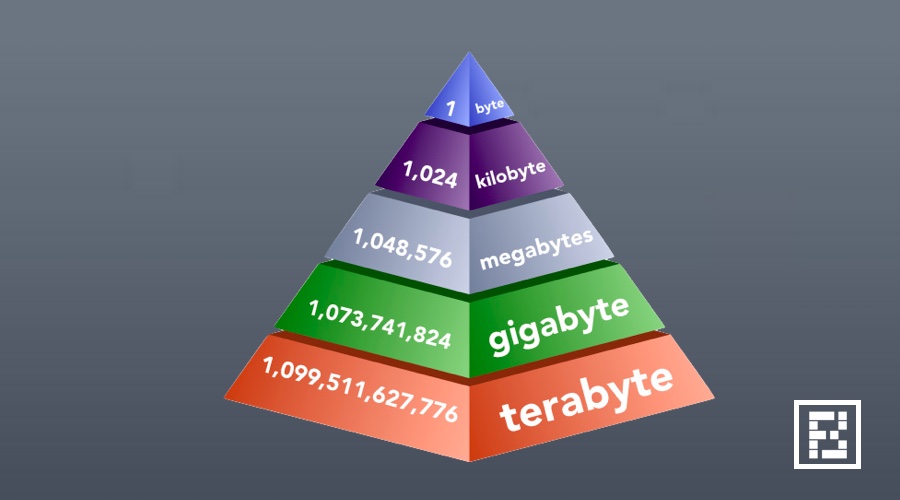
Moving up the ladder, the megabyte (MB) is the next significant unit of digital information. Following the binary convention, one megabyte (MB) is equal to 1,024 kilobytes (KB). If we trace it back, this means 1 MB is approximately 1,024 * 1,024 bytes, or roughly 1 million bytes (1,048,576 bytes, to be exact).
The megabyte is a practical unit for measuring the size of many common digital files we interact with daily:
- Photos: A typical high-resolution JPEG photo from a smartphone might range from 2 MB to 10 MB.
- Audio Files: A standard MP3 song of about 3-4 minutes is often between 3 MB and 10 MB.
- Short Videos: A very short, low-resolution video clip might be in the tens of megabytes.
- Documents: Word documents or PDFs can range from a few kilobytes to several megabytes, depending on their content (images, complex formatting).
- Small Applications: Many mobile apps or lightweight desktop utilities are measured in megabytes.
Understanding megabytes helps us gauge the impact of individual files on storage space or data usage.
The Gigabyte (GB): The Workhorse of Modern Storage
The gigabyte (GB) is arguably the most ubiquitous unit of data measurement in today’s consumer electronics. It represents a significantly larger quantity of data than a megabyte. Following the same binary progression, one gigabyte (GB) is equal to 1,024 megabytes (MB). This means 1 GB is approximately 1,024 * 1,024 * 1,024 bytes, which is roughly 1 billion bytes (1,073,741,824 bytes).
The gigabyte is the standard unit for measuring the capacity of most modern storage devices and the size of large files:
- Smartphones and Tablets: Storage capacities are typically advertised in gigabytes (e.g., 64 GB, 128 GB, 256 GB, 512 GB).
- Computer Hard Drives and SSDs: Internal and external storage drives for laptops and desktops are commonly measured in hundreds of gigabytes or several terabytes.
- Operating Systems: The installation footprint of Windows, macOS, or Linux can easily consume tens of gigabytes.
- Video Games: Modern video games, especially AAA titles, can range from 20 GB to well over 100 GB.
- High-Definition Movies: A full-length HD movie can be anywhere from 2 GB to 10 GB or more, depending on its length and quality.
- Large Software Applications: Professional design software, video editing suites, or complex development environments often require many gigabytes for installation.
The leap from megabytes to gigabytes signifies a massive increase in data volume. Where a megabyte might hold a single song, a gigabyte can hold hundreds.
The “Kilo” Confusion: Binary vs. Decimal Prefixes

It’s important to address a subtle but significant point of confusion regarding these prefixes. Historically, and for simplicity, computer manufacturers sometimes use the metric “kilo,” “mega,” and “giga” to mean exact powers of 10 (1,000, 1,000,000, 1,000,000,000). For instance, a hard drive advertised as 1 terabyte (TB) might actually contain 1,000,000,000,000 bytes. However, operating systems and software that report storage often use the binary interpretation where 1 KB = 1,024 bytes, 1 MB = 1,024 KB, and so on.
To alleviate this ambiguity, the International Electrotechnical Commission (IEC) introduced new prefixes in 1998:
- Kibibyte (KiB) for 1,024 bytes (2^10)
- Mebibyte (MiB) for 1,024 KiB (2^20)
- Gibibyte (GiB) for 1,024 MiB (2^30)
- Tebibyte (TiB) for 1,024 GiB (2^40)
While these IEC prefixes are technically more accurate for binary measurements, the traditional KB, MB, GB, and TB are still widely used by software, hardware manufacturers, and in common parlance, often implicitly referring to the binary (powers of 1024) values when discussing RAM or file sizes, and sometimes decimal (powers of 1000) values for raw storage capacity in marketing. This discrepancy is why, for example, a brand-new 500 GB hard drive might show up as around 465 GB or GiB in your operating system – the difference comes from one using powers of 1000 and the other powers of 1024. For the purpose of understanding the general difference, remembering the 1024 factor between each consecutive unit (KB, MB, GB) is sufficient for practical applications.
Why These Differences Matter in the Real World
Understanding the distinction between megabytes and gigabytes is not just an academic exercise; it has tangible implications for how we use and manage our digital lives.
Device Storage Capacity
When purchasing a new phone, tablet, laptop, or external hard drive, the advertised storage capacity is usually in gigabytes (GB) or terabytes (TB). Knowing what these numbers mean helps you make an informed decision. For instance, a 64 GB smartphone might seem sufficient for casual use, but if you take many high-resolution photos and videos, download large games, or store extensive media, you’ll quickly find yourself needing more space. A 128 GB or 256 GB device offers significantly more breathing room, directly translating to more apps, more photos, more videos, and more documents. This choice directly impacts your ability to store memories, enjoy entertainment, and be productive without constantly managing storage.
Internet Data Usage
Mobile data plans and even some broadband packages often come with monthly data caps, measured in gigabytes. Streaming a movie in standard definition might consume a few hundred megabytes per hour, while streaming in high definition or 4K can easily consume several gigabytes per hour. Downloading a large game update could be tens of gigabytes, rapidly depleting a data allowance. Understanding that 1 GB is 1024 MB allows you to estimate your data consumption more accurately. For example, knowing that your favorite streaming service uses 3 GB per hour for HD content immediately tells you that a 10 GB monthly plan won’t last long if you stream frequently.
File Sizes and Performance
The size of files, whether measured in megabytes or gigabytes, directly impacts various aspects of performance:
- Download/Upload Times: Larger files naturally take longer to download or upload, depending on your internet speed. A 5 MB photo will upload almost instantly, while a 5 GB video might take minutes or even hours on a slower connection.
- Application Loading: Larger applications or games, often measured in gigabytes, can take longer to load initially due to the volume of data that needs to be read from storage.
- Video Rendering/Editing: Working with high-resolution video files, which are almost always in gigabytes, demands significant processing power and temporary storage, impacting rendering times and overall editing workflow.
Understanding System Requirements
Software and games always list minimum and recommended system requirements, which often include disk space. If a game requires 60 GB of free space, you need to ensure your hard drive has at least that much available. Similarly, complex professional software might require several gigabytes for installation and additional space for project files, which could quickly grow into tens or hundreds of gigabytes. Misjudging these requirements can lead to installation failures or frustrating performance issues.
Beyond Gigabytes: The Expanding Universe of Data
While gigabytes are the everyday norm, the digital universe continues to expand, giving rise to even larger units of data measurement that are increasingly relevant for professional and enterprise contexts.
Terabytes (TB): For Mass Storage
The next unit after the gigabyte is the terabyte (TB). One terabyte (TB) is equal to 1,024 gigabytes (GB). This represents a massive amount of data, equivalent to over a trillion bytes. Terabytes are now commonplace for:
- External Hard Drives: Many external storage devices come in capacities of 1 TB, 2 TB, 4 TB, or even more.
- Desktop Computer Storage: High-capacity hard drives in desktop computers are often measured in terabytes.
- Network-Attached Storage (NAS): Home and small business NAS devices, used for centralized data storage and backups, are typically provisioned with multiple terabytes of storage.
- Server Storage: Enterprise servers and data centers rely heavily on terabyte-scale storage for their operations.
A terabyte can hold hundreds of thousands of high-resolution photos, hundreds of hours of HD video, or dozens of modern video games.
Petabytes (PB) and Exabytes (EB): Big Data Territory
As we move beyond terabytes, we enter the realm of “big data,” where information is measured in petabytes (PB) and exabytes (EB).
- Petabyte (PB): One petabyte is equal to 1,024 terabytes (TB). This is an almost unimaginable amount of data for an individual user, often associated with large cloud storage providers, major research institutions, or government agencies. Think of the entire content of a large university library or the data generated by a major particle accelerator.
- Exabyte (EB): One exabyte is equal to 1,024 petabytes (PB). This unit is used to describe truly massive datasets, such as the total data processed by Google in a day, the entire internet traffic of a large country, or the storage capacity of global cloud infrastructure.
These units highlight the sheer scale of information being generated, stored, and processed globally, driving the need for increasingly sophisticated storage solutions and data management strategies.
The Future of Data Storage
The demand for data storage continues its relentless upward trajectory. With advancements in technologies like 4K and 8K video, virtual reality, artificial intelligence, and the Internet of Things (IoT), the amount of data we create and consume will only grow. This necessitates continuous innovation in storage technology, leading to denser, faster, and more energy-efficient storage solutions, pushing the boundaries even further into zettabytes (ZB) and yottabytes (YB). Understanding the basic differences between megabytes and gigabytes is therefore not just about current technology, but about building a foundational literacy for the ever-evolving digital future.
In conclusion, while “megabyte” and “gigabyte” might sound similar, their difference in scale is profound. A megabyte is suitable for measuring individual files like photos or songs, whereas a gigabyte is the standard for large software, high-definition media, and device storage capacities. By understanding that a gigabyte is roughly 1,000 times larger than a megabyte (specifically, 1,024 times larger in binary terms), users can make more informed decisions about their tech purchases, data consumption, and overall digital lifestyle. In an era where data is king, a clear grasp of its fundamental units is an indispensable part of digital literacy.
aViewFromTheCave is a participant in the Amazon Services LLC Associates Program, an affiliate advertising program designed to provide a means for sites to earn advertising fees by advertising and linking to Amazon.com. Amazon, the Amazon logo, AmazonSupply, and the AmazonSupply logo are trademarks of Amazon.com, Inc. or its affiliates. As an Amazon Associate we earn affiliate commissions from qualifying purchases.