
The iPhone has long served as the benchmark for the smartphone industry, not just because of its sleek hardware, but because of the seamless integration of its operating system. With the latest updates to iOS, Apple has once again shifted the paradigm of how users interact with their devices. This latest iteration is more than a simple cosmetic facelift; it represents a significant leap in on-device intelligence, communication protocols, and personalization. As we peel back the layers of the recent update, it becomes clear that Apple is focusing on making the iPhone more intuitive, more protective of user privacy, and more integrated into the daily tapestry of our lives.
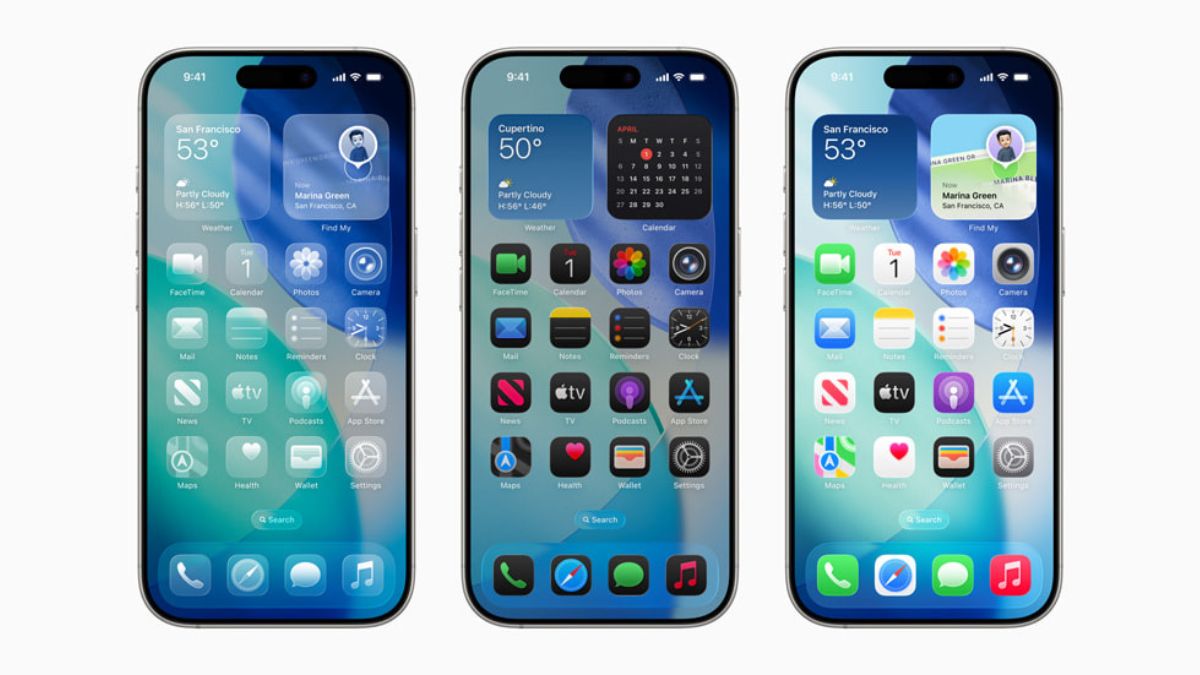
Redefining Personalization and the User Interface
For years, the criticism against iOS was its “walled garden” approach to customization. However, the latest update continues to dismantle that narrative, offering users unprecedented control over the aesthetics and functional flow of their devices. The focus has shifted from a static grid of apps to a dynamic, living interface that adapts to the user’s environment.
Enhanced Lock Screen Customization and Live Activities
The Lock Screen has undergone its most significant transformation yet. Users can now create multiple Lock Screens, each with unique backdrops, font styles, and a selection of widgets that provide information at a glance. The update introduces a multilayered depth effect for photos, where the subject of the image is artfully displayed in front of the time, creating a sense of three-dimensionality.
Furthermore, “Live Activities” have become a cornerstone of the Lock Screen experience. Whether it is tracking a food delivery in real-time, following a live sports score, or monitoring a workout timer, these persistent notifications eliminate the need to unlock the phone and jump between apps. This reduces digital friction and allows the iPhone to act as a passive information hub.
StandBy Mode: A New Use Case for the iPhone
One of the most innovative features in the recent update is StandBy. When the iPhone is placed on its side while charging, it transforms into a smart display. This full-screen experience is designed to be viewed from a distance, offering glanceable information through large clock styles, photos, or widgets.
StandBy is particularly effective for bedside tables or office desks. It utilizes the Always-On display of the Pro models to keep essential information visible without draining significant power. By integrating Siri, incoming calls, and large notifications into this mode, Apple has effectively turned the iPhone into a multi-functional piece of home hardware, bridging the gap between a smartphone and a smart home controller.
Communication and Connectivity Upgrades
At its core, the iPhone is a communication device. The latest update focuses on making these interactions more expressive and streamlined, leveraging hardware sensors and proximity to facilitate sharing in ways that feel almost futuristic.
The Evolution of iMessage and Contact Posters
Communication is now more visual with the introduction of “Contact Posters.” This feature allows users to customize how they appear on the screens of the people they call. By choosing specific typography, colors, and imagery, the user creates a digital calling card that is transmitted during a phone call.
Within iMessage, the interface has been cleaned up to provide a sleeker look. The new “Check In” feature is a standout for safety-conscious users. It automatically notifies a family member or friend when the user arrives at their destination. If progress stops, it can share the device’s location, battery level, and cell service status with the chosen contact—all encrypted end-to-end. This is a prime example of how Apple integrates software features to solve real-world security concerns.
NameDrop and the Refinement of AirDrop
AirDrop has been the gold standard for file sharing for a decade, but the update takes it further with NameDrop. By simply bringing two iPhones (or an iPhone and an Apple Watch) close together, users can instantly share contact information. This eliminates the clunky process of manually typing in digits or searching for a contact in a crowded room.
Beyond contact sharing, the same proximity gesture can be used to initiate “SharePlay,” allowing two people to listen to music, watch a movie, or play a game together while their devices are physically near each other. This physical-to-digital bridge reinforces the ecosystem’s strength, making the iPhone feel like a collaborative tool rather than an isolated screen.
Productivity, AI Integration, and On-Device Intelligence
Artificial Intelligence (AI) is the buzzword of the decade, but Apple’s approach is characteristically different. Rather than focusing on cloud-based chatbots, the latest iPhone update leans heavily into on-device machine learning to improve the daily user experience without compromising privacy.

The New Journal App and Mental Wellbeing
A major addition to the app suite is “Journal.” Using on-device machine learning, the iPhone analyzes a user’s photos, location, music, and workouts to suggest “moments” worth writing about. This isn’t just a digital diary; it is a tech-driven approach to mindfulness.
The API for Journaling Suggestions allows third-party apps to also contribute to these prompts, creating a holistic view of the user’s day. Crucially, because the processing happens on the device, Apple cannot see what the user writes or what moments are suggested, maintaining a strict boundary between AI utility and personal privacy.
Transformer-Based Autocorrect and Predictive Text
The keyboard is perhaps the most used tool on any smartphone, and it has received a massive under-the-hood upgrade. The update utilizes a “transformer” language model—the same type of technology that powers many modern LLMs—to significantly improve autocorrect.
The keyboard now learns the user’s personal vocabulary, including slang and acronyms, more effectively. It provides inline predictive text recommendations that allow users to complete entire sentences with a tap of the space bar. This shift toward more sophisticated NLP (Natural Language Processing) on-device means that the iPhone is becoming better at “understanding” the intent behind the user’s input, leading to a faster and less frustrating typing experience.
Security, Privacy, and Accessibility
Apple has long positioned privacy as a fundamental human right, and the latest iPhone update introduces several features that harden the device against digital threats while making the technology more accessible to a broader range of users.
Advanced Data Protection and the Death of the Password
The update pushes the industry further toward a passwordless future through the expanded use of Passkeys. By leveraging FaceID and TouchID, Passkeys allow users to sign into websites and apps without ever creating a traditional password. This virtually eliminates the risk of phishing and credential leaks.
In terms of privacy, “Link Tracking Protection” is now active in Mail, Messages, and Safari Private Browsing. This feature strips away tracking parameters from URLs, preventing advertisers from following a user across the web based on the links they click. This is a subtle but powerful technical change that limits the amount of data harvested by third-party brokers.
Personal Voice and Assistive Access
Accessibility remains a pillar of the iOS experience. One of the most impressive technical feats in the update is “Personal Voice.” Designed for users at risk of losing their ability to speak (such as those with a recent diagnosis of ALS), this feature allows the iPhone to create a synthesized voice that sounds exactly like the user.
By reading a series of prompts for about 15 minutes, the device’s neural engine processes the audio to create a local voice model. When combined with “Live Speech,” users can type a message and have it spoken in their own voice during phone or FaceTime calls. This is a profound application of AI that prioritizes human dignity and connection over mere novelty.
Looking Ahead: The Convergence of iOS and Emerging Tech
The latest update is not just about the current generation of iPhones; it is about laying the groundwork for the future of spatial computing and the broader Apple ecosystem. The software is increasingly designed to work in harmony with secondary devices, creating a seamless mesh of technology.
Integration with VisionOS and Spatial Content
With the introduction of the Vision Pro, the iPhone update has begun to include features that support spatial computing. The latest iPhone models can now capture “Spatial Video,” which uses the Main and Ultra Wide cameras simultaneously to record 3D video. While these videos look like standard 2D clips on the iPhone screen, they come to life with incredible depth when viewed on a spatial headset.
This move signals the iPhone’s role as the primary capture device for the next era of media. By turning the smartphone into a 3D camera, Apple is ensuring that the transition to spatial computing is supported by a library of personal content that users already possess.

The Role of the A-Series Chips in Software Longevity
Finally, the fluidity of these new features is a testament to the power of Apple’s silicon. The A-series chips, with their dedicated Neural Engines, allow for complex tasks like real-time background blurring in video calls and on-device voice synthesis to happen without overheating or significant battery drain.
As software updates continue to demand more from the hardware, the synergy between the OS and the chip architecture ensures that even older iPhone models benefit from performance optimizations. The latest update proves that the iPhone is no longer just a gadget; it is a sophisticated, AI-driven hub that balances power, privacy, and personal expression in a way that remains unmatched in the tech landscape.
aViewFromTheCave is a participant in the Amazon Services LLC Associates Program, an affiliate advertising program designed to provide a means for sites to earn advertising fees by advertising and linking to Amazon.com. Amazon, the Amazon logo, AmazonSupply, and the AmazonSupply logo are trademarks of Amazon.com, Inc. or its affiliates. As an Amazon Associate we earn affiliate commissions from qualifying purchases.