
Microsoft 365, formerly known as Office 365, has evolved from a simple suite of productivity applications into a comprehensive, cloud-powered ecosystem designed to empower individuals and organizations in the modern digital landscape. It’s not just about Word, Excel, and PowerPoint anymore; it’s a dynamic platform offering a robust array of tools and services aimed at enhancing collaboration, boosting productivity, ensuring security, and facilitating seamless communication. Understanding what Microsoft 365 truly encompasses requires looking beyond its constituent applications and appreciating its overarching strategy and the integrated experience it provides.
The core of Microsoft 365 lies in its subscription-based model, which offers continuous updates and access to the latest features. This contrasts with the traditional perpetual license model of older Office versions, providing users with a more dynamic and future-proof solution. It’s a shift that reflects the broader trend in the technology industry towards Software-as-a-Service (SaaS), where access and ongoing value are prioritized over one-time purchases. For businesses, this model translates to predictable costs and the assurance that their software is always up-to-date with the latest security patches and innovations. For individuals, it means having access to powerful professional-grade tools without the significant upfront investment.

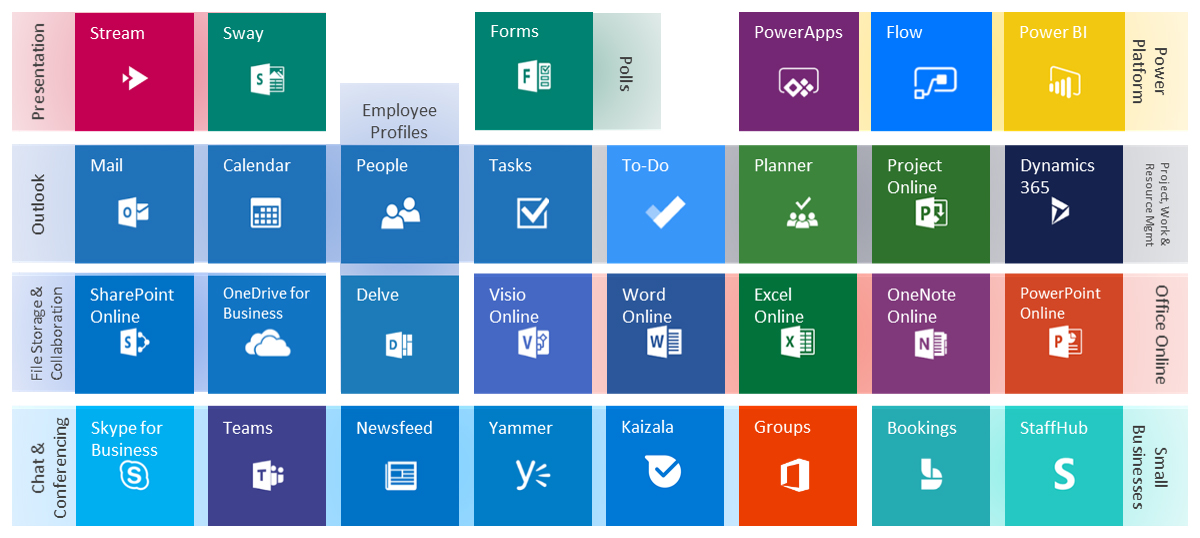
Beyond the familiar desktop applications, Microsoft 365 integrates a suite of cloud services, including OneDrive for cloud storage, SharePoint for team collaboration and document management, and Teams for real-time communication and virtual meetings. This integration is key to its value proposition, enabling a fluid workflow where documents can be co-authored in real-time, files can be accessed from any device, and communication is centralized. The platform is designed to break down silos and foster a more connected and efficient working environment, whether you’re a solopreneur, part of a small team, or a large enterprise.
The Core Applications and Their Evolution
At its heart, Microsoft 365 is built upon the familiar pillars of the Microsoft Office suite, but these applications have undergone significant transformations to align with the cloud-first, AI-infused era. They are no longer standalone desktop programs; they are deeply integrated components of a larger, interconnected system.
Word, Excel, and PowerPoint: More Than Just Documents
The foundational applications—Word, Excel, and PowerPoint—remain the cornerstones of productivity for billions. However, Microsoft 365 breathes new life into them.
Real-Time Collaboration and Co-Authoring
One of the most transformative features is the ability to co-author documents, spreadsheets, and presentations in real-time. Multiple users can work on the same file simultaneously, seeing each other’s edits as they happen. This eliminates the cumbersome process of emailing versions back and forth, reducing errors and accelerating project completion. Presence indicators show who else is in the document, and individual cursors highlight where others are working. This functionality is powered by the cloud, ensuring that all collaborators are working on the most current version of the file, typically stored in OneDrive or SharePoint.
AI-Powered Features and Smart Assistance
Microsoft 365 is increasingly infused with Artificial Intelligence (AI) to assist users. Features like Microsoft Editor in Word provide advanced grammar and style suggestions, going beyond basic spell-checking to improve clarity and conciseness. In Excel, “Ideas” can automatically analyze data and suggest charts or pivot tables to reveal trends. PowerPoint’s “Designer” offers professional slide layout suggestions based on content, significantly speeding up presentation creation. These AI capabilities are designed to democratize advanced functionalities, making them accessible to users of all skill levels and helping them produce higher-quality work more efficiently.
Cloud-Connected Functionality
The desktop applications within Microsoft 365 are inherently connected to the cloud. This means that files can be saved directly to OneDrive or SharePoint, enabling access from any device with an internet connection. AutoSave, enabled when files are stored in these cloud locations, ensures that work is continuously backed up, mitigating the risk of data loss due to crashes or unexpected shutdowns. This seamless cloud integration is a defining characteristic of the Microsoft 365 experience.
Beyond the Desktop: The Cloud Services Ecosystem
Microsoft 365 is far more than just a collection of desktop applications; it’s a powerful ecosystem of cloud-based services that are designed to work in concert, fostering collaboration, communication, and data management.
OneDrive and SharePoint: Your Digital Workspace
Storage and file management are central to a productive digital workflow, and Microsoft 365 offers robust solutions through OneDrive and SharePoint.
OneDrive: Personal Cloud Storage and Synchronization
OneDrive provides individual cloud storage, allowing users to save their files, photos, and other content online. This makes it easy to access documents from any device, share them with others, and keep them synchronized across multiple machines. For personal use or as a stepping stone for business, OneDrive ensures that your important data is accessible and protected. Features like file versioning allow you to revert to previous iterations of a document, providing an extra layer of safety.
SharePoint: Team Collaboration and Document Management
SharePoint is a more robust platform designed for team collaboration and enterprise-level document management. It allows organizations to create team sites, intranets, and document libraries where teams can store, organize, and share files. SharePoint facilitates workflow automation, enables advanced search capabilities, and provides granular control over permissions and access. It’s the backbone for many organizational knowledge bases and project repositories, enabling efficient information sharing and collective problem-solving.

Microsoft Teams: The Hub for Teamwork
Microsoft Teams has rapidly become the de facto central hub for communication and collaboration within Microsoft 365. It consolidates chat, video meetings, calling, and file sharing into a single, integrated application.
Unified Communication and Collaboration
Teams allows for persistent chat conversations, both one-on-one and in group channels dedicated to specific projects or teams. This asynchronous communication is complemented by real-time capabilities, including high-definition video conferencing and voice calls. The ability to share screens, present content, and use virtual whiteboards during meetings enhances engagement and productivity. Files shared within Teams are often stored in underlying SharePoint sites, ensuring seamless integration.
Integration with Other Microsoft 365 Services
The power of Teams lies in its deep integration with the rest of the Microsoft 365 suite. Users can access and edit Word, Excel, and PowerPoint files directly within Teams, participate in polls created in Forms, and even integrate third-party applications. This creates a unified experience where users can accomplish most of their daily tasks without leaving the Teams interface, significantly reducing context switching and boosting efficiency.
Security and Compliance: Protecting Your Digital Assets
In today’s threat landscape, robust security and compliance measures are paramount. Microsoft 365 offers a comprehensive suite of tools designed to protect data, manage identities, and ensure adherence to regulatory standards.
Advanced Threat Protection and Data Loss Prevention
Microsoft 365 includes advanced security features designed to defend against sophisticated cyber threats. This includes protection against malware, phishing, and ransomware through services like Microsoft Defender for Office 365. For businesses, Data Loss Prevention (DLP) policies can be implemented to prevent sensitive information from being shared inappropriately, whether intentionally or accidentally. These policies can identify, monitor, and protect confidential data across Office 365.
Identity and Access Management
Securing access to corporate data is critical. Microsoft 365 offers robust identity and access management solutions, including Multi-Factor Authentication (MFA), which adds an extra layer of security beyond a password. Conditional Access policies allow organizations to define specific conditions under which users can access resources, further tightening security by restricting access based on location, device health, or user risk.
Compliance and Governance Tools
For organizations operating in regulated industries, Microsoft 365 provides a range of compliance and governance tools. These include eDiscovery capabilities, which help organizations identify, preserve, and produce electronically stored information for legal or investigatory purposes. Audit logs provide a record of user activities, and retention policies ensure that data is managed according to legal and business requirements. This comprehensive approach to security and compliance provides peace of mind and helps organizations meet their regulatory obligations.
The Value Proposition: Why Choose Microsoft 365?
The adoption of Microsoft 365 represents a strategic decision for individuals and organizations looking to thrive in the digital age. Its integrated nature, continuous innovation, and focus on security offer a compelling value proposition that extends far beyond the sum of its parts.
Flexibility and Scalability for Every Need
Microsoft 365 is designed to be flexible and scalable. Whether you are a freelancer needing basic productivity tools or a large enterprise requiring advanced collaboration and security features, there are plans tailored to your specific requirements. The subscription model allows organizations to easily scale their licenses up or down as their needs change, providing cost-effectiveness and agility. This flexibility ensures that businesses are not locked into outdated software and can adapt to evolving workflows and team sizes.
Continuous Innovation and Future-Proofing
As a cloud-based service, Microsoft 365 receives regular updates and new features. This means users always have access to the latest advancements in productivity and security without needing to purchase new software versions. Microsoft is constantly investing in AI, cloud infrastructure, and new application features, ensuring that Microsoft 365 remains at the forefront of technological innovation. This commitment to continuous development makes it a future-proof investment, empowering users with cutting-edge tools to stay competitive.
Enhanced Productivity and Collaboration
The true strength of Microsoft 365 lies in its ability to enhance productivity and collaboration. By integrating familiar applications with powerful cloud services like Teams, OneDrive, and SharePoint, it streamlines workflows, facilitates seamless communication, and empowers teams to work together more effectively, regardless of their location. The intelligent features embedded within its applications further boost efficiency, allowing users to focus on their core tasks and achieve better outcomes. Microsoft 365 is more than just software; it’s a comprehensive platform for modern work.
aViewFromTheCave is a participant in the Amazon Services LLC Associates Program, an affiliate advertising program designed to provide a means for sites to earn advertising fees by advertising and linking to Amazon.com. Amazon, the Amazon logo, AmazonSupply, and the AmazonSupply logo are trademarks of Amazon.com, Inc. or its affiliates. As an Amazon Associate we earn affiliate commissions from qualifying purchases.