
In an increasingly connected yet complex world, the desire for safety and peace of mind for our loved ones has never been more paramount. Amidst a sea of digital tools promising various forms of security, one application has carved out a significant niche: Life360. Far from being a mere dot on a digital map, Life360 is a multifaceted family safety and location-sharing application designed to keep families connected and informed about each other’s whereabouts and safety status. At its core, it’s a technological answer to the age-old parental question, “Are they safe?” and a practical tool for families navigating the demands of modern life.
Launched in 2008, Life360 predates many of the sophisticated smartphone capabilities we take for granted today. Its evolution mirrors the advancements in GPS technology, mobile computing, and the growing integration of digital tools into our daily lives. Initially conceived as a disaster preparedness tool, it quickly pivoted to focus on everyday family safety, recognizing the immediate and continuous need for families to stay connected. Today, it stands as a leading platform, offering a suite of features that extend beyond simple location tracking to encompass driving safety, digital security, and emergency assistance, all aimed at fostering a safer environment for its users.
Unpacking the Core Functionality: More Than Just a Map
Life360’s appeal lies in its comprehensive feature set, meticulously designed to address various aspects of family safety. It’s an ecosystem built on the pillars of location intelligence, proactive safety measures, and reactive emergency support, all integrated into an intuitive user interface.
Real-Time Location Sharing and Geofencing
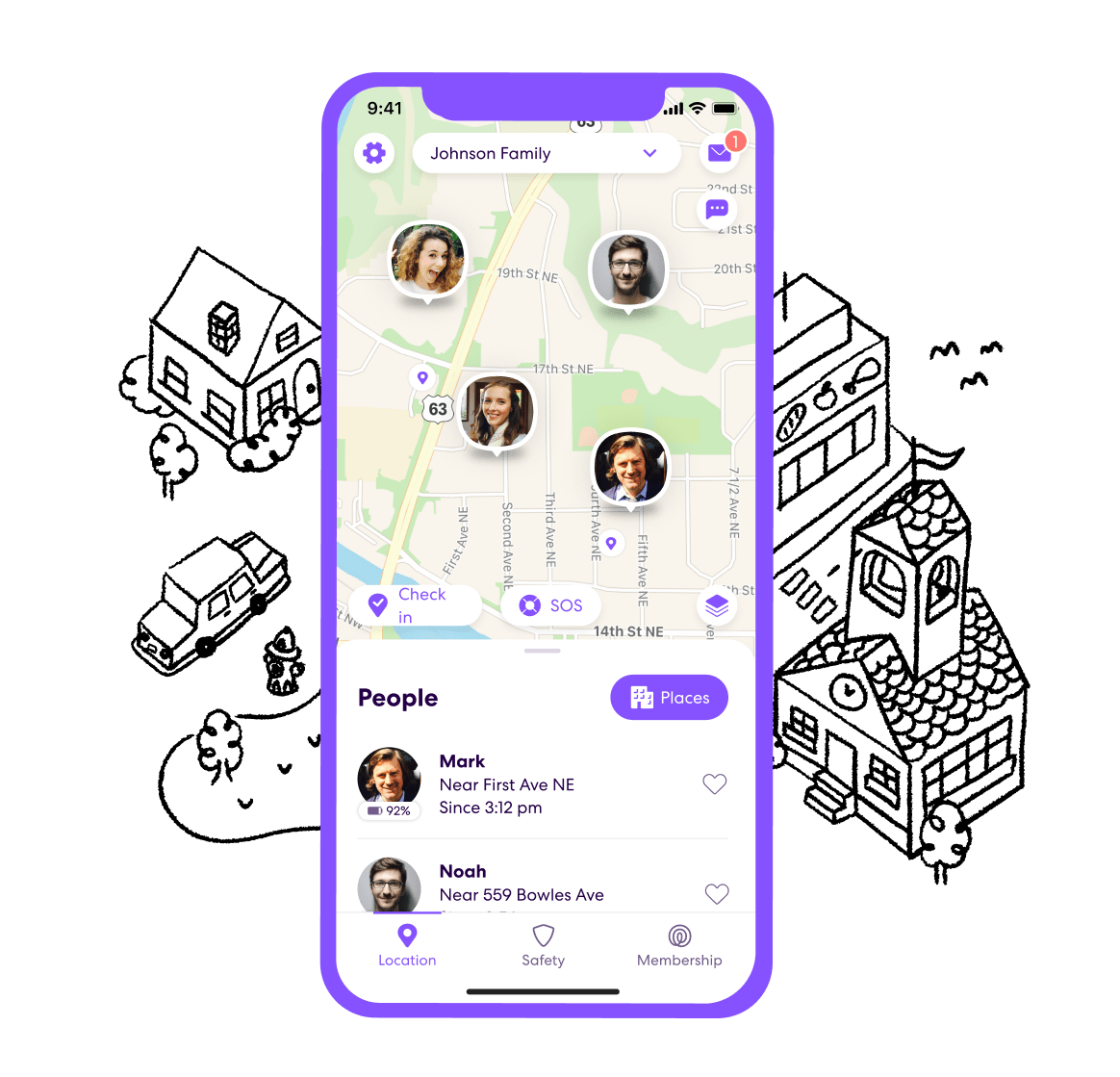
At the heart of Life360 is its sophisticated real-time location sharing capability. Users create “Circles”—private groups, typically for family members—within which their locations are visible on a private map. This isn’t just a static pin; it’s a dynamic, updating view that allows Circle members to see each other’s current positions, battery levels, and even speed if they’re in a vehicle. This feature is particularly valuable for coordinating family activities, ensuring children arrive safely at school, or simply knowing when a family member is on their way home.
Complementing real-time tracking is Life360’s geofencing capability, known as “Places.” Users can designate specific locations, such as home, work, school, or a grandparent’s house, and receive automated alerts when Circle members arrive at or depart from these predefined zones. This eliminates the need for constant check-ins, providing automatic updates and a layer of reassurance. For instance, a parent can receive an alert when their teenager arrives at school and another when they leave, all without manual intervention.
Driver Protect: Enhancing Road Safety
Recognizing that driving is a significant area of concern for many families, especially those with new or teenage drivers, Life360 has integrated a robust “Driver Protect” suite of features. This goes beyond simple location tracking to provide actionable insights into driving behavior and immediate assistance in critical situations.
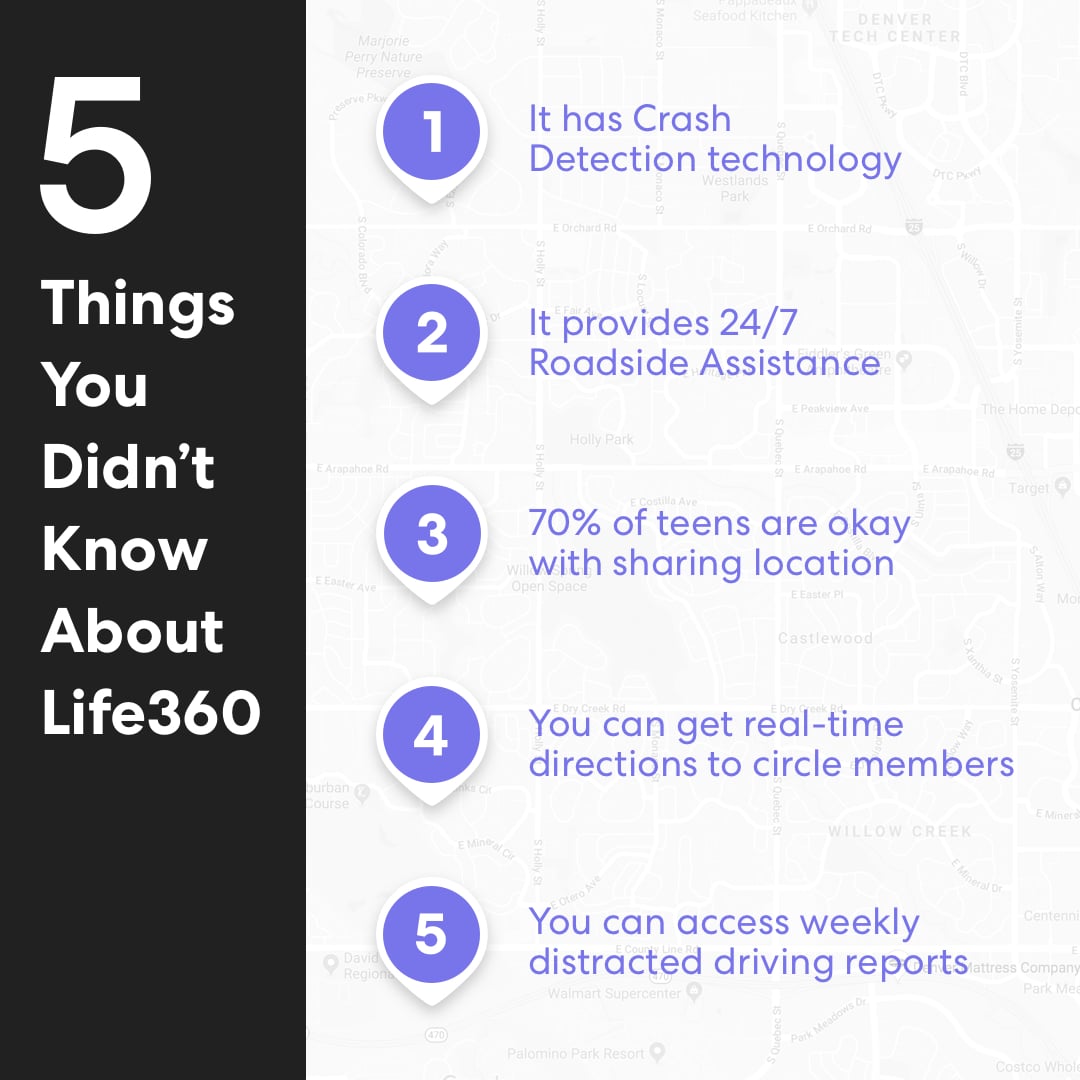
The “Driver Reports” feature offers a detailed summary of each Circle member’s driving habits, including top speed, phone usage while driving (such as texting or calling), hard braking events, and rapid acceleration. This data can be invaluable for coaching new drivers, identifying risky behaviors, and encouraging safer practices behind the wheel. The aim isn’t just surveillance but education and improvement.
Perhaps the most critical aspect of Driver Protect is “Crash Detection.” Utilizing the smartphone’s accelerometers and GPS, Life360 can detect if a significant collision has occurred. In the event of a detected crash, the app automatically alerts Circle members and, for premium subscribers, can dispatch emergency services directly to the accident location, providing crucial minutes that could save lives, particularly if the driver is incapacitated. This automatic response mechanism transforms the app from a monitoring tool into a proactive safety net.
Digital Safety Features for a Connected World
Beyond physical location and driving safety, Life360 has expanded into the realm of digital security, acknowledging that threats to family safety aren’t always physical. With personal data breaches and online scams becoming increasingly prevalent, the app now offers features designed to protect members’ digital footprints.
“Data Breach Alerts” proactively notify users if their personal information (such as email addresses or passwords) has been exposed in a known data breach. This allows users to take immediate action, like changing compromised passwords, to prevent identity theft or account takeovers. Similarly, “Scam Protection” aims to identify and warn users about potential scam attempts received via text messages or email, leveraging advanced algorithms to flag suspicious communications. These features underscore Life360’s evolving role as a comprehensive family safety hub, addressing both real-world and cyber threats.
The Technology Behind the Peace of Mind
The seamless and reliable operation of Life360 is underpinned by sophisticated technological infrastructure, combining various data sources and processing techniques to deliver accurate and timely information.
GPS, Geofencing, and Predictive Analytics
The primary technology enabling Life360’s core functionality is Global Positioning System (GPS). Modern smartphones are equipped with highly accurate GPS receivers, which, combined with Wi-Fi and cellular triangulation, allow for precise location determination. Life360 continuously pings these location services, optimizing battery usage while ensuring real-time updates.
Geofencing relies on these precise location capabilities. By defining virtual perimeters around specific points of interest, the app’s backend systems can trigger alerts when a device crosses these boundaries. This involves constant monitoring and comparison of current location data against predefined “Places.”
Furthermore, Life360 increasingly incorporates predictive analytics. By analyzing historical data on user movements, common routes, and traffic patterns, the app can anticipate arrival times more accurately, optimize location updates, and even infer potential risks. For instance, consistent patterns in driving behavior can be used to refine crash detection algorithms, reducing false positives while maintaining sensitivity for genuine incidents.
Data Processing and Security Protocols
Handling sensitive location and personal data requires robust data processing capabilities and stringent security protocols. Life360’s servers process vast amounts of real-time location data from millions of users globally. This data is anonymized where possible and stored securely, typically using encryption both in transit and at rest.
The app employs secure communication channels (e.g., HTTPS) to transmit data between user devices and its servers, protecting against interception. Authentication mechanisms, such as secure login procedures and multi-factor authentication, are in place to ensure that only authorized Circle members can access private family data. The continuous monitoring of system integrity and vulnerability assessments are critical to maintaining the trust users place in the platform.
Seamless Integration Across Devices
Life360 is designed for ubiquity across the mobile ecosystem. It is available on both iOS and Android platforms, ensuring that families with mixed device environments can still benefit from its features. The user experience is optimized for each operating system, leveraging native features where appropriate.
Beyond smartphones, Life360 integrates with other smart technologies, such as certain in-car infotainment systems or smartwatches, extending its reach and utility. This cross-device compatibility is crucial for providing a consistent and reliable safety net, allowing users to access information and receive alerts regardless of the device they are using. The focus is on creating a cohesive digital environment where safety information is readily accessible and actionable.
Navigating the Privacy Landscape: A Double-Edged Sword
While Life360 offers undeniable benefits for family safety, its core functionality—location tracking—inevitably raises significant privacy concerns. This tension between security and privacy is a central theme in modern digital life, and Life360 is no exception.
Understanding Data Collection and Usage
Life360 collects various types of data, including real-time and historical location data, driving behavior data, device information, and, for some features, personal identification details (like email addresses for data breach alerts). This data is essential for the app’s operation, allowing it to provide location updates, generate driver reports, and detect crashes.
However, the question of how this data is used beyond core app functionality has been a point of scrutiny. Historically, like many free-to-use services, Life360 has generated revenue through various means, including the anonymized and aggregated sale of location data to third-party data brokers. While Life360 has stated that this data is anonymized and used for purposes such as urban planning or retail analytics, the practice itself raises questions about the scope of user consent and the potential for re-identification or misuse. In 2022, Life360 publicly committed to no longer selling precise location data, a significant step towards addressing these privacy concerns.
The Ethical Dilemma: Surveillance vs. Safety
The use of Life360 often sparks debate within families, particularly concerning the privacy of teenagers. For parents, it’s a tool for safety and responsibility; for teens, it can feel like constant surveillance, eroding trust and autonomy. This highlights a fundamental ethical dilemma: at what point does proactive safety cross the line into intrusive monitoring?
Open communication within families about the purpose and limits of using Life360 is crucial. Establishing clear boundaries, such as agreeing not to check locations unnecessarily or understanding that the app is for safety emergencies rather than daily tracking, can help mitigate feelings of distrust. The technology itself is neutral; its impact is determined by how it’s used and integrated into family dynamics.
Empowering Users with Privacy Controls
Recognizing these concerns, Life360 has implemented various privacy controls to empower users. Circle members can typically control who sees their location, for how long, and with what level of detail. Options may include pausing location sharing for a period, turning off specific notifications, or deciding which “Places” trigger alerts.
Users also have granular control over data permissions within their device’s operating system, allowing them to manage access to location services, contacts, and notifications. Life360’s privacy policy, while lengthy, outlines its data collection, usage, and sharing practices. Users are encouraged to review these policies and customize their in-app settings to align with their comfort levels and family agreements, striking a balance between leveraging technology for safety and preserving personal privacy.
Beyond the Basics: Advanced Features and Future Trajectories
Life360 is not a static product; it continuously evolves, integrating new technologies and responding to user needs and market demands. Its trajectory points towards an even more comprehensive and intelligent safety ecosystem.
Emergency Assistance and Crisis Response
One of Life360’s most critical functionalities is its ability to facilitate emergency assistance. Beyond automated crash detection, many premium tiers offer “SOS” or “Panic Alert” features. In a dangerous situation, a user can press a button to immediately alert all Circle members, sharing their precise location. For premium users, this can also trigger a dispatch to emergency services or connect them with a live safety advisor who can monitor the situation and coordinate help.
This rapid response capability is particularly vital for individuals in vulnerable situations, such as those walking alone at night, or for elderly family members who might need quick assistance in a medical emergency. The ability to quickly and accurately relay location information to both family and professional responders can significantly reduce response times and improve outcomes in critical moments.
The Evolution of Family Safety Tech
Life360 represents a significant leap from rudimentary “find my phone” features to a dedicated family safety platform. The evolution of this technology is driven by several factors: increased smartphone penetration, improved GPS accuracy, advancements in cloud computing, and a growing societal reliance on digital tools for daily management.
Future iterations of family safety tech are likely to integrate even more deeply with other smart home devices, wearables, and vehicle systems. Imagine a scenario where a smartwatch detects a sudden fall, automatically triggers a Life3360 alert, and simultaneously unlocks the front door for emergency responders. The trend is towards a more interconnected and proactive safety network that can anticipate and respond to a wider array of risks.
Potential for AI and Machine Learning Integration
The future of Life360 and similar platforms will undoubtedly be shaped by Artificial Intelligence (AI) and Machine Learning (ML). These technologies hold immense potential for enhancing predictive capabilities and automating safety responses.
-
Predictive Safety: AI could analyze patterns in location data, weather, local crime statistics, and individual behavior to identify potential risks even before they manifest. For example, if a family member deviates significantly from their usual route in a high-crime area, AI could flag it as a potential concern.
-
Contextual Awareness: ML could enable the app to better understand context. Is a user speeding because they’re on a highway, or are they recklessly driving through a residential neighborhood? AI could differentiate and provide more nuanced driver reports.
-
Enhanced Emergency Response: AI could streamline communication with emergency services, providing more accurate information faster and even suggesting optimal routes for responders based on real-time traffic data.
-
Personalized Safety Profiles: AI could help tailor safety settings and alerts to individual family members based on their age, typical activities, and risk profiles, making the app more personalized and less intrusive.
These advancements would transform Life360 from a reactive and monitoring tool into a truly intelligent safety companion, capable of not just reporting events but actively mitigating risks.
Making an Informed Choice: Is Life360 Right for You?
Deciding whether to integrate Life360 into your family’s digital toolkit requires careful consideration of its benefits, the inherent privacy implications, and how it aligns with your family’s values and needs.
Weighing Benefits Against Concerns
Benefits:
-
Peace of Mind: Knowing the whereabouts and safety status of loved ones.
-
Emergency Response: Rapid alerts and assistance in crashes or distress situations.
-
Coordination: Easier management of family schedules and logistics.
-
Driver Safety: Tools to encourage and monitor safer driving habits.
-
Digital Security: Protection against data breaches and scams.
Concerns:
-
Privacy: The collection and potential (even if anonymized) sharing of location data.
-
Trust Issues: Potential for perceived surveillance, especially for teenagers.
-
Battery Drain: Continuous location services can impact device battery life.
-
Cost: Premium features come with a subscription fee.
Ultimately, the utility of Life360 is highly dependent on how a family chooses to use it. When implemented with transparency and mutual agreement, it can be a powerful tool for safety and connectivity.
Best Practices for Responsible Use
For families opting to use Life360, establishing clear ground rules and fostering open communication are paramount:
-
Discuss Together: Involve all family members, especially teenagers, in the decision-making process. Explain the “why” behind using the app (safety, coordination).
-
Set Boundaries: Agree on when and why location data will be checked. For example, only during emergencies or for specific check-ins, not constant monitoring.
-
Utilize Privacy Settings: Take advantage of the app’s privacy controls to customize sharing preferences for each Circle member.
-
Focus on Safety, Not Surveillance: Frame the app as a safety net and an emergency tool, not a means to control or spy.
-
Review Regularly: Periodically revisit the family’s agreement on Life360 usage as needs and circumstances change.
Alternatives and Complementary Solutions
While Life360 offers a comprehensive suite, it’s not the only option. Many smartphones have built-in location-sharing features (e.g., Apple’s Find My, Google Maps location sharing) that provide basic functionality without the extensive features or data collection of dedicated apps. Other apps like Google Family Link or Bark offer parental controls and content monitoring, which might be a better fit for families prioritizing digital wellness over pure location tracking.
Sometimes, the best solution is a combination of tools and practices. A basic location-sharing feature for emergencies, coupled with regular communication and established family rules, might be more effective than relying solely on one all-encompassing app. The key is to choose the technology that best supports your family’s unique dynamics and safety needs without compromising on trust and privacy.
In conclusion, Life360 stands as a significant technological solution in the realm of family safety. By leveraging GPS, advanced analytics, and integrating various security features, it offers a robust platform for connection and peace of mind. However, like all powerful technologies, its benefits are best realized when used thoughtfully, ethically, and in conjunction with open communication, ensuring that digital safety enhances, rather than detracts from, family relationships.
aViewFromTheCave is a participant in the Amazon Services LLC Associates Program, an affiliate advertising program designed to provide a means for sites to earn advertising fees by advertising and linking to Amazon.com. Amazon, the Amazon logo, AmazonSupply, and the AmazonSupply logo are trademarks of Amazon.com, Inc. or its affiliates. As an Amazon Associate we earn affiliate commissions from qualifying purchases.