
In the ever-evolving digital landscape, the ability to establish an online presence is no longer a luxury but a necessity. Whether you’re a small business owner looking to showcase your products, a freelancer eager to attract clients, an educator sharing resources, or an individual wanting a personal portfolio, a website is your virtual storefront. However, the perceived complexity and cost associated with website creation often deter many. This is precisely where Google Sites steps in, offering a refreshingly accessible and remarkably powerful solution for building websites without requiring extensive technical expertise or significant financial investment. At its core, Google Sites is a free website building tool integrated within the Google Workspace ecosystem, designed to empower users to create professional-looking, functional websites with ease.
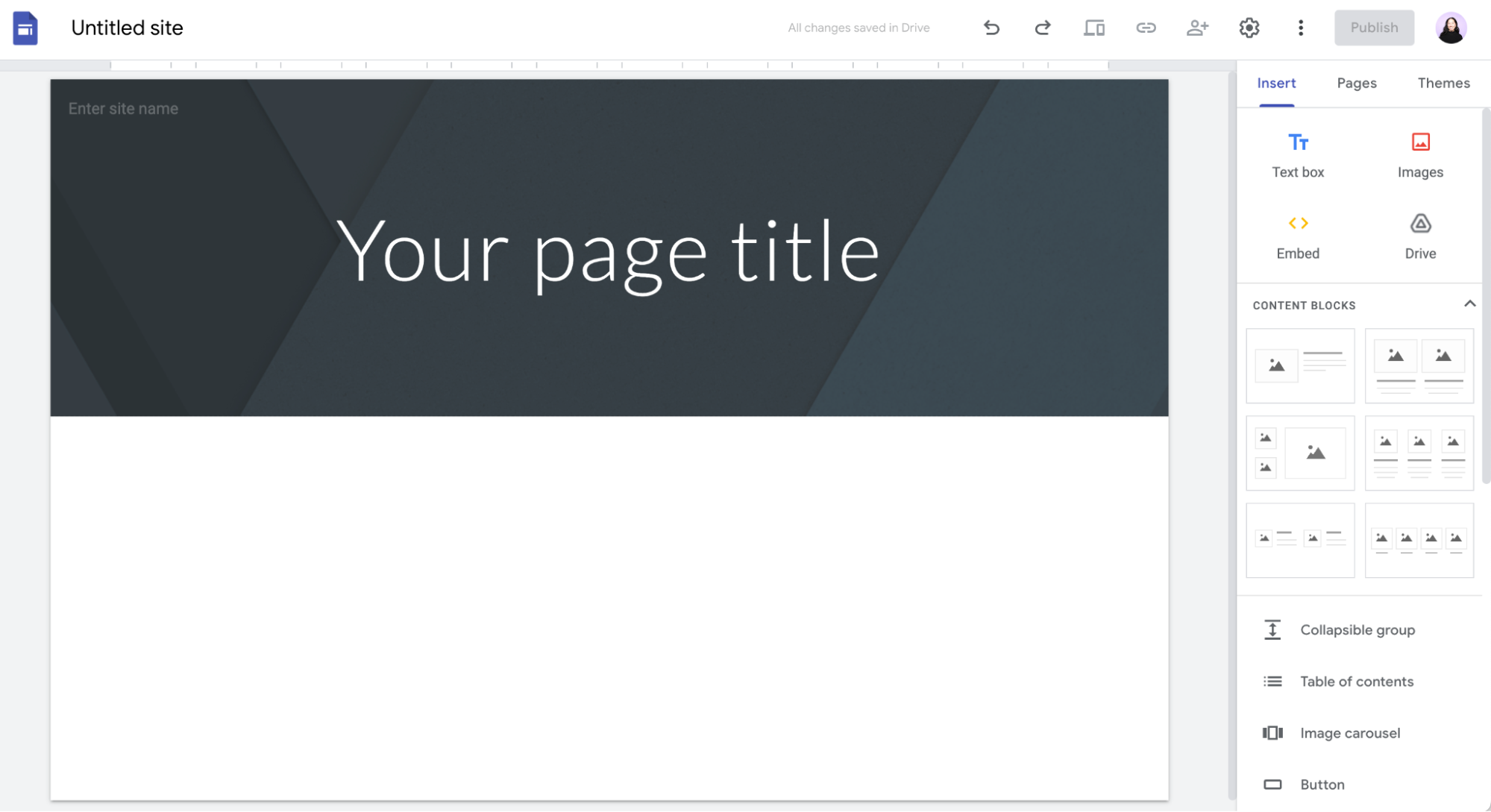
Google Sites distinguishes itself by abstracting away the intricacies of coding and web design, allowing users to focus on the content and purpose of their site. Its intuitive drag-and-drop interface, coupled with a rich library of templates and customization options, democratizes web development, making it a viable option for a broad spectrum of users. Unlike more complex platforms that demand a steep learning curve, Google Sites prioritizes user-friendliness, enabling individuals and organizations to launch their online presence quickly and efficiently. This article will delve into the capabilities of Google Sites, exploring its features, benefits, and ideal use cases within the realm of technology.
The Core Functionality and User Experience of Google Sites
Google Sites is built upon a foundation of simplicity and accessibility, making it a compelling choice for those venturing into website creation. Its integration with Google’s suite of productivity tools further enhances its appeal, offering a seamless experience for users already familiar with Google Drive, Docs, or Sheets. The platform is designed to be inherently user-friendly, eliminating the need for technical jargon or specialized knowledge.
Intuitive Drag-and-Drop Interface for Effortless Content Placement
The cornerstone of Google Sites’ ease of use lies in its intuitive drag-and-drop interface. This visual editor allows users to directly manipulate elements on their webpage. From text boxes and images to embedded videos and forms, every component can be placed, resized, and repositioned with a simple click and drag. This tactile approach to web design removes the barrier of code, allowing users to see their website take shape in real-time. For beginners, this translates to an immediate understanding of how to structure their content and arrange their visual elements. Even for experienced designers, the drag-and-drop functionality can expedite the prototyping and initial design phases. The interface is clean and uncluttered, ensuring that the focus remains on the content itself rather than on navigating complex menus or toolbars. Users can select from a variety of pre-designed layouts or create their own custom arrangements, offering a good balance between structured guidance and creative freedom.
Seamless Integration with the Google Ecosystem
One of Google Sites’ most significant advantages is its tight integration with the broader Google ecosystem. This means that users can effortlessly pull content from other Google services directly into their website. For instance, embedding a Google Doc or Sheet is as simple as selecting it from a list within the Google Sites editor. This allows for dynamic content that can be updated in real-time across both platforms. Likewise, images stored in Google Photos or Google Drive can be directly uploaded and incorporated into the site. For collaborative projects, integrating Google Forms for data collection or embedding Google Calendar events to display schedules becomes a straightforward process. This seamless flow of information eliminates the need for manual uploads or complex workarounds, streamlining the website development and management process. This integration is particularly beneficial for educational institutions, businesses, and project teams who already rely on Google Workspace for their daily operations.
A Rich Library of Themes and Customization Options
While simplicity is a hallmark, Google Sites doesn’t compromise on aesthetics. The platform offers a curated selection of professional-looking themes that serve as excellent starting points for website design. These themes provide a consistent visual style across the entire site, ensuring a cohesive and polished appearance. Beyond the pre-set themes, users have a considerable degree of control over their site’s visual identity. This includes customizing color palettes, selecting fonts, and adjusting the layout of various sections. While it may not offer the granular design control of more advanced platforms, Google Sites provides enough flexibility to create a website that aligns with a brand’s identity or a personal aesthetic. The ability to upload custom logos and banners further enhances brand recognition and personalization. For those looking for a professional look without the need for a dedicated designer, Google Sites offers a robust set of tools to achieve this.
Empowering Users with Versatile Features for Diverse Needs
Google Sites is not just a basic website builder; it’s a versatile platform equipped with features that cater to a wide array of user needs and project types. Its functionality extends beyond static pages, enabling dynamic content and interactive elements.
Embedding Multimedia and Interactive Content
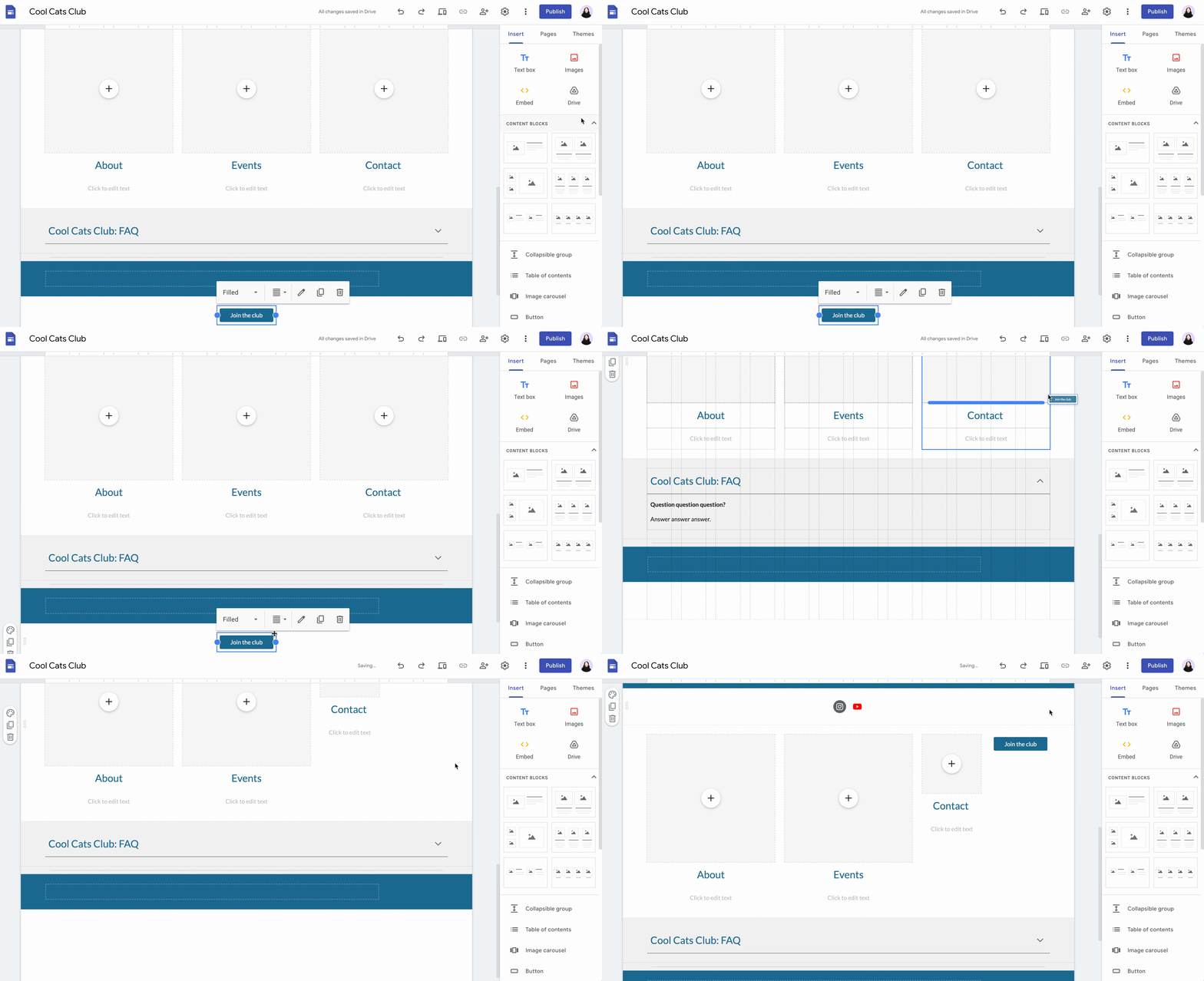
The ability to embed various forms of multimedia is crucial for creating engaging websites, and Google Sites excels in this area. Users can seamlessly embed videos from YouTube or Google Drive, ensuring that their content is presented in a dynamic and captivating manner. Image galleries can be created to showcase portfolios or product lines, and presentations from Google Slides can be directly integrated, making it easy to share visual information. Beyond passive media, Google Sites allows for the embedding of interactive elements. Google Forms can be incorporated to gather feedback, collect registrations, or conduct surveys. Google Maps can be embedded to provide location information for businesses or event venues. Even spreadsheets from Google Sheets can be embedded to display data tables, offering a live, updatable source of information. This rich embedding capability transforms a static webpage into a dynamic hub of information and interaction.
Collaborative Website Creation and Management
In today’s interconnected world, collaboration is key, and Google Sites embraces this principle. Multiple users can work on a single website simultaneously, with clear roles and permissions that can be assigned. This feature is invaluable for teams, schools, or organizations where different individuals might be responsible for various aspects of the website’s content or design. The real-time editing capabilities, similar to Google Docs, allow for simultaneous contributions, with changes visible to all collaborators. This not only streamlines the development process but also fosters a sense of shared ownership and efficiency. Project managers can oversee the progress, content creators can focus on their sections, and editors can refine the overall presentation, all within a unified platform. This collaborative functionality makes Google Sites an excellent tool for group projects, internal company wikis, or community-driven websites.
Mobile Responsiveness for a Global Audience
In an era where mobile devices dominate internet access, a website’s ability to adapt to different screen sizes is paramount. Google Sites is inherently designed to be mobile-responsive. This means that websites built on the platform automatically adjust their layout and content to look good and function flawlessly on smartphones, tablets, and desktops. Users don’t need to do anything extra to ensure their site is accessible to a mobile audience; the platform handles it automatically. This responsiveness is crucial for ensuring a positive user experience, as visitors accessing the site from various devices will have a consistent and intuitive interaction. For businesses, this translates to reaching a wider audience without the need for separate mobile site development. For individuals, it means their personal website will be accessible and professional, regardless of how it’s viewed.
Ideal Use Cases and Target Audiences for Google Sites
Google Sites’ combination of ease of use, accessibility, and integration makes it an ideal solution for a diverse range of users and projects, particularly within the technology and education sectors.
Educational Projects and Resource Sharing
For educators and students, Google Sites offers an unparalleled platform for creating dynamic and interactive educational resources. Teachers can build websites to house course syllabi, lecture notes, assignment details, and supplementary reading materials. Embedded videos, interactive quizzes, and links to external educational content can enhance the learning experience. Students can leverage Google Sites for project-based learning, creating digital portfolios to showcase their work, research papers, or presentations. Collaborative projects can easily be managed on a shared Google Site, allowing multiple students to contribute to a single, cohesive output. The platform’s free nature makes it accessible to schools and students of all levels, democratizing access to web-based learning tools. The ability to embed content from Google Classroom and other educational platforms further streamlines the integration into existing teaching workflows.
Small Business and Personal Portfolios
Small businesses often face budget constraints when it comes to establishing an online presence. Google Sites provides a cost-effective and efficient solution for creating professional-looking websites to showcase products, services, and company information. A simple yet elegant website can serve as a digital brochure, an online storefront for basic e-commerce, or a contact point for potential clients. Freelancers and independent professionals can utilize Google Sites to build compelling personal portfolios. This allows them to display their work, highlight their skills, and share testimonials, effectively attracting new clients. The ease of updating content means that portfolios can remain current and reflective of their latest achievements. For entrepreneurs in the early stages, a Google Site can be a crucial first step in building brand credibility and reaching a wider customer base without significant upfront investment in web development.

Internal Company Communication and Project Management
Within organizations, Google Sites serves as an excellent tool for internal communication and project management. Companies can create internal wikis, knowledge bases, or team portals to centralize important information, policies, and resources. This makes it easier for employees to access the information they need to perform their jobs effectively, reducing reliance on scattered email chains or physical documents. Project teams can utilize Google Sites to track progress, share updates, store project-related documents, and coordinate tasks. The collaborative features are particularly valuable here, allowing team members to contribute to a shared project hub. This fosters transparency and ensures that everyone is on the same page, regardless of their physical location. For startups and small to medium-sized businesses, this can be a cost-effective way to establish internal communication channels and project management workflows.
In conclusion, Google Sites is more than just a simple website builder; it’s a powerful and accessible tool that democratizes web creation. Its intuitive interface, seamless integration with the Google ecosystem, and versatile features make it an ideal solution for individuals, educators, small businesses, and internal teams looking to establish a professional and functional online presence without the complexities of traditional web development. By focusing on user-friendliness and leveraging the power of Google’s integrated services, Google Sites empowers anyone to bring their ideas and projects to life on the web.
aViewFromTheCave is a participant in the Amazon Services LLC Associates Program, an affiliate advertising program designed to provide a means for sites to earn advertising fees by advertising and linking to Amazon.com. Amazon, the Amazon logo, AmazonSupply, and the AmazonSupply logo are trademarks of Amazon.com, Inc. or its affiliates. As an Amazon Associate we earn affiliate commissions from qualifying purchases.