
In the vast and intricate world of computing, where milliseconds can define user experience and system performance, few concepts are as fundamental yet often misunderstood as “cache.” Far from being a mere technical jargon, caching is a pervasive and indispensable strategy employed at virtually every layer of a modern computing system, from the microscopic transistors within a CPU to the global networks delivering web content. At its core, “cache” refers to a temporary storage area that holds frequently accessed data, enabling faster retrieval than if that data had to be fetched from its primary, slower source. It’s a proactive measure, a system’s intelligent guess about what information it will need next, stored conveniently close for immediate access. Understanding what cache means isn’t just about defining a term; it’s about grasping a foundational principle that underpins the speed, efficiency, and responsiveness we’ve come to expect from our digital lives.
The Fundamental Concept of Cache in Computing
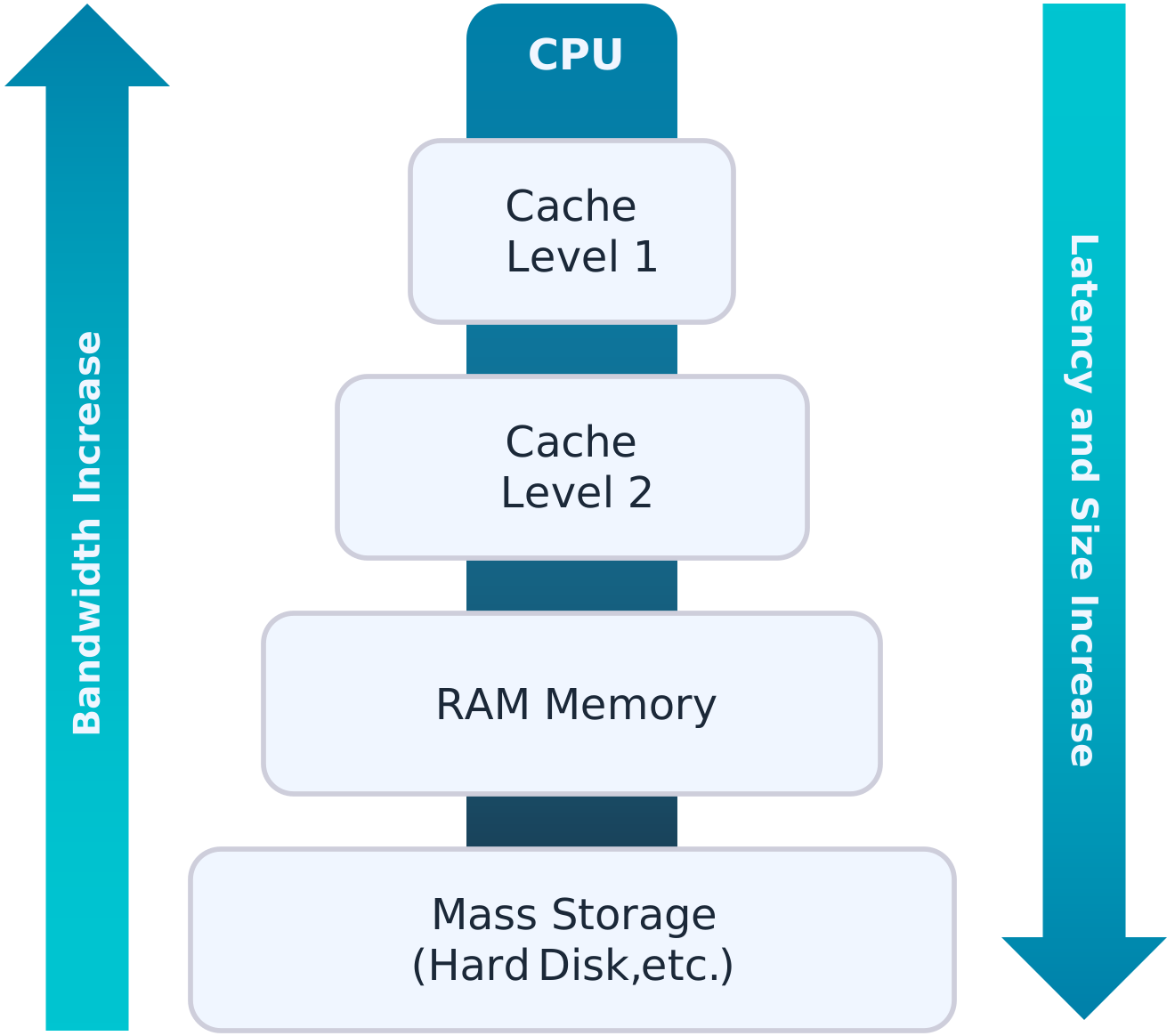
To truly appreciate the significance of caching, we must first delve into its core purpose and mechanism. Computing systems are characterized by a hierarchy of components, each operating at different speeds. Processors (CPUs) are incredibly fast, capable of executing billions of operations per second. However, accessing data from main memory (RAM) is significantly slower, and accessing data from storage devices like SSDs or traditional hard drives is orders of magnitude slower still. This disparity in speed creates a bottleneck: a fast processor waiting idly for slow data. Caching is the elegant solution to this imbalance.
Speed and Efficiency: The Core Purpose of Caching
The primary objective of any cache is to mitigate the performance bottleneck between fast and slow components. By storing copies of frequently requested data in a faster, smaller memory area, the system can reduce the average time it takes to access data. Imagine a chef in a bustling kitchen. Their main pantry (main memory/storage) is large and contains everything, but it takes time to walk there. A small, accessible counter (cache) holds the most commonly used ingredients, allowing the chef to work much faster without constant trips to the pantry. This analogy perfectly illustrates how a cache improves efficiency by bringing the data closer to where it’s needed, thereby speeding up overall operations and improving responsiveness.
How Cache Works: A Simplified Explanation
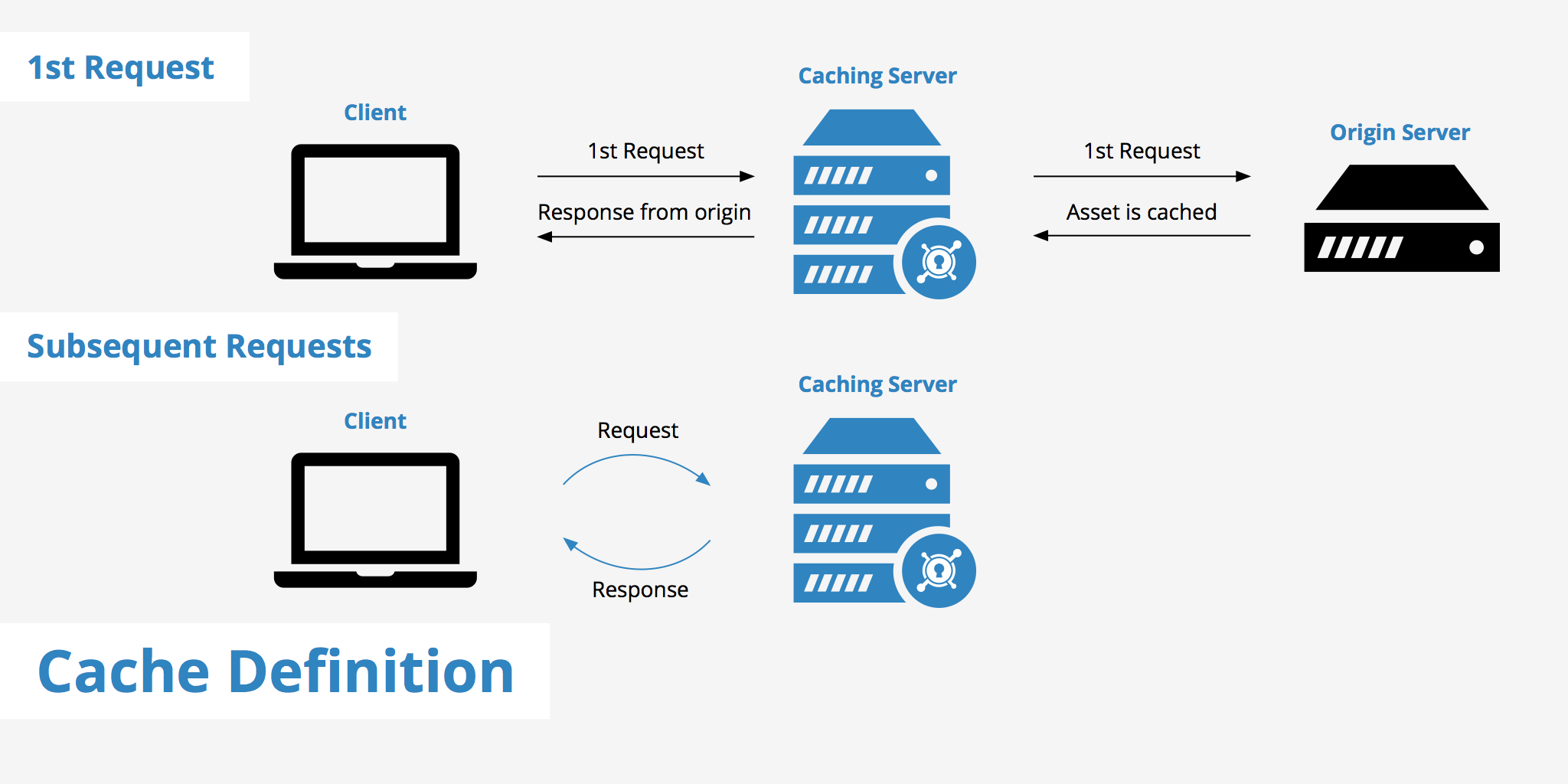
When a system or application needs a piece of data, it first checks the cache. This is known as a “cache hit.” If the data is found in the cache, it’s retrieved rapidly. If the data is not in the cache (a “cache miss”), the system then fetches it from the slower, primary storage location (e.g., RAM, disk, or a remote server). Once retrieved, a copy of this data is often placed into the cache, on the assumption that it might be needed again soon. To make room for new data when the cache is full, a “cache replacement policy” is used. Common policies include Least Recently Used (LRU), which discards the data that hasn’t been accessed for the longest time, or First-In, First-Out (FIFO). The effectiveness of a cache is often measured by its “hit rate” – the percentage of times requested data is found in the cache. A higher hit rate indicates a more efficient cache.
The Cache Hierarchy: A Multi-Layered Approach to Performance
Modern computing systems don’t just have one cache; they employ a sophisticated hierarchy of caches, each with different sizes, speeds, and locations. This multi-layered approach further optimizes data access.
- L1 Cache (Level 1): The smallest and fastest cache, located directly on the CPU chip. It’s usually split into instruction cache (for program instructions) and data cache (for operands). L1 operates at the same speed as the CPU core.
- L2 Cache (Level 2): Larger and slightly slower than L1, but still much faster than main memory. It may be shared between CPU cores or dedicated to each.
- L3 Cache (Level 3): The largest and slowest of the CPU caches, often shared across all cores on a processor. It acts as a victim cache for L1 and L2, meaning data evicted from L1 or L2 might be moved here before going to main memory.
Beyond these hardware-level caches, the hierarchy extends to other system components, including disk caches, operating system caches, and application-level caches, each playing a critical role in optimizing specific operations.
Diverse Applications of Caching Across Technology
The principle of caching is so powerful and versatile that it’s implemented in countless ways across the technological landscape, from the deepest hardware levels to the sprawling internet. Each application addresses a specific performance bottleneck, demonstrating the universal utility of temporary, fast storage.
CPU Cache: The Brain’s Immediate Scratchpad
As previously mentioned, CPU caches (L1, L2, L3) are perhaps the most critical for raw processing power. Without them, a multi-gigahertz processor would spend an inordinate amount of time waiting for data from RAM, effectively crippling its performance. These caches are designed to store instructions and data that the CPU is likely to need next, anticipating future demands based on spatial and temporal locality (data near recently accessed data, or data accessed recently). The intelligent design and management of CPU caches are pivotal for modern processor architectures, enabling the incredibly fast computation we rely on.
Disk Cache: Bridging the Speed Gap
While CPU caches accelerate access to main memory, disk caches accelerate access to data stored on slower persistent storage devices like hard drives or SSDs.
- Hardware Disk Cache: Modern hard drives and SSDs include a small amount of built-in RAM that acts as a buffer or cache. This cache stores frequently read data blocks and writes data blocks before committing them to the slower platter or flash memory, improving I/O performance.
- Operating System Disk Cache: The OS (e.g., Windows, macOS, Linux) also reserves a portion of main memory (RAM) to act as a disk cache. When an application requests data from the disk, the OS first checks if that data is already in its RAM cache. This dramatically speeds up file access, particularly for frequently opened files or applications.
Browser Cache: Enhancing Your Web Experience
Every time you visit a website, your web browser downloads various assets: HTML files, CSS stylesheets, JavaScript files, images, and more. To avoid downloading these same files every time you revisit a page or navigate within a site, browsers employ a “browser cache.” This cache stores these static assets on your local machine (typically within a specific directory). The next time you visit, the browser checks if the cached version is still valid. If it is, it loads the assets directly from your local disk, resulting in significantly faster page loading times, reduced bandwidth usage, and a smoother browsing experience.
Server Cache and Content Delivery Networks (CDNs): Scaling the Internet

Beyond individual devices, caching is fundamental to the architecture of the internet itself. Web servers use caching to store frequently requested web pages, database queries, or computational results, avoiding the need to regenerate them for every user. This vastly improves server responsiveness and reduces load.
Content Delivery Networks (CDNs) take this concept global. A CDN is a geographically distributed network of proxy servers and their data centers. When you access content from a website using a CDN, the content (like videos, images, or static web files) is served from the server closest to your physical location. This “edge caching” significantly reduces latency and bandwidth strain on the origin server, ensuring fast and reliable access to content for users worldwide. Without CDNs and various forms of server caching, the modern web as we know it—fast, responsive, and globally accessible—would be impossible.
Benefits and Challenges of Effective Caching
While the advantages of caching are profound, its implementation and management come with their own set of complexities and considerations.
Performance Boost: Faster Data Access and Responsiveness
The most obvious and celebrated benefit of caching is the dramatic improvement in performance. Faster data access translates directly into more responsive applications, quicker website loading times, and smoother user experiences. For computationally intensive tasks, caching can prevent redundant calculations, saving processing power and energy. In a competitive digital landscape, where user patience is thin, the performance boost from effective caching can be a critical differentiator.
Reduced Latency and Bandwidth Usage
By serving data from a local or closer source, caching significantly reduces latency—the delay before a transfer of data begins following an instruction. This is particularly evident with CDNs, where content travels a shorter physical distance. Furthermore, by serving cached copies, systems avoid repeatedly fetching data from the original source, which can be across a network or even the internet. This reduces the amount of data transferred over networks, saving bandwidth costs for providers and speeding up connectivity for end-users, especially those with limited data plans or slower connections.
The “Cache Invalidation” Problem: Ensuring Data Freshness
One of the most significant challenges in caching is “cache invalidation.” This refers to the problem of ensuring that cached data is still fresh and accurate, especially when the original data has changed. If a system serves outdated data from its cache, it can lead to inconsistent information, errors, or a poor user experience. Strategies for invalidation include:
- Time-to-Live (TTL): Data in the cache is given an expiration time. After this time, it’s considered stale and must be re-fetched.
- Manual Invalidation: Data can be explicitly removed from the cache when the original source changes.
- Event-Driven Invalidation: The cache is updated or cleared when specific events (e.g., a database update) occur.
Implementing an effective cache invalidation strategy is crucial for maintaining data consistency and is often cited as one of the hardest problems in computer science.
Security and Privacy Considerations with Cached Data
Cached data, particularly browser and server caches, can also raise security and privacy concerns.
- Browser Cache: If not properly secured or cleared, cached sensitive information (like login pages or personal data) on a shared computer could be accessed by unauthorized individuals. Malicious websites could also potentially exploit cached data.
- Server Cache: In the context of web applications, inadequate caching of authenticated content could lead to sensitive user-specific data being served to the wrong users. Similarly, improperly cached API responses could expose confidential information. Regular clearing, secure configurations, and careful management of cached data are essential to mitigate these risks.
Practical Implications and Management of Cache
For the average user, developer, or system administrator, understanding cache isn’t just theoretical; it has direct practical implications for system performance, troubleshooting, and application design.
Clearing Browser Cache: When and Why You Should
While browser cache is designed to enhance your web experience, there are times when clearing it is necessary:
- Troubleshooting: If a website isn’t displaying correctly or behaving as expected, outdated cached files might be the culprit. Clearing the cache forces the browser to download fresh copies, often resolving the issue.
- Privacy: On shared or public computers, clearing your browser cache helps protect your privacy by removing traces of your browsing activity and potentially sensitive data.
- Updates: When web developers deploy updates to a website, your browser’s cache might hold older versions of files. Clearing the cache ensures you see the latest version of the site.
Most browsers offer straightforward options to clear cache and cookies through their settings or developer tools.
Cache in Application Development: Strategies for Developers
For software developers, integrating caching effectively is a critical skill. This involves:
- Identifying Cacheable Data: Determining which data is frequently accessed and relatively static.
- Choosing the Right Caching Layer: Deciding whether to use in-memory caches (like Redis or Memcached), database caching, or HTTP caching.
- Implementing Invalidation Strategies: Carefully designing how cached data will be updated or removed when the source data changes.
- Monitoring Cache Performance: Tracking hit rates, miss rates, and latency to fine-tune caching configurations.
Well-implemented caching can drastically improve an application’s scalability and responsiveness, reducing the load on databases and backend services.
Future of Caching: Emerging Technologies and Trends
The quest for faster data access is unending, and caching continues to evolve with new technologies.
- Persistent Memory: New non-volatile memory technologies are blurring the lines between RAM and storage, offering the potential for even faster and larger caches that retain data even when power is off.
- Machine Learning for Caching: AI and machine learning are being explored to predict data access patterns more accurately, leading to more intelligent and predictive caching algorithms.
- Edge Computing and Serverless Functions: As computing moves closer to the data source (edge computing) and microservices become prevalent, caching strategies are adapting to distributed environments and short-lived compute instances.
The underlying principle of bringing data closer to computation remains, but the methods and technologies for achieving it are constantly being refined, pushing the boundaries of what’s possible in terms of speed and efficiency.
In conclusion, “what’s cache mean” is a question that opens the door to understanding a cornerstone of modern technology. From the lightning-fast operations within your computer’s CPU to the seamless streaming of content across the globe, caching is the silent hero, diligently working behind the scenes to make our digital world faster, more efficient, and more responsive. It’s a testament to ingenious problem-solving, a principle that, despite its complexity, boils down to a simple yet powerful idea: keep what you need close by, and you’ll always be ready.
aViewFromTheCave is a participant in the Amazon Services LLC Associates Program, an affiliate advertising program designed to provide a means for sites to earn advertising fees by advertising and linking to Amazon.com. Amazon, the Amazon logo, AmazonSupply, and the AmazonSupply logo are trademarks of Amazon.com, Inc. or its affiliates. As an Amazon Associate we earn affiliate commissions from qualifying purchases.